
आर्ट प्रिंट तैयारी
बड़े प्रारूप वाली गैलरी प्रिंट, कैनवास रैप और पोस्टर उत्पादन के लिए डिजिटल कलाकृति, तस्वीरें और चित्र तैयार करें। यह टेम्पलेट गुणवत्ता खोए बिना छवियों को प्रिंट-रेडी रिज़ॉल्यूशन तक अपस्केल करने के लिए AI Enhance का और गैलरी रैप मार्जिन के लिए कैनवास के किनारों को विस्तारित करने हेतु AI Expand का उपयोग करता है — और यह सब पेशेवर प्रिंटिंग के लिए रंग सटीकता बनाए रखते हुए।
यह टेम्पलेट निःशुल्क आज़माएँDesign template preview
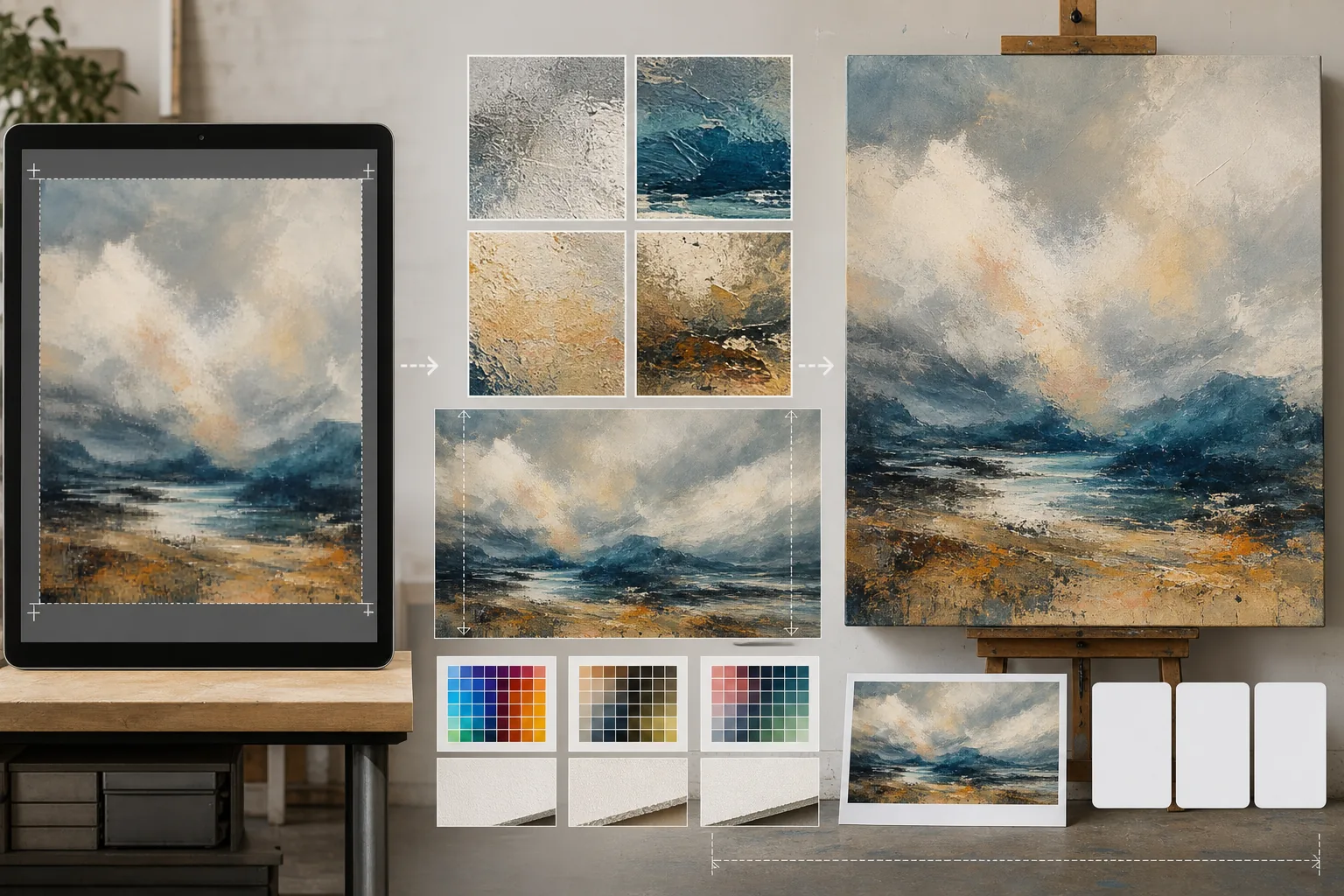
यह टेम्पलेट क्या करता है
स्क्रीन-रिज़ॉल्यूशन वाली डिजिटल फ़ाइलों और भौतिक प्रिंट उत्पादन की कठोर रिज़ॉल्यूशन आवश्यकताओं के बीच की खाई को पाटता है। AI Enhance छवियों को 2x से 4x तक अपस्केल करता है, साथ ही बारीक विवरण — चित्रों में ब्रशस्ट्रोक, तस्वीरों में दानेदार संरचना, चित्रों में रेखा कार्य — को संरक्षित रखता है, बिना उस धुंधलेपन या विकृति के जो साधारण इंटरपोलेशन में आम होती है। AI Expand कलाकृति के निर्बाध विस्तार उत्पन्न करके कैनवास के किनारों को बढ़ाता है, जिससे गैलरी कैनवास रैप के लिए आवश्यक अतिरिक्त मार्जिन मिलता है, जहाँ छवि स्ट्रेचर फ्रेम के चारों ओर मुड़ती है। रंग प्रोफ़ाइल को CMYK या Adobe RGB में बदला जाता है, और सॉफ़्ट प्रूफ़िंग के साथ यह दिखाया जाता है कि अंतिम प्रिंट कागज़, कैनवास या धातु की सतहों पर कैसा दिखेगा।
टेम्पलेट सेटिंग्स
| अपस्केल फ़ैक्टर | 2x, 3x या 4x (बड़े प्रारूप प्रिंट के लिए लंबे किनारे पर 16000px तक) |
| कैनवास विस्तार | गैलरी रैप ब्लीड के लिए 1.5-इंच, 2-इंच या कस्टम मार्जिन |
| विवरण संरक्षण | अनुकूली: चित्रों के लिए ब्रशस्ट्रोक, तस्वीरों के लिए दाना, चित्रों के लिए रेखा |
| रंग प्रोफ़ाइल | sRGB (स्क्रीन), Adobe RGB (फ़ोटो प्रिंट) या CMYK (व्यावसायिक प्रेस) |
| आउटपुट प्रारूप | TIFF (हानिरहित प्रिंट), PNG (पारदर्शिता) या JPEG (वेब पूर्वावलोकन) |
इस टेम्पलेट का उपयोग कैसे करें
अपनी कलाकृति अपलोड करें
डिजिटल फ़ाइल अपलोड करें — पेंटिंग, तस्वीर, चित्र या मिश्रित माध्यम। टेम्पलेट JPEG, PNG, TIFF और PSD फ़ाइलें स्वीकार करता है। सर्वोत्तम अपस्केलिंग परिणामों के लिए, अपने पास उपलब्ध उच्चतम रिज़ॉल्यूशन वाले संस्करण से शुरू करें, भले ही वह प्रिंट आवश्यकता से कम हो।
प्रिंट रिज़ॉल्यूशन तक अपस्केल करें
अपने लक्षित प्रिंट आकार के आधार पर अपस्केल फ़ैक्टर चुनें। 300 DPI पर 24×36 इंच के प्रिंट के लिए, आपको 7200×10800 पिक्सेल चाहिए। AI मूल की विशेषता को संरक्षित रखते हुए अपस्केल करता है — ब्रशस्ट्रोक ब्रशस्ट्रोक ही रहते हैं, फ़िल्म का दाना दाना ही रहता है, पिक्सेल आर्ट अपना चौकोर आकर्षण बनाए रखती है।
गैलरी रैप के लिए कैनवास विस्तारित करें
यदि गैलरी रैप के साथ कैनवास पर प्रिंट कर रहे हैं, तो AI Expand सभी चार किनारों के चारों ओर कलाकृति के निर्बाध विस्तार उत्पन्न करता है। विस्तारित मार्जिन मूल की शैली, रंग पैलेट और बनावट से मेल खाता है, ताकि लिपटे हुए किनारे खिंचे या प्रतिबिंबित दिखने के बजाय जानबूझकर बनाए हुए दिखें।
प्रूफ़ करें और निर्यात करें
सॉफ़्ट प्रूफ़ की समीक्षा करें जो दिखाता है कि छवि आपके लक्षित रंग प्रोफ़ाइल में कैसी प्रस्तुत होगी — ऑफ़सेट या जिक्ले प्रिंटिंग के लिए CMYK, फ़ाइन आर्ट इंकजेट के लिए Adobe RGB। प्रिंट शॉप के लिए TIFF के रूप में या आगे संपादन के लिए PNG के रूप में निर्यात करें। फ़ाइल में सटीक रंग पुनरुत्पादन के लिए एम्बेडेड ICC प्रोफ़ाइल डेटा शामिल होता है।
सर्वोत्तम परिणामों के लिए विशेषज्ञ सुझाव
- ✓हमेशा मूल फ़ाइल को उसके मूल रिज़ॉल्यूशन पर ही उपयोग करना शुरू करें। ऐसी फ़ाइल को अपस्केल करना जो पहले ही वेब प्रदर्शन के लिए संपीड़ित और डाउनसैंपल की जा चुकी है, ऐसी विकृतियाँ पैदा करता है जो प्रसंस्करण की हर पीढ़ी के साथ बढ़ती जाती हैं।
- ✓गैलरी रैप कैनवास प्रिंट के लिए, 2-इंच का विस्तार मार्जिन माँगें, भले ही स्ट्रेचर फ्रेम 1.5 इंच गहरा हो। आधा इंच अतिरिक्त कैनवास तनाव प्रक्रिया के लिए सहनशीलता देता है, जहाँ खिंचाव के दौरान थोड़ा सा खिसकना छवि के किनारे को उजागर कर सकता है।
- ✓बड़े प्रारूप उत्पादन के लिए प्रतिबद्ध होने से पहले छोटे आकार में एक भौतिक प्रूफ़ प्रिंट माँगें। स्क्रीन और कागज़ी प्रिंट रंग को अलग-अलग प्रस्तुत करते हैं, और 5×7 प्रूफ़ की लागत 30×40 कैनवास का एक अंश होती है, लेकिन यह किसी भी ऐसे रंग बदलाव को उजागर कर देता है जिसे सुधारने की आवश्यकता हो।
टूल्स
सामान्य प्रश्न
मैं फ़ोन की तस्वीर से कितना बड़ा प्रिंट कर सकता हूँ?
+
एक सामान्य 12-मेगापिक्सेल फ़ोन तस्वीर (4000×3000px) 300 DPI पर 13×10 इंच में अच्छी तरह प्रिंट होती है। 2x AI अपस्केलिंग के साथ, यह दोगुना होकर 26×20 इंच हो जाती है। 4x अपस्केलिंग के साथ, एक फ़ोन तस्वीर साफ़ 40×30 इंच का प्रिंट बना सकती है — जो गैलरी प्रदर्शन के लिए उपयुक्त है।
क्या अपस्केलिंग मेरी कलाकृति का रूप बदल देगी?
+
AI सामग्री के प्रकार के अनुसार अपना अपस्केलिंग तरीका अनुकूलित करता है। पेंटिंग दृश्य ब्रशस्ट्रोक और बनावट बनाए रखती हैं। तस्वीरें अपनी दानेदार संरचना और तीक्ष्णता का चरित्र बनाए रखती हैं। चित्र रेखा की मोटाई की एकरूपता को संरक्षित रखते हैं। लक्ष्य एक बड़ा संस्करण है जो मूल जैसा दिखे, न कि कोई पुनर्व्याख्या।
क्या मैं कैनवास का केवल एक किनारा विस्तारित कर सकता हूँ?
+
हाँ। आप निर्दिष्ट कर सकते हैं कि किन किनारों को और कितना विस्तारित करना है। यह तब उपयोगी होता है जब आप किसी प्रिंट के भीतर रचना को स्थानांतरित करना चाहते हैं — उदाहरण के लिए, किसी शीर्षक के लिए जगह बनाने हेतु परिदृश्य के ऊपर आकाश जोड़ना, या क्षितिज-प्रधान रचना को संतुलित करने के लिए अग्रभूमि जोड़ना।
गुणवत्ता खोए बिना अपनी कला को किसी भी आकार में प्रिंट करें
डिजिटल कलाकृति अपलोड करें और AI अपस्केलिंग, कैनवास विस्तार और रंग-सटीक प्रूफ़िंग के साथ प्रिंट-रेडी फ़ाइलें प्राप्त करें।
निःशुल्क आज़माएँRelated templates
More design templates for your workflow.
वेब, प्रिंट, सोशल मीडिया और ऐप आइकन के लिए साफ किनारे परिशोधन और बहु-आकार निर्यात के साथ पारदर्शी पीएनजी लोगो बनाएं। मुद्रित लोगो और डिजिटल फ़ाइलों की तस्वीरों पर काम करता है।
लेखक विपणन और प्रकाशक प्रचार के लिए 3डी परिप्रेक्ष्य, छाया प्रतिपादन और जीवनशैली पृष्ठभूमि के साथ यथार्थवादी पुस्तक कवर मॉकअप तैयार करें।
पॉडकास्ट कवर आर्ट डिज़ाइन करें जो पृष्ठभूमि प्रतिस्थापन, होस्ट पोर्ट्रेट अलगाव और टाइपोग्राफी-तैयार लेआउट के साथ ऐप्पल पॉडकास्ट और स्पॉटिफाई विनिर्देशों को पूरा करता है।
ट्रेडमार्क हटाने, मॉडल रिलीज़ अनुपालन संपादन, तकनीकी गुणवत्ता जांच और एजेंसी-विशिष्ट प्रारूप आवश्यकताओं के साथ स्टॉक एजेंसी सबमिशन के लिए फ़ोटो तैयार करें।