
पुस्तक कवर मॉकअप
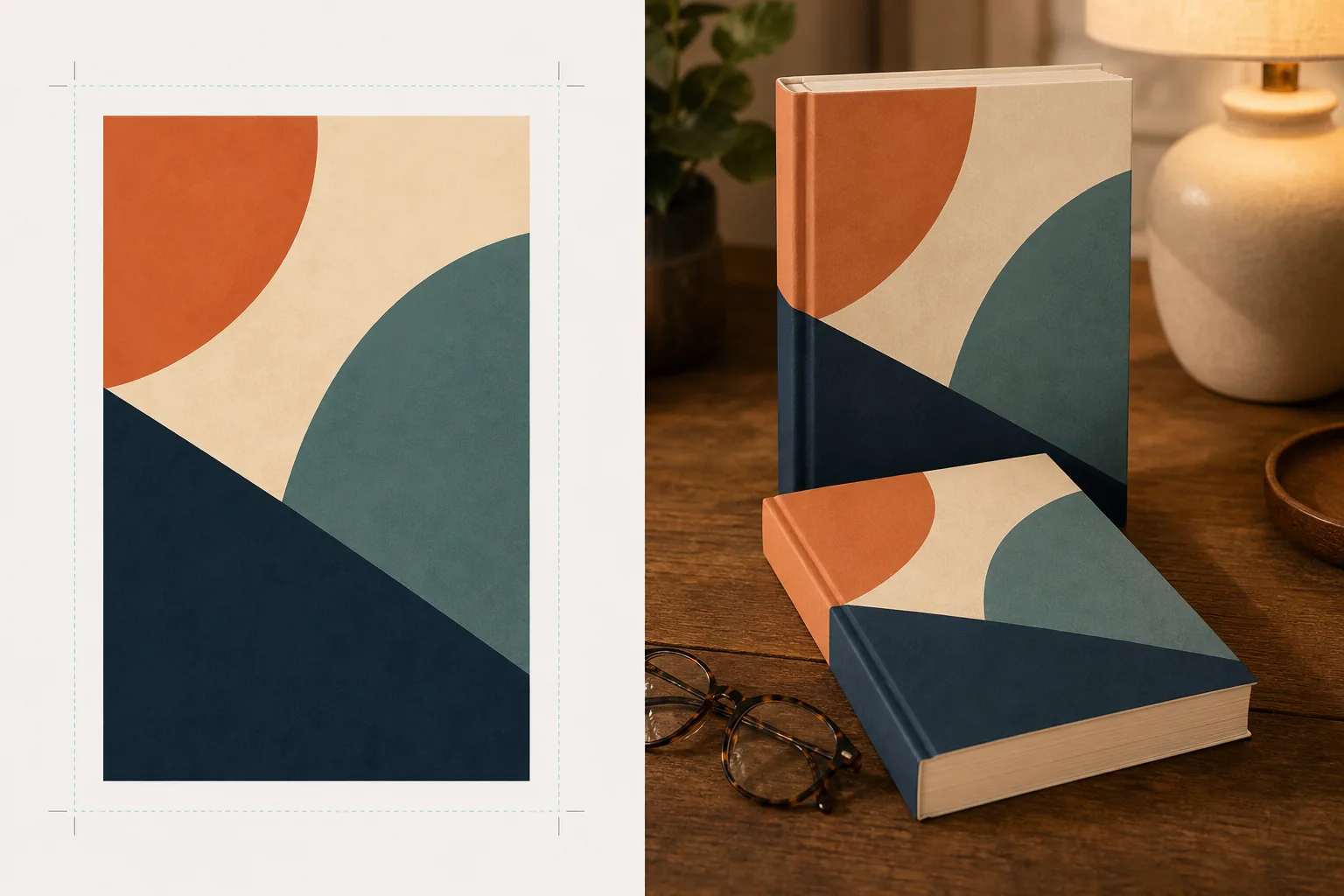
अपनी पुस्तक के कवर के यथार्थवादी, तस्वीर जैसे मॉकअप बनाएं जो जीवनशैली दृश्यों में, अलमारियों पर रखे हों, या प्राकृतिक छायाओं के साथ एक स्वतंत्र 3डी रेंडर के रूप में प्रदर्शित हों। यह टेम्पलेट आपके समतल कवर आर्टवर्क को लेकर उसे सोशल मीडिया घोषणाओं, लेखक वेबसाइटों, Amazon A+ सामग्री और प्रेस किट के लिए प्रचार छवियों में बदल देता है — किसी 3डी सॉफ़्टवेयर की आवश्यकता नहीं।
इस टेम्पलेट को मुफ़्त आज़माएंDesign template preview
यह टेम्पलेट क्या करता है
समतल पुस्तक कवर डिज़ाइनों को प्रचार मॉकअप छवियों में बदलता है जो पेशेवर उत्पाद फोटोग्राफी जैसी दिखती हैं। अपने कवर आर्टवर्क को समतल JPEG या PNG के रूप में अपलोड करें और टेम्पलेट उसे उचित परिप्रेक्ष्य, पृष्ठ मोटाई और रीढ़ की वक्रता के साथ एक यथार्थवादी पुस्तक रूप पर मैप कर देता है। फिर मॉकअप को जीवनशैली दृश्यों में रखा जाता है — पढ़ने के चश्मे के साथ एक कॉफ़ी टेबल, एक किताब की दुकान की अलमारी, गर्म लैंप की रोशनी वाली एक नाइटस्टैंड — या प्राकृतिक छाया के साथ एक साफ़ पृष्ठभूमि पर एक स्वतंत्र उत्पाद के रूप में रेंडर किया जाता है। शृंखला या कई पुस्तकों के प्रचार के लिए, कई कवरों को एक पंक्ति में व्यवस्थित किया जा सकता है या एक समान परिप्रेक्ष्य के साथ ढेर लगाया जा सकता है। प्रकाश और छाया की दिशा दृश्य के वातावरण से मेल खाती है ताकि पुस्तक संयोजित होने के बजाय भौतिक रूप से मौजूद दिखे।
टेम्पलेट सेटिंग्स
| पुस्तक प्रारूप | पेपरबैक, हार्डकवर, या डस्ट जैकेट के साथ हार्डकवर |
| पृष्ठ संख्या का स्वरूप | पतला (100 पृष्ठ), मध्यम (250 पृष्ठ), मोटा (400+ पृष्ठ) — रीढ़ और पृष्ठ किनारे की चौड़ाई को प्रभावित करता है |
| दृश्य प्रकार | छाया के साथ स्वतंत्र, कॉफ़ी टेबल, किताबों की अलमारी, नाइटस्टैंड, या हाथ में पकड़ा हुआ |
| परिप्रेक्ष्य कोण | सामने की ओर, तीन-चौथाई, या ऊपर से हल्का झुकाव |
| आउटपुट रिज़ॉल्यूशन | 3000×3000px (1:1 सोशल) या 2400×1600px (16:10 बैनर) |
इस टेम्पलेट का उपयोग कैसे करें
अपना कवर आर्टवर्क अपलोड करें
अपनी पुस्तक का कवर एक समतल छवि के रूप में अपलोड करें — कम से कम सामने का कवर। डस्ट जैकेट वाले हार्डकवर मॉकअप के लिए, आप रीढ़ और पिछला कवर भी अपलोड कर सकते हैं। टेम्पलेट JPEG, PNG और PDF स्वीकार करता है। कवर के आयाम स्वचालित रूप से पहचाने जाते हैं और पुस्तक के अनुपात तदनुसार समायोजित किए जाते हैं।
पुस्तक प्रारूप और दृश्य चुनें
पेपरबैक, हार्डकवर, या डस्ट जैकेट प्रारूपों में से चुनें। पृष्ठ संख्या सीमा चुनें ताकि रीढ़ और पृष्ठ किनारे की चौड़ाई आपकी वास्तविक पुस्तक से मेल खाए। फिर एक दृश्य चुनें: छाया के साथ स्वतंत्र, जीवनशैली सेटिंग, या कस्टम पृष्ठभूमि रंग।
परिप्रेक्ष्य समायोजित करें और रेंडर करें
देखने का कोण चुनें — थंबनेल की स्पष्टता के लिए सामने की ओर, दृश्य गहराई के लिए तीन-चौथाई, या फ़्लैट-ले सोशल पोस्ट के लिए ऊपर से झुकाव। टेम्पलेट उपयुक्त प्रकाश, पृष्ठ किनारे की बनावट, और चयनित दृश्य से मेल खाती छाया दिशा के साथ मॉकअप को रेंडर करता है।
प्रचार छवियाँ डाउनलोड करें
Instagram के लिए 1:1, Twitter/Facebook हेडर के लिए 16:9, या अपनी वेबसाइट के हीरो अनुभाग के लिए कस्टम आयामों में निर्यात करें। प्रत्येक निर्यात में पारदर्शी पृष्ठभूमि विकल्प के साथ पुस्तक मॉकअप शामिल है ताकि आप इसे अपने स्वयं के कस्टम लेआउट में रख सकें।
सर्वोत्तम परिणामों के लिए पेशेवर सुझाव
- ✓अपना कवर उपलब्ध उच्चतम रिज़ॉल्यूशन पर अपलोड करें। 3डी परिप्रेक्ष्य रूपांतरण पुस्तक के पीछे हटते फलक पर दिखाई देने वाले रिज़ॉल्यूशन को कम कर देता है, इसलिए उच्च-रिज़ॉल्यूशन स्रोत से शुरुआत करने से यह सुनिश्चित होता है कि रीढ़ और कवर पर पाठ पठनीय बना रहे।
- ✓Amazon A+ सामग्री के लिए, सफ़ेद पृष्ठभूमि पर स्वतंत्र मॉकअप का उपयोग करें। यह पुस्तक को एक प्रीमियम उत्पाद फोटोग्राफी का अनुभव देता है जो इसे लिस्टिंग पृष्ठ पर पहले से दिखाई गई समतल कवर छवि से अलग करता है।
- ✓किसी शृंखला के सभी कवर अपलोड करके एक शृंखला विस्तार बनाएं। टेम्पलेट उन्हें एक समान परिप्रेक्ष्य और अंतराल के साथ एक पंक्ति में व्यवस्थित करता है, जो कवरों को अलग-अलग दिखाने की तुलना में शृंखला प्रचार के लिए दृश्य रूप से कहीं अधिक प्रभावशाली है।
सामान्य प्रश्न
क्या मैं अपना कवर दिखाने वाले ई-रीडर या टैबलेट का मॉकअप बना सकता हूँ?
+
टेम्पलेट भौतिक पुस्तक मॉकअप — पेपरबैक और हार्डकवर प्रारूपों — पर केंद्रित है। ई-रीडर या टैबलेट प्रदर्शन मॉकअप के लिए, आप समतल कवर को किसी डिवाइस की तस्वीर पर अलग से संयोजित करेंगे।
क्या रीढ़ का पाठ पठनीय होगा?
+
हाँ, बशर्ते स्रोत कवर फ़ाइल में रीढ़ का आर्टवर्क शामिल हो। टेम्पलेट रीढ़ के आर्टवर्क को पुस्तक के किनारे के चारों ओर उस परिप्रेक्ष्य के साथ लपेटता है जो सामने के कवर के कोण से मेल खाता है। पतली पुस्तकों (150 पृष्ठों से कम) के लिए, रीढ़ संकरी होती है और छोटा पाठ छोटे प्रदर्शन आकारों पर पढ़ने में कठिन हो सकता है।
क्या मैं इसका उपयोग ऑडियोबुक या पॉडकास्ट प्रचार के लिए कर सकता हूँ?
+
हाँ। ऑडियोबुक और पॉडकास्ट के लिए उपयोग किए जाने वाले वर्गाकार कवर प्रारूप को CD-केस शैली के मॉकअप के रूप में या आयामी छाया के साथ एक स्वतंत्र वर्ग के रूप में रेंडर किया जा सकता है, जो इसे एक भौतिक उपस्थिति देता है जिसकी समतल कवर कला में कमी होती है।
अपनी कवर कला को शानदार प्रचार छवियों में बदलें
समतल कवर आर्टवर्क अपलोड करें और सोशल मीडिया, लेखक वेबसाइटों और विपणन अभियानों के लिए यथार्थवादी पुस्तक मॉकअप प्राप्त करें।
इसे मुफ़्त आज़माएंRelated templates
More design templates for your workflow.
वेब, प्रिंट, सोशल मीडिया और ऐप आइकन के लिए साफ किनारे परिशोधन और बहु-आकार निर्यात के साथ पारदर्शी पीएनजी लोगो बनाएं। मुद्रित लोगो और डिजिटल फ़ाइलों की तस्वीरों पर काम करता है।
पॉडकास्ट कवर आर्ट डिज़ाइन करें जो पृष्ठभूमि प्रतिस्थापन, होस्ट पोर्ट्रेट अलगाव और टाइपोग्राफी-तैयार लेआउट के साथ ऐप्पल पॉडकास्ट और स्पॉटिफाई विनिर्देशों को पूरा करता है।
एआई अपस्केलिंग, कैनवास विस्तार, रंग-सटीक प्रूफिंग और प्रिंट-रेडी फ़ाइल निर्यात के साथ बड़े प्रारूप वाली प्रिंटिंग के लिए डिजिटल कला और तस्वीरें तैयार करें।
ट्रेडमार्क हटाने, मॉडल रिलीज़ अनुपालन संपादन, तकनीकी गुणवत्ता जांच और एजेंसी-विशिष्ट प्रारूप आवश्यकताओं के साथ स्टॉक एजेंसी सबमिशन के लिए फ़ोटो तैयार करें।