
प्राकृतिक त्वचा रीटचिंग
प्लास्टिक जैसे लुक के बिना पोर्ट्रेट को निखारें। यह टेम्पलेट अस्थायी दाग-धब्बे हटाता है, त्वचा की रंगत को एक समान करता है और रोशनी की असमानताओं को मुलायम बनाता है, साथ ही उन छिद्रों, महीन रेखाओं और प्राकृतिक बनावट को जानबूझकर बनाए रखता है जो त्वचा को असली दिखाती हैं। नतीजा एक ऐसा पोर्ट्रेट है जहां व्यक्ति अपने सबसे अच्छे दिन पर अपने सबसे अच्छे रूप में दिखता है — न कि AI द्वारा बनाया गया कोई पुतला।
इस टेम्पलेट को मुफ़्त आज़माएंPortrait template preview
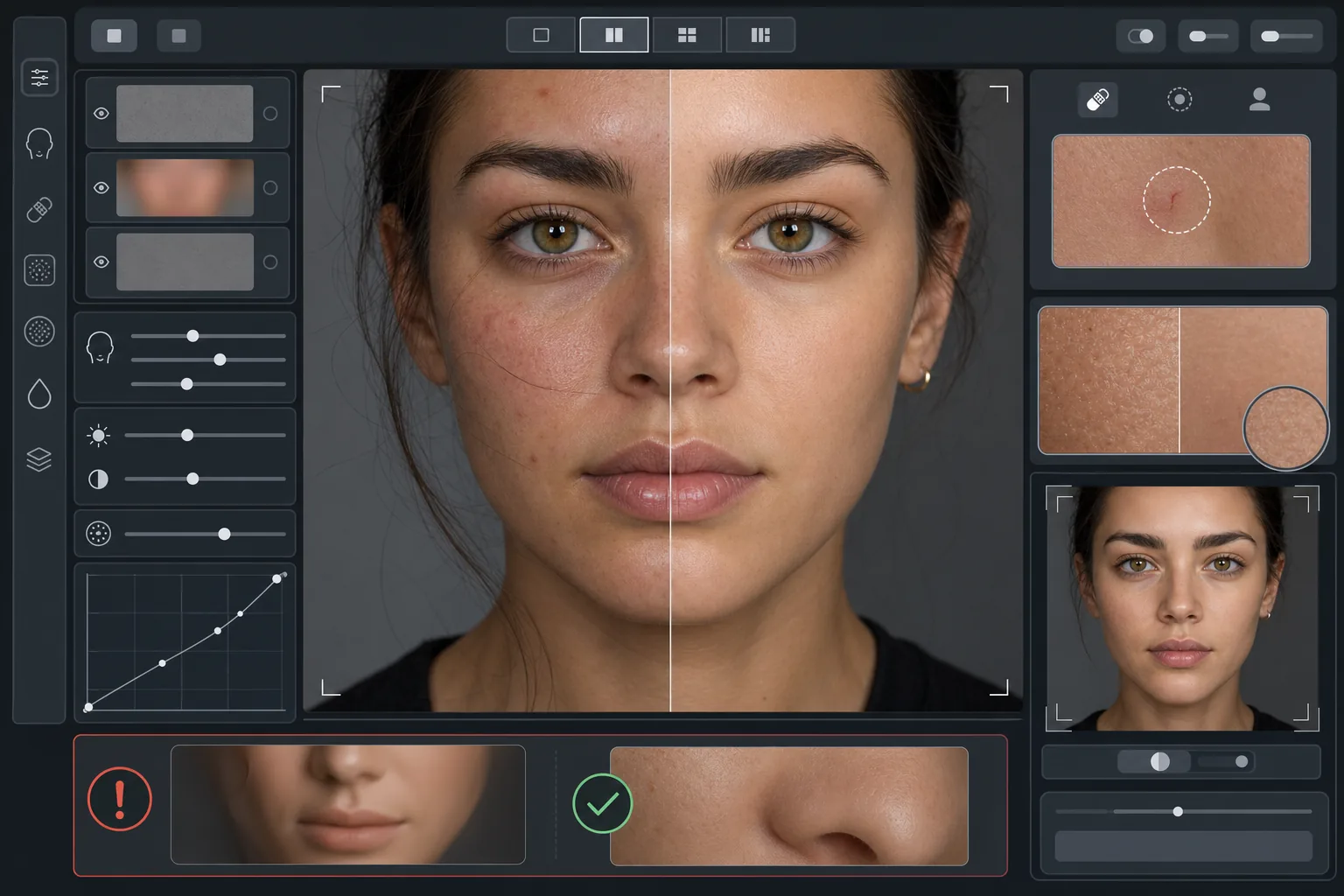
यह टेम्पलेट क्या करता है
यह फ़्रीक्वेंसी-आधारित त्वचा रीटचिंग लागू करता है जो बनावट को रंगत से अलग करती है। AI Enhance अस्थायी खामियों (मुंहासे, लालिमा, आंखों के नीचे के काले घेरे) को हटाता है, साथ ही त्वचा की महीन बनावट — छिद्र, मुलायम रोएं और प्राकृतिक विविधता — को बनाए रखता है जिसे आंख असली के रूप में पहचानती है। जहां AI सुधार बहुत व्यापक होता है, वहां Magic Eraser विशिष्ट जगह को हटाने का काम संभालता है, जैसे आसपास की त्वचा को प्रभावित किए बिना एक खरोंच या कीड़े के काटने के निशान को हटाना। समग्र प्रभाव एक समान, स्वस्थ दिखने वाली त्वचा है जो ज़ूम परीक्षण में खरी उतरती है।
टेम्पलेट सेटिंग्स
| रीटचिंग तीव्रता | प्राकृतिक — दाग-धब्बों और लालिमा को लक्षित करती है, बनावट बनाए रखती है |
| छिद्रों का संरक्षण | पूर्ण — पिक्सेल स्तर पर त्वचा की सभी प्राकृतिक बनावट बनाए रखता है |
| रंगत को एक समान करना | मध्यम — रंग की विविधता को समतल किए बिना धब्बे और लालिमा कम करता है |
| आंखों के नीचे सुधार | हल्का — प्राकृतिक छाया हटाए बिना काले घेरों को हल्का करता है |
| रोशनी को मुलायम करना | कठोर छायाओं को भरता है और सीधे फ्लैश से बने चमकीले धब्बे कम करता है |
| आउटपुट रिज़ॉल्यूशन | इनपुट से मेल खाता है (क्रॉप और ज़ूम के लिए पूरा विवरण बनाए रखता है) |
इस टेम्पलेट का उपयोग कैसे करें
एक पोर्ट्रेट फ़ोटो अपलोड करें
ऐसा अच्छी रोशनी वाला पोर्ट्रेट इस्तेमाल करें जिसमें चेहरा तेज़ फ़ोकस में हो। यह टेम्पलेट तब सबसे अच्छा काम करता है जब मूल छवि में त्वचा की प्राकृतिक बनावट दिखाई दे — सॉफ़्ट-फ़ोकस या ज़्यादा कंप्रेस की गई छवियां AI को बनाए रखने के लिए कम बनावट देती हैं।
प्राकृतिक रीटचिंग लागू करें
AI Enhance अस्थायी दाग-धब्बों, असमान लालिमा और रंगत की असमानताओं को पहचानता है और उन्हें ठीक करता है, साथ ही नीचे की त्वचा की बनावट को पूरी तरह बरकरार रखता है। छिद्र, महीन रेखाएं और प्राकृतिक रंग विविधता दिखाई देती रहती हैं — केवल खामियां बदलती हैं।
विशिष्ट क्षेत्रों को स्थानीय रूप से ठीक करें
जिन बचे हुए अलग-अलग निशानों को आप हटाना चाहते हैं, उनके लिए Magic Eraser का उपयोग करें — भर रही खरोंच, अस्थायी चकत्ता, या चेहरे पर पड़ा कोई बाल। हर हटाव आसपास की प्राकृतिक त्वचा बनावट में घुल-मिल जाता है।
पूरे ज़ूम पर समीक्षा करें और निर्यात करें
त्वचा की बनावट बरकरार है यह सत्यापित करने के लिए 100% पर ज़ूम करें — छिद्र दिखाई देने योग्य और प्राकृतिक होने चाहिए। अगर कोई क्षेत्र बहुत मुलायम दिखे, तो रीटचिंग तीव्रता घटाएं और फिर से प्रोसेस करें। प्राकृतिक विवरण बनाए रखने के लिए पूर्ण रिज़ॉल्यूशन पर निर्यात करें।
बेहतरीन नतीजों के लिए प्रो टिप्स
- ✓सबसे कम रीटचिंग तीव्रता से शुरू करें और ज़रूरत होने पर ही बढ़ाएं — मुलायमपन जोड़ना उस बनावट को वापस लाने की तुलना में कहीं आसान है जो प्रोसेसिंग में हट चुकी हो।
- ✓मुंहासे या रोज़ेशिया वाले व्यक्तियों के लिए, यह टेम्पलेट नीचे की त्वचा की रंगत बदले बिना अलग-अलग दाग-धब्बे हटाता है — नतीजा साफ़ त्वचा वाले दिन जैसा दिखता है, किसी अलग व्यक्ति जैसा नहीं।
- ✓इस टेम्पलेट को फ़ोन कैमरे के ब्यूटी फ़िल्टरों के साथ मिलाकर इस्तेमाल करने से बचें — कई फ़ोन कैमरों में मौजूद स्मूदिंग पहले ही बनावट घटा देती है, और दोहरी प्रोसेसिंग वही प्लास्टिक लुक बना देती है जिससे बचने के लिए यह टेम्पलेट बनाया गया है।
- ✓हो सके तो RAW फ़ॉर्मेट में शूट करें और अपलोड करने से पहले JPEG में बदलें — RAW त्वचा की बनावट का अधिक डेटा कैप्चर करता है जिसे AI रीटचिंग के दौरान बनाए रख सकता है।
सामान्य प्रश्न
यह त्वचा को मुलायम करने वाले ब्यूटी फ़िल्टरों से कैसे अलग है?
+
ब्यूटी फ़िल्टर एक समान ब्लर लगाते हैं जो छिद्रों, महीन रेखाओं और प्राकृतिक बनावट को मिटा देता है — और वही साफ़ पहचाना जाने वाला प्लास्टिक लुक बना देता है। यह टेम्पलेट फ़्रीक्वेंसी-आधारित प्रोसेसिंग का उपयोग करता है जो बनावट को रंगत से अलग करती है, रंगत वाली परत से दाग-धब्बे हटाती है जबकि बनावट वाली परत को अछूता छोड़ देती है। नतीजा असली त्वचा जैसा दिखता है, किसी रेंडर की गई सतह जैसा नहीं।
क्या इससे चेहरे की बनावट का आकार बदलेगा?
+
नहीं। यह टेम्पलेट केवल त्वचा की सतही दिखावट को प्रभावित करता है — रंगत, दाग-धब्बे और रोशनी की समानता। यह नाक, जबड़े, आंखों या किसी भी चेहरे की संरचना को कभी नहीं बदलता। व्यक्ति बिल्कुल अपने जैसा ही दिखता है, बस अधिक साफ़ और अधिक समान रूप से रोशन त्वचा के साथ।
क्या मैं इसका उपयोग पेशेवर हेडशॉट और पोर्टफोलियो कार्य के लिए कर सकता हूं?
+
हां। प्राकृतिक रीटचिंग मानक कॉर्पोरेट हेडशॉट, अभिनय पोर्टफोलियो, डेटिंग प्रोफ़ाइल और सोशल मीडिया की उन पेशेवर अपेक्षाओं को पूरा करता है जहां प्रामाणिकता मायने रखती है। व्यक्ति आमने-सामने भी अपनी फ़ोटो जैसा ही दिखेगा — और यही प्राकृतिक रीटचिंग का पूरा मकसद है।
बेहतर त्वचा, फिर भी आप
एक पोर्ट्रेट अपलोड करें और सेकंडों में बनावट को बनाए रखने वाली प्राकृतिक त्वचा रीटचिंग पाएं। कोई प्लास्टिक लुक नहीं, कोई अजीब स्मूदिंग नहीं — बस आपके सबसे अच्छे दिन पर आप।
इसे मुफ़्त आज़माएंRelated templates
More portrait templates for your workflow.
आयु-उपयुक्त स्कूल पोर्ट्रेट रीटचिंग टेम्पलेट। संपूर्ण कक्षाओं के लिए बैच प्रोसेसिंग के साथ प्राकृतिक दोष निष्कासन, सुसंगत पृष्ठभूमि और सालाना-मानक आउटपुट।
स्टूडियो-गुणवत्ता वाला पालतू पोर्ट्रेट टेम्पलेट। फर के किनारों को संभालता है, पट्टे और हैंडलर को हटाता है, पृष्ठभूमि बदलता है, और कुत्तों, बिल्लियों और अन्य जानवरों के लिए आंखें तेज करता है।
नवजात शिशु और शिशु की तस्वीरों को नरम गर्म टोन, सौम्य त्वचा चिकनाई, प्रोप और व्याकुलता हटाने, और घोषणाओं और दीवार कला के लिए प्रिंट-तैयार आकार के साथ बढ़ाएं।
शाश्वत गर्भावस्था पोर्ट्रेट लुक के लिए कोमल त्वचा की कोमलता, नरम चमक वाली रोशनी, पृष्ठभूमि सरलीकरण और गर्म रंग ग्रेडिंग के साथ मातृत्व तस्वीरों को सुधारें।
पृष्ठभूमि विकर्षणों को हटाकर, असमान एक्सपोज़र को ठीक करके, त्वचा को प्राकृतिक रूप से चिकना करके, और यह सुनिश्चित करके कि सभी लोग एक ही फ्रेम में सर्वश्रेष्ठ दिखें, पारिवारिक चित्रों को साफ़ करें।