
स्कूल पोर्ट्रेट रीटचिंग
हर छात्र को ऐसा पोर्ट्रेट दें जिससे वह संतुष्ट महसूस करे, और साथ ही लुक को स्वाभाविक तथा उम्र के अनुरूप बनाए रखें। यह टेम्पलेट स्कूल फ़ोटोग्राफ़ी की आम समस्याओं को संभालता है — अस्थायी दाग-धब्बे, सत्र भर असमान रोशनी, और असंगत पृष्ठभूमि — और कक्षा के हर छात्र के लिए एक समान, पेशेवर गुणवत्ता वाली, इयरबुक-तैयार तस्वीरें तैयार करता है।
यह टेम्पलेट मुफ़्त आज़माएँPortrait template preview
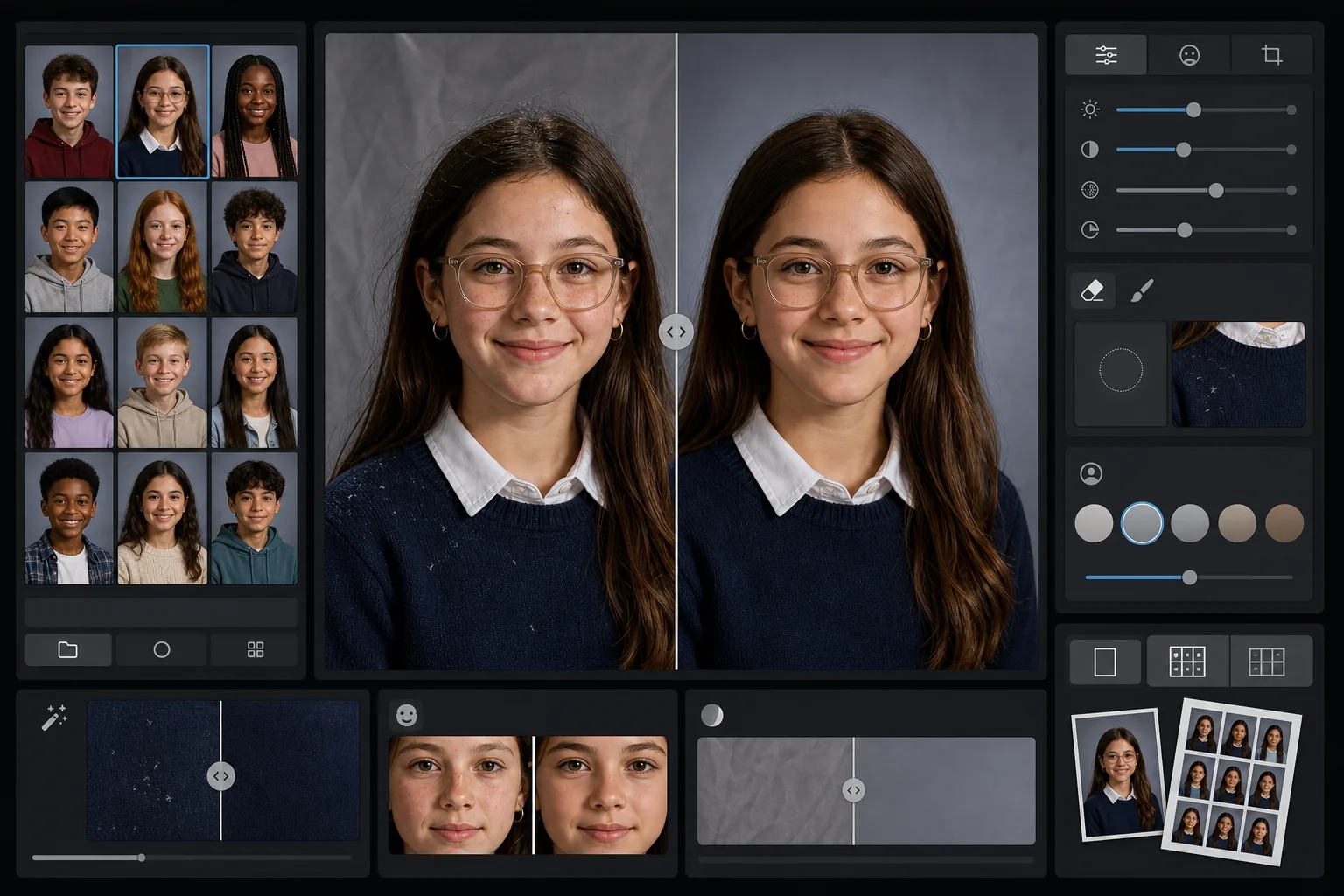
यह टेम्पलेट क्या करता है
स्कूल पोर्ट्रेट पर सौम्य, उम्र के अनुरूप रीटचिंग लागू करता है जो हर छात्र के स्वाभाविक रूप को बनाए रखते हुए अस्थायी दाग-धब्बों को चिकना करता है। AI Enhance उस असमान एक्सपोज़र और रंग-बदलाव को ठीक करता है जो किसी सत्र में एक ही रोशनी सेटअप के तहत दर्जनों छात्रों की तस्वीरें खींचते समय होता है। Magic Eraser कपड़ों पर बिखरे बाल, टेढ़े कॉलर के किनारे और पोर्टेबल बैकड्रॉप पर पृष्ठभूमि की सिलवटें हटा देता है।
टेम्पलेट सेटिंग्स
| रीटचिंग स्तर | हल्का — केवल अस्थायी दाग-धब्बे हटाता है, झाइयों और स्वाभाविक विशेषताओं को बनाए रखता है |
| आउटपुट आकार | 1200×1500px (4:5 मानक पोर्ट्रेट, वॉलेट आकार पर 300 DPI) |
| पृष्ठभूमि सामान्यीकरण | एक बैच की सभी तस्वीरों में बैकड्रॉप का टोन मिलाता है |
| एक्सपोज़र सुधार | स्वतः — शूटिंग सत्र भर रोशनी के बहाव की भरपाई करता है |
| रंग की एकरूपता | सभी संसाधित पोर्ट्रेट में एक समान व्हाइट बैलेंस |
| बिखरे विवरण की सफ़ाई | कंधों पर उड़ते बाल, रोएँ और बैकड्रॉप की सिलवटें हटाता है |
इस टेम्पलेट का उपयोग कैसे करें
कक्षा के पोर्ट्रेट अपलोड करें
एक पोर्ट्रेट या पूरी कक्षा का बैच अपलोड करें। टेम्पलेट अलग-अलग तस्वीरें या समूह संभालता है, और सभी तस्वीरों पर एक ही रीटचिंग मानक लागू करता है ताकि इयरबुक का खंड एकसमान रहे।
उम्र के अनुरूप रीटचिंग लागू करें
AI Enhance अस्थायी दाग-धब्बों जैसे फुंसी या खरोंच को सौम्यता से चिकना करता है, साथ ही हर छात्र को उसके अपने जैसा बनाए रखता है। झाइयाँ, तिल, ब्रेसेस और चश्मा हमेशा बने रहते हैं — लक्ष्य उनके वास्तविक रूप का एक संवारा हुआ संस्करण है।
एक्सपोज़र और पृष्ठभूमि सामान्य करें
पोर्ट्रेट सत्र के दौरान सेटअप के खिसकने से रोशनी की स्थितियाँ बदलती रहती हैं। टेम्पलेट एक्सपोज़र और व्हाइट बैलेंस को ठीक करता है ताकि हर छात्र एक समान रोशनी में दिखे, और पूरे बैच में बैकड्रॉप का टोन मिलता रहे।
साफ़ करें और निर्यात करें
Magic Eraser छोटी-छोटी विकर्षणों को हटाता है — गहरे रंग के स्वेटर पर रोआँ, माथे पर बिखरा एक बाल, पोर्टेबल बैकड्रॉप में एक सिलवट। प्रिंट के लिए इयरबुक-मानक रिज़ॉल्यूशन में या स्कूल की ऑनलाइन गैलरी के लिए कम रिज़ॉल्यूशन वाले JPEG में निर्यात करें।
बेहतरीन परिणामों के लिए पेशेवर सुझाव
- ✓एक-एक करके के बजाय पूरी कक्षा के बैच को एक साथ संसाधित करें — टेम्पलेट समूह का उपयोग करके सभी पोर्ट्रेट में एक समान एक्सपोज़र और रंग को कैलिब्रेट करता है।
- ✓चश्मा पहनने वाले छात्रों के लिए, मूल तस्वीर में छात्र को चकाचौंध कम करने के लिए ठोड़ी थोड़ी नीचे झुकानी चाहिए — AI सुधार तब सबसे अच्छा काम करता है जब लेंस के पीछे आँखें दिखाई दें।
- ✓पूरे स्कूल को संसाधित करने से पहले 5-10 पोर्ट्रेट का परीक्षण बैच चलाएँ ताकि पुष्टि हो सके कि रीटचिंग स्तर आपकी इयरबुक समिति के मानकों पर खरा उतरता है।
- ✓संसाधित संस्करणों के साथ-साथ मूल बिना-रीटच की गई फ़ाइलें भी रखें — कुछ अभिभावक व्यक्तिगत उपयोग के लिए पूरी तरह असंपादित तस्वीर पसंद करते हैं।
सामान्य प्रश्न
क्या यह रीटचिंग बच्चों और किशोरों के लिए उपयुक्त है?
+
हाँ। यह टेम्पलेट विशेष रूप से स्कूल-आयु के विषयों के लिए डिज़ाइन किया गया है। यह केवल अस्थायी दाग-धब्बे हटाता है जैसे तस्वीर वाले दिन निकली फुंसी — यह कभी भी चेहरे की बनावट को नहीं बदलता, त्वचा का रंग नहीं बदलता, और न ही वयस्क ब्यूटी रीटचिंग में इस्तेमाल होने वाली स्मूदिंग लागू करता है। हर छात्र अपने जैसा ही दिखता है।
क्या मैं एक बार में पूरी कक्षा या स्कूल को संसाधित कर सकता हूँ?
+
हाँ। एक ही बैच में सैकड़ों तक पोर्ट्रेट अपलोड करें। टेम्पलेट समान रीटचिंग मानक लागू करता है और हर तस्वीर में एक्सपोज़र, रंग और पृष्ठभूमि की एकरूपता को सामान्य करता है ताकि इयरबुक का खंड एकसमान दिखे।
क्या यह ब्रेसेस, चश्मा या श्रवण यंत्र हटा देगा?
+
नहीं। यह टेम्पलेट ब्रेसेस, चश्मा, श्रवण यंत्र और चिकित्सा उपकरणों सहित सभी स्थायी और अर्ध-स्थायी विशेषताओं को बनाए रखने के लिए डिज़ाइन किया गया है। यह केवल अस्थायी सतही दाग-धब्बों और रोएँ तथा बैकड्रॉप की सिलवटों जैसे पर्यावरणीय विकर्षणों को संभालता है।
मिनटों में इयरबुक-तैयार पोर्ट्रेट दें
स्कूल पोर्ट्रेट को अलग-अलग या कक्षा के अनुसार अपलोड करें और एक समान, स्वाभाविक रूप से रीटच की गई, प्रिंट के लिए तैयार तस्वीरें पाएँ। हर छात्र अपने सर्वश्रेष्ठ रूप में दिखता है।
मुफ़्त आज़माएँRelated templates
More portrait templates for your workflow.
स्टूडियो-गुणवत्ता वाला पालतू पोर्ट्रेट टेम्पलेट। फर के किनारों को संभालता है, पट्टे और हैंडलर को हटाता है, पृष्ठभूमि बदलता है, और कुत्तों, बिल्लियों और अन्य जानवरों के लिए आंखें तेज करता है।
प्राकृतिक त्वचा सुधार टेम्पलेट जो छिद्रों और बनावट को संरक्षित करते हुए दाग-धब्बे हटाता है। यहां तक कि प्रकाश व्यवस्था भी, कोई प्लास्टिक लुक नहीं - बस कैमरे पर बेहतर त्वचा।
नवजात शिशु और शिशु की तस्वीरों को नरम गर्म टोन, सौम्य त्वचा चिकनाई, प्रोप और व्याकुलता हटाने, और घोषणाओं और दीवार कला के लिए प्रिंट-तैयार आकार के साथ बढ़ाएं।
शाश्वत गर्भावस्था पोर्ट्रेट लुक के लिए कोमल त्वचा की कोमलता, नरम चमक वाली रोशनी, पृष्ठभूमि सरलीकरण और गर्म रंग ग्रेडिंग के साथ मातृत्व तस्वीरों को सुधारें।
पृष्ठभूमि विकर्षणों को हटाकर, असमान एक्सपोज़र को ठीक करके, त्वचा को प्राकृतिक रूप से चिकना करके, और यह सुनिश्चित करके कि सभी लोग एक ही फ्रेम में सर्वश्रेष्ठ दिखें, पारिवारिक चित्रों को साफ़ करें।