
पारिवारिक पोर्ट्रेट क्लीनअप
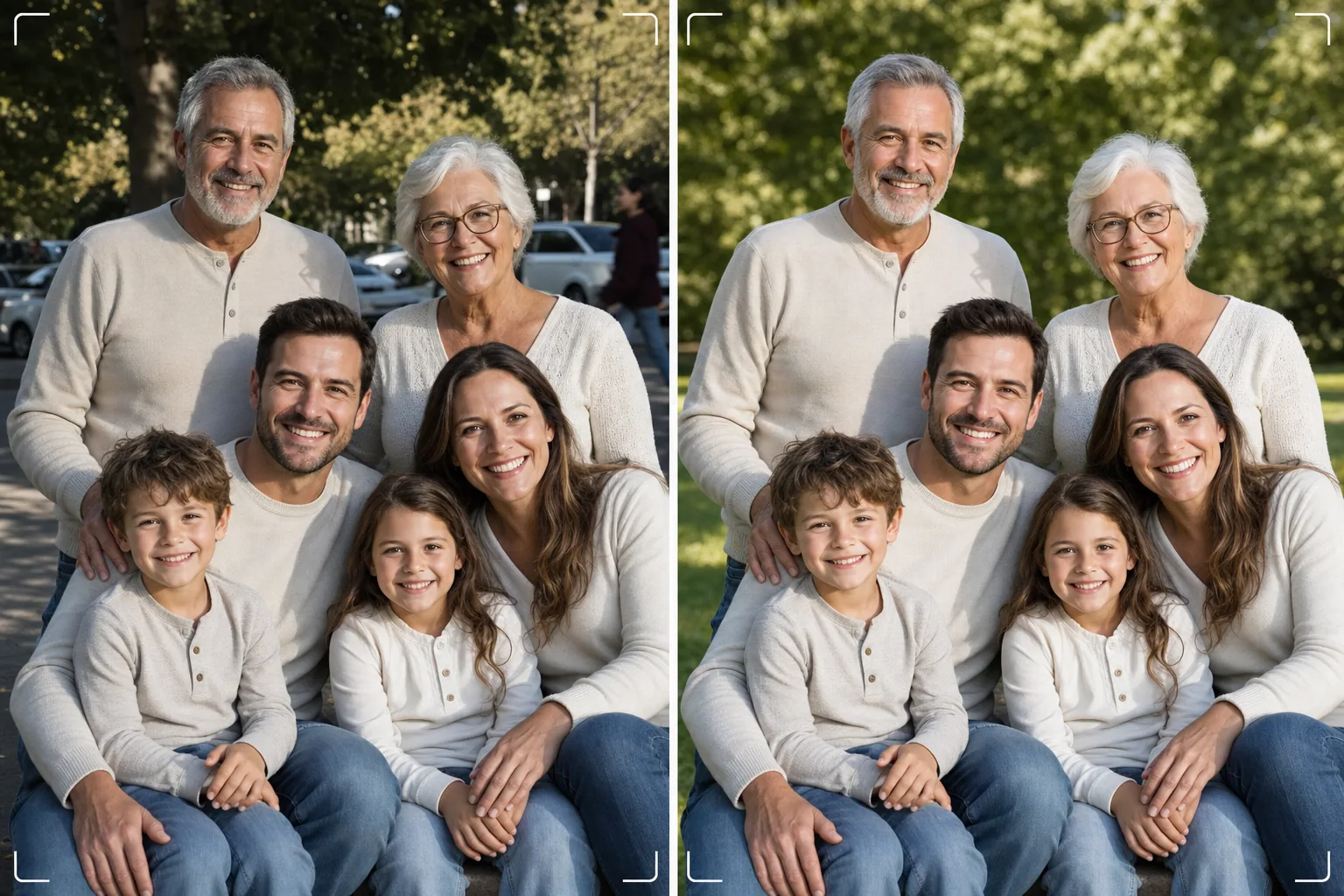
सौ बार फ़ोटो खींचे बिना सटीक पारिवारिक फ़ोटो पाएं। यह टेम्प्लेट पृष्ठभूमि के विकर्षणों को हटाता है, पूरे समूह में असमान रोशनी को ठीक करता है, हर चेहरे पर दाग-धब्बों को प्राकृतिक रूप से कम करता है, और उन छोटी खामियों को साफ़ करता है जो एक अच्छी समूह फ़ोटो को शानदार बनने से रोकती हैं।
यह टेम्प्लेट मुफ़्त आज़माएंPortrait template preview
यह टेम्प्लेट क्या करता है
पारिवारिक फ़ोटो की सार्वभौमिक समस्या को हल करता है — सभी को एक ही फ्रेम में शानदार दिखाना। Magic Eraser फ़ोटो में घुस आए अजनबियों, कूड़ेदानों, निकास संकेतों, बिजली के तारों, खड़ी कारों, और अन्य विकर्षणों को हटाता है जो अन्यथा अच्छी समूह संरचना को बिगाड़ देते हैं। AI Enhance उस असमान रोशनी को ठीक करता है जो तब होती है जब कुछ परिवार के सदस्य छाया में होते हैं और अन्य सीधी धूप में, सभी को एक समान, आकर्षक एक्सपोज़र पर लाता है। प्राकृतिक त्वचा स्मूदनिंग हर चेहरे पर दाग-धब्बे, आंखों के नीचे के काले घेरे, और लालिमा को कम करती है, बिना किसी को कृत्रिम रूप से रीटच किया हुआ दिखाए। परिणाम वही पारिवारिक पोर्ट्रेट होता है जिसकी आपने कल्पना की थी जब आपने सभी को एक साथ इकट्ठा किया था।
टेम्प्लेट सेटिंग्स
| पृष्ठभूमि सफ़ाई | विकर्षणों का स्वतः पता लगाकर हटाएं (लोग, संकेत, वस्तुएं) |
| एक्सपोज़र संतुलन | सभी विषयों पर समान रोशनी (छाया भराई + हाइलाइट पुनर्प्राप्ति) |
| त्वचा सुधार | हर चेहरे के अनुसार प्राकृतिक दाग-धब्बा कमी (विशिष्ट विशेषताओं को बनाए रखता है) |
| रंग सुधार | मिश्रित-रोशनी वाली समूह फ़ोटो में एकीकृत व्हाइट बैलेंस |
| शार्पनिंग | चेहरा-जागरूक शार्पनिंग (आंखों और मुस्कान को प्राथमिकता) |
| आउटपुट रिज़ॉल्यूशन | 6000px लंबा किनारा (300 DPI पर 20×13 इंच तक की दीवार प्रिंट) |
इस टेम्प्लेट का उपयोग कैसे करें
पारिवारिक फ़ोटो अपलोड करें
किसी पारिवारिक समारोह, छुट्टी, पुनर्मिलन, या पोर्ट्रेट सत्र में ली गई समूह फ़ोटो अपलोड करें। यह टेम्प्लेट दो से तीस लोगों तक के समूहों को संभालता है। सर्वोत्तम परिणामों के लिए, वह फ्रेम चुनें जिसमें सबसे अधिक चेहरे सुखद भाव के साथ कैमरे की ओर देख रहे हों — टेम्प्लेट पृष्ठभूमि और रोशनी ठीक करता है लेकिन चेहरे के भाव या बंद आंखें नहीं बदल सकता।
पृष्ठभूमि के विकर्षण हटाएं
Magic Eraser पारिवारिक समूह के पीछे से अजनबियों, ध्यान भटकाने वाले संकेतों, कूड़े, वाहनों, और अन्य अवांछित तत्वों की पहचान करके उन्हें हटाता है। AI पृष्ठभूमि को प्राकृतिक रूप से पुनर्निर्मित करता है, हटाई गई वस्तुओं के पीछे घास, आकाश, दीवारें, या फ़र्श भरता है।
रोशनी संतुलित करें और चेहरों को निखारें
AI Enhance परिवार के सदस्यों के बीच एक्सपोज़र के अंतर को ठीक करता है — अब आधा समूह छाया में और आधा धूप में आंखें सिकोड़ता नहीं दिखेगा। हर चेहरे को अलग-अलग दाग-धब्बा कमी और सूक्ष्म आंख चमक मिलती है, साथ ही हर व्यक्ति की विशिष्ट विशेषताएं और प्राकृतिक रूप बना रहता है।
प्रिंट या साझा करने के लिए निर्यात करें
बड़े दीवार प्रिंट के लिए 6000px लंबे किनारे पर, या सोशल मीडिया और डिजिटल त्योहार कार्ड के लिए 2000px पर डाउनलोड करें। टेम्प्लेट स्क्रीन प्रदर्शन के लिए sRGB में या पेशेवर प्रिंटिंग के लिए Adobe RGB में आउटपुट देता है। सामान्य फ्रेम आकारों के लिए कई क्रॉप अनुपात (4:5, 5:7, 8:10) उपलब्ध हैं।
सर्वोत्तम परिणामों के लिए विशेषज्ञ सुझाव
- ✓तेज़ी से लगातार तीन से पांच शॉट लें। वह चुनें जिसमें सबसे अधिक लोगों की आंखें खुली हों और भाव प्राकृतिक हो — टेम्प्लेट बाकी सब कुछ संभाल लेता है, लेकिन भाव और आंखें खुली होने की स्थिति बाद में नहीं बदली जा सकती।
- ✓परिवार को मिश्रित धूप और छाया के बजाय खुली छाया में रखें — किसी पेड़ की छतरी के नीचे या इमारत की छाया वाली ओर। इससे टेम्प्लेट को समान रूप से रोशन शुरुआती बिंदु मिलता है जो सबसे प्राकृतिक सुधार देता है।
- ✓बड़े समूहों (दस या अधिक) के लिए, लोगों को सीढ़ीनुमा पंक्तियों में व्यवस्थित करें और लंबे सदस्यों को पीछे रखें। यह प्राकृतिक परत गहराई बनाती है और सुनिश्चित करती है कि हर चेहरा दिखाई दे। टेम्प्लेट पीछे की पंक्तियों के उन चेहरों को चमका सकता है जो प्रकाश स्रोत से दूरी के कारण थोड़े गहरे होते हैं।
सामान्य प्रश्न
क्या यह बंद आंखें या ख़राब भाव ठीक कर सकता है?
+
नहीं। टेम्प्लेट रोशनी निखारता है, विकर्षण हटाता है, और त्वचा को चिकना करता है, लेकिन यह चेहरे के भाव नहीं बदल सकता, बंद आंखें नहीं खोल सकता, या लोगों की स्थिति नहीं बदल सकता। अपलोड करने से पहले सबसे अच्छे भाव वाला फ्रेम चुनें — टेम्प्लेट उस फ्रेम को बिल्कुल सर्वश्रेष्ठ बना देता है।
बड़े पुनर्मिलन समूहों के बारे में क्या?
+
टेम्प्लेट लगभग तीस लोगों तक के समूहों को संभालता है। बहुत बड़े समूहों के लिए, फ्रेम में चेहरे का आकार छोटा होने के कारण व्यक्तिगत चेहरा सुधार अधिक सूक्ष्म हो जाता है, लेकिन पृष्ठभूमि सफ़ाई और रोशनी सुधार किसी भी समूह आकार में पूरी तरह प्रभावी रहते हैं।
क्या मैं पारिवारिक फ़ोटो से किसी व्यक्ति को हटा सकता हूं?
+
हां, Magic Eraser समूह से विशिष्ट व्यक्तियों को हटा सकता है। जिस व्यक्ति को आप हटाना चाहते हैं उसे चुनें और AI उसके पीछे की पृष्ठभूमि को पुनर्निर्मित कर देगा। यह तब सबसे अच्छा काम करता है जब व्यक्ति दूसरों के बीच केंद्र में होने के बजाय समूह के किनारे पर हो।
सटीक पारिवारिक पोर्ट्रेट बस एक क्लीनअप दूर है
अपनी समूह फ़ोटो अपलोड करें और दीवार के लिए तैयार साफ़, समान रूप से रोशन, प्राकृतिक रूप से निखरी पारिवारिक पोर्ट्रेट पाएं।
मुफ़्त आज़माएंRelated templates
More portrait templates for your workflow.
आयु-उपयुक्त स्कूल पोर्ट्रेट रीटचिंग टेम्पलेट। संपूर्ण कक्षाओं के लिए बैच प्रोसेसिंग के साथ प्राकृतिक दोष निष्कासन, सुसंगत पृष्ठभूमि और सालाना-मानक आउटपुट।
स्टूडियो-गुणवत्ता वाला पालतू पोर्ट्रेट टेम्पलेट। फर के किनारों को संभालता है, पट्टे और हैंडलर को हटाता है, पृष्ठभूमि बदलता है, और कुत्तों, बिल्लियों और अन्य जानवरों के लिए आंखें तेज करता है।
प्राकृतिक त्वचा सुधार टेम्पलेट जो छिद्रों और बनावट को संरक्षित करते हुए दाग-धब्बे हटाता है। यहां तक कि प्रकाश व्यवस्था भी, कोई प्लास्टिक लुक नहीं - बस कैमरे पर बेहतर त्वचा।
नवजात शिशु और शिशु की तस्वीरों को नरम गर्म टोन, सौम्य त्वचा चिकनाई, प्रोप और व्याकुलता हटाने, और घोषणाओं और दीवार कला के लिए प्रिंट-तैयार आकार के साथ बढ़ाएं।
शाश्वत गर्भावस्था पोर्ट्रेट लुक के लिए कोमल त्वचा की कोमलता, नरम चमक वाली रोशनी, पृष्ठभूमि सरलीकरण और गर्म रंग ग्रेडिंग के साथ मातृत्व तस्वीरों को सुधारें।