
मेनू बोर्ड डिज़ाइन
अपनी खुद की खाद्य फोटोग्राफी से पेशेवर मेनू बोर्ड ग्राफिक्स बनाएं। यह टेम्पलेट प्रत्येक व्यंजन को टेबल सेटिंग और अव्यवस्थित पृष्ठभूमि से अलग करता है, एक सुसंगत मेनू के लिए सभी आइटम्स में रूप को एक समान बनाता है, और डिजिटल मेनू बोर्ड, मुद्रित मेनू तथा DoorDash, Uber Eats और Grubhub जैसे डिलीवरी प्लेटफ़ॉर्म लिस्टिंग के लिए अनुकूलित लेआउट-तैयार छवियां निर्यात करता है।
इस टेम्पलेट को मुफ़्त आज़माएंFood template preview
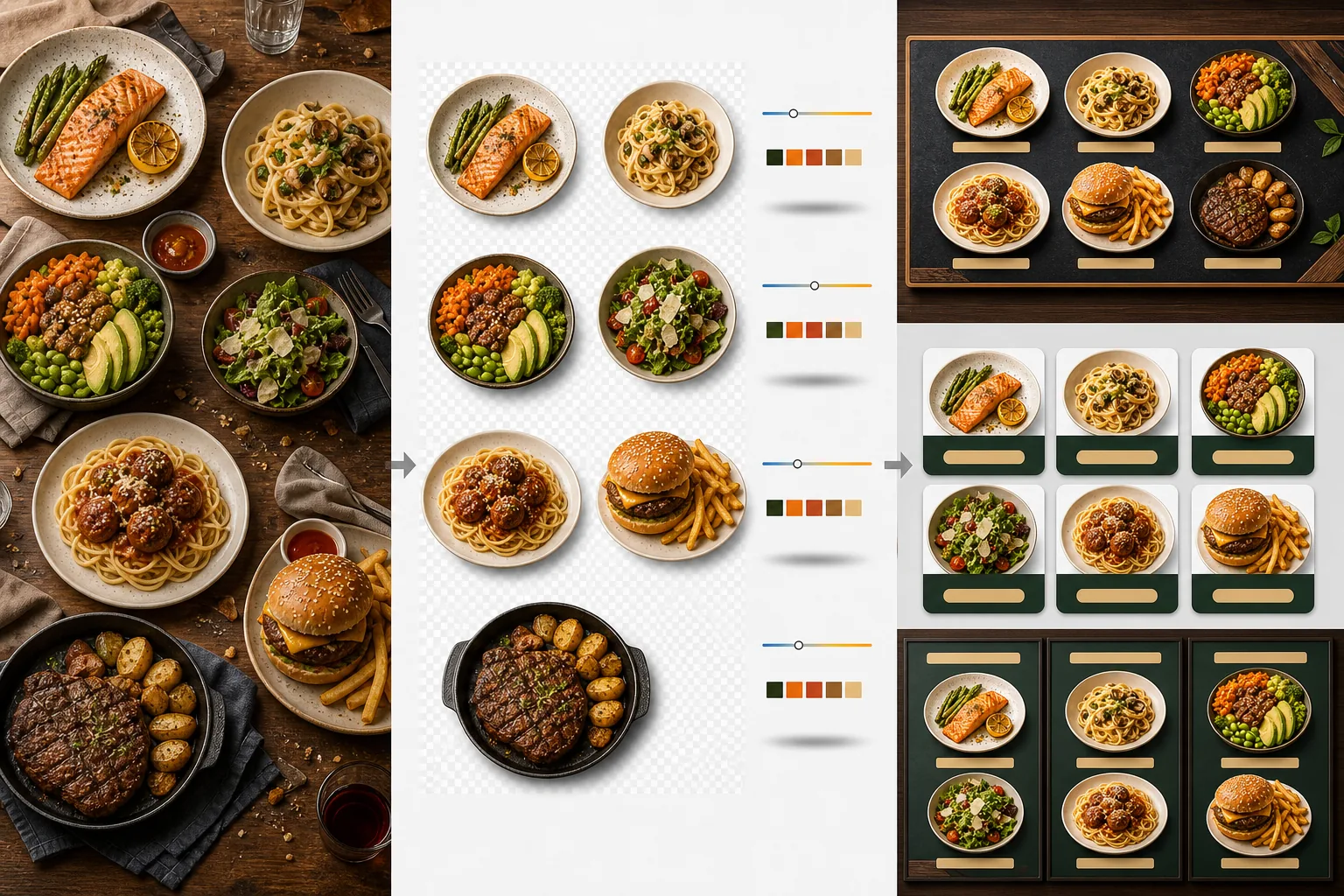
यह टेम्पलेट क्या करता है
अलग-अलग समय, अलग-अलग रोशनी और अलग-अलग टेबल पर ली गई असंगत खाद्य तस्वीरों को मेनू के लिए तैयार छवियों के एक एकीकृत सेट में बदल देता है। Background Eraser प्रत्येक व्यंजन — प्लेट, कटोरा या पैकेजिंग — को उसकी मूल टेबल सेटिंग से अलग करता है और पृष्ठभूमि को एक सुसंगत रंग या बनावट से बदल देता है जो आपके रेस्तरां ब्रांडिंग से मेल खाती है। रंग तापमान को सभी आइटम्स में सामान्यीकृत किया जाता है ताकि गर्म टंगस्टन रोशनी, ठंडे LED पैनल और प्राकृतिक खिड़की की रोशनी में ली गई तस्वीरें सभी सुसंगत दिखें। खाद्य रंगों को अवास्तविक क्षेत्र में जाए बिना भूख बढ़ाने वाला दिखने के लिए बढ़ाया जाता है — हरियाली जीवंत, मांस गर्म और रसीला, और चटनियां चमकदार होती हैं। परिणाम छवियों का एक ऐसा सेट है जो फ़ोन की तस्वीरों के यादृच्छिक संग्रह के बजाय एक एकीकृत दृश्य मेनू प्रणाली के रूप में काम करता है।
टेम्पलेट सेटिंग्स
| पृष्ठभूमि | ठोस रंग (ब्रांड से मेल खाता), लकड़ी की बनावट, स्लेट, या पारदर्शी |
| रंग तापमान सामान्यीकरण | सभी आइटम्स को 5000K दिन के उजाले वाले व्हाइट बैलेंस से मिलाएं |
| खाद्य रंग वृद्धि | भूख बढ़ाने वाला बूस्ट (गर्म प्रोटीन, जीवंत हरियाली, चमकदार चटनियां) |
| छाया शैली | ठोस पृष्ठभूमि पर गहराई के लिए सूक्ष्म ड्रॉप शैडो |
| आउटपुट आकार | 1200×1200px (डिलीवरी प्लेटफ़ॉर्म), 800×600px (डिजिटल मेनू बोर्ड), कस्टम |
इस टेम्पलेट का उपयोग कैसे करें
खाद्य तस्वीरें अपलोड करें
प्रत्येक मेनू आइटम की तस्वीरें अपलोड करें। सेवा के दौरान ली गई फ़ोन की तस्वीरें, औपचारिक खाद्य फोटोग्राफी शूट और डिलीवरी प्लेटफ़ॉर्म लिस्टिंग तस्वीरें सभी काम करती हैं। टेम्पलेट आपके पूरे मेनू में सुसंगत परिणामों के लिए प्रत्येक व्यंजन को अलग से संसाधित करता है।
व्यंजनों को पृष्ठभूमि से अलग करें
Background Eraser प्रत्येक व्यंजन को उसकी टेबल, प्लेसमैट या काउंटर सतह से अलग करता है। किनारा पहचान प्लेट के किनारे, कटोरे के किनारे या पैकेजिंग की रूपरेखा का सटीक रूप से अनुसरण करती है। प्लेट के किनारे से आगे बढ़ने वाली सजावट और टॉपिंग — अजमोद की एक टहनी, चटनी की एक बूंदबारी — संरक्षित रहती हैं।
रंग और शैली को मानकीकृत करें
रंग तापमान को सामान्यीकृत किया जाता है ताकि सभी व्यंजन एक ही सुसंगत रोशनी में दिखें। भूख बढ़ाने की अपील के लिए खाद्य रंगों को बढ़ाया जाता है। नई पृष्ठभूमि पर एक स्थिर, त्रि-आयामी रूप के लिए प्रत्येक व्यंजन के नीचे एक सूक्ष्म छाया जोड़ी जाती है।
मेनू और प्लेटफ़ॉर्म के लिए निर्यात करें
DoorDash, Uber Eats और Grubhub लिस्टिंग के लिए 1200×1200px पर डाउनलोड करें। डिजिटल मेनू बोर्ड और TV डिस्प्ले के लिए 800×600px पर निर्यात करें। कस्टम मुद्रित मेनू और साइनेज बनाने वाले ग्राफिक डिज़ाइनरों के लिए पारदर्शी PNG निर्यात उपलब्ध हैं।
सर्वोत्तम परिणामों के लिए प्रो टिप्स
- ✓व्यंजनों को सीधे ऊपर से (फ्लैट ले) या 45 डिग्री के कोण पर फोटोग्राफ करें। ये दो कोण सबसे साफ पृष्ठभूमि हटाने का परिणाम देते हैं क्योंकि प्लेट की रूपरेखा पूरी तरह दिखाई देती है और AI व्यंजन को टेबल से सटीकता से अलग कर सकता है।
- ✓फोटोग्राफ करने से पहले प्लेट के किनारे को पोंछकर साफ करें। प्लेट के किनारे पर चटनी के धब्बे और टुकड़े अलग की गई छवि का हिस्सा बन जाते हैं और नई साफ पृष्ठभूमि पर गंदे दिखते हैं।
- ✓सभी मेनू आइटम्स को एक ही सेटिंग के साथ एक बैच में संसाधित करें। हर व्यंजन की तस्वीर में सुसंगतता ही वह चीज़ है जो मेनू को पेशेवर बनाती है — बेमेल रंग तापमान और पृष्ठभूमि की छटाएं बेहतरीन भोजन को भी शौकिया दिखा देती हैं।
सामान्य प्रश्न
क्या मैं इसे पेय पदार्थों के लिए उपयोग कर सकता हूं?
+
हां। गिलास, कप, बोतलें और कॉकटेल उसी सटीकता से अलग किए जाते हैं जैसे प्लेट में परोसे गए व्यंजन। पानी, वाइन और साफ कॉकटेल जैसे पारदर्शी पेय नई पृष्ठभूमि पर अपनी पारदर्शिता बनाए रखते हैं।
क्या भोजन कृत्रिम रूप से बढ़ाया हुआ दिखेगा?
+
रंग वृद्धि को इस तरह कैलिब्रेट किया गया है कि भोजन अवास्तविक क्षेत्र में जाए बिना अपने सबसे भूख बढ़ाने वाले रूप में दिखे। इसे कठोर फ्लोरोसेंट रोशनी में फोटोग्राफ किए गए भोजन और प्राकृतिक दिन की रोशनी में फोटोग्राफ किए गए भोजन के बीच के अंतर के रूप में सोचें — टेम्पलेट हर व्यंजन को ऐसा दिखाता है जैसे उसे आदर्श परिस्थितियों में शूट किया गया हो।
क्या यह डिलीवरी प्लेटफ़ॉर्म मेनू तस्वीरों के लिए काम करता है?
+
हां। 1200×1200px वर्गाकार आउटपुट DoorDash, Uber Eats, Grubhub और Postmates की छवि आवश्यकताओं को पूरा करता है। डिलीवरी प्लेटफ़ॉर्म पर पेशेवर दिखने वाली मेनू तस्वीरों वाले रेस्तरां लगातार उन रेस्तरां की तुलना में अधिक ऑर्डर दर प्राप्त करते हैं जो असंसाधित फ़ोन स्नैपशॉट का उपयोग करते हैं।
एक ऐसा मेनू बनाएं जो हर व्यंजन को अप्रतिरोध्य बना दे
खाद्य तस्वीरें अपलोड करें और डिजिटल बोर्ड, प्रिंट मेनू और डिलीवरी प्लेटफ़ॉर्म के लिए तैयार सुसंगत, भूख बढ़ाने वाली मेनू छवियां प्राप्त करें।
इसे मुफ़्त आज़माएंRelated templates
More food templates for your workflow.
रंग जीवंतता वृद्धि, स्वच्छ पृष्ठभूमि, भाप और ताजगी प्रभाव और प्लेटफ़ॉर्म-अनुकूलित आयामों के साथ स्वादिष्ट भोजन वितरण मेनू फ़ोटो बनाएं।
प्रिंट-क्वालिटी शार्पनिंग, सामग्री रंग सटीकता, स्टाइल सीन क्लीनअप और उच्च-रिज़ॉल्यूशन आउटपुट के साथ कुकबुक और खाद्य ब्लॉग के लिए रेसिपी फ़ोटो को बेहतर बनाएं।