
फूड डिलीवरी मेन्यू फोटो
अपने डिलीवरी मेनू के व्यंजनों को उतना ही स्वादिष्ट दिखाएँ जितने वे लगते हैं। यह टेम्पलेट अधिकतम भूख-आकर्षण के लिए भोजन के रंगों को निखारता है, बिखरी हुई रसोई की पृष्ठभूमि हटाता है, व्यंजनों की दृश्य गर्माहट और ताजगी बढ़ाता है, और DoorDash, Uber Eats, Grubhub तथा अन्य डिलीवरी प्लेटफ़ॉर्म के लिए अनुकूलित छवियाँ तैयार करता है।
यह टेम्पलेट मुफ़्त आज़माएँFood template preview
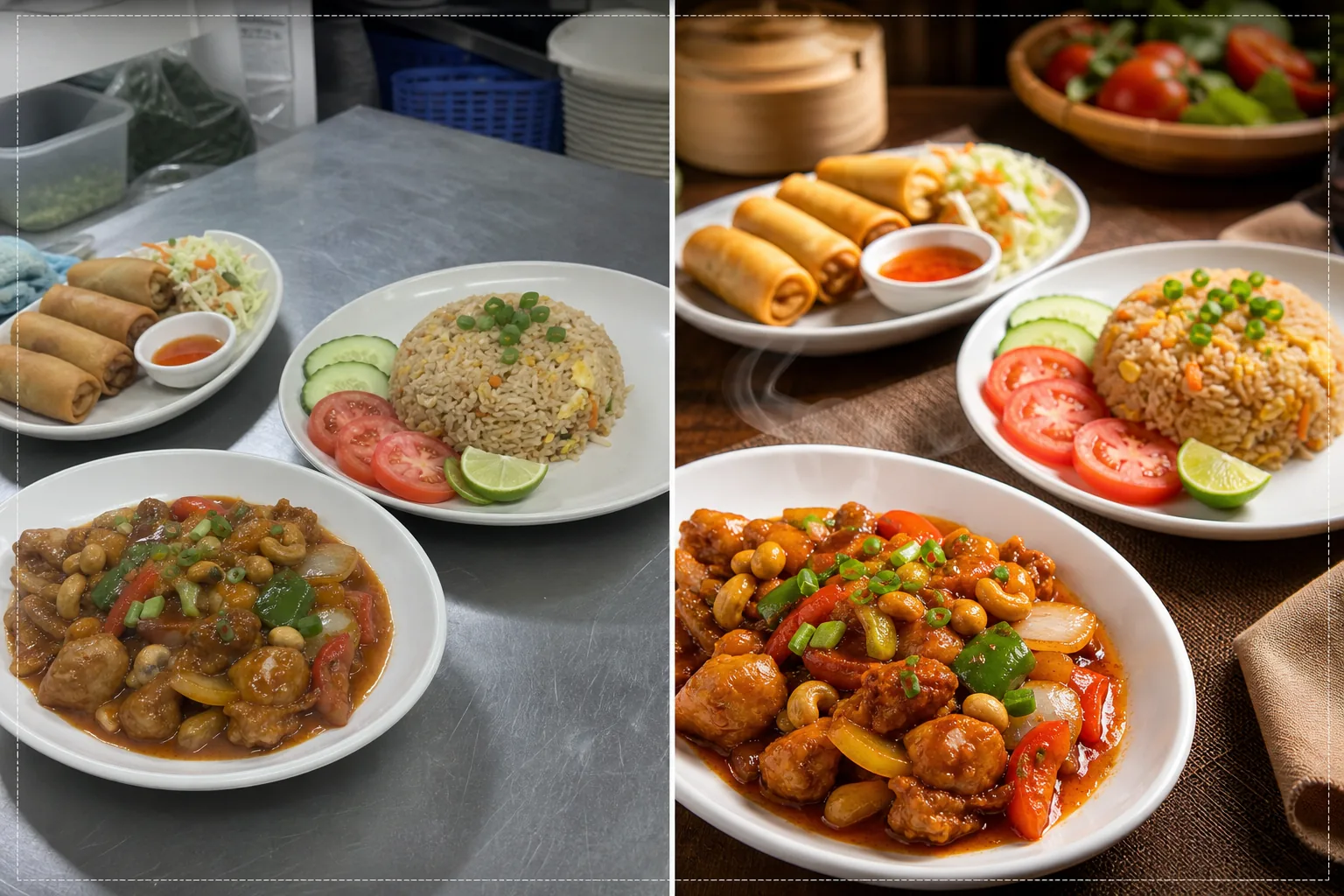
यह टेम्पलेट क्या करता है
रसोई में जल्दी से ली गई तस्वीरों को मेनू-स्तर की छवियों में बदलता है जो भोजन डिलीवरी प्लेटफ़ॉर्म पर ऑर्डर बढ़ाती हैं। रेस्तराँ अक्सर व्यस्त रसोई में फ्लोरोसेंट रोशनी के नीचे व्यंजनों की तस्वीरें लेते हैं, जिससे भोजन अनाकर्षक दिखता है — हरे रंग की झाँई वाला चिकन, फीका भूरा चावल और रंग उड़ी हुई चटनियाँ। यह टेम्पलेट रंग तापमान को गर्म, भूख जगाने वाले टोन में सुधारता है और टमाटर, हरी सब्जियों और मिर्च जैसी स्वाभाविक रूप से चटख सामग्री की संतृप्ति बढ़ाता है। Background Eraser बिखरी हुई रसोई की पृष्ठभूमि हटाकर उसे साफ-सुथरी, भोजन के अनुकूल सतहों से बदल देता है। AI Enhance भोजन की बनावट को तीक्ष्ण करता है ताकि खरीदार तले हुए व्यंजनों की कुरकुराहट, गरम व्यंजनों से उठती भाप और सजावट की ताजगी देख सकें।
टेम्पलेट सेटिंग्स
| रंग की गर्माहट | गर्म, भूख जगाने वाले टोन (+15% गर्म शिफ्ट, फ्लोरोसेंट हरे को सुधारता है) |
| भोजन की संतृप्ति | लाल, हरे और पीले रंगों पर चयनात्मक वृद्धि (भोजन के प्राकृतिक रंग) |
| बनावट में सुधार | कुरकुरेपन, नमी और चमक के विवरण को तीक्ष्ण करना |
| पृष्ठभूमि | साफ मेज़ की सतह, ठोस रंग या गहरा भावपूर्ण बैकड्रॉप |
| आउटपुट आयाम | 1200 × 800 px (डिलीवरी प्लेटफ़ॉर्म के लिए इष्टतम) और 1080 × 1080 px (सोशल) |
इस टेम्पलेट का उपयोग कैसे करें
अपने व्यंजन की फ़ोटो अपलोड करें
परोसे गए व्यंजन की तस्वीर सीधे ऊपर से (फ्लैट ले) या 45-डिग्री के कोण पर लें — दोनों संरचनाएँ डिलीवरी मेनू के लिए अच्छी रहती हैं। उपलब्ध सर्वोत्तम प्राकृतिक रोशनी का उपयोग करें या व्यंजन को खिड़की के पास रखें। सीधे अपने फ़ोन से अपलोड करें — किसी स्टूडियो सेटअप की ज़रूरत नहीं।
रंग और गर्माहट सुधार
यह टेम्पलेट रसोई की फ्लोरोसेंट और LED रोशनी से आने वाली रंग झाँई को सुधारता है और भोजन के टोन को गर्म, भूख जगाने वाले रंगों की ओर ले जाता है। चटनियाँ अधिक गाढ़ी, प्रोटीन सुनहरे-भूरे और सब्ज़ियाँ ताज़ी दिखती हैं। यह सुधार जो प्राकृतिक रूप से मौजूद है उसे निखारता है, न कि भोजन को कृत्रिम रूप से रंगा हुआ दिखाता है।
पृष्ठभूमि और बनावट में सुधार
Background Eraser रसोई की पृष्ठभूमि को साफ सतह से बदल देता है — लकड़ी की मेज़, संगमरमर, स्लेट या साधारण ठोस रंग। AI Enhance भोजन की बनावट को तीक्ष्ण करता है ताकि तले हुए व्यंजनों की कुरकुराहट, चटनियों की चमक और उत्पादों की ताजगी उभर सके। पूरी छवि पेशेवर फूड फ़ोटोग्राफ़ी जैसी गुणवत्ता पा लेती है।
डिलीवरी प्लेटफ़ॉर्म के लिए एक्सपोर्ट करें
डिलीवरी प्लेटफ़ॉर्म की मेनू लिस्टिंग (DoorDash, Uber Eats, Grubhub) के लिए 1200 × 800 px पर या Instagram फूड पोस्ट के लिए 1080 × 1080 px पर डाउनलोड करें। गर्म रंग प्रोफ़ाइल सुनिश्चित करता है कि व्यंजन सभी डिवाइस और स्क्रीन प्रकारों पर स्वादिष्ट दिखे।
सर्वोत्तम परिणामों के लिए प्रो टिप्स
- ✓व्यंजनों की तस्वीर परोसने के तुरंत बाद लें, जब भाप, नमी और सजावट की ताजगी अपने चरम पर हो। फूड फ़ोटोग्राफ़ी के पास लगभग तीन से पाँच मिनट का समय होता है, इससे पहले कि चटनियाँ जम जाएँ, सजावट मुरझा जाए और भाप उड़ जाए। यह टेम्पलेट ताजगी के इन संकेतों को निखारता है पर उन्हें बना नहीं सकता।
- ✓मेनू फ़ोटो के लिए सफ़ेद या हल्के रंग की प्लेट का उपयोग करें। सफ़ेद प्लेटें भोजन के साथ सबसे मजबूत कंट्रास्ट बनाती हैं, जिससे रंग उभरते हैं और पृष्ठभूमि हटाते समय AI साफ-सुथरे किनारे बना पाता है। गहरे रंग की प्लेटें भी काम करती हैं पर रंग कंट्रास्ट का लाभ घटा देती हैं।
- ✓कॉम्बो भोजन और कई-आइटम वाले ऑर्डर के लिए सभी आइटम को थोड़ी दूरी पर एक ही फ़्रेम में व्यवस्थित करें। यह टेम्पलेट प्रत्येक भोजन तत्व को अलग-अलग तीक्ष्ण करता है, और पूरा ऑर्डर दिखाने से डिलीवरी ग्राहकों को स्पष्ट अंदाज़ा मिलता है कि उन्हें क्या मिलेगा।
सामान्य प्रश्न
क्या यह रसोई की फ्लोरोसेंट रोशनी में ली गई तस्वीरों को ठीक कर सकता है?
+
हाँ। फ्लोरोसेंट रोशनी रेस्तराँ फूड फ़ोटोग्राफ़ी में सबसे आम समस्या है, जो हरे-पीले रंग की झाँई बनाती है जिससे भोजन अनाकर्षक दिखता है। यह टेम्पलेट विशेष रूप से इस रंग बदलाव को सुधारता है और उसे गर्म, भूख जगाने वाले टोन से बदल देता है जिससे भोजन स्वाभाविक रूप से स्वादिष्ट दिखता है।
क्या यह सभी प्रकार के व्यंजनों के लिए काम करता है?
+
यह टेम्पलेट सभी प्रकार के भोजन को संभालता है — अमेरिकी, एशियाई, मैक्सिकन, इतालवी, भारतीय, मध्य-पूर्वी और बहुत कुछ। रंग सुधार और वृद्धि सभी पाक परंपराओं के भोजन के प्राकृतिक रंगों के अनुसार समायोजित की गई है, जो टमाटर-आधारित व्यंजनों में लाल, सलाद में हरे और तले व पके व्यंजनों में सुनहरे टोन को निखारती है।
क्या मैं अपने पूरे मेनू को एक साथ प्रोसेस कर सकता हूँ?
+
हाँ। सभी मेनू आइटम की फ़ोटो अपलोड करें और उन्हें एक बैच में प्रोसेस करें। यह टेम्पलेट आपके पूरे मेनू पर एक समान रंग उपचार, पृष्ठभूमि और आयाम लागू करता है ताकि डिलीवरी प्लेटफ़ॉर्म पर एक समान, पेशेवर मेनू गैलरी बने।
ऐसी मेनू फ़ोटो जो ग्राहकों को तुरंत ऑर्डर करने पर टैप करवा दें
अपनी रसोई से व्यंजनों की फ़ोटो अपलोड करें और स्वादिष्ट, प्लेटफ़ॉर्म-तैयार छवियाँ पाएँ जो अधिक डिलीवरी ऑर्डर लाती हैं।
मुफ़्त आज़माएँRelated templates
More food templates for your workflow.
प्रिंट-क्वालिटी शार्पनिंग, सामग्री रंग सटीकता, स्टाइल सीन क्लीनअप और उच्च-रिज़ॉल्यूशन आउटपुट के साथ कुकबुक और खाद्य ब्लॉग के लिए रेसिपी फ़ोटो को बेहतर बनाएं।
खाद्य फोटो पृष्ठभूमि हटाने, सुसंगत स्टाइलिंग और डिजिटल डिस्प्ले, मुद्रित मेनू और तृतीय-पक्ष डिलीवरी प्लेटफ़ॉर्म के लिए लेआउट-तैयार निर्यात के साथ मेनू बोर्ड ग्राफिक्स बनाएं।