
फ़ोटो से उपयोगिता पोल हटाएँ
लैंडस्केप फोटोग्राफी, संपत्ति के बाहरी हिस्सों और सड़क के दृश्यों से उपयोगिता खंभे, टेलीफोन खंभे, क्रॉसआर्म, ट्रांसफार्मर और आदमी के तारों को मिटा दें। Magic Eraser पोल को हटा देता है और उसके पीछे आकाश, पेड़ की छतरी, या इमारत के मुखौटे का पुनर्निर्माण करता है ताकि दृश्य खुला और अबाधित दिखे।
अंतिम अपडेट
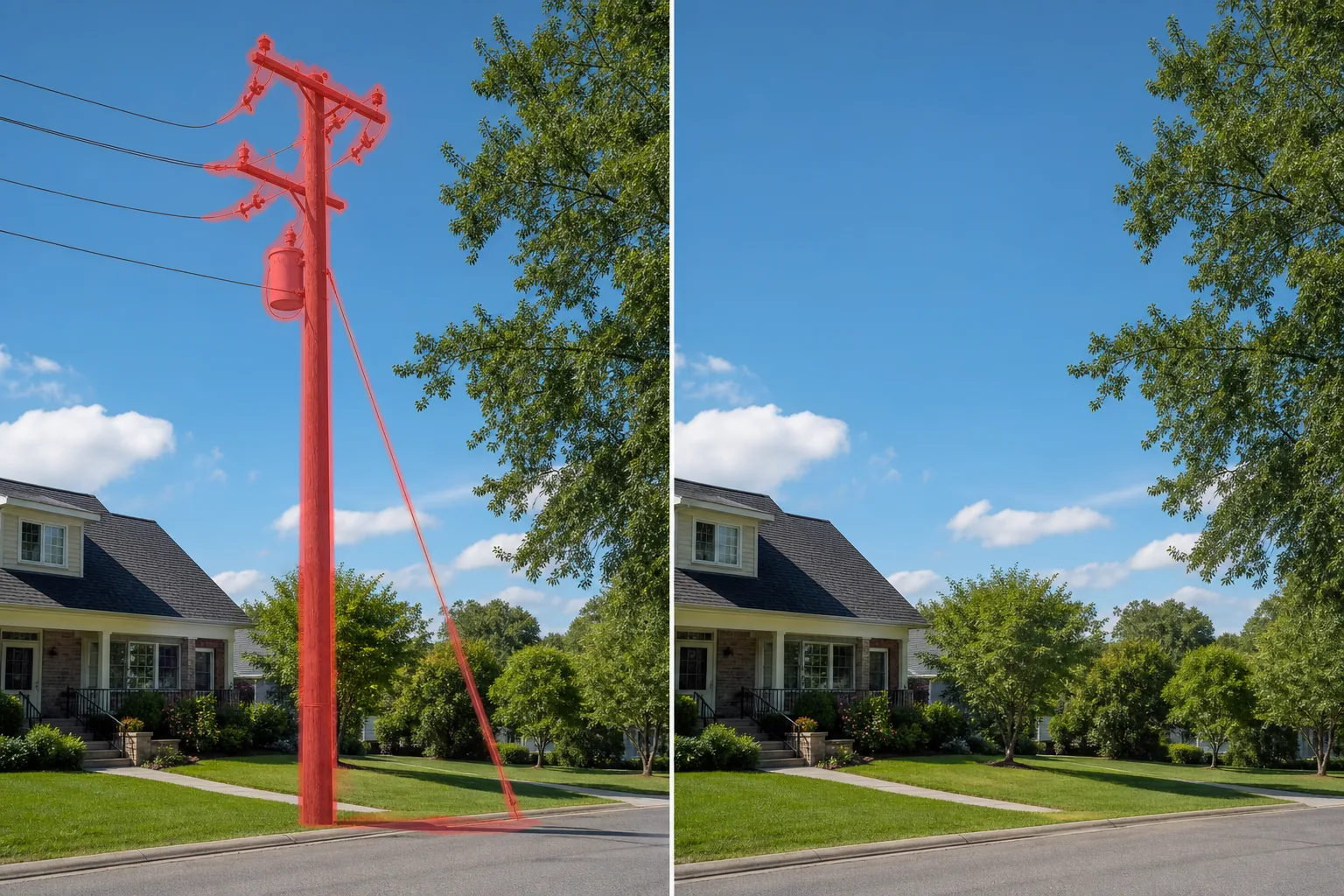
बाहरी फोटोग्राफी में यूटिलिटी पोल सबसे लगातार विकर्षणों में से एक क्यों हैं?
उपयोगिता खंभे लंबी, ऊर्ध्वाधर संरचनाएं हैं जो बाहरी तस्वीर के सबसे महत्वपूर्ण हिस्से को काटती हैं: आकाश और क्षितिज रेखा। लैंडस्केप फोटो में एक एकल पोल संरचना को विभाजित करता है, और इससे जुड़े क्रॉसआर्म्स, ट्रांसफार्मर, इंसुलेटर और तार दृश्य शोर की परतें जोड़ते हैं। रियल-एस्टेट फोटोग्राफी में, सामने के यार्ड में या किनारे पर एक उपयोगिता पोल लिस्टिंग के हीरो बाहरी शॉट पर हावी होता है - इसकी ऊंचाई घर से दूर, आंख को ऊपर की ओर खींचती है। परिदृश्य और यात्रा फोटोग्राफी में, सड़क के किनारे या सुंदर दृश्य के पार उपयोगिता खंभे औद्योगिक बुनियादी ढांचे को एक प्राकृतिक दृश्य में शामिल करते हैं। वास्तुशिल्प फोटोग्राफी में, इमारत के मुखौटे के ठीक सामने एक खंभा ऊंचाई के दृश्य को द्विभाजित करता है। मैन्युअल रूप से हटाने में चुनौती पोल की ऊंचाई और उसके हार्डवेयर की जटिलता है। एक उपयोगिता पोल फ्रेम की पूरी ऊंचाई तक फैल सकता है, इंसुलेटर और ट्रांसफार्मर के साथ दो से चार क्रॉसआर्म्स ले जा सकता है, ग्राउंड एंकरों के लिए तारों को ट्रैक कर सकता है, और पेड़ की शाखाओं, छत लाइनों और अन्य ध्रुवों के साथ काट सकता है। Magic Eraser पूर्ण निष्कासन को संभालता है - पोल शाफ्ट, क्रॉसआर्म्स, हार्डवेयर, ट्रांसफार्मर कैन, और आदमी तार - प्रत्येक तत्व के पीछे आकाश, बादलों, पेड़ की छतरी, या इमारत की सतह का पुनर्निर्माण।
उपयोगिता खंभों को तीन चरणों में हटाएँ
- 1
अपना फोटो अपलोड करें
वेब, iOS, या Android पर Magic Eraser खोलें और जिस उपयोगिता पोल को आप हटाना चाहते हैं, उसके साथ लैंडस्केप, संपत्ति या सड़क की तस्वीर अपलोड करें। JPEG, PNG, HEIC और WebP सभी समर्थित हैं।
- 2
उपयोगिता पोल पर ब्रश करें
सभी क्रॉसआर्म्स, इंसुलेटर, ट्रांसफार्मर और जमीन तक चलने वाले किसी भी तार सहित पूरे पोल पर आधार से ऊपर तक पेंट करें। यदि बिजली की लाइनें खंभे से फैली हुई हैं, तो खंभे के नजदीक तार के पहले कुछ फीट को शामिल करें - अलग-अलग बिजली-लाइन हटाने वाला उपकरण पूर्ण तार चलाने को संभालता है। यदि खंभे की छाया फ्रेम के भीतर पड़ती है तो उसे जमीन पर शामिल करें।
- 3
मिटाएँ और समीक्षा करें
मिटाएँ टैप करें और Magic Eraser आकाश, पेड़ की छतरी, या उसके पीछे की पृष्ठभूमि का पुनर्निर्माण करते समय पोल को हटा देता है। 100% ज़ूम पर जांचें कि आकाश की ढाल चिकनी है, बादल के किनारे प्राकृतिक हैं, और ध्रुव के पीछे जो भी पेड़ की शाखाएँ थीं वे निरंतर हैं। किसी भी बचे हुए गाइ-वायर लाइन या ग्राउंड हार्डवेयर पर दूसरा पास चलाएं, फिर पूर्ण रिज़ॉल्यूशन पर निर्यात करें।
के लिए सर्वोत्तम
- रियल-एस्टेट लिस्टिंग तस्वीरें जहां एक कर्बसाइड उपयोगिता पोल सामने-यार्ड दृश्य पर हावी है
- लैंडस्केप और यात्रा फोटोग्राफी जहां सड़कों के किनारे या विस्तारों के पार खंभे प्राकृतिक दृश्यों को तोड़ते हैं
- वास्तुशिल्प फोटोग्राफी जहां अग्रभूमि में एक खंभा इमारत के अग्रभाग को द्विभाजित करता है
- ड्रोन और हवाई फोटोग्राफी जहां उपयोगिता खंभे अप्रत्याशित कोणों पर फ्रेम में उभरे हुए हैं
- आस-पड़ोस और सामुदायिक विपणन सामग्री जिसके लिए स्वच्छ, आकर्षक सड़कों के दृश्य की आवश्यकता होती है
प्राकृतिक दिखने वाले उपयोगिता पोल हटाने के लिए युक्तियाँ
उपयोगिता खंभे लंबी, संकीर्ण वस्तुएं हैं जो विभिन्न पृष्ठभूमि क्षेत्रों - जमीन, वनस्पति, भवन और आकाश - को एक ही ऊर्ध्वाधर पट्टी में फैलाती हैं, जो उन्हें हटाने के लिए सीधा और विवरण-संवेदनशील दोनों बनाती है। सर्वोत्तम परिणामों के लिए तीन युक्तियाँ. सबसे पहले, पोल और तारों को अलग-अलग संभालें: पोल हार्डवेयर के साथ एक ऊर्ध्वाधर वस्तु है, जबकि तार पतली क्षैतिज रेखाएं हैं जो पूरे फ्रेम में फैली हुई हैं। पहले खंभे को हटाएं (उसकी क्रॉसआर्म्स और प्रत्येक तार के पहले कुछ फीट सहित), फिर आकाश में फैले शेष तार को हटाने के लिए दूसरे पास का उपयोग करें। यह दो-चरणीय दृष्टिकोण प्रत्येक भरण के लिए एआई क्लीनर संदर्भ देता है। दूसरा, आकाश ढाल पर ध्यान दें: ध्रुव अक्सर आकाश से होकर गुजरता है जो क्षितिज के पास प्रकाश से आंचल में गहरे नीले रंग में परिवर्तित हो जाता है। एआई ग्रेडिएंट्स को अच्छी तरह से संभालता है, लेकिन पूर्ण ज़ूम पर सत्यापित करता है कि भरी हुई ऊर्ध्वाधर पट्टी में कोई बैंडिंग या रंग असंतोष दिखाई नहीं देता है। तीसरा, ट्रांसफार्मर और भारी हार्डवेयर: बैरल के आकार का ट्रांसफार्मर एक खंभे के शीर्ष के पास एक चमकदार आकाश के सामने एक बड़ी, अंधेरी वस्तु है। इसे अपने मास्क में पूरी तरह से शामिल करें और किसी भी गहरे किनारे को पकड़ने के लिए इसकी रूपरेखा से थोड़ा आगे बढ़ाएं। एकाधिक पोल वाले फ़ोटो के लिए, सबसे प्रमुख अग्रभूमि पोल से शुरू करके उन्हें एक-एक करके हटाएं।
अक्सर पूछे जाने वाले प्रश्नों
- क्या किसी फोटो से उपयोगिता पोल हटाना मुफ़्त है?
- हाँ। Magic Eraser का फ्री टियर दैनिक उपयोग सीमा के साथ उपयोगिता पोल हटाने का काम संभालता है। प्रीमियम ($29.99/वर्ष) सीमाएं हटाता है और उच्च-रिज़ॉल्यूशन निर्यात को अनलॉक करता है।
- क्या ध्रुव जहां था वहां आकाश प्राकृतिक दिखेगा?
- हाँ। एआई भरे हुए क्षेत्र के माध्यम से आकाश की ढाल, बादल संरचनाओं और वायुमंडलीय धुंध का पुनर्निर्माण करता है। जटिल बादल पैटर्न वाले आसमान के लिए, यह सत्यापित करने के लिए कि बादल के किनारे और रंग संक्रमण सुचारू हैं, 100% तक ज़ूम करें।
- क्या मुझे बिजली लाइनों को खंभे से अलग हटा देना चाहिए?
- हाँ, सर्वोत्तम परिणामों के लिए. प्रत्येक कनेक्शन बिंदु पर पहले कुछ फीट तार सहित, पहले पोल और उसके क्रॉसआर्म्स को हटा दें। फिर आकाश में फैले शेष तार को मिटाने के लिए दूसरे पास का उपयोग करें। यह प्रत्येक भरण के लिए AI क्लीनर संदर्भ देता है।
- क्या यह ट्रांसफार्मर और पुरुष तारों वाले खंभे को संभाल सकता है?
- हाँ। अपने ब्रश चयन में पोल के साथ ट्रांसफार्मर कैन, गाइ वायर और किसी भी ग्राउंड एंकर को शामिल करें। एआई सभी हार्डवेयर को हटा देता है और प्रत्येक तत्व के पीछे उपयुक्त पृष्ठभूमि - आकाश, वनस्पति, या भवन की सतह - का पुनर्निर्माण करता है।