
दर्शनीय तस्वीरों से कूड़ेदान हटाएँ
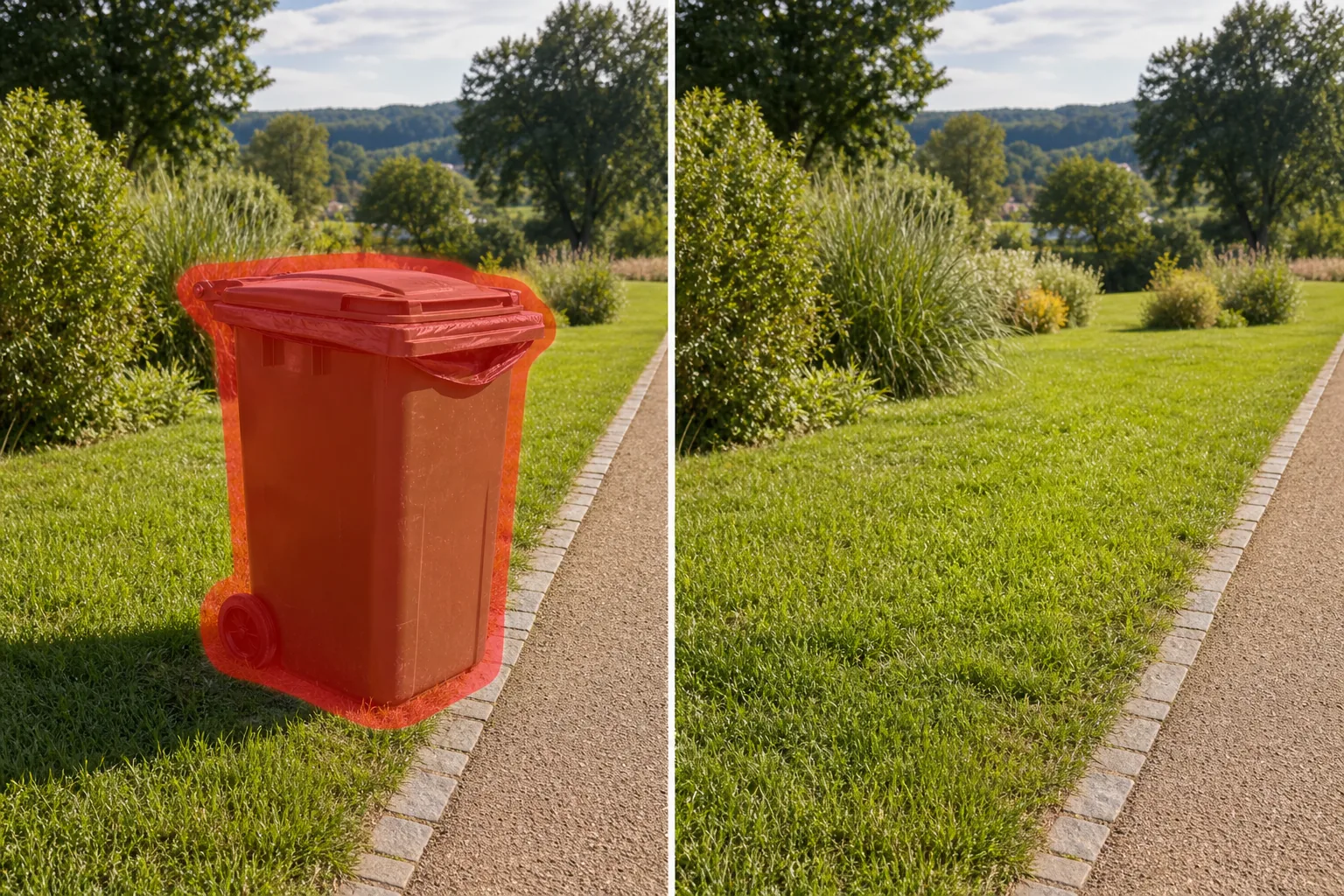
यात्रा, पार्क और लैंडस्केप फोटोग्राफी से बाहरी कचरा डिब्बे, रीसाइक्लिंग कंटेनर, व्हीली डिब्बे और सार्वजनिक कचरा पात्र मिटा दें। Magic Eraser कंटेनर को हटाता है और उसके पीछे की घास, पथ, दीवार, या दृश्यों का पुनर्निर्माण करता है - कोई मैन्युअल रीटचिंग नहीं, कोई क्लोन-स्टैंप सीम नहीं।
अंतिम अपडेट
क्यों बाहरी कूड़ेदान प्राकृतिक और यात्रा फोटोग्राफी को खराब करते हैं?
पार्कों, सुंदर दृश्यों, समुद्र तट बोर्डवॉक और ऐतिहासिक शहर के चौराहों पर सार्वजनिक कूड़ेदान अपरिहार्य हैं - वही स्थान जहां फोटोग्राफर सुंदरता को कैद करने के लिए सबसे कठिन काम करते हैं। कमरे की सजावट में मिश्रित होने वाले इनडोर कूड़ेदानों के विपरीत, बाहरी कूड़ेदान दृश्यता और स्थायित्व के लिए डिज़ाइन किए गए हैं: बड़े, बक्सेदार, अक्सर चमकीले हरे या नीले, कभी-कभी भरे हुए, और आमतौर पर पथ या रेलिंग के ठीक किनारे स्थित होते हैं जहां आगंतुक तस्वीरें लेने के लिए खड़े होते हैं। पहाड़ के किनारे पर एक व्हीली बिन एक पैनोरमिक शॉट को बर्बाद कर सकता है। पार्क बेंच के बगल में रीसाइक्लिंग कंटेनरों का एक समूह एक शांत उद्यान दृश्य को नगरपालिका रखरखाव तस्वीर में बदल देता है। ट्रैवल ब्लॉगर्स, लैंडस्केप फ़ोटोग्राफ़र और पर्यटन बोर्ड इन कूड़ेदानों से बचने वाले कोण ढूंढने में काफी प्रयास करते हैं, लेकिन भीड़-भाड़ वाले प्राकृतिक क्षेत्रों में यह अक्सर असंभव होता है। एक संपादक में बाहरी कूड़ेदानों को मैन्युअल रूप से हटाने के लिए उनके पीछे जो कुछ भी बैठता है उसे पुनर्निर्माण की आवश्यकता होती है - घास, बजरी पथ, पत्थर की दीवारें, हेजरो, या सुंदर दृश्य - प्रत्येक अद्वितीय बनावट, प्रकाश व्यवस्था और परिप्रेक्ष्य के साथ। Magic Eraser का AI आस-पास के वातावरण का विश्लेषण करता है, कूड़ेदान और उसकी छाया को हटा देता है, और एक भराव उत्पन्न करता है जो कूड़ेदान के कब्जे वाले स्थान के माध्यम से जमीन के कवर, दीवार की सतह, या पृष्ठभूमि दृश्यों को जारी रखता है। नतीजा यह है कि यह दृश्य बिन के बिना वैसा ही दिखेगा - प्राकृतिक, निरंतर और दृष्टि से निर्बाध।
बाहरी कूड़ेदानों को तीन चरणों में हटाएँ
- 1
अपना फोटो अपलोड करें
वेब, iOS, या Android पर Magic Eraser खोलें और अवांछित बिन वाले दर्शनीय, पार्क, या यात्रा फ़ोटो अपलोड करें। JPEG, PNG, HEIC और WebP समर्थित हैं। लैंडस्केप और पैनोरमिक प्रारूप अच्छी तरह से काम करते हैं - आपके पास जो उच्चतम रिज़ॉल्यूशन है उसका उपयोग करें ताकि पृष्ठभूमि दृश्य पूरे विवरण के साथ फिर से निर्मित हो जाएं।
- 2
कूड़ेदान पर ब्रश करें
पूरे कूड़ेदान पर पेंट करें, जिसमें उसका ढक्कन, पहिये, किनारे के ऊपर दिखाई देने वाला कोई भी संलग्न बैग लाइनर और जमीन पर उसकी छाया शामिल है। यदि किसी रीसाइक्लिंग स्टेशन में एक साथ कई डिब्बे हैं, तो एक ही झटके में उन सभी पर ब्रश करें। स्वच्छ भरण के लिए एआई बनावट संदर्भ देने के लिए आसपास के पथ या घास का एक छोटा सा मार्जिन शामिल करें।
- 3
मिटाएँ और अंतिम रूप दें
मिटाएँ टैप करें और बिन गायब हो जाता है। Magic Eraser स्थान को मेल खाती घास, बजरी, फ़र्श, या दीवार की बनावट से भर देता है - जहां बिन खड़ा था, वहां प्राकृतिक परिवेश का विस्तार करता है। यह जांचने के लिए ज़ूम इन करें कि पथ के किनारे और घास रेखाएं सुचारू रूप से प्रवाहित हो रही हैं, फिर अपने ब्लॉग, पोर्टफोलियो या प्रिंट के लिए पूर्ण रिज़ॉल्यूशन पर निर्यात करें।
के लिए सर्वोत्तम
- यात्रा और पर्यटन फोटोग्राफी जहां सार्वजनिक कूड़ेदान प्राकृतिक रचनाओं पर अतिक्रमण करते हैं
- फ्रेम में ट्रेल-साइड डिब्बे के साथ राष्ट्रीय उद्यान और प्रकृति की फोटोग्राफी
- रियल-एस्टेट के बाहरी दृश्य जहां कर्बसाइड व्हीली डिब्बे संपत्ति को नुकसान पहुंचाते हैं
- समुद्र तट और बोर्डवॉक की तस्वीरें जहां बड़े सार्वजनिक पात्र दृश्य को अवरुद्ध करते हैं
- संपादकीय या पर्यटन बोर्ड के उपयोग के लिए शहर और टाउन-स्क्वायर फोटोग्राफी
बाहरी परिवेश में प्राकृतिक कूड़ेदान हटाने के लिए युक्तियाँ
बाहरी कूड़ेदान अक्सर असमान जमीन पर रखे होते हैं - घास, बजरी, कोबलस्टोन - जहां उनका वजन एक दृश्यमान संपीड़न निशान या फीका पड़ा हुआ पैच बनाता है। इस जमीनी क्षेत्र को अपने ब्रश स्ट्रोक में शामिल करें ताकि एआई इसे आसपास की सतह में मिला सके। किनारे के ऊपर दिखाई देने वाले बैग या कूड़े से भरे हुए डिब्बे के लिए, सभी दृश्यमान कचरे को ढकने के लिए अपने चयन को ऊपर की ओर बढ़ाएं; मिटे हुए कूड़ेदान के ऊपर तैरता हुआ बैग छोड़ना मूल से भी बदतर लगता है। जब डिब्बे किसी हेज, दीवार या रेलिंग के सामने बैठते हैं, तो पृष्ठभूमि संरचना में थोड़ा सा ब्रश करें ताकि एआई लगातार दीवार या हेज के किनारे का पुनर्निर्माण कर सके। युग्मित डिब्बे (कचरा प्लस रीसाइक्लिंग) के लिए, अलग-अलग के बजाय दोनों को एक साथ चुनें - यह एक हटाने से भरे डिब्बे को दूसरे के साथ टकराव से बचाता है।
अक्सर पूछे जाने वाले प्रश्नों
- यह कूड़ेदान को हटाने से किस प्रकार भिन्न है?
- आंतरिक तस्वीरों में 'ट्रैश कैन' टूल को इनडोर रसोई और कार्यालय के डिब्बे के लिए अनुकूलित किया गया है। यह 'कचरा बिन' उपकरण बाहरी संदर्भों के लिए तैयार किया गया है - सार्वजनिक पार्क रिसेप्टेकल्स, कर्बसाइड व्हीली डिब्बे, बड़े नगरपालिका अपशिष्ट कंटेनर - जहां पृष्ठभूमि कमरे के इंटीरियर के बजाय घास, बजरी, पत्थर या दृश्यावली है।
- क्या यह बड़े डंपस्टर शैली के डिब्बे संभाल सकता है?
- पूर्ण वाणिज्यिक डंपस्टर के लिए, समर्पित डंपस्टर हटाने वाले उपकरण का उपयोग करें। यह उपकरण मानक आउटडोर कूड़ेदान और रीसाइक्लिंग डिब्बे के लिए डिज़ाइन किया गया है - जिस तरह से आप पार्कों में, फुटपाथों पर, सुंदर दृश्यों पर और संग्रहण दिवस पर पाते हैं।
- यदि कूड़ादान आंशिक रूप से किसी बेंच या रेलिंग के पीछे छिपा हो तो क्या होगा?
- कूड़ेदान के केवल दिखाई देने वाले हिस्से पर ही ब्रश करें। Magic Eraser खुले हिस्से को हटा देगा और सामने की बेंच या रेलिंग को संरक्षित करते हुए क्षेत्र को भर देगा। एआई गहराई परतों को समझता है, इसलिए अग्रभूमि वस्तु बरकरार रहती है।
- यह नि: शुल्क है?
- हाँ। Magic Eraser का निःशुल्क टियर दैनिक सीमा के साथ कचरा-बिन हटाने को कवर करता है। प्रीमियम ($29.99/वर्ष) पेशेवर यात्रा और लैंडस्केप फोटोग्राफी के लिए सीमाएं हटाता है और पूर्ण-रिज़ॉल्यूशन निर्यात को अनलॉक करता है।