
फ़ोटो से पोर्ट-ए-पॉटी हटाएँ
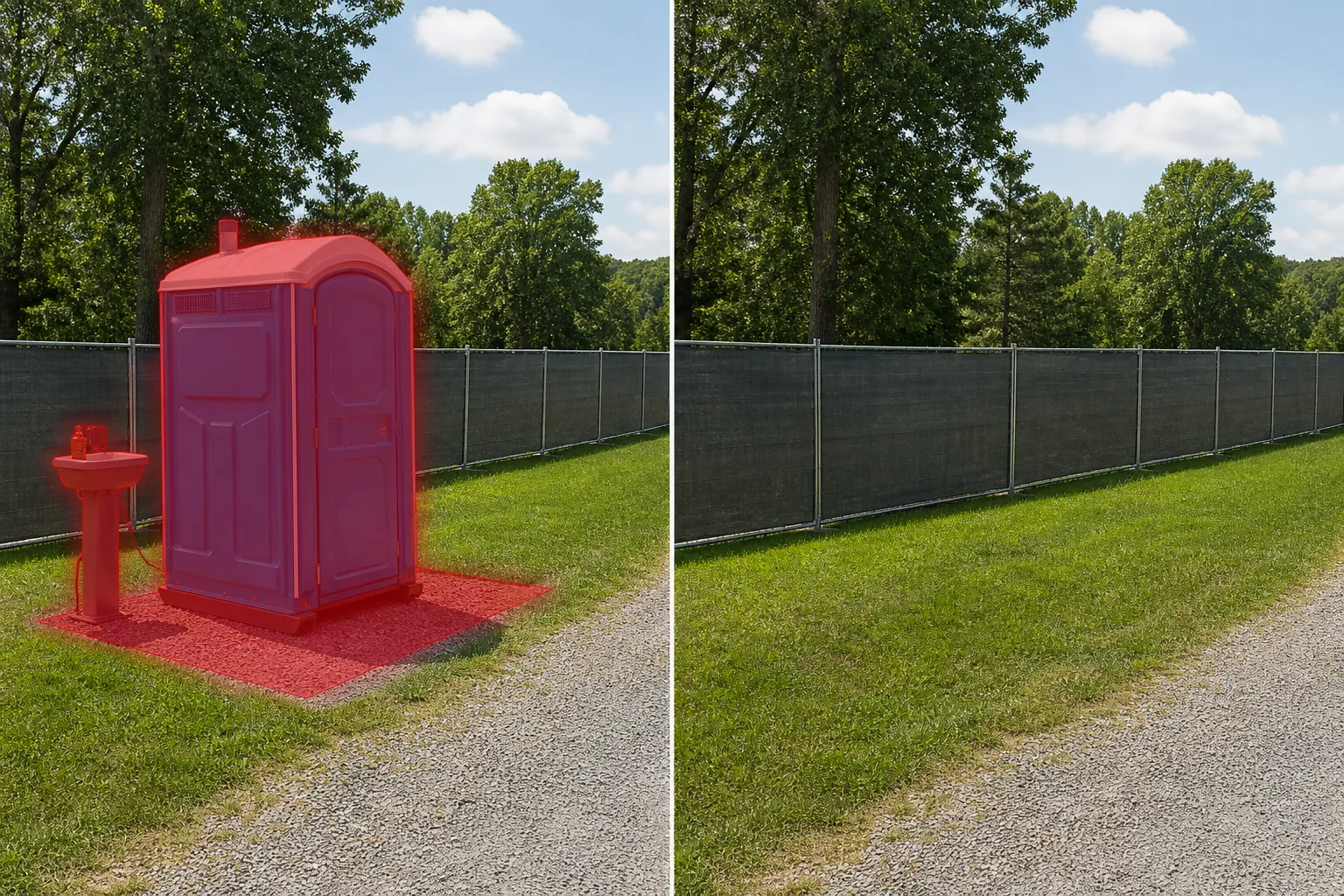
निर्माण स्थल की तस्वीरों, कार्यक्रम स्थल शॉट्स और संपत्ति लिस्टिंग से पोर्टेबल शौचालय, स्वच्छता ट्रेलरों और हाथ धोने वाले स्टेशनों को मिटा दें। Magic Eraser इकाई को हटा देता है और उसके पीछे की जमीन, बाड़, या परिदृश्य का पुनर्निर्माण करता है ताकि दृश्य साफ और पेशेवर दिखे।
अंतिम अपडेट
क्यों पोर्टेबल शौचालय निर्माण, आयोजन और संपत्ति की तस्वीरों को बर्बाद कर देते हैं?
किसी तस्वीर में कुछ वस्तुएँ पोर्टेबल शौचालय की तरह सार्वभौमिक रूप से अवांछित होती हैं। उनके बॉक्सनुमा, चमकीले रंग के प्लास्टिक के गोले - आमतौर पर नीले, हरे, या भूरे - नौकरी साइटों पर अधिकतम दृश्यता के लिए डिज़ाइन किए गए हैं, जिससे वे जहां भी दिखाई देते हैं, किसी भी फोटो में उन्हें नज़रअंदाज करना असंभव हो जाता है। निर्माण प्रगति दस्तावेज़ीकरण में, पोर्ट-ए-पॉटीज़ आवश्यक हैं लेकिन आप जिस भवन निर्माण कार्य को प्रदर्शित करने का प्रयास कर रहे हैं उससे ध्यान भटकाएँ। इवेंट फ़ोटोग्राफ़ी में, किसी त्यौहार, शादी या बाहरी समारोह के किनारे पोर्टेबल शौचालयों की एक पंक्ति एक मूड-किलर है जो अन्यथा सुंदर स्थल शॉट्स को बर्बाद कर देती है। रियल-एस्टेट फ़ोटोग्राफ़ी में, नवीकरण के तहत एक संपत्ति पर एक ठेकेदार द्वारा छोड़ा गया पोर्ट-ए-पॉटी, आगे बढ़ने की तैयारी के बजाय सक्रिय निर्माण का संकेत देता है। और पड़ोस और वाणिज्यिक संपत्ति विपणन में, पास के स्थान पर एक पोर्टेबल शौचालय क्षेत्र को एक सक्रिय निर्माण क्षेत्र जैसा दिखता है। आप अपने फोटो शूट को हमेशा पोर्ट-ए-पॉटी पिकअप शेड्यूल के आसपास नहीं रख सकते हैं, और उनसे बचने के लिए कैमरे को दोबारा लगाने का मतलब विषय का सबसे अच्छा कोण खोना हो सकता है। Magic Eraser पूरी इकाई - प्लास्टिक खोल, वेंटिलेशन स्टैक, बेस स्किड और जमीन की छाया - को हटा देता है और इसके पीछे घास, गंदगी, बजरी या फुटपाथ का पुनर्निर्माण करता है।
पोर्ट-ए-पॉटीज़ को तीन चरणों में हटाएँ
- 1
अपना फोटो अपलोड करें
वेब, आईओएस, या एंड्रॉइड पर Magic Eraser खोलें और जिस पोर्टेबल शौचालय को आप हटाना चाहते हैं, उसके साथ निर्माण, घटना या संपत्ति की तस्वीर अपलोड करें। JPEG, PNG, HEIC और WebP सभी समर्थित हैं।
- 2
पोर्ट-ए-पॉटी पर ब्रश करें
छत के वेंटिलेशन पाइप, दरवाजे, बेस स्किड और जमीन पर किसी भी छाया सहित पूरी इकाई पर पेंट करें। एकाधिक इकाइयों की पंक्तियों के लिए, एक चयन में पूरी पंक्ति पर ब्रश करें। इकाइयों के पास दिखाई देने वाले किसी भी संबंधित हाथ धोने के स्टेशन, रोकथाम ट्रे, या सर्विस होज़ को शामिल करें।
- 3
मिटाएँ और समीक्षा करें
मिटाएँ टैप करें और Magic Eraser पृष्ठभूमि का पुनर्निर्माण करते समय इकाई को हटा देता है। जांचें कि हटाई गई इकाई के पीछे की ज़मीन की सतह, बाड़ रेखा या परिदृश्य प्राकृतिक और निरंतर दिखता है। किसी भी अवशिष्ट छाया या ज़मीन के मलिनकिरण पर दूसरा पास चलाएँ, फिर पूर्ण रिज़ॉल्यूशन पर निर्यात करें।
के लिए सर्वोत्तम
- निर्माण प्रगति की तस्वीरें जहां पोर्टेबल शौचालय दस्तावेज़ीकृत किए जा रहे भवन निर्माण कार्य से ध्यान भटकाते हैं
- इवेंट और विवाह स्थल की फोटोग्राफी जहां पृष्ठभूमि शॉट्स में स्वच्छता सुविधाएं दिखाई दे रही हैं
- नवीनीकरण के तहत संपत्तियों की रीयल-एस्टेट लिस्टिंग तस्वीरें, ठेकेदार उपकरण के साथ अभी भी साइट पर हैं
- त्यौहार और आउटडोर कार्यक्रम विपणन सामग्री जिसके लिए स्वच्छ, आकर्षक स्थल छवियों की आवश्यकता होती है
- वाणिज्यिक विकास विपणन जहां निर्माण-क्षेत्र की उपस्थिति को कम करने की आवश्यकता है
प्राकृतिक दिखने वाले पोर्ट-ए-पॉटी हटाने के लिए युक्तियाँ
पोर्टेबल शौचालय बड़े, अपारदर्शी, बॉक्स के आकार की वस्तुएं हैं जो उनके पीछे जो कुछ भी है उसे पूरी तरह से छुपाते हैं, जिसका अर्थ है कि एआई को आसपास के संदर्भ से पृष्ठभूमि के एक महत्वपूर्ण क्षेत्र का पुनर्निर्माण करना होगा। सर्वोत्तम परिणामों के लिए तीन युक्तियाँ. सबसे पहले, विचार करें कि यूनिट के पीछे क्या है: यदि पोर्ट-ए-पॉटी बाड़ के खिलाफ है, तो एआई भरे हुए क्षेत्र के माध्यम से बाड़ लाइन का विस्तार करेगा। यदि यह किसी इमारत के सामने है, तो एआई इमारत के मुखौटे का पुनर्निर्माण करता है। परिणाम तब सर्वोत्तम होते हैं जब छिपी हुई पृष्ठभूमि एक समान (एक बाड़, एक दीवार, खुला मैदान) होती है और जब पोर्ट-ए-पॉटी एक जटिल पृष्ठभूमि (एक द्वार, उपकरण, साइनेज) को छुपाता है तो कम पूर्वानुमानित होता है। दूसरा, नीचे की जमीन: पोर्टेबल शौचालय आमतौर पर बजरी, प्लाईवुड, या जमा हुई गंदगी पर रखे जाते हैं जो आसपास की जमीन से अलग होती है। इस आधार क्षेत्र को अपने ब्रश मास्क में शामिल करें ताकि एआई विभिन्न सामग्रियों का एक आयताकार पैड छोड़ने के बजाय आसपास की जमीन की बनावट से भर जाए। तीसरा, इकाइयों की पंक्तियाँ: एक पंक्ति में तीन या अधिक इकाइयों के लिए, एक बार में उन सभी को मास्क करें और हटा दें। उन्हें अलग-अलग हटाने से एआई प्रत्येक क्रमिक भरण के लिए कम संदर्भ छोड़ता है क्योंकि यह पहले से भरे क्षेत्रों से पृष्ठभूमि का पुनर्निर्माण कर रहा है।
अक्सर पूछे जाने वाले प्रश्नों
- क्या किसी फ़ोटो से पोर्ट-अ-पॉटीज़ हटाना मुफ़्त है?
- हाँ। Magic Eraser का निःशुल्क टियर दैनिक उपयोग सीमा के साथ पोर्टेबल शौचालय हटाने का काम संभालता है। प्रीमियम ($29.99/वर्ष) सीमाएं हटाता है और उच्च-रिज़ॉल्यूशन निर्यात को अनलॉक करता है।
- क्या यह एक साथ कई इकाइयों की पंक्ति को हटा सकता है?
- हाँ। एक झटके में पूरी पंक्ति पर ब्रश करें। एआई सभी इकाइयों को हटा देता है और पृष्ठभूमि - बाड़, दीवार, परिदृश्य, या खुले मैदान - को एक सतत सतह के रूप में पुनर्निर्माण करता है।
- यदि पोर्ट-ए-पॉटी किसी इमारत के हिस्से को अवरुद्ध कर रहा है तो क्या होगा?
- एआई आसपास के वास्तुशिल्प संदर्भ का उपयोग करके हटाई गई इकाई के पीछे इमारत के मुखौटे का पुनर्निर्माण करता है - मिलान साइडिंग, ईंट पैटर्न, खिड़की के बीच की दूरी, या दीवार का रंग। परिणाम तब सर्वोत्तम होते हैं जब छिपा हुआ क्षेत्र किसी दृश्यमान पैटर्न की निरंतरता हो। जटिल छिपे हुए क्षेत्रों के लिए, 100% ज़ूम पर परिणाम की समीक्षा करें।
- क्या यह इकाई के नीचे ग्राउंड पैड को संभालता है?
- यूनिट के साथ-साथ अपने ब्रश चयन में बजरी पैड, प्लाईवुड शीट, या कॉम्पैक्ट डर्ट बेस को भी शामिल करें। एआई पूरे क्षेत्र को आसपास की जमीनी बनावट - घास, गंदगी, या फुटपाथ से भर देता है - दृश्य पदचिह्न को पूरी तरह से खत्म कर देता है।