
फ़ोटो से चश्मा हटाएँ
पोर्ट्रेट, हेडशॉट और आईडी फ़ोटो से चश्मा, धूप का चश्मा और पढ़ने का चश्मा मिटा दें। Magic Eraser फ्रेम और लेंस को हटा देता है और प्राकृतिक आंख क्षेत्र, नाक के पुल और मंदिरों का पुनर्निर्माण करता है - जिससे चश्मा-मुक्त उपस्थिति बनती है।
अंतिम अपडेट
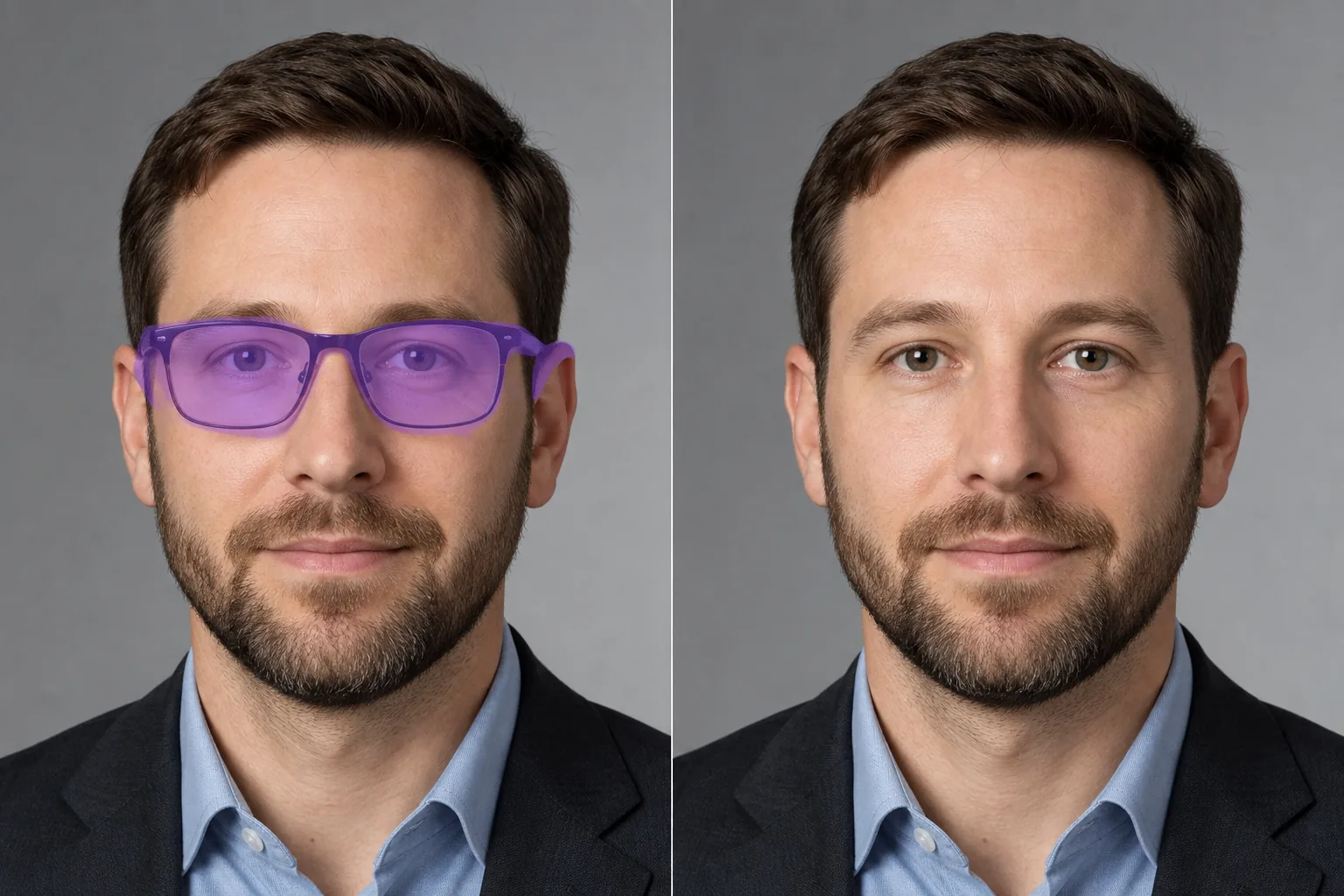
फोटो से चश्मा कैसे हटाएं
फोटो से चश्मा हटाने के लिए Magic Eraser खोलें (वेब, iOS या Android), पोर्ट्रेट अपलोड करें और चश्मे के पूरे हिस्से पर ब्रश करें — लेंस, ब्रिज, साइड की डंडियाँ और नोज़-पैड के निशान। Erase पर टैप करें। AI फ्रेम हटा देता है और उनके पीछे की आँखों और त्वचा को स्वाभाविक और असली जैसा दिखने वाला फिर से बना देता है। मुफ़्त, बिना साइनअप के। कई देशों में पासपोर्ट और वीज़ा फोटो के लिए चश्मे की आवश्यकता नहीं होती है। मॉडलिंग एजेंसियां अक्सर ग्लास-ऑन और ग्लास-ऑफ दोनों पोर्टफोलियो शॉट्स का अनुरोध करती हैं। हेडशॉट फोटोग्राफर सुनते हैं 'क्या आप पोस्ट में चश्मा उतार सकते हैं?' जब कोई ग्राहक दूसरा लुक लाना भूल गया। ग्रुप फोटो में धूप का चश्मा किसी व्यक्ति की अभिव्यक्ति को छुपाता है और एक अवांछित अवरोध पैदा करता है। इन सभी मामलों में, डिजिटल रूप से चश्मे को हटाने के लिए फ्रेम को मिटाने से कहीं अधिक की आवश्यकता होती है - एआई को आंखों, नाक के पुल, मंदिर क्षेत्र और फ्रेम की भुजाओं के नीचे की त्वचा का पुनर्निर्माण करना होगा जहां छाया और निशान आम तौर पर दिखाई देते हैं। Magic Eraser का AI चेहरे की ज्यामिति को समझता है और जहां चश्मा लगा होता है उसके पीछे प्राकृतिक दिखने वाली आंखों, भौंहों और नाक के विवरण को फिर से बनाने के लिए चेहरे के दृश्य भागों का उपयोग करता है।
तीन चरणों में चश्मा हटाएँ
- 1
अपना चित्र अपलोड करें
वेब, iOS, या Android पर Magic Eraser खोलें और फ़ोटो अपलोड करें। यह टूल किसी भी फेस-फॉरवर्ड फोटो पर काम करता है जहां चश्मा स्पष्ट रूप से दिखाई देता है।
- 2
चश्मे पर ब्रश करें
चश्मे के पूरे क्षेत्र पर पेंट करें: दोनों लेंस, ब्रिज और कानों तक फैली कनपटी की भुजाएँ। नाक के पैड के निशान और फ़्रेम द्वारा डाली गई कोई भी छाया शामिल करें। पूरे चश्मे के फ़ुटप्रिंट को कवर करने से एआई को पुनर्निर्माण के लिए सबसे अच्छा संदर्भ मिलता है।
- 3
मिटाएँ और निरीक्षण करें
मिटाएँ पर टैप करें और AI आँखों, भौहों, नाक के पुल और मंदिर क्षेत्र का पुनर्निर्माण करते हुए चश्मा हटा देता है। जांचें कि दोनों आंखें सुसंगत रंग और विवरण के साथ प्राकृतिक दिखें। सत्यापित करें कि नोज ब्रिज क्षेत्र सुचारू रूप से मिश्रित होता है। चश्मा-मुक्त पोर्ट्रेट निर्यात करें।
के लिए सर्वोत्तम
- पासपोर्ट और वीज़ा फ़ोटो जिनमें चश्मे की आवश्यकता नहीं है
- मॉडलिंग पोर्टफ़ोलियो को चश्मे और बिना चश्मे वाले दोनों संस्करणों की आवश्यकता होती है
- पेशेवर हेडशॉट जहां ग्राहक वैकल्पिक रूप चाहता है
- कैज़ुअल और ग्रुप फ़ोटो में आंखें दिखाने के लिए धूप का चश्मा हटा रहा हूं
- बिना चश्मे वाली आवश्यकताओं वाली आईडी बैज तस्वीरें
- LASIK और नेत्र शल्य चिकित्सा विपणन के लिए विज़ुअलाइज़ेशन से पहले/बाद में
- इवेंट और शादी के चित्रों के चश्मा-मुक्त संस्करण बनाना
- सोशल मीडिया प्रोफाइल फोटो में दिखा अलग लुक
प्राकृतिक चश्मा हटाने के लिए युक्तियाँ
समान रोशनी में चेहरे को आगे की ओर दिखाने वाले पोर्ट्रेट पर चश्मा हटाना सबसे अच्छा काम करता है। एआई को पूरे नेत्र क्षेत्र का पुनर्निर्माण करने की आवश्यकता है, इसलिए तस्वीरें जहां आंखें आंशिक रूप से लेंस के माध्यम से दिखाई देती हैं (स्पष्ट या हल्के रंग की) सबसे प्राकृतिक परिणाम देती हैं - एआई के पास काम करने के लिए आंखों की आंशिक जानकारी होती है। आंखों को पूरी तरह से छिपाने वाले काले धूप के चश्मे के लिए, एआई चेहरे के बाकी हिस्सों के आधार पर अनुमानित आंखें उत्पन्न करता है - परिणाम प्राकृतिक दिखता है लेकिन व्यक्ति की वास्तविक आंखों से बिल्कुल मेल नहीं खा सकता है। मोटे फ्रेम वाले चश्मे की तुलना में पतले वायरफ्रेम वाले चश्मे को हटाना आसान होता है क्योंकि चेहरे का विवरण कम अस्पष्ट होता है। यदि चश्मा गालों या नाक पर गहरी छाया डालता है, तो छाया क्षेत्र को अपने ब्रश स्ट्रोक में शामिल करें। पर्यावरणीय प्रतिबिंब दिखाने वाले परावर्तक लेंस के लिए, प्रतिबिंब सहित पूरे लेंस क्षेत्र पर ब्रश करें। हटाने के बाद, दोनों आंखों पर ज़ूम करें और जांचें कि वे एक-दूसरे के साथ सममित और सुसंगत दिखें।
अक्सर पूछे जाने वाले प्रश्नों
- क्या यह धूप का चश्मा हटाकर आंखें दिखा सकता है?
- हाँ। गहरे रंग के धूप के चश्मे के लिए, AI आस-पास की चेहरे की विशेषताओं के आधार पर प्राकृतिक दिखने वाली आँखें उत्पन्न करता है। परिणाम सामान्य देखने की दूरी पर विश्वसनीय है, हालांकि उत्पन्न आंखें व्यक्ति की वास्तविक आंखों के बजाय एआई अनुमान हैं।
- क्या यह पासपोर्ट फोटो आवश्यकताओं के लिए काम करेगा?
- हाँ। कई पासपोर्ट कार्यालयों को बिना चश्मे के फोटो की आवश्यकता होती है। Magic Eraser आधिकारिक आईडी प्रस्तुत करने के लिए उपयुक्त स्वच्छ चश्मा-मुक्त पोर्ट्रेट तैयार करता है।
- क्या यह फ़्रेम के निशान और नाक पैड के इंडेंटेशन को हटा देता है?
- अपने ब्रश चयन में नाक पैड क्षेत्र और किसी भी दृश्यमान फ्रेम चिह्न को शामिल करें। एआई चश्मे और संबंधित निशानों को हटा देता है, उन क्षेत्रों में चिकनी त्वचा का पुनर्निर्माण करता है।
- क्या चश्मा हटाना मुफ़्त है?
- हाँ। Magic Eraser का निःशुल्क टियर पोर्ट्रेट से चश्मा हटाने को कवर करता है। अपना फोटो अपलोड करें, चश्मे पर ब्रश करें और बिना किसी कीमत के परिणाम निर्यात करें।