
फ़ोटो से बोलार्ड हटाएँ
वास्तुशिल्प, शहरी और रियल-एस्टेट फोटोग्राफी से धातु के बोलार्ड, कंक्रीट पोस्ट, वापस लेने योग्य सुरक्षा अवरोध और सजावटी सड़क तोरणों को मिटा दें। Magic Eraser पोस्ट को हटा देता है और उसके नीचे फुटपाथ, कर्ब या प्लाजा सतह का पुनर्निर्माण करता है - कोई क्लोन-स्टैंप कार्य नहीं, कोई दृश्यमान पैच नहीं।
अंतिम अपडेट
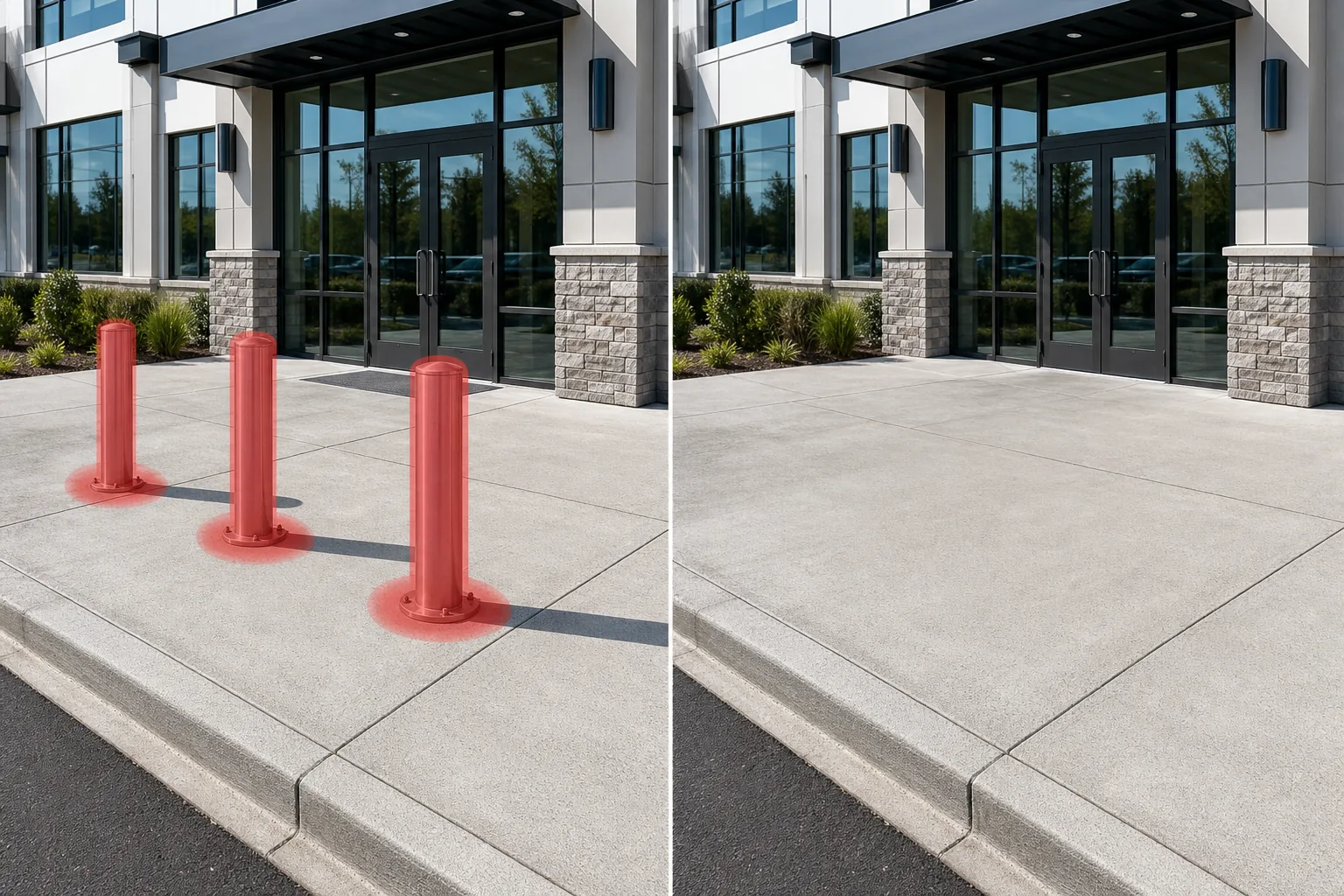
बोलार्ड अन्यथा स्वच्छ सड़कों की रचनाओं को अव्यवस्थित क्यों करते हैं
किसी फोटो से बोलार्ड (खंभे) हटाने के लिए, वेब, iOS या Android पर Magic Eraser खोलें, इमेज अपलोड करें, हर खंभे पर ब्रश फेरें — साथ ही उसकी परछाई और उससे जुड़ी कोई चेन या केबल भी — और AI को उसके पीछे की फुटपाथ या प्लाज़ा की सतह दोबारा बना लेने दें। यह मुफ़्त है, बिना किसी साइनअप के। सादे कंक्रीट या डामर जैसी समतल सतह पर लगे बोलार्ड लगभग पूरी तरह साफ़ हो जाते हैं, क्योंकि AI आसपास के टेक्सचर को आगे बढ़ा देता है; डिटेल वाले पेविंग, कर्ब लाइन या एक्सपैंशन जॉइंट पर खड़े खंभे को एक भरोसेमंद मेल के रूप में दोबारा बनाया जाता है। किसी पंक्ति के लिए एक-एक खंभे पर काम करें, फिर से चलाएँ, और ज़ूम करके देखें कि ज़मीन की रेखाएँ कहाँ मिलती हैं। बोलार्ड एक महत्वपूर्ण उद्देश्य पूरा करते हैं - वे पैदल चलने वालों और स्टोरफ्रंट को वाहन घुसपैठ से बचाते हैं - लेकिन तस्वीरों में वे दोहरावदार ऊर्ध्वाधर रुकावटें पैदा करते हैं जो फुटपाथ, प्लाजा या इमारत के प्रवेश द्वार पर दर्शकों की आंखों के रास्ते को खंडित कर देते हैं। एक लक्जरी रिटेल मुखौटा के सामने स्टेनलेस-स्टील बोलार्ड की एक पंक्ति स्टोरफ्रंट को आकर्षक बनाने के बजाय मजबूत बनाती है। एक सरकारी इमारत के बाहर कंक्रीट सुरक्षा बोलार्ड एक वास्तुशिल्प शोकेस के अग्रभूमि पर हावी हैं। यहां तक कि एक ऐतिहासिक जिले में सजावटी कच्चा लोहा बोलार्ड, व्यक्तिगत रूप से आकर्षक होते हुए भी, चौड़े कोण वाली सड़क की तस्वीर में एक दृश्य बाड़ बन जाते हैं। बोलार्ड को मैन्युअल रूप से हटाना चुनौतीपूर्ण है क्योंकि प्रत्येक पोस्ट एक सटीक बिंदु पर जमीन से मिलती है जहां फुटपाथ की बनावट, विस्तार जोड़, कर्ब लाइनें और कभी-कभी एम्बेडेड लाइटिंग या रिफ्लेक्टिव पेंट मिलते हैं। बोलार्ड की छाया जटिलता की एक और परत जोड़ती है - यह एक सतह पर गिरती है जिसमें ईंट पेवर्स, स्टैम्प्ड कंक्रीट या डामर शामिल हो सकते हैं, प्रत्येक को अलग-अलग भराव बनावट की आवश्यकता होती है। Magic Eraser इन बदलावों को स्वचालित रूप से संभालता है। यह बोलार्ड की पहचान करता है, उसे उसकी छाया और आसन्न खंभों से जोड़ने वाली किसी भी श्रृंखला या केबल के साथ हटा देता है, और जमीन के तल को बनावट से भर देता है जो आसपास की सतह सामग्री से मेल खाता है। परिणाम एक सतत, निर्बाध पैदल यात्री सतह है जो इमारत या सड़कों के दृश्य को अपने बारे में बोलने देती है।
तीन चरणों में बोलार्ड हटाएँ
- 1
अपना फोटो अपलोड करें
वेब, आईओएस या एंड्रॉइड पर Magic Eraser खोलें और सड़क के दृश्य, भवन के बाहरी हिस्से, या अवांछित बोलार्ड वाले प्लाजा की तस्वीर अपलोड करें। JPEG, PNG, HEIC और WebP समर्थित हैं। वास्तुशिल्प कार्य के लिए, उपलब्ध उच्चतम रिज़ॉल्यूशन का उपयोग करें ताकि पुनर्निर्माण के दौरान कर्ब विवरण और पेवर पैटर्न संरक्षित रहें।
- 2
बोलार्ड पर ब्रश करें
प्रत्येक बोलार्ड पर ऊपर से आधार तक पेंट करें, जिसमें जमीन पर उसकी छाया और उसे पड़ोसी खंभों से जोड़ने वाली कोई चेन या केबल भी शामिल है। समान बोलार्ड की एक पंक्ति के लिए, आप उन सभी पर एक निरंतर स्ट्रोक में ब्रश कर सकते हैं। आस-पास के फुटपाथ का एक छोटा सा मार्जिन शामिल करें ताकि एआई के पास भरने के लिए साफ बनावट का संदर्भ हो।
- 3
मिटाएँ और समीक्षा करें
मिटाएँ टैप करें और बोलार्ड गायब हो जाएंगे। Magic Eraser प्रत्येक स्थान को निरंतर फुटपाथ, प्लाजा टाइल, ईंट पेवर, या कर्ब सतह से भरता है जो आसपास की जमीन से मेल खाता है। यह जांचने के लिए कि विस्तार जोड़ और पेवर सीम स्वाभाविक रूप से संरेखित हैं, 100% तक ज़ूम करें, फिर पूर्ण रिज़ॉल्यूशन पर निर्यात करें।
के लिए सर्वोत्तम
- वाणिज्यिक रियल-एस्टेट लिस्टिंग जहां प्रवेश द्वार के सामने सुरक्षा बोलार्ड संपत्ति की दृश्य अपील को ख़राब करते हैं
- स्टोरफ्रंट, प्लाज़ा और सार्वजनिक भवनों की वास्तुकला पोर्टफोलियो छवियां
- शहरी सड़क फोटोग्राफी जहां दोहरावदार पोस्ट बाधाएं फुटपाथ संरचना को खंडित करती हैं
- ऐतिहासिक जिला दस्तावेज़ीकरण जहां आधुनिक सुरक्षा बोल्डर अवधि सौंदर्यशास्त्र के साथ संघर्ष करते हैं
- आतिथ्य और खुदरा विपणन जहां एक खुला, स्वागत योग्य प्रवेश द्वार किलेबंद प्रवेश द्वार की तुलना में अधिक आकर्षक होता है
यथार्थवादी बोलार्ड हटाने के लिए युक्तियाँ
बोलार्ड अक्सर समान दूरी वाली पंक्तियों में आते हैं, और उन्हें हटाने से फुटपाथ में लंगर प्लेटों या बढ़ते छेदों का एक पैटर्न सामने आता है। अपने ब्रश क्षेत्र में एक उदार ग्राउंड मार्जिन शामिल करें ताकि एआई उन हार्डवेयर चिह्नों को बोलार्ड के साथ ही भर सके। यदि बोलार्ड चेन या केबल से जुड़े हुए हैं, तो प्रत्येक चेन खंड और उसके दो आसन्न बोलार्ड को एक ही चयन के रूप में मानें - यह अनाथ चेन सिरों को छवि में बने रहने से रोकता है। वापस लेने योग्य बोलार्ड के लिए जो नीचे गिराए जाने पर जमीन के साथ समान रूप से चिपक जाते हैं, गोलाकार ग्राउंड स्लीव पर भी ब्रश करें, क्योंकि इसकी धातु की अंगूठी अक्सर फुटपाथ में दिखाई देती है। सजावटी बोलार्ड के साथ काम करते समय जिसमें सजावटी कैप या एकीकृत प्रकाश व्यवस्था हो, सुनिश्चित करें कि पूरे सजावटी तत्व और आसपास के फुटपाथ पर किसी भी प्रकाश की चमक को कवर किया जाए।
अक्सर पूछे जाने वाले प्रश्नों
- क्या यह एक बार में बोलार्ड की पूरी पंक्ति को हटा सकता है?
- हाँ। छाया और किसी भी कनेक्टिंग चेन सहित, पूरी पंक्ति को एक झटके में ब्रश करें। लंबी पंक्तियों (आठ या अधिक) के लिए, प्रत्येक खंड में सबसे सटीक फुटपाथ पुनर्निर्माण के लिए चार से पांच के समूह में काम करने पर विचार करें।
- जमीन में बढ़ते हार्डवेयर के बारे में क्या?
- अपने ब्रश क्षेत्र में बेस प्लेट या ग्राउंड स्लीव शामिल करें। एआई माउंटिंग पॉइंट को मैचिंग फुटपाथ बनावट से भर देगा - चाहे वह कंक्रीट, ईंट, डामर या पत्थर हो। यदि पहली बार पास करने के बाद कोई हल्की सी अंगूठी रह जाती है, तो उस स्थान पर त्वरित दूसरा ब्रश करने से वह ठीक हो जाता है।
- क्या बोलार्ड के बीच की चेन लिंक भी हटा दी जाएंगी?
- हां, जब तक आप अपने ब्रश स्ट्रोक में चेन शामिल करते हैं। दोनों छोर पर बोलार्ड के साथ श्रृंखला खंड का चयन करें ताकि संपूर्ण असेंबली को एक निष्कासन के रूप में माना जाए। जमीन पर किसी भी श्रृंखला की छाया भी मिट जाती है और अंतर्निहित सतह से भर जाती है।
- क्या यह मुफ़्त है?
- Magic Eraser का फ्री टियर दैनिक उपयोग सीमा के साथ बोलार्ड हटाने का काम संभालता है। प्रीमियम ($29.99/वर्ष) पेशेवर वास्तुशिल्प और रियल-एस्टेट वर्कफ़्लो के लिए असीमित संपादन और उच्च-रिज़ॉल्यूशन निर्यात को अनलॉक करता है।