
फोटो से बिजली की लाइनें कैसे हटाएं
बिजली की लाइनें, टेलीफोन के तार और केबल अन्यथा सुंदर परिदृश्यों, रियल एस्टेट के बाहरी हिस्सों और वास्तुशिल्प तस्वीरों को काटते हैं। Magic Eraser का AI इन रेखाओं का पता लगाता है और उन्हें हटा देता है, और उनके पीछे के स्वच्छ आकाश या दृश्यों का पुनर्निर्माण करता है।
Last updated
अभी बिजली लाइनें हटाएं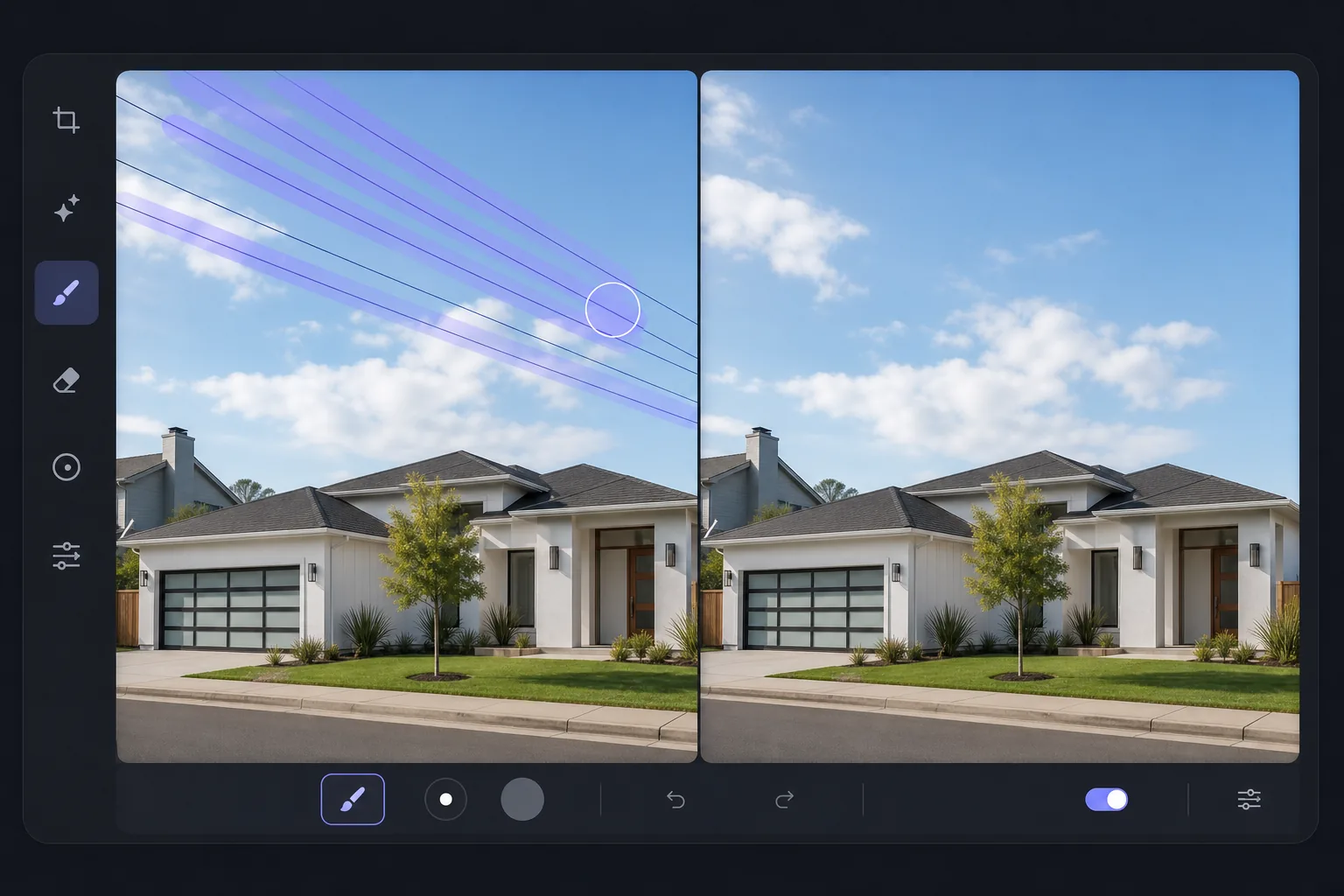
आउटडोर फोटोग्राफी में बिजली लाइनें आम क्यों हैं?
फोटो से बिजली के तार हटाने के लिए, वेब, iOS या Android पर Magic Eraser खोलें, इमेज अपलोड करें, हर तार पर brush चलाएं और AI को उसके पीछे का आसमान या नज़ारा भरने दें। यह फ्री है, बिना किसी signup के। सबसे साफ-सुथरे रिज़ल्ट के लिए एक-एक तार पर बारी-बारी काम करें, फिर जहां कोई तार पेड़ों, छतों या किसी भरे-पूरे बैकग्राउंड को काटते हुए गुज़रा हो, वहां ज़ूम करके दूसरी बार पास करें, क्योंकि ये हिस्से दोबारा बनाए जाते हैं और इन्हें थोड़ी टच-अप की ज़रूरत पड़ सकती है। खुले आसमान के सामने वाले तार लगभग एकदम परफेक्ट निकलते हैं; तार के पीछे का बैकग्राउंड जितना ज़्यादा डिटेल वाला होगा, फिल उतना ही असली ओरिजिनल के बजाय AI का सबसे बेहतर अंदाज़ा होता है। शहरी और उपनगरीय फोटोग्राफी में बिजली लाइनों से बचना लगभग असंभव है। वे रियल एस्टेट के बाहरी दृश्यों में क्षितिज रेखाओं को पार करते हैं, परिदृश्य परिदृश्यों को काटते हैं, वास्तुशिल्प विषयों के पीछे दिखाई देते हैं, और ड्रोन फुटेज में दिखाई देते हैं। उनकी पतली प्रोफ़ाइल शूटिंग के दौरान उन्हें नज़रअंदाज़ करना आसान बनाती है लेकिन अंतिम छवि में तुरंत दिखाई देती है। फ़ोटोशॉप में मैन्युअल रूप से हटाने के लिए क्लोन स्टैम्प टूल के साथ प्रत्येक पंक्ति को ट्रेस करने की आवश्यकता होती है - थकाऊ काम जिसमें 5-15 मिनट लगते हैं, यह इस बात पर निर्भर करता है कि कितनी लाइनें फ्रेम को पार करती हैं और क्या वे पेड़ों और इमारतों जैसी जटिल पृष्ठभूमि से गुजरती हैं। Magic Eraser का AI पूरी प्रक्रिया को संभालता है: पतली रेखा ज्यामिति का पता लगाना, प्रत्येक तार को हटाना, और उसके पीछे के आकाश या पृष्ठभूमि का पुनर्निर्माण करना।
Before you start
तीन चरणों में बिजली लाइनें हटाएं
Start with फोटो अपलोड करें. The result preview above and tips below use this guide's existing content; no separate before-and-after proof is assumed.
- 1
फोटो अपलोड करें
वेब, iOS या Android पर Magic Eraser खोलें। परिदृश्य, रियल एस्टेट बाहरी, वास्तुशिल्प फोटो, या अवांछित बिजली लाइनों या केबलों वाली कोई भी छवि अपलोड करें। JPEG, PNG, HEIC और WebP समर्थित।
- 2
प्रत्येक विद्युत लाइन पर ब्रश करें
ब्रश टूल से प्रत्येक तार को ट्रेस करें। पूर्ण कवरेज सुनिश्चित करने के लिए तार से थोड़े बड़े आकार के ब्रश का उपयोग करें। फ़्रेम के किनारे से किनारे तक प्रत्येक दृश्य रेखा की पूरी लंबाई पर ब्रश करें। कई समानांतर तारों के लिए, प्रत्येक को अलग से ब्रश करें या क्लस्टर को कवर करने के लिए चौड़े ब्रश का उपयोग करें।
- 3
मिटाएँ और समीक्षा करें टैप करें
एआई बिजली लाइनों को हटा देता है और आकाश, पेड़ों या पृष्ठभूमि को भर देता है जो वहां होना चाहिए। किसी भी अवशिष्ट पतली कलाकृति के लिए प्रत्येक हटाई गई पंक्ति की पूरी लंबाई की जाँच करें। जहां रेखाएं जटिल पृष्ठभूमि (पेड़, भवन) को पार करती हैं, वहां सत्यापित करें कि पुनर्निर्माण प्राकृतिक दिखता है। यदि आवश्यक हो तो दूसरे पास से परिष्कृत करें। पूर्ण रिज़ॉल्यूशन पर निर्यात करें.
के लिए सर्वोत्तम
- रियल एस्टेट फ़ोटोग्राफ़ी जहां आकाश में बिजली की लाइनें संपत्ति के बाहरी हिस्से को ख़राब करती हैं
- लैंडस्केप फ़ोटोग्राफ़ी जहां तार सुंदर पहाड़, समुद्र या सूर्यास्त के दृश्यों को काटते हैं
- वास्तुशिल्प फोटोग्राफी जहां केबल भवन के अग्रभागों या छतों को पार करते हैं
- ड्रोन फोटोग्राफी जहां पड़ोस के हवाई दृश्यों में ओवरहेड तार दिखाई देते हैं
- यात्रा फ़ोटोग्राफ़ी जहां उपयोगिता लाइनें सुंदर स्थलों और शहर के दृश्यों से अलग हो जाती हैं
सर्वोत्तम परिणामों के लिए युक्तियाँ
साफ़ या समान रूप से बादल वाले आकाश के विरुद्ध विद्युत लाइनें सबसे आसान मामला है - एआई मिलान वाले आकाश को निर्बाध रूप से भरता है। जटिल पृष्ठभूमियों (विस्तृत पत्ते वाले पेड़, पैटर्न वाली इमारत के अग्रभाग) को पार करने वाली रेखाओं को अधिक सावधानीपूर्वक पुनर्निर्माण की आवश्यकता होती है और दूसरे पास से लाभ हो सकता है। कई समानांतर तारों वाले फ़ोटो के लिए, ऊपर से नीचे तक काम करें, एक समय में एक पंक्ति हटाएं और अगली पर जाने से पहले प्रत्येक को सत्यापित करें। उपयोगिता खंभे अलग-अलग वस्तुएं हैं - यदि आप खंभों के साथ-साथ तारों को भी हटाना चाहते हैं, तो समग्र परिणाम को साफ करने के लिए तारों के बाद खंभे को ब्रश करें। रियल एस्टेट फ़ोटो के लिए, बिजली लाइनों को हटाना सबसे अधिक प्रभाव वाले संपादनों में से एक है: इसे रियल एस्टेट एजेंटों द्वारा लगातार सबसे अधिक अनुरोधित फोटो सुधार के रूप में उद्धृत किया जाता है।
अक्सर पूछे जाने वाले प्रश्नों
- क्या यह अनेक समानांतर तारों को संभाल सकता है?
- हाँ। सबसे साफ परिणामों के लिए प्रत्येक तार को अलग-अलग ब्रश करें, या एक पास में निकट दूरी वाले तारों के समूह को कवर करने के लिए एक व्यापक ब्रश का उपयोग करें। एआई दोनों दृष्टिकोणों को संभालता है।
- उस स्थान के बारे में क्या जहां तार पेड़ों या इमारतों को पार करते हैं?
- एआई हटाए गए तार के पीछे पेड़ के पत्ते या इमारत के विवरण का पुनर्निर्माण करता है। जटिल चौराहों के लिए, परिणाम आमतौर पर बहुत अच्छा होता है, लेकिन बारीक विवरण पकड़ने के लिए पूर्ण ज़ूम पर दूसरा पास देने से लाभ हो सकता है।
- क्या मुझे उपयोगिता खम्भों को भी हटा देना चाहिए?
- ये फोटो पर निर्भर करता है. केवल तारों को हटाने से आकाश में नाटकीय रूप से सुधार होता है। खंभों को हटाने से भी एक साफ-सुथरा दृश्य बनता है लेकिन एआई को भरने के लिए अधिक क्षेत्र बचता है। रियल एस्टेट और लैंडस्केप के लिए, तारों और खंभों दोनों को हटाने से सबसे अच्छा परिणाम मिलता है।
- क्या बिजली लाइन हटाना मुफ़्त है?
- हाँ। Magic Eraser के निःशुल्क स्तर में दैनिक उपयोग सीमा के साथ बिजली लाइन हटाने के लिए ब्रश टूल शामिल है। प्रीमियम बैच रियल एस्टेट प्रसंस्करण के लिए सीमाएं हटा देता है।
- क्या यह पतले तार, केबल और जेट की धारियां (contrails) भी हटाता है?
- हां। यही brush आसमान के सामने मौजूद किसी भी पतली लाइन पर काम करता है — टेलीफोन और केबल के तार, गाय-वायर, बाड़ और ज़िप लाइन, और जेट की contrails। लाइन के साथ-साथ brush चलाएं और AI उसके पीछे का आसमान दोबारा बना देगा। सादे आसमान पर मौजूद पतली लाइनें सबसे आसान केस हैं और लगभग बिना किसी निशान के साफ हो जाती हैं; किसी डिटेल वाले सब्जेक्ट को काटती लाइन (इमारत का किनारा, टहनियां) ज़्यादा मुश्किल होती है, इसलिए उन हिस्सों को पूरे ज़ूम पर जांचें और ज़रूरत पड़ने पर दोबारा चलाएं।