
Remove an Emoji Covering a Face
Magic Eraser से चेहरे से इमोजी हटाएं करना सीखें। मुफ़्त AI टूल के साथ आसान स्टेप-बाय-स्टेप गाइड। वेब, iOS और Android पर काम करता है।
Last updated
अभी आज़माएं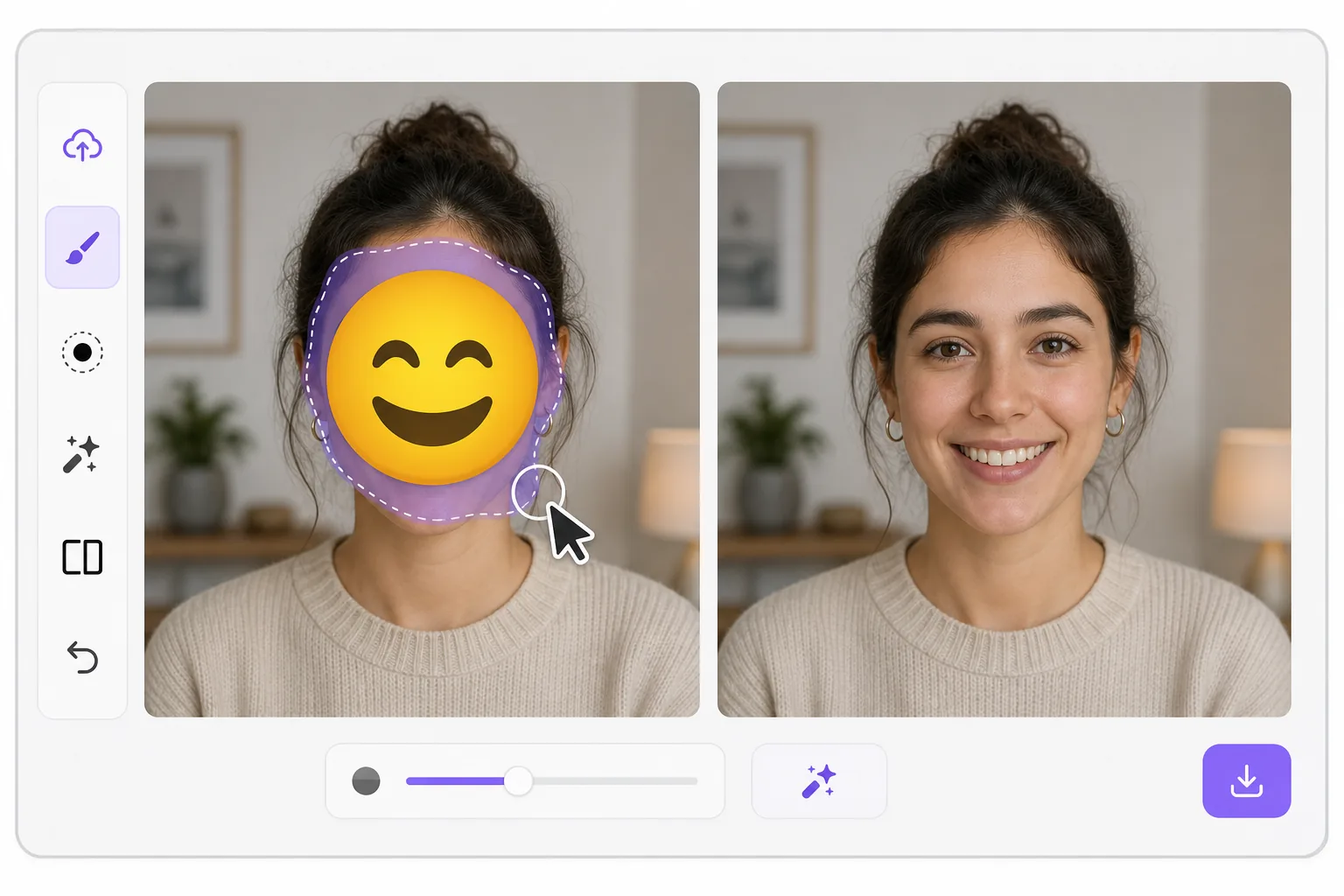
What "uncensoring" an emoji actually does — Magic Eraser
When a smiley, sunglasses, or blur-emoji is slapped over someone's face, those original pixels are gone — the emoji replaced them in the saved image. Magic Eraser's AI inpainting can remove that emoji and fill the gap with a natural-looking face that matches the lighting, skin tone, hairline, and angle around it. Here's the honest part most tools won't tell you: this is a reconstruction, not a recovery. The AI synthesizes a face that fits the scene; it does not and cannot reveal the true identity of whoever was censored. Treat the result as a plausible repair for a photo, not as forensic proof of who someone is. Use it to fix your own images or photos you have permission to edit — never to unmask someone who deliberately hid their face.
Before you start
स्टेप-बाय-स्टेप निर्देश
Start with फ़ोटो अपलोड करें. The result preview above and tips below use this guide's existing content; no separate before-and-after proof is assumed.
- 1
फ़ोटो अपलोड करें
वेब, iOS या Android पर Magic Eraser खोलें। JPEG, PNG, HEIC या WebP फ़ोटो ड्रैग एंड ड्रॉप करें। अकाउंट की ज़रूरत नहीं।
- 2
टूल और एरिया चुनें
सही टूल चुनें और प्रोसेस करने का एरिया मार्क करें। AI ऑटोमैटिक एनालाइज़ करेगा और कुछ सेकंड में बदलाव लागू करेगा।
- 3
रिज़ल्ट डाउनलोड करें
रिज़ल्ट का प्रीव्यू देखें और एडिटेड फ़ोटो डाउनलोड करें। हाई क्वालिटी PNG या JPEG में एक्सपोर्ट करें।
सबसे उपयुक्त
- Restoring an old group photo where you yourself added a privacy emoji and lost the original
- Cleaning up a meme or reaction image so the face area reads as a face again instead of a sticker
- Removing a smiley or sunglasses emoji a friend placed on your own picture before resharing
- Designers prototyping how a portrait looks without a placeholder emoji overlay
- Recovering the composition of a photo you edited, where you have the right to undo your own censorship
सर्वोत्तम परिणामों के लिए टिप्स
Smaller emojis over a clear, well-lit face reconstruct far better than a big sticker covering eyes, nose, and mouth at once — the more original face the AI can see around the edges, the more convincing its fill. If the emoji sits on a turned or partially shadowed face, expect a softer, more generic result. Run it two or three times and compare; each pass produces a different plausible face. Above all, stay honest with anyone you share it with: say the face was AI-reconstructed. Don't present the output as the real hidden person, and don't use it to identify or expose someone who covered their face on purpose.
अक्सर पूछे जाने वाले सवाल
- क्या चेहरे से इमोजी हटाएं फ़ीचर मुफ़्त है?
- हाँ, Magic Eraser आपको दैनिक सीमा के अंदर मुफ़्त में चेहरे से इमोजी हटाएं करने देता है। अनलिमिटेड प्रोसेसिंग के लिए Pro में अपग्रेड करें।
- चेहरे से इमोजी हटाएं में कितना समय लगता है?
- बस कुछ सेकंड। Magic Eraser का AI फ़ोटो तेज़ी से प्रोसेस करता है — ज़्यादातर रिज़ल्ट अपलोड के तुरंत बाद मिल जाते हैं।
- क्या मैं मोबाइल पर इस्तेमाल कर सकता/सकती हूं?
- हाँ, Magic Eraser iOS, Android और सभी वेब ब्राउज़र पर काम करता है। आप डिवाइस के बीच आसानी से स्विच कर सकते हैं।
- क्या इमेज क्वालिटी कम होती है?
- नहीं, Magic Eraser ओरिजिनल फ़ोटो क्वालिटी बनाए रखता है। AI स्मार्ट तरीके से प्रोसेस करता है ताकि डिटेल और शार्पनेस बनी रहे।