
How to remove dark circles from a photo
Magic Eraser से How to remove dark circles from a photo करना सीखें। मुफ़्त AI टूल के साथ आसान स्टेप-बाय-स्टेप गाइड। वेब, iOS और Android पर काम करता है।
Last updated
अभी आज़माएं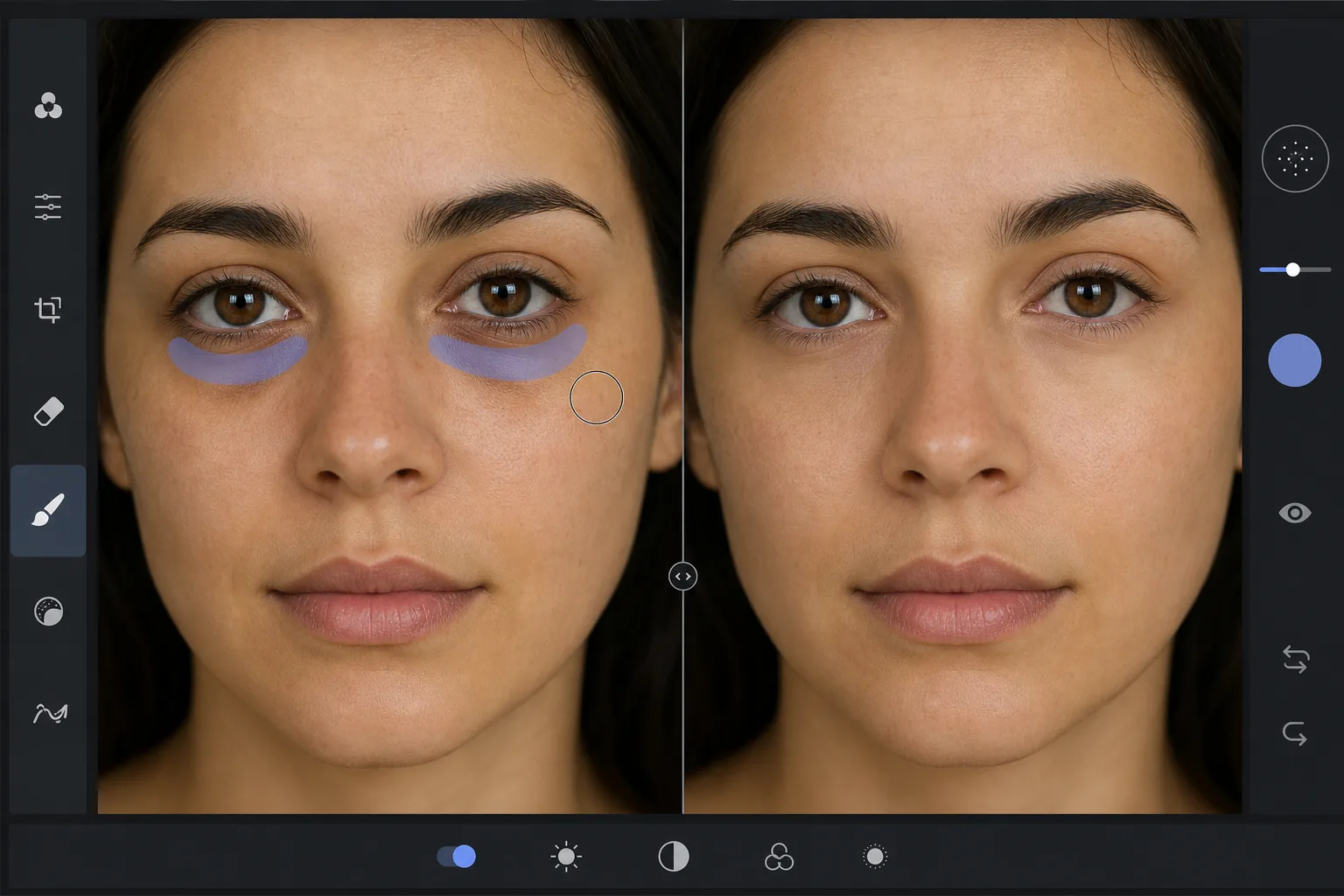
Why dark circles are tricky to retouch — Magic Eraser
Under-eye dark circles are not a single object you can cut out — they are a gradient of shadow and discoloration that blends into the surrounding skin. Heavy-handed editing (a brightness brush, a clone stamp) erases the natural shading that gives the face dimension, leaving a flat, obviously-retouched patch under the eye. The goal is to reduce the darkness while preserving skin texture, pores, and the subtle highlight-to-shadow transition that reads as real. Magic Eraser's AI treats the under-eye region as skin to reconstruct rather than a color to paint over: it lightens the area and rebuilds matching texture from the surrounding cheek and lower-lid skin, so the result looks like a well-rested version of the same face, not an airbrushed mask. This makes it useful for headshots, dating-profile photos, family portraits, and any shot where the subject looks more tired than they felt.
Before you start
स्टेप-बाय-स्टेप निर्देश
Start with फ़ोटो अपलोड करें. The result preview above and tips below use this guide's existing content; no separate before-and-after proof is assumed.
- 1
फ़ोटो अपलोड करें
वेब, iOS या Android पर Magic Eraser खोलें। JPEG, PNG, HEIC या WebP फ़ोटो ड्रैग एंड ड्रॉप करें। अकाउंट की ज़रूरत नहीं।
- 2
टूल और एरिया चुनें
सही टूल चुनें और प्रोसेस करने का एरिया मार्क करें। AI ऑटोमैटिक एनालाइज़ करेगा और कुछ सेकंड में बदलाव लागू करेगा।
- 3
रिज़ल्ट डाउनलोड करें
रिज़ल्ट का प्रीव्यू देखें और एडिटेड फ़ोटो डाउनलोड करें। हाई क्वालिटी PNG या JPEG में एक्सपोर्ट करें।
सबसे उपयुक्त
- Professional headshots where the subject looks tired despite good lighting
- Dating-profile and social photos that need a fresher, well-rested look
- Family and event portraits taken late in the day
- Quick retouching without learning frequency separation or dodge-and-burn
- Batch-cleaning a set of portraits to a consistent look
सर्वोत्तम परिणामों के लिए टिप्स
Reduce, don't erase. Real faces have some shadow under the eye — removing it completely reads as fake. Aim to lighten dark circles to the point they no longer draw attention, not to a uniform flat tone. Brush each eye separately so the AI references the skin closest to each one. If the subject has both dark circles and under-eye bags, the discoloration and the puffiness-shadow are two issues: lighten the discoloration first, then assess whether the remaining shadow still needs a light pass. For a related cleanup, pair this with removing blemishes or skin shine in the same edit. And as always, the most natural result keeps pores and skin texture intact — Magic Eraser preserves them automatically, so avoid over-brushing into clear skin.
अक्सर पूछे जाने वाले सवाल
- क्या How to remove dark circles from a photo फ़ीचर मुफ़्त है?
- हाँ, Magic Eraser आपको दैनिक सीमा के अंदर मुफ़्त में How to remove dark circles from a photo करने देता है। अनलिमिटेड प्रोसेसिंग के लिए Pro में अपग्रेड करें।
- How to remove dark circles from a photo में कितना समय लगता है?
- बस कुछ सेकंड। Magic Eraser का AI फ़ोटो तेज़ी से प्रोसेस करता है — ज़्यादातर रिज़ल्ट अपलोड के तुरंत बाद मिल जाते हैं।
- क्या मैं मोबाइल पर इस्तेमाल कर सकता/सकती हूं?
- हाँ, Magic Eraser iOS, Android और सभी वेब ब्राउज़र पर काम करता है। आप डिवाइस के बीच आसानी से स्विच कर सकते हैं।
- क्या इमेज क्वालिटी कम होती है?
- नहीं, Magic Eraser ओरिजिनल फ़ोटो क्वालिटी बनाए रखता है। AI स्मार्ट तरीके से प्रोसेस करता है ताकि डिटेल और शार्पनेस बनी रहे।