
फोटो से मुंहासे कैसे हटाएं
ब्रेकआउट सबसे बुरे समय में होता है - किसी फोटोशूट, इवेंट या महत्वपूर्ण मीटिंग से ठीक पहले। Magic Eraser नीचे की प्राकृतिक त्वचा की बनावट को संरक्षित करते हुए मुंहासों और दाग-धब्बों को हटाता है, इसलिए परिणाम साफ त्वचा जैसा दिखता है, एयरब्रश प्लास्टिक जैसा नहीं।
Last updated
अभी मुँहासे दूर करें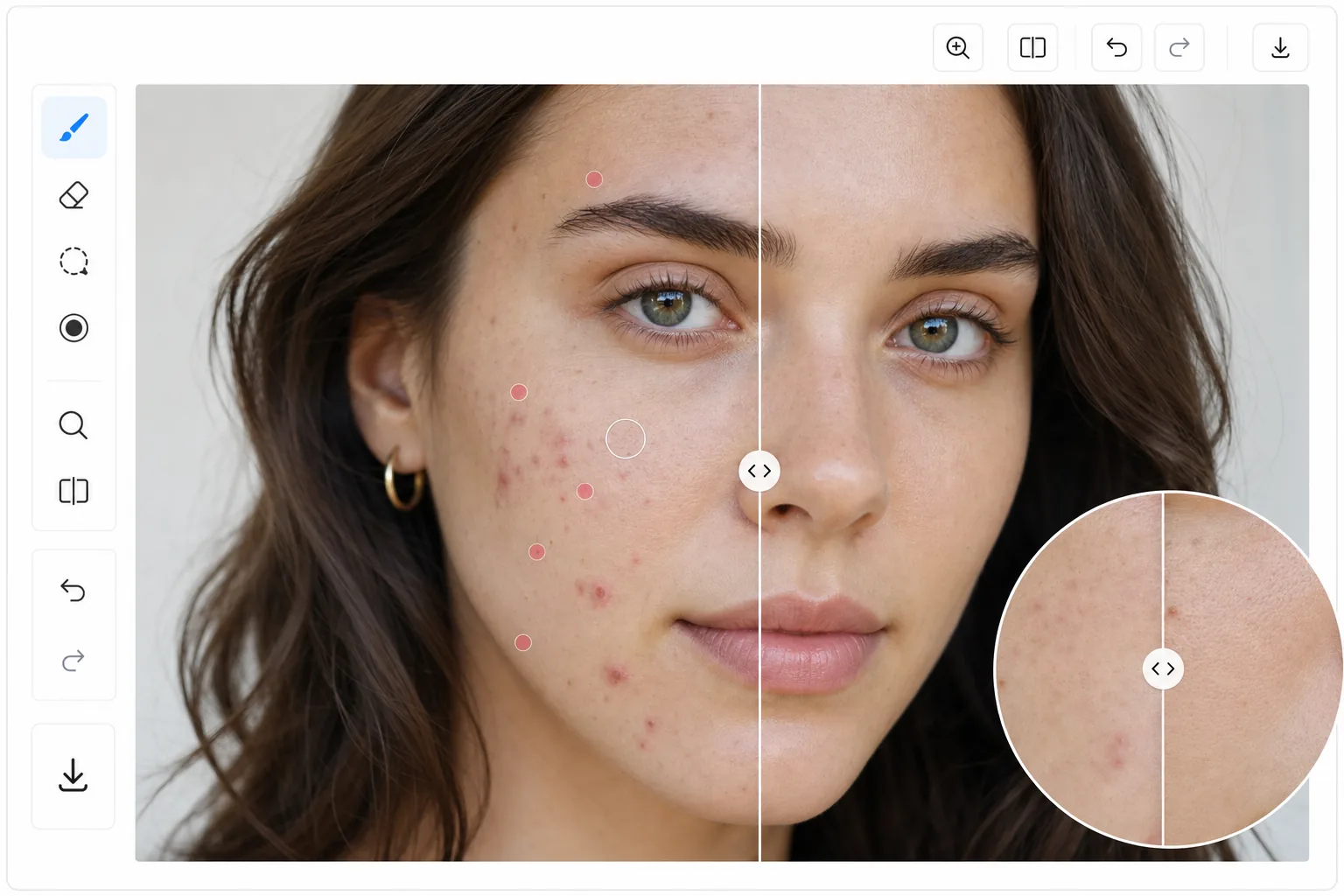
प्राकृतिक मुँहासे हटाना बनाम अत्यधिक चिकनाई
किसी फोटो से मुंहासे हटाने के लिए, वेब, iOS या Android पर Magic Eraser खोलें, अपना पोर्ट्रेट अपलोड करें, हर पिंपल या दाग पर ब्रश घुमाएं, और AI को उसकी जगह ऐसी त्वचा बनाने दें जो आसपास की बनावट और रंगत से मेल खाती हो। यह मुफ़्त है, कोई साइनअप नहीं। यह सिर्फ़ फोटो को एडिट करता है — यह सिर्फ़ इमेज में त्वचा के दिखने के तरीके को संवारता है और आपकी असली त्वचा पर कुछ नहीं करता। सबसे प्राकृतिक नतीजे के लिए एक-एक दाग पर ब्रश करें, और कुछ असली खूबियां (रोमछिद्र, हल्की झाइयां) रहने दें ताकि चेहरा एयरब्रश किया हुआ न लगकर आप जैसा ही दिखे। दोषपूर्ण सुधार में सबसे बड़ी गलती अति-स्मूथिंग है। त्वचा की पूरी सतह को धुंधला करने से मुँहासे दूर हो जाते हैं, लेकिन छिद्र, महीन रेखाएँ और प्राकृतिक बनावट भी नष्ट हो जाती है - जिससे एक अनोखा, प्लास्टिक लुक बनता है। एआई-संचालित मुँहासे हटाने के लिए एक लक्षित दृष्टिकोण अपनाया जाता है: यह अलग-अलग दोषों (मुँहासे, सफ़ेद दाग, लालिमा वाले धब्बे) की पहचान करता है और प्रत्येक को ऐसी त्वचा से बदल देता है जो आसपास के क्षेत्र की सटीक बनावट, रंग और प्रकाश से मेल खाती है। छिद्र दिखाई देते रहते हैं। बारीक रेखाएं बरकरार रहती हैं. परिणाम निश्चित रूप से स्वाभाविक है क्योंकि एआई वास्तविक त्वचा विवरण को धुंधला करने के बजाय उसका पुनर्निर्माण करता है।
Before you start
तीन चरणों में मुँहासे हटाएँ
Start with चित्र अपलोड करें. The result preview above and tips below use this guide's existing content; no separate before-and-after proof is assumed.
- 1
चित्र अपलोड करें
वेब, iOS या Android पर Magic Eraser खोलें। आप जिस मुँहासे को हटाना चाहते हैं, उसका चित्र या क्लोज़-अप अपलोड करें। उच्च रिज़ॉल्यूशन वाली तस्वीरें एआई को काम करने के लिए अधिक बनावट विवरण देती हैं।
- 2
दाग-धब्बों पर ब्रश करें
अलग-अलग पिंपल्स पर टैप करने के लिए छोटे ब्रश का उपयोग करें, या गुच्छों को ढकने के लिए थोड़े बड़े ब्रश का उपयोग करें। आपको पूरी तरह से सटीक होने की आवश्यकता नहीं है - एआई आपके चयन के भीतर दोष की पहचान करता है और केवल दोष को ही हटा देता है, आसपास की साफ त्वचा को संरक्षित करता है।
- 3
समीक्षा करें और निर्यात करें
एआई प्रत्येक दोष को त्वचा की उपयुक्त बनावट से बदल देता है। यह सत्यापित करने के लिए ज़ूम इन करें कि छिद्र और प्राकृतिक त्वचा विवरण संरक्षित हैं। यदि आवश्यक हो तो अतिरिक्त क्षेत्रों को संसाधित करें, फिर सुधारे गए पोर्ट्रेट को निर्यात करें।
के लिए सर्वोत्तम
- पोर्ट्रेट फ़ोटोग्राफ़र अपने संपादन वर्कफ़्लो के हिस्से के रूप में त्वचा सुधार की पेशकश करते हैं
- किशोर और युवा वयस्क जो सोशल मीडिया तस्वीरों में साफ़ त्वचा चाहते हैं
- पेशेवर हेडशॉट तैयारी जहां एक शानदार उपस्थिति की उम्मीद की जाती है
- शादी और कार्यक्रम के फोटोग्राफर अतिथि और दुल्हन के चित्रों का बैच-प्रसंस्करण करते हैं
- त्वचाविज्ञान के रोगी समय के साथ त्वचा में सुधार का दस्तावेजीकरण कर रहे हैं
सर्वोत्तम परिणामों के लिए युक्तियाँ
सक्रिय ब्रेकआउट्स (मुँहासे, व्हाइटहेड्स, सूजन वाले धब्बे) पर ध्यान केंद्रित करें और झाइयों और सौंदर्य के निशान जैसी प्राकृतिक त्वचा की विशेषताओं को छोड़ दें, जब तक कि विशेष रूप से उन्हें हटाने का अनुरोध न किया जाए। मुँहासे के दाग (सक्रिय पिंपल्स के बजाय बनावट में बदलाव) के लिए, एआई इंडेंटेशन को सुचारू कर सकता है लेकिन अच्छी रोशनी के साथ सबसे अच्छा काम करता है जो निशान ऊतक में कठोर छाया को कम करता है। सबसे प्रमुख दोषों को पहले संसाधित करें - 3-5 सबसे बड़े धब्बों को हटाने से अक्सर हर छोटी-छोटी खामियों को दूर करने की कोशिश से ज्यादा तस्वीर बदल जाती है। सबसे विश्वसनीय परिणामों के लिए त्वचा में कुछ प्राकृतिक बदलाव छोड़ें।
अक्सर पूछे जाने वाले प्रश्नों
- क्या यह सिस्टिक मुँहासे पर काम करता है?
- हाँ। बड़े, गहरे दाग-धब्बों को सतह-स्तरीय पिंपल्स की तरह ही हटा दिया जाता है। बहुत बड़े सूजन वाले क्षेत्रों के लिए, एआई अधिक त्वचा का पुनर्निर्माण करता है, जिसके लिए आसपास की लालिमा सहित पूरे क्षेत्र को पकड़ने के लिए थोड़े बड़े ब्रश चयन की आवश्यकता हो सकती है।
- क्या इससे झाइयां भी दूर हो जाएंगी?
- केवल अगर आप उन पर ब्रश करते हैं। AI केवल आपके द्वारा चुने गए क्षेत्रों को संसाधित करता है। आपके ब्रश स्ट्रोक के बाहर झाइयां पूरी तरह से अछूती हैं।
- क्या मुँहासे हटाना मुफ़्त है?
- हाँ। ऑब्जेक्ट रिमूवल सुविधाएँ दैनिक उपयोग सीमा के साथ फ्री टियर में दोष हटाने के लिए काम करती हैं। प्रीमियम बैच पोर्ट्रेट रीटचिंग के लिए सीमाएं हटा देता है।
- क्या मुझे मुंहासों के निशान और बनावट भी हटानी चाहिए, या सिर्फ़ ताज़ा निकले मुंहासे?
- यह आप पर निर्भर है, और यह सोचना ज़रूरी है कि फोटो किस काम के लिए है। किसी एक बार के इवेंट की फोटो के लिए, ताज़ा निकले मुंहासे साफ़ करना और निशान व प्राकृतिक बनावट छोड़ देना आमतौर पर सबसे विश्वसनीय लगता है। प्रोफ़ाइल पिक्चर या प्रोफ़ेशनल हेडशॉट के लिए, निशानों को हल्का कम करना मददगार हो सकता है — पर थोड़ी असली बनावट रखना बिल्कुल चिकनी त्वचा के मुकाबले ज़्यादा असली लगता है। दोनों में से कोई भी चुनाव गलत नहीं है; बस इतना एडिट करने से बचें कि फोटो आप जैसी ही न लगे, खासकर ID या डेटिंग प्रोफ़ाइल के लिए जहां इसे आपके असल रूप से मेल खाना चाहिए।
- क्या एडिट की गई फोटो साफ़ तौर पर रीटच की हुई लगेगी?
- नहीं, अगर आप पूरे चेहरे को चिकना करने के बजाय एक-एक दाग पर काम करें। चूंकि AI त्वचा को धुंधला करने के बजाय मेल खाती हुई नई बनावट बनाता है, इसलिए टारगेट करके हटाई गई चीज़ पकड़ में मुश्किल से आती है। रीटचिंग तब साफ़ दिखती है जब पूरी त्वचा की सतह चिकनी कर दी जाए — वह सपाट, प्लास्टिक जैसा लुक पूरे चेहरे पर लगने वाले ब्यूटी फ़िल्टर से आता है, कुछ दागों को स्पॉट करके हटाने से नहीं।