
Passport Photo Template
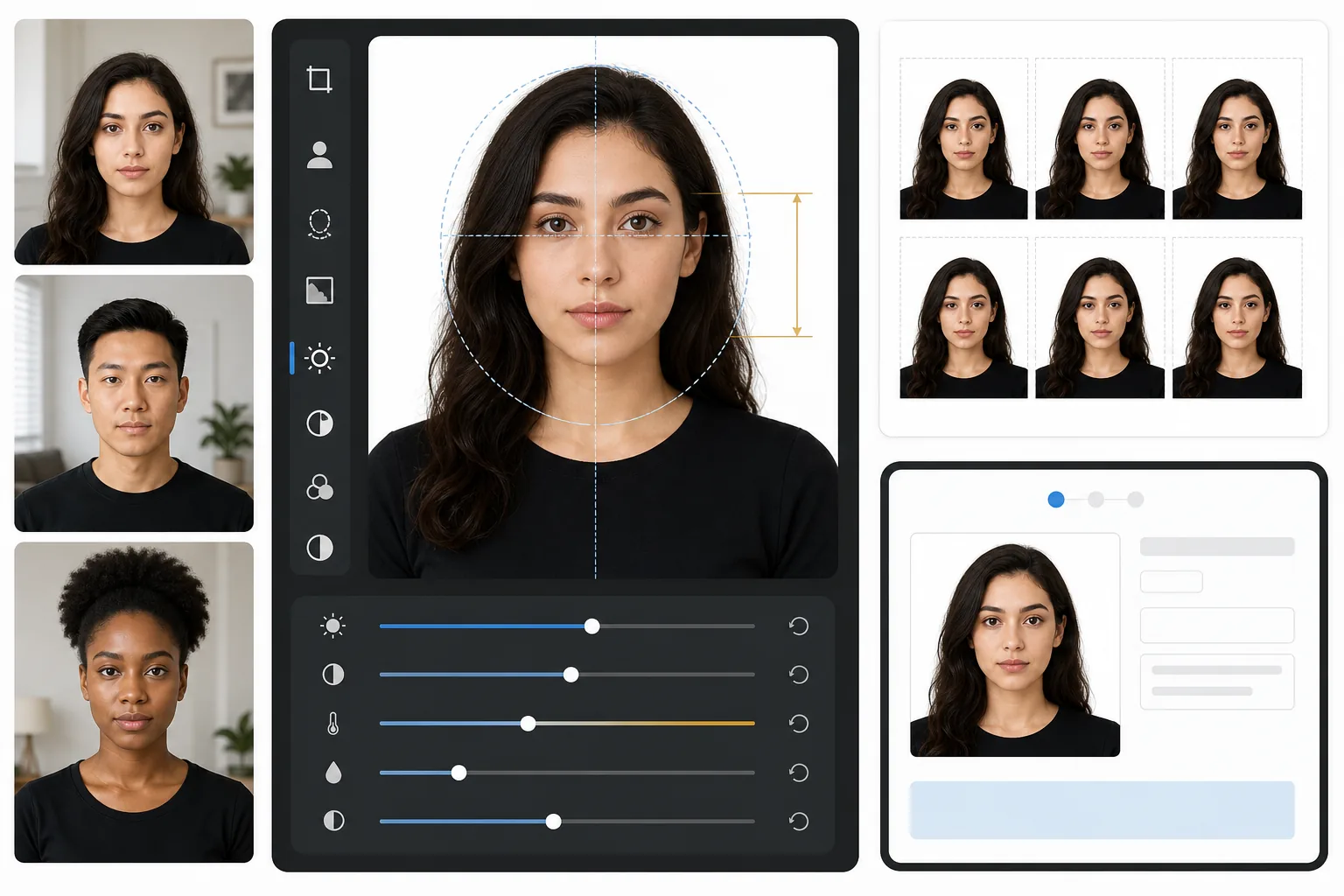
Skip the drugstore photo booth. This template creates government-compliant passport photos from any well-lit selfie — white background, correct head-to-frame ratio (1 to 1-3/8 inches from chin to crown), and 2×2 inch output at 600 DPI that meets US State Department, UK HMPO, EU, and Schengen visa requirements.
Try this template freeProfessional template preview
What this template does
Converts a standard portrait photo into a government-compliant passport or visa photo. The template removes any background and replaces it with plain white, crops to the exact 2×2 inch (51×51mm) dimensions required by the US State Department, positions the head within the required size range, and ensures even lighting without harsh shadows. The output is print-ready at 600 DPI for photo-paper printing or direct digital submission.
Template settings
| Output dimensions | 2×2 inches (51×51mm) at 600 DPI (1200×1200px) |
| Background | Plain white (#FFFFFF), no gradients or texture |
| Head size | 1 inch to 1-3/8 inches (25–35mm) chin to crown |
| Eye position | Eyes centered between 1-1/8 and 1-3/8 inches from bottom |
| Color profile | sRGB (photo-lab compatible) |
| File format | JPEG 100% quality or PNG (for digital submission portals) |
How to use this template
Take a front-facing portrait
Stand in front of a plain wall with even lighting on your face. Use natural daylight or two lamps placed at equal distance on each side. Look directly at the camera with a neutral expression and both ears visible.
Remove and replace the background
Background Eraser strips any background — wallpaper patterns, shadows, furniture edges — and replaces it with the required plain white. The tool preserves natural hair edges and glasses frames without creating halo artifacts.
Auto-crop to compliance
The template detects your face and positions it within the government-specified head-size range. Eyes are placed at the correct height, and chin-to-crown measurement falls within the 1 to 1-3/8 inch requirement.
Print or submit digitally
Download the 600 DPI file for printing on 4×6 glossy photo paper (fits four 2×2 photos per sheet) or submit the digital file directly to online passport renewal and visa application portals.
Pro tips for best results
- ✓Use front-facing natural daylight from a window — it creates the soft, even illumination that passport offices prefer and eliminates the harsh shadows from flash photography.
- ✓Remove glasses before shooting if possible. Many countries now require photos without eyewear, and even where allowed, reflections and frame shadows are the most common reason for photo rejection.
- ✓Wear a solid-colored top that contrasts with white — dark blue, black, or deep green works best. White clothing blends into the background and can cause rejection.
- ✓Have someone else take the photo at arm's length rather than using a selfie. Front-camera selfies introduce slight wide-angle distortion that can make facial proportions look unnatural and trigger manual review.
Common questions
Will this photo be accepted by the US State Department?
+
The template follows the exact specifications published in the US Department of State's passport photo requirements: 2×2 inches, white background, head size between 1 and 1-3/8 inches, and correct eye positioning. However, acceptance also depends on your expression, head angle, and lighting — the template handles background, sizing, and cropping but cannot fix closed eyes or turned heads.
Does this work for non-US passport photos?
+
The default is set for US passports (2×2 inches), but passport photo dimensions vary by country — for example, UK requires 35×45mm and India requires 2×2 inches with different head-size ratios. The core background removal and face positioning work for any country; adjust the crop dimensions for your specific requirement.
Can I print this at home?
+
Yes. The 600 DPI output prints at exactly 2×2 inches on any photo printer. For the best results, use glossy or matte photo paper and print four copies on a single 4×6 sheet. Most drugstore photo kiosks also accept the digital file for high-quality prints.
Get compliant passport photos without leaving home
Upload a front-facing portrait and get a government-specification passport photo in seconds. Print at home or submit digitally.
Try it freeRelated templates
More professional templates for your workflow.
Professional LinkedIn headshot template. Clean background, natural skin enhancement, and the polished look that gets 14x more profile views.
Professional headshot template for actors and models. Meet casting director standards with 8×10 print-ready output, natural retouching, and clean backgrounds for agency submissions.
Enhance dental marketing photos with natural tooth whitening, consistent portrait backgrounds, and before-after comparison images for practice websites and social media.