
Remove sunglasses from photos
Take the shades off a portrait, selfie, or vacation shot so the face reads as eye-contact instead of dark lenses. Magic Eraser erases the sunglasses, the frame, and the shadow they cast, then reconstructs the eyes and brow beneath — clearly when the eyes were partly visible, and as a plausible AI estimate when the lenses were fully opaque.
Last updated
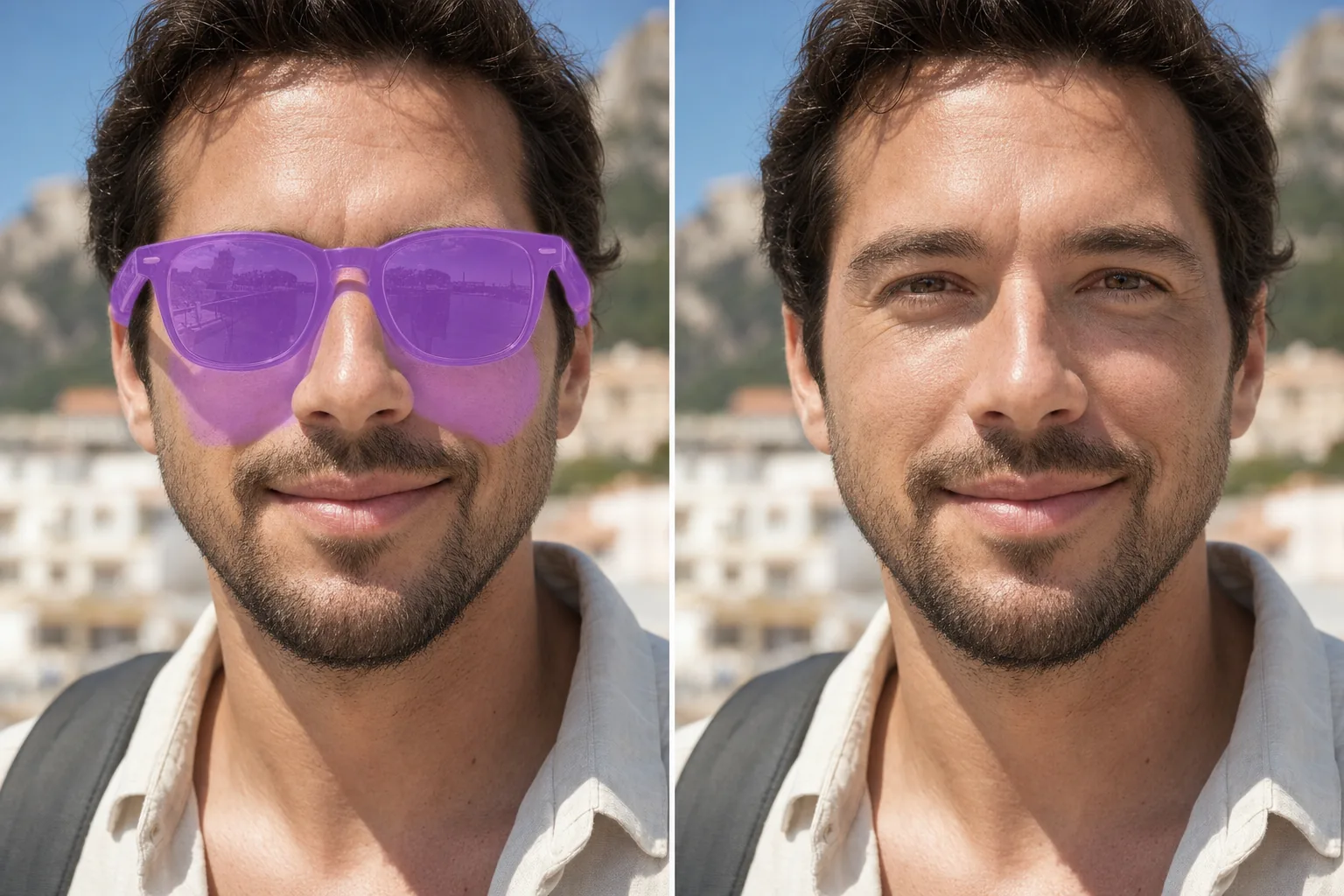
Why removing sunglasses is harder than it looks
Sunglasses are not just an object sitting on the face — they hide the most expressive part of a portrait. That makes this edit different from clearing a stray hair or a logo. When the lenses are lightly tinted and you can see the eyes through them, Magic Eraser can lift the tint and recover the real eyes with high fidelity. When the lenses are dark, mirrored, or polarized, there is simply no eye information in the pixels to recover, so the AI generates a likely pair of eyes from the rest of the face — pose, lighting, skin tone, and eyebrows. That reconstruction is convincing but invented; it is not your true gaze. Mirrored and reflective lenses add a second problem: they carry a bright reflection of the scene that has to be removed before any eye can be drawn underneath. The frame matters too, because it casts a hard shadow across the upper cheeks and nose that has to be relit so the unmasked face looks naturally exposed rather than patchy.
Remove sunglasses in three steps
- 1
Upload the portrait
Open Magic Eraser on the web, iOS, or Android and upload the photo. Front-facing portraits where the head is level and the lenses sit straight give the cleanest reconstruction.
- 2
Brush the lenses, frame, and shadow
Paint over both lenses, the full frame and temple arms, and the shadow line the glasses cast on the cheeks and nose bridge. Catch any mirrored reflection on the lens surface — leaving it behind makes the AI draw eyes under a glare and the result looks wrong.
- 3
Erase and review the eyes
Tap Erase. The AI removes the eyewear and reconstructs the eyes, lids, and brow underneath, relighting the shaded skin. Check that the two eyes match each other and the gaze direction suits the face, re-brush if a frame edge or shadow lingers, then export.
Best for
- Revealing the eyes in a vacation or beach selfie shot in bright sun
- Lifting light tint off lenses where the eyes are still faintly visible
- Clearing the scene reflection off mirrored or polarized lenses
- Removing the frame and temple arms along with the lenses
- Relighting the hard frame shadow on the cheeks and nose bridge
- Recovering a usable headshot when shades were the only flaw
- Cleaning up group photos where one person kept their sunglasses on
- Turning a shaded profile picture into a friendlier eye-contact shot
What reconstructs well and what is AI-estimated
Be clear-eyed about the limits before you rely on the result. Lightly tinted lenses where the eyes show through reconstruct well, because the AI is enhancing real pixels rather than inventing them. Dark, opaque, mirrored, or heavily polarized lenses hide the eyes completely, so the eyes you get back are an AI estimate built from the surrounding face — a believable pair of eyes, but not a record of how you actually looked or where you were looking. The brow, eye socket shape, and skin around the eyes usually rebuild accurately because the AI has nearby context to follow. Fine details that carry identity — exact iris color, the precise gaze direction, asymmetry between your two eyes, and catchlights — are guessed and may differ from reality. Always remove the lens reflection first or the generated eyes sit under a ghost of the scene. For anything where authenticity matters, such as ID photos, legal documents, or evidence, treat a reconstructed-eye image as an edited illustration, not a true likeness.
Frequently asked questions
- Can it recover my actual eyes behind dark lenses?
- No. If the lenses are dark or mirrored, there is no eye information left in the photo to recover. Magic Eraser generates a plausible pair of eyes from the rest of your face. It looks natural, but it is an AI estimate, not your real gaze.
- What about mirrored or reflective sunglasses?
- Brush over the reflection on the lens surface as well as the frame. The scene reflected in the lens has to be removed first, otherwise the AI draws eyes underneath a leftover glare and the result looks off. Once the reflection is gone, it reconstructs the eye area cleanly.
- How is this different from removing clear glasses?
- Clear prescription glasses let the eyes show through, so removing them is mostly about erasing the frames and lens glare while keeping the real eyes. Dark sunglasses hide the eyes entirely, so the eyes have to be reconstructed — a harder, less faithful edit.
- Is removing sunglasses free?
- Yes. Magic Eraser's free tier handles sunglasses removal on web, iOS, and Android. Upload your photo, brush the lenses and frame, erase, and export the result at no cost.