
Remove JPEG artifacts from photos
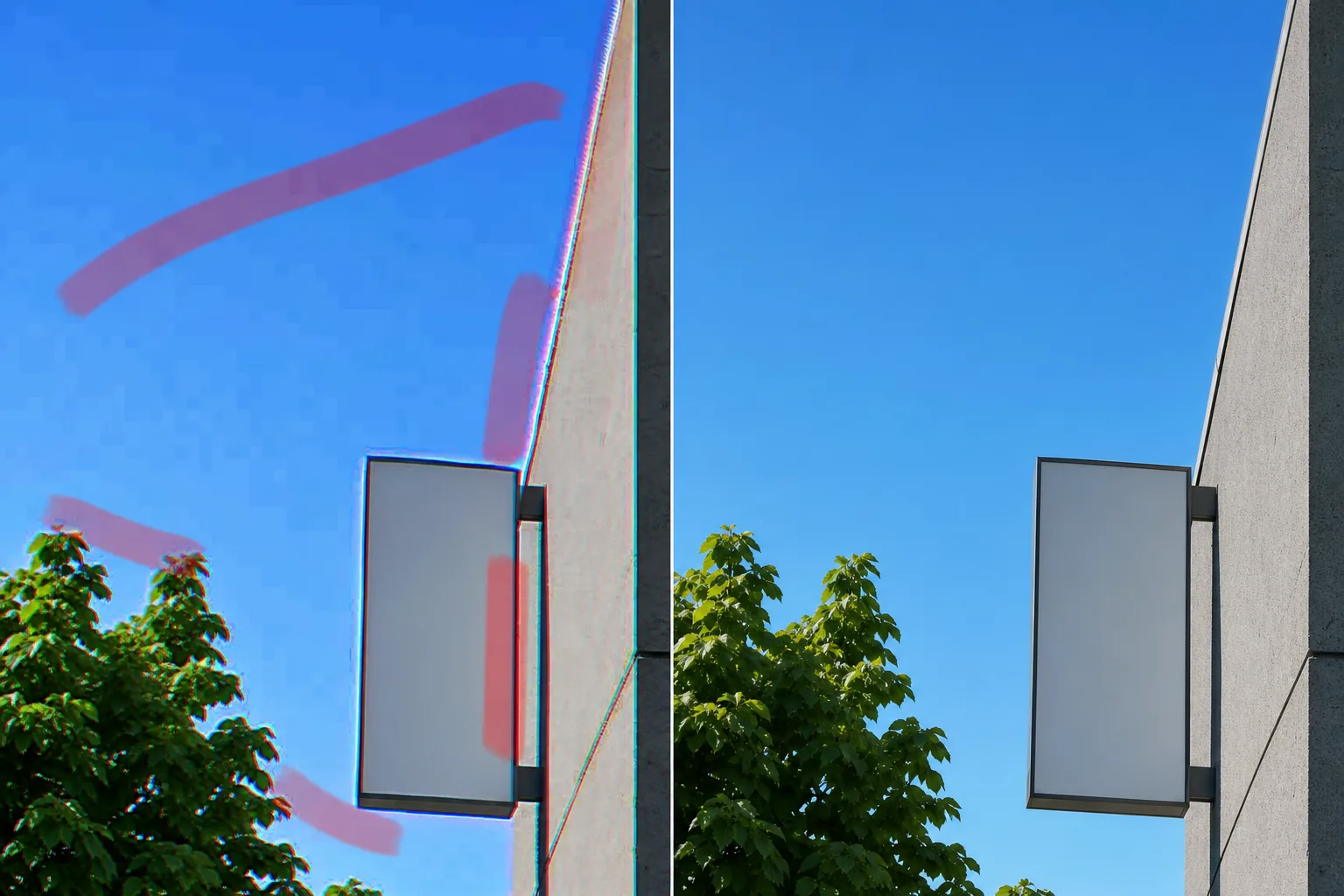
Repair the blocky 8x8 squares, mosquito-noise halos around text and edges, and color smearing that heavy compression and repeated re-saving leave behind. Magic Eraser smooths the compression damage and rebuilds clean gradients and sharp edges, so the image reads as a quality photo instead of a degraded JPEG.
Last updated
What JPEG artifacts are and why they appear
JPEG artifacts are compression damage, not sensor speckle. JPEG works by splitting an image into 8x8 pixel blocks, converting each to frequency coefficients, and throwing away the high-frequency detail your eye is least likely to miss. At low quality settings — or after a file is opened, edited, and re-saved several times — that discarded data starts to show as three distinct flaws. Blocking is the most obvious: smooth gradients like sky or skin break into visible 8x8 squares with hard seams between them. Mosquito noise is the shimmer of ringing that clusters around high-contrast edges, especially text, logos, and crisp outlines, where the block boundaries can't represent a sharp transition cleanly. Color smearing, or chroma bleed, comes from JPEG storing color at half resolution, so saturated reds and blues fringe and run past their real edges. This is fundamentally different from grain or noise, which are random per-pixel speckle from the sensor — JPEG artifacts are structured, grid-aligned errors baked into the file at save time. The hard part of fixing them is that the lost detail is genuinely gone, so a naive blur just trades blocky damage for a soft, smeared mess. Magic Eraser instead reconstructs what the blocks destroyed: it flattens the 8x8 seams across gradients, suppresses the ringing around edges, and rebuilds plausible texture and color so the result looks like clean photo data rather than a smoothed-over compromise.
Remove JPEG artifacts in three steps
- 1
Upload your compressed image
Open Magic Eraser on the web, iOS, or Android and upload the over-compressed file — a heavily-saved JPEG, a re-shared screenshot, or a low-quality download. Artifacts are easiest to judge at 100% zoom, so work on the file as-is rather than a further downscaled copy.
- 2
Brush the damaged areas
Paint over the regions showing the worst artifacts — blocky squares in skies and skin, ringing halos around text and logos, or color bleed along saturated edges. You can target just the blotchy gradients and fringed edges instead of flooding clean parts of the frame.
- 3
Erase and check at 100%
Tap Erase and the AI smooths the block seams, suppresses the mosquito ringing, and rebuilds edge and color detail. Zoom to 100% to confirm gradients are smooth and edges stayed sharp, then re-brush any patch that still shows blocking before exporting.
Best for
- Flattening visible 8x8 blocks in skies, walls, and skin gradients
- Cleaning mosquito-noise ringing around text and logos
- Fixing color smearing and chroma bleed on saturated edges
- Repairing images degraded by repeated save and re-save cycles
- Tidying low-quality social media downloads and re-shares
- Cleaning compressed screenshots before reuse or printing
- Recovering old web images saved at aggressive quality settings
- Prepping a heavily-compressed photo for upscaling or large display
What to expect from JPEG artifact removal
Artifact removal works best when there is still real structure under the damage for the AI to lock onto. Moderate blocking in skies, skin, and smooth backgrounds cleans up convincingly, because Magic Eraser can read the underlying gradient and rebuild it without the 8x8 seams. The honest limits matter, though. JPEG compression permanently discards detail, so the tool cannot recover information that was never saved — on severely compressed files it reconstructs a plausible, clean-looking version rather than the original pixels, and very fine texture (hair, fabric weave, distant foliage) may come back smoother or slightly invented rather than truly restored. Ringing around small text usually softens well, but extremely degraded type can stay fuzzy because the edge data is simply gone. Color smearing on heavily clipped, saturated areas is reconstructed as a believable boundary, not a measured per-channel correction. And because this is generative cleanup, treat the output as a repaired interpretation of the file, not a lossless decode — for most over-compressed images that reads as a clear quality jump, but it is retouching, not data recovery. Tight, targeted brushing on the worst regions gives the most natural result.
Frequently asked questions
- How is this different from removing grain or noise?
- Grain and noise are random, per-pixel speckle from the camera sensor. JPEG artifacts are structured, grid-aligned compression damage — blocky 8x8 squares, ringing around edges, and color smearing baked into the file at save time. Magic Eraser targets that block structure and ringing specifically, rather than smoothing random sensor texture.
- Can it recover detail that compression destroyed?
- Only up to a point. JPEG permanently discards data, so the tool cannot decode pixels that were never saved. It reconstructs a plausible, clean version — flattening blocks and rebuilding edges — but on severely compressed files expect a believable repair, not exact recovery of the original detail.
- Will fixing the blocks make my image soft?
- That is the failure mode of a plain blur, and it is what Magic Eraser avoids. Instead of smearing everything, it flattens the 8x8 seams while reconstructing edge and texture detail, so gradients clean up without the whole image going soft. Check edges at 100% to confirm they stayed sharp.
- Is JPEG artifact removal free?
- Yes. Magic Eraser's free tier handles JPEG artifact cleanup on web, iOS, and Android. Upload your compressed image, brush the damaged areas, and export the cleaned-up result at no cost.