
Remove chromatic aberration from photos
Strip the purple, green, and magenta fringing that lens dispersion leaves along high-contrast edges — bare branches against sky, backlit hair, chrome trim, window frames. Magic Eraser neutralizes the colored halo and rebuilds true edge color so the boundary stays sharp instead of going soft and gray.
Last updated
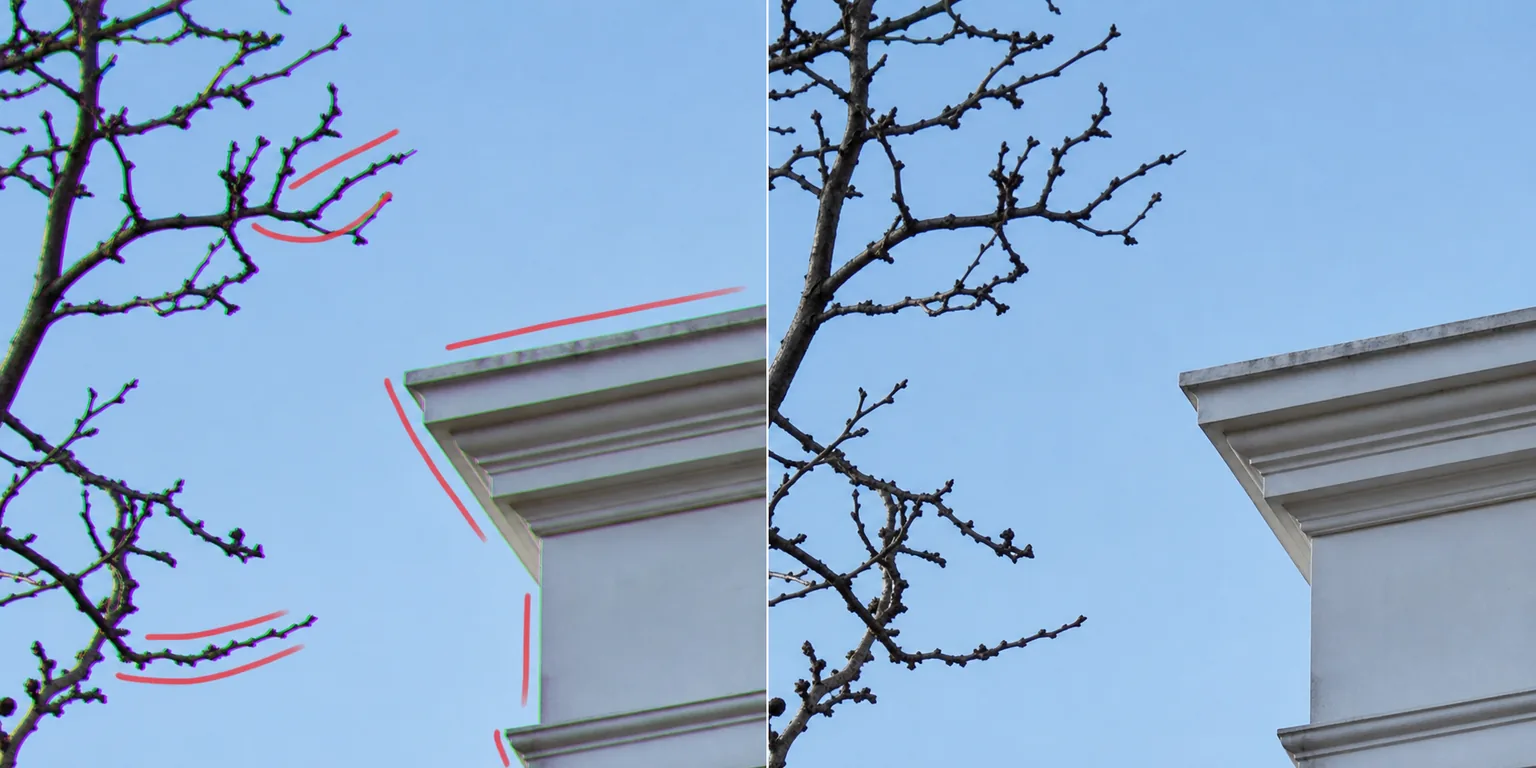
What chromatic aberration is and why it shows up
Chromatic aberration is a lens defect, not a sensor or processing problem. A lens bends different wavelengths of light by slightly different amounts, so red, green, and blue focus on marginally different planes and positions. The result is colored fringing — usually purple or magenta on one side of a high-contrast edge and green or cyan on the other — most visible toward the corners of the frame and along hard transitions like dark branches against a bright sky, backlit hair, specular highlights on metal, or the edge of a white building. Fast primes shot wide open, cheap zooms, and ultra-wide lenses fringe the worst, and stopping down or moving away from the corners only reduces it. The hard part of fixing it is selectivity: the fringe sits exactly on the detail you want to keep, so a crude desaturate turns crisp edges into muddy gray seams. Magic Eraser targets the fringe band itself — it samples the true color on either side of the edge, removes the dispersed purple or green halo, and reconstructs the correct boundary color so the edge reads sharp, not smeared.
Remove chromatic aberration in three steps
- 1
Upload your photo
Open Magic Eraser on the web, iOS, or Android and upload the shot. Fringing is easiest to judge at 100% zoom, so work on the full-resolution file rather than a downscaled export.
- 2
Brush the fringed edges
Paint along the high-contrast edges showing color fringe — the purple or green band that traces branches, hair, railings, or window frames. Cover the colored halo, not the whole object, and follow the edge rather than flooding the surrounding area.
- 3
Erase and check at 100%
Tap Erase and the AI neutralizes the fringe and rebuilds true edge color. Zoom to 100% and inspect the corners, where aberration is strongest, then re-brush any band that still shows a colored cast before exporting.
Best for
- Purple and magenta fringing on backlit branches and foliage
- Green and cyan halos along high-contrast architectural edges
- Color fringe on chrome trim, railings, and specular metal
- Cleaning corner aberration from ultra-wide and cheap zoom lenses
- Fixing fringe on fast primes shot wide open
- Backlit hair and rim-lit subject outlines
- Window frames and white edges against bright sky
- Tidying edges before large prints or pixel-peeping crops
What to expect from chromatic aberration removal
Chromatic aberration removal works best as a targeted edge fix, not a global filter. Magic Eraser reconstructs the true boundary color along the fringe you brush, so a clean, well-defined edge — a branch against even sky, a railing against a wall — fixes almost invisibly. The honest limits are worth knowing. Where the fringe overlaps fine, low-contrast detail (thin backlit hair, lace, mesh), the AI has to guess the underlying color and can slightly soften or shift it; brush tightly and check at 100%. Very wide purple-fringe blooms around blown specular highlights are partly a recording problem, not just lateral dispersion — once a channel is clipped to white, the original color under the bloom is gone, so the tool produces a plausible neutral rather than recovered detail. It also can't undo the resolution loss a heavily aberrated lens caused; it cleans the color, not the optical softness. And because it's generative, it reconstructs a believable edge rather than performing a measured per-channel realignment — for most photos that reads as correct, but it's retouching, not a physically exact lens-correction profile. Subtle, edge-following brushing gives the most natural result.
Frequently asked questions
- How is this different from removing glare or grain?
- Glare is a bright wash of light and grain is texture across the whole frame; chromatic aberration is colored fringing that sits specifically on high-contrast edges. Magic Eraser targets that purple or green edge band and rebuilds the true boundary color, rather than dimming a highlight or smoothing texture.
- Will it make my edges look soft or gray?
- That's the failure mode of a crude desaturate, and it's exactly what Magic Eraser avoids. Instead of graying out the fringe, it samples the real color on either side of the edge and reconstructs the correct boundary, so the edge stays sharp after the colored halo is gone.
- Can it fix purple fringing around blown highlights?
- Partly. Lateral fringe along the edge cleans up well. But where a highlight is clipped to pure white, the original color underneath is already lost, so the AI fills a plausible neutral rather than recovering true detail. Expect a clean edge, not magic recovery of missing data.
- Is chromatic aberration removal free?
- Yes. Magic Eraser's free tier handles chromatic aberration cleanup on web, iOS, and Android. Upload your photo, brush the fringed edges, and export the corrected result at no cost.