
Magic Eraser vs Meitu: Production Editing or Beauty Filters?
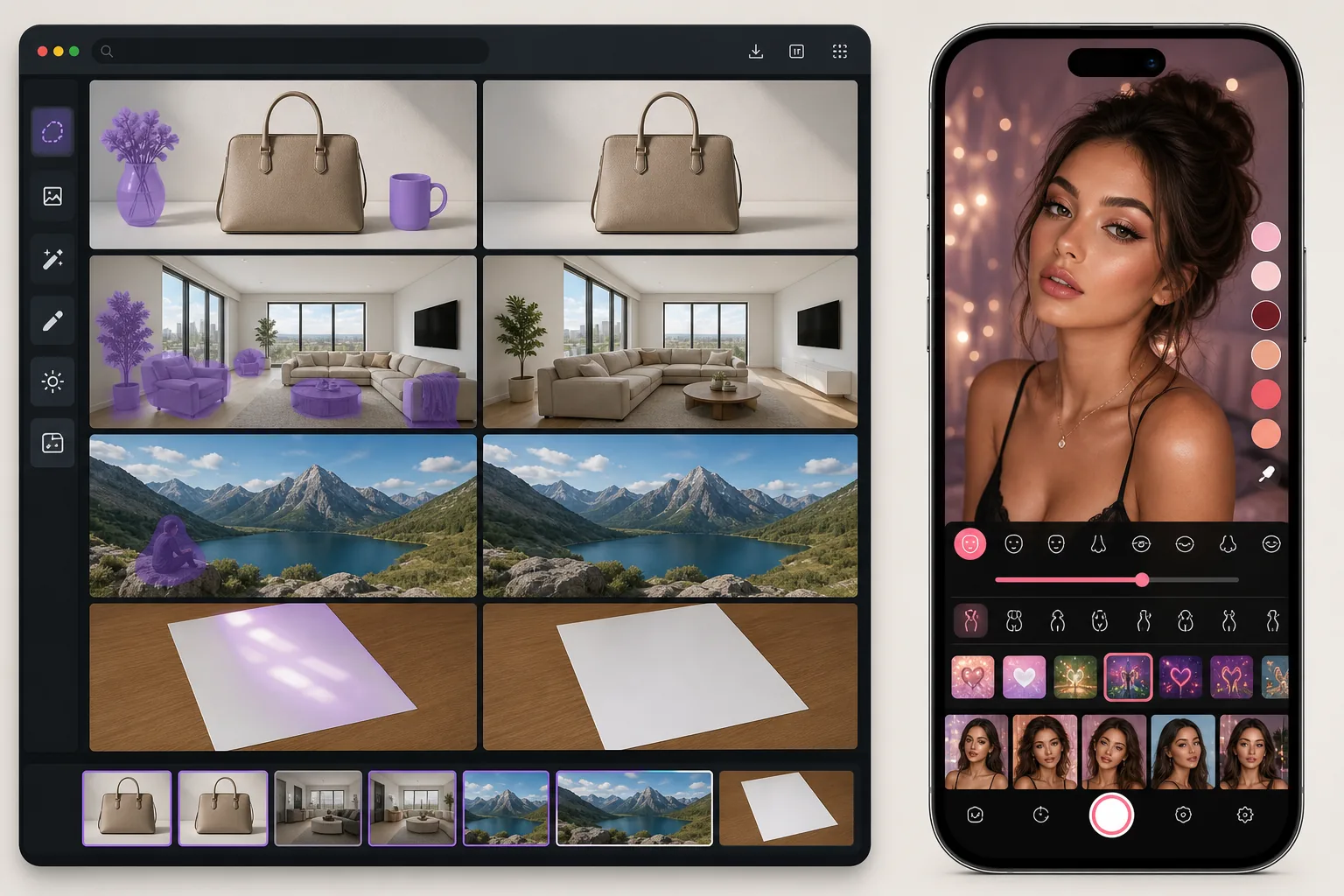
Meitu is a popular beauty and selfie app with AI filters, face reshaping, and skin smoothing tools. Magic Eraser focuses on practical photo editing — object removal, background replacement, and AI enhancement for professional output.
Last updated
Try Magic Eraser freeComparison rows are editorial summaries from the latest page review, not a guarantee of current pricing, limits, watermark policy, batch support, speed, or platform availability.
Overview
Magic Eraser provides AI-powered tools for object removal, background replacement, generative fill, photo enhancement, and batch processing — serving creators, sellers, and marketers who need polished photos for professional use.
Meitu is a mobile beauty app popular in Asia with face beautification, body reshaping, skin smoothing, and creative filters. It focuses on selfie enhancement and social sharing rather than professional photo editing or production workflows.
Feature Comparison
Magic Eraser provides AI-powered tools for object removal, background replacement, generative fill, photo enhancement, and batch processing — serving creators, sellers, and marketers who need polished photos for professional use.
Meitu is a mobile beauty app popular in Asia with face beautification, body reshaping, skin smoothing, and creative filters. It focuses on selfie enhancement and social sharing rather than professional photo editing or production workflows.
| Feature | Magic Eraser | Meitu |
|---|---|---|
| Object removal | Yes — AI brush | Basic |
| Background removal | Yes | Yes |
| AI enhancement | Yes — all photos | Portrait-focused |
| Beauty filters | No | Yes — extensive |
| Generative fill | Yes | No |
| Batch processing | Yes | No |
| Web version | Yes | Limited |
| Body reshaping | No | Yes |
| Best for | Professional editing | Selfie beautification |
Feature rows summarize visible product positioning and should be rechecked against official product pages before purchase, migration, or compliance decisions.
- Last content review May 17, 2026
- Meitu source: official product site (https://www.meitu.com/)
- Magic Eraser source: https://magiceraser.live/en/product/magic-eraser
- Pricing, feature availability, platform support, and limits can change; recheck official sources before relying on a buying decision.
Pricing Comparison
| Plan | Magic Eraser | Meitu |
|---|---|---|
| Free tier | Free — limited edits | Free — basic + ads |
| Monthly | $9.99/mo | $4.99/mo (VIP) |
| Annual | $4.99/mo (billed yearly) | $2.50/mo (VIP, billed yearly) |
Prices as of May 2026. Check each provider for current rates.
Pricing rows are snapshots from review time. Free tiers, subscriptions, trials, export limits, and regional availability can change without notice.
- Last content review May 17, 2026
- Meitu source: official product site (https://www.meitu.com/)
- Magic Eraser source: https://magiceraser.live/en/product/magic-eraser
- Pricing, feature availability, platform support, and limits can change; recheck official sources before relying on a buying decision.
Why Choose Magic Eraser
Works on all photo types
Meitu is designed almost entirely for selfies and portraits. Magic Eraser handles product photos, landscapes, real estate, documents, and any other image type that needs editing.
Professional output quality
Meitu's output is optimized for social media sharing with beauty effects. Magic Eraser produces clean, unfiltered results suitable for e-commerce, marketing, and print production.
Full web and desktop access
Meitu is primarily mobile. Magic Eraser works in any browser, making it accessible on desktop, laptop, and tablet for professional workflows.
Real editing tools, not just filters
Magic Eraser's AI removes objects, replaces backgrounds, and fills missing areas. Meitu's AI applies cosmetic adjustments — different tools for fundamentally different tasks.
Frequently Asked Questions
Is Meitu better for portrait editing?
+
For beauty filters and cosmetic adjustments, Meitu has more options. For professional portrait retouching — background cleanup, blemish removal, lighting correction — Magic Eraser produces more natural results.
Can Meitu remove objects from photos?
+
Meitu has basic object removal, but it's not the app's focus. Magic Eraser handles complex removals with generative fill for natural background reconstruction.
Which is more popular?
+
Meitu has hundreds of millions of downloads, primarily in Asian markets. Magic Eraser serves a global audience focused on practical photo editing rather than selfie beautification.
Is Magic Eraser free like Meitu?
+
Both offer free tiers. Meitu's free version includes ads. Magic Eraser's free tier provides ad-free editing with paid plans for higher volume.
How do I remove a person from a photo in Meitu vs Magic Eraser?
+
In Meitu, the eraser/object-removal tool lives inside its broader beauty-editing app, so you open the photo, find the removal tool, brush the person, and apply. In Magic Eraser, removal is the main function — upload, brush over the person, tap Erase, and the AI rebuilds the background behind them. For a person standing against a busy or detailed background, Magic Eraser's generative fill usually reconstructs the scene more cleanly; Meitu is quicker if you're already editing a selfie there.
Does Meitu remove objects as well as a dedicated eraser?
+
Meitu can remove small objects and blemishes, but object removal isn't its focus — it's built around beauty filters, makeup, and selfie effects. For removing larger objects, signs, or people against complex backgrounds, a dedicated tool like Magic Eraser tends to leave fewer smudges and reconstruct detail more accurately. For touch-ups while beautifying a portrait, Meitu's built-in tool is convenient enough.
Which is better for natural-looking edits without a beautified look?
+
Magic Eraser, if your goal is an edit that looks untouched. Meitu's strength is stylized beauty results — smoothing, reshaping, makeup — which many people love for selfies but which can look processed for documentary or product photos. Magic Eraser focuses on removing distractions and rebuilding the real scene, so the photo still looks like a photo. Pick Meitu for selfie glam, Magic Eraser for clean, natural retouching.
Need real editing tools, not beauty filters?
Try Magic Eraser free and get AI-powered object removal, background replacement, and enhancement for any photo type.
Try Magic Eraser freeRelated use cases
See how professionals use these tools in real-world workflows.
Listing photos cluttered with personal items, parked cars, or construction equipment can turn buyers away. Magic Eraser uses AI to clean up your property photos instantly — no Photoshop skills required.
Product listings need clear images before shoppers can judge the item. Magic Eraser helps sellers remove messy backgrounds, table edges, labels, props, glare, and other distractions so each product photo is easier to review before publishing.
Photobombers ruining your travel pics? Messy backgrounds killing your selfie game? Stop wasting hours in Photoshop. Magic Eraser removes distractions, cleans up cluttered shots, and expands your photos to fit any platform format — all in one tap.
Related guides
Explore more guides and editorial content related to this workflow.
Learn how to use Magic Eraser to remove objects, people, text, and distractions from photos with cleaner AI editing results.
Learn how to remove people from photos using AI in seconds. Step-by-step guide for travel photos, real estate shots, and product images.
Step-by-step guide to removing watermarks from your own photos using AI. Learn when it is appropriate, the best techniques, and how Magic Eraser handles it.
Other comparisons
See how Magic Eraser compares to other photo editing tools.
Cleanup.pictures is a free web tool with one generic eraser brush. Magic Eraser gives you 100+ purpose-built removal tools — one for emoji, glasses, watermarks, sky, power lines, and dozens more — plus background removal, AI enhance, and mobile apps, in 16 languages. See how breadth changes the result.
Two powerful AI photo editors with different strengths. Magic Eraser offers a broader set of generative AI tools for creative editing, while Photoroom excels at e-commerce product photography and batch processing. See which fits your workflow.
We tested and compared the top AI photo editing tools so you don't have to. From object removal to background replacement, see which editor delivers the best results for your workflow.
Fotor is a capable all-round AI editor that competes on the big head-term features. Magic Eraser wins on depth: 130+ task-specific removal tools — including the emoji and sticker niches Fotor has no dedicated tool for — each tuned for that exact job. When your need is "remove THIS specific thing," the depth is the difference.
Snapseed remains a popular free mobile editor, but it depends more on manual adjustments and traditional photo tools. Magic Eraser adds modern AI workflows for users who want faster cleanup and enhancement with less effort.
Pixlr gives users a classic browser-based editing environment with layers and effects. Magic Eraser focuses on AI-first cleanup, enhancement, and background work for users who want polished results without a full editing interface.