
Uhren-Produktfoto
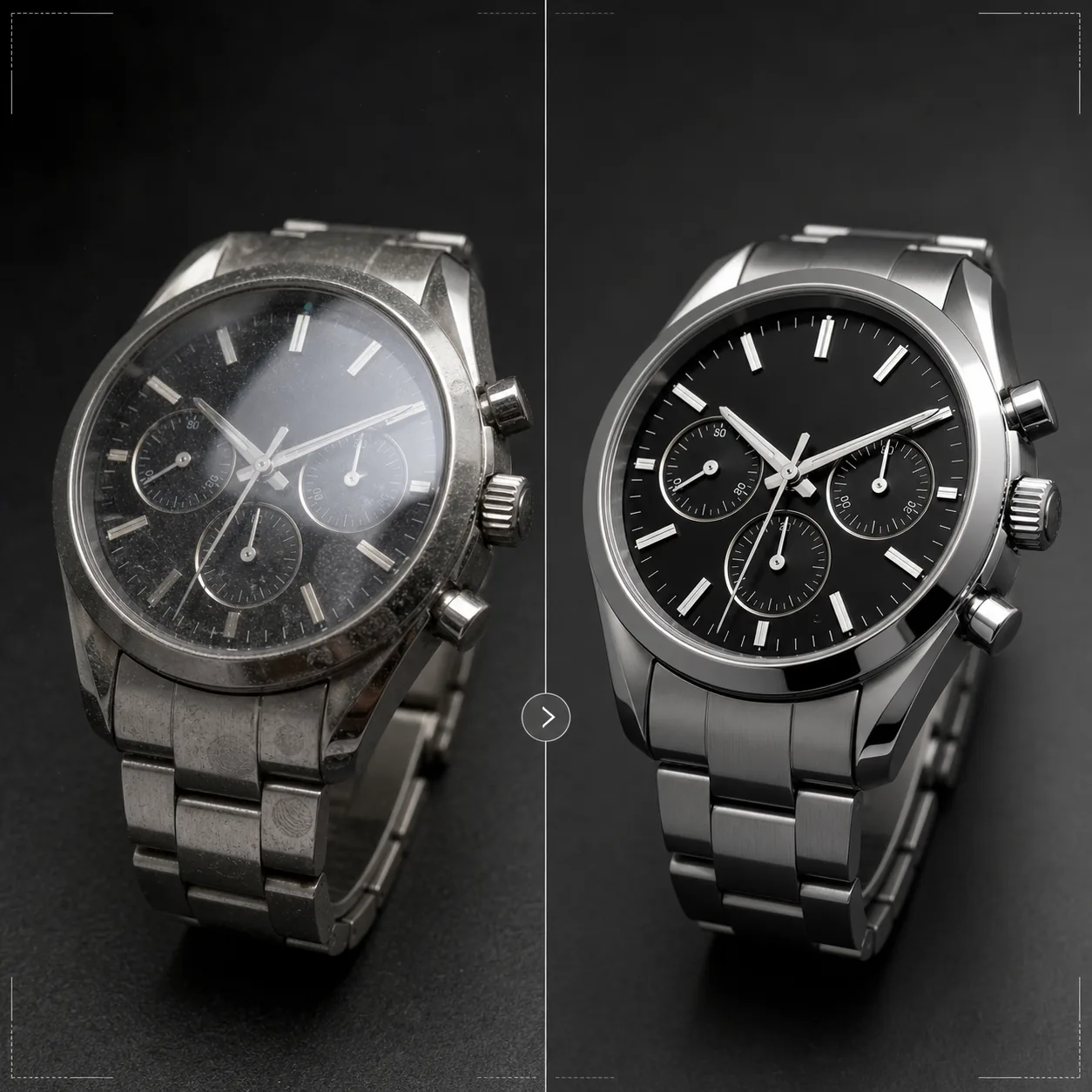
Präsentieren Sie Zeitmesser mit der Präzision, die sie verdienen. Diese Vorlage schärft Zifferblattdetails und Indizes, kontrolliert Glasreflexionen, betont die Metalltexturen von Armband und Gehäuse, entfernt Staub und Fingerabdrücke von polierten Oberflächen und bereitet das Bild für hochwertige E-Commerce-Listings und den Katalogeinsatz vor.
Diese Vorlage kostenlos testenE-commerce template preview
Was diese Vorlage leistet
Sie meistert die spezifischen Herausforderungen der Uhrenfotografie, bei der winzige Details für Käufer enorm wichtig sind. Zifferblätter enthalten feine Details — Indizes, Hilfszifferblätter, Datumsfenster, gedruckte Schrift —, die gestochen scharf sein müssen, damit das Bild Qualität vermittelt. Diese Vorlage nutzt AI Enhance, um Zifferblattelemente selektiv zu schärfen und das Gesamtbild dabei natürlich zu halten. Magic Eraser entfernt Staubpartikel, Fingerabdrücke auf polierten Gehäusen und kleine Kratzer auf Gläsern, die bei starker Vergrößerung sichtbar werden. Glasreflexionen werden reduziert, sodass das darunterliegende Zifferblatt klar erkennbar ist, und die Metalltexturen an Gehäusen und Armbändern werden betont, um den Unterschied zwischen gebürsteter und polierter Verarbeitung hervorzuheben, den Uhrenkäufer sorgfältig beurteilen.
Vorlageneinstellungen
| Zifferblattschärfung | Selektive Mikrodetail-Optimierung (Indizes, Zeiger, Schrift) |
| Glasreflexion | Blendung und Reflexionen auf Saphir-/Mineralglas reduzieren |
| Metalltextur | Unterscheidung zwischen gebürsteten und polierten Oberflächen betonen |
| Oberflächenreinigung | Staub, Fingerabdrücke und kleine Kratzer entfernen |
| Ausgabeauflösung | 4000 × 4000 px (Makrodetails für die Zoom-Ansicht) |
| Hintergrund | Reinweiß, dunkles Vollton oder Verlauf (Standard für Luxusprodukte) |
So verwenden Sie diese Vorlage
Laden Sie Ihr Uhrenfoto hoch
Laden Sie ein Produktfoto der Uhr hoch — Aufnahme am Handgelenk, Flatlay oder Studioaufbau auf Kissen oder Ständer. Makro-Nahaufnahmen des Zifferblatts und seitliche Gehäuseansichten werden ebenfalls unterstützt. Für beste Ergebnisse fotografieren Sie die Uhr in der Zeigerstellung 10:10, dem Branchenstandard, der das Logo einrahmt und eine ausgewogene, symmetrische Komposition schafft.
Zifferblatt- und Detailoptimierung
AI Enhance schärft das Zifferblatt selektiv — Stundenmarkierungen, Zeiger, Hilfszifferblätter, Datumsfenster und gedruckte Schrift werden klar und gut lesbar. Die Leuchtpunkte auf den Indizes werden leicht aufgehellt, um ihre Präsenz zu zeigen. Die Optimierung berücksichtigt die Schärfentiefe Ihrer Originalaufnahme und hält bewusst unscharfe Bereiche weich.
Oberflächenreinigung und Reflexionskontrolle
Magic Eraser entfernt Staubpartikel auf dem Zifferblatt, Fingerabdrücke auf Gehäuse und Armband sowie kleine Kratzer auf dem Glas. Glasreflexionen werden reduziert, um das gesamte darunterliegende Zifferblatt sichtbar zu machen, wobei genügend Reflexion erhalten bleibt, um die Präsenz des Glases zu vermitteln — werden Reflexionen vollständig entfernt, wirkt die Uhr unrealistisch flach.
Für Listing oder Katalog exportieren
Laden Sie in 4000 × 4000 px für zoomfähige E-Commerce-Listings oder in Druckauflösung für Kataloge und Anzeigen herunter. Zu den Hintergrundoptionen zählen Reinweiß für Marktplatz-Listings, dunkles Vollton für die Ästhetik von Luxusmarken und Verläufe für den redaktionellen Einsatz.
Profi-Tipps für beste Ergebnisse
- ✓Fotografieren Sie die Uhr mit den Zeigern auf 10:10 oder 10:08 — diese Stellung rahmt das Markenlogo zwischen den Zeigern ein, zeigt sowohl das Datumsfenster als auch die Hilfszifferblätter deutlich und schafft eine optisch ausgewogene Komposition, die in der gesamten Uhrenbranche verwendet wird.
- ✓Verwenden Sie ein Makroobjektiv oder den Nahaufnahmemodus, um die maximalen Zifferblattdetails einzufangen. Die Vorlage kann vorhandene Details schärfen, aber keine Details erzeugen, die nicht aufgenommen wurden — ein höher aufgelöstes Ausgangsbild mit mehr Zifferblattdetails liefert deutlich bessere Ergebnisse.
- ✓Bei Uhren mit Metallarmband richten Sie das Licht so aus, dass der Unterschied zwischen gebürsteten und polierten Oberflächen sichtbar wird. Die Vorlage verstärkt diesen Kontrast, doch beginnt man mit sichtbarer Oberflächendifferenzierung, entsteht das eindrucksvollste Ergebnis.
- ✓Reinigen Sie die Uhr unmittelbar vor der Aufnahme mit einem Mikrofasertuch. Magic Eraser entfernt zwar Staub und Fingerabdrücke, doch ein sauberer Ausgangszustand bedeutet weniger KI-Rekonstruktion und eine genauere Erhaltung der Metalltextur in den gereinigten Bereichen.
E-commerce workflow
Product photo hub
Use this template with the full ecommerce product photo workflow for marketplace backgrounds, cleanup, compression, resizing, and listing-ready exports.
View ecommerce product photo workflowHäufige Fragen
Kann das Fotos korrigieren, bei denen das Zifferblatt von einer Reflexion verdeckt ist?
+
Mäßige Reflexionen lassen sich reduzieren, um die darunterliegenden Zifferblattdetails sichtbar zu machen. Ist die Reflexion jedoch so stark, dass im Originalfoto keinerlei Zifferblattdetail erkennbar ist, kann die KI keine Details erzeugen, die nie aufgenommen wurden. Für beste Ergebnisse fotografieren Sie mit einer Lichtquelle, die so positioniert ist, dass direkte Reflexionen auf dem Glas minimiert werden.
Funktioniert das bei Smartwatches?
+
Ja. Smartwatch-Bildschirme werden mit geschärften Bedienelementen und reduzierten Fingerabdrücken auf dem Glas optimiert. Die Vorlage erkennt sowohl klassische analoge Zifferblätter als auch digitale Anzeigen und passt ihren Schärfungsansatz entsprechend an.
Was ist mit Uhrenbändern und -armbändern?
+
Lederarmbänder erhalten eine Texturoptimierung, die Narbung und Nahtdetails zeigt. NATO- und Stoffarmbänder erhalten eine dezente Texturschärfung. Metallarmbänder erhalten die Optimierung der gebürsteten/polierten Oberfläche. Die gesamte Uhr — Gehäuse, Glas, Zifferblatt und Armband — wird als vollständiges Produkt behandelt.
Beim Verkauf eines Zeitmessers zählt jedes Detail
Laden Sie Uhrenfotos hoch und erhalten Sie gestochen scharfe Zifferblattdetails, kontrollierte Reflexionen und Bildqualität in Schmuckqualität für Ihre Listings.
Kostenlos testenRelated templates
More e-commerce templates for your workflow.
Reinweiße Hintergrundvorlage für Produktfotos. Amazon-, Shopify- und Marketplace-fähige Einstellungen für saubere, professionelle Produktbilder, die konvertieren.
Für Etsy optimierte Fotovorlage für Einträge. Wandelt Lifestyle-Aufnahmen in saubere weiße Hintergründe mit 2000 Pixel um, verbessert handgefertigte Produktdetails und erfüllt die Bildrichtlinien von Etsy.
Für eBay optimierte Angebotsfotovorlage. Weißer Hintergrund für Galeriebilder, Verbesserung der Zustandsdokumentation und Mehrwinkel-Layouts, die den eBay-Bildstandards entsprechen.
Professionelle Schmuckfotografie-Vorlage für Ringe, Halsketten und Uhren. Kontrolliert Reflexionen, verstärkt das Glitzern von Edelsteinen und liefert marktreife Bilder auf sauberen Hintergründen.
Professionelle Möbelfotovorlage für Marktplatzangebote. Beseitigen Sie Unordnung im Raum, zeigen Sie echte Dimensionen und präsentieren Sie Stücke auf sauberen Hintergründen oder in stilvollen Raumkontexten.
Bereinigen Sie flach liegende Kleidungsfotos mit Faltenentfernung, Fusselentfernung, reinweißen Hintergründen und präziser Stofffarbe. Bereit für Shopify, Amazon und Boutiquen.