
Reinigung flach liegender Kleidung
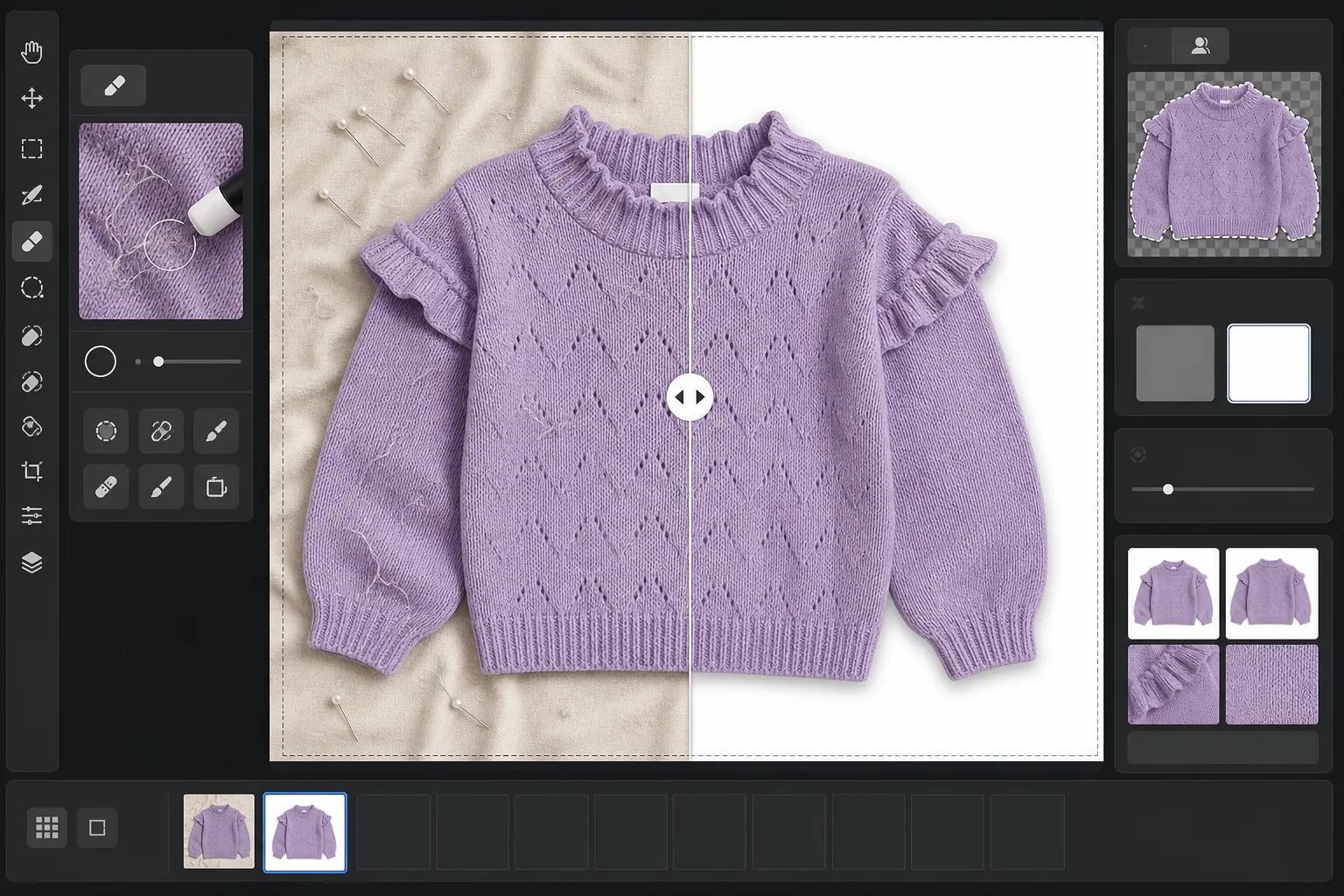
Verwandeln Sie rohe Fotos flach liegender Kleidung in marktplatzfertige Produktbilder. Diese Vorlage entfernt Falten, Fusseln, Tierhaare und lose Fäden, ersetzt unordentliche Hintergründe durch reines Weiß und korrigiert die Stofffarbe, sodass das, was Kunden auf dem Bildschirm sehen, dem entspricht, was im Paket ankommt.
Diese Vorlage kostenlos testenE-commerce template preview
Was diese Vorlage leistet
Sie behebt die häufigsten Probleme bei der Fotografie flach liegender Kleidung: Stofffalten durch Falten und Versand, Fusseln und Tierhaare, die die Kamera erfasst, das Auge aber übersieht, ungleichmäßige Hintergründe durch Bettlaken oder Nahtstellen von Pappplatten und ungenaue Stofffarben durch Mischlicht. Magic Eraser entfernt Schmutz an der Oberfläche, lose Fäden und Pflegeetiketten, die am Ausschnitt hervorstehen. Background Eraser isoliert das Kleidungsstück und platziert es auf einem sauberen weißen Hintergrund. AI Enhance korrigiert die Farbtemperatur, sodass Stofffarben auf Monitoren und in gedruckten Katalogen naturgetreu erscheinen.
Vorlageneinstellungen
| Hintergrund | Reines Weiß (#FFFFFF) mit 2px weicher Kantenglättung |
| Faltenreduzierung | Mittel (glättet Versandfalten, erhält gewollte Bügelfalten) |
| Farbgenauigkeit | sRGB mit automatischer Weißpunkt-Kalibrierung auf eine neutrale Graukarte |
| Fusselentfernung | Automatische Erkennung von Fasern, Haaren und Staub über 3px |
| Schatten | Dezenter Schlagschatten (4px Versatz, 15% Deckkraft) für Tiefe |
| Ausgabeabmessungen | Quadratischer 2000×2000px-Zuschnitt mit 10% Rand |
So verwenden Sie diese Vorlage
Laden Sie Ihr Flachlagefoto hoch
Fotografieren Sie das Kleidungsstück flach liegend auf einer beliebigen sauberen Oberfläche — einem Bett, einem Tisch oder einer Pappplatte. Der Hintergrund muss nicht perfekt weiß oder faltenfrei sein, da er ersetzt wird. Natürliches Tageslicht in Fensternähe liefert die naturgetreuesten Stofffarben.
Fusseln, Fäden und Etiketten entfernen
Magic Eraser erkennt und entfernt automatisch Fusseln, Tierhaare, lose Fäden und Pflegeetiketten, die über dem Ausschnitt oder Bund sichtbar sind. Sie können außerdem manuell Kleiderbügel, Klammern oder Stylingnadeln auswählen und entfernen, die im Bild verblieben sind.
Den Hintergrund ersetzen
Background Eraser isoliert das Kleidungsstück von der jeweiligen Aufnahmeoberfläche und platziert es auf einem reinweißen Hintergrund. Die Kantenerkennung folgt der tatsächlichen Kontur des Kleidungsstücks einschließlich Rüschen, Fransen und Spitzendetails, ohne feine Merkmale abzuschneiden.
Farbe korrigieren und exportieren
AI Enhance passt den Weißabgleich an, sodass die Stofffarbe auf dem Bildschirm dem physischen Kleidungsstück so genau wie möglich entspricht. Laden Sie das fertige Bild als quadratisches 2000x2000px-JPEG herunter, bereit für Shopify, Amazon, Etsy oder Ihren eigenen Shop — passend dimensioniert, um die Bildanforderungen der meisten Marktplätze zu erfüllen.
Profi-Tipps für beste Ergebnisse
- ✓Dämpfen oder bügeln Sie das Kleidungsstück nach Möglichkeit vor der Aufnahme. Die Faltenreduzierung bewältigt leichte Versandfalten gut, aber tief eingeprägte Faltlinien durch lange Lagerung lassen sich schwerer glätten, ohne den natürlichen Fall und die Textur des Stoffs zu beeinträchtigen.
- ✓Platzieren Sie eine kleine Graukarte oder eine Weißabgleich-Referenzkarte am Rand Ihres Bildausschnitts (außerhalb des endgültigen Zuschnittbereichs). Der Algorithmus für Farbgenauigkeit nutzt sie zur Kalibrierung des Weißpunkts und erzeugt Stofffarben, die deutlich genauer sind als ein automatischer Weißabgleich allein.
- ✓Achten Sie bei dunklen Stoffen auf weißem Hintergrund darauf, dass das Originalfoto genügend Kontrast zwischen der Kante des Kleidungsstücks und der Oberfläche aufweist. Schwarze Kleidung auf dunklem Holz lässt sich schwerer sauber freistellen als schwarze Kleidung auf einem hellgrauen oder weißen Laken.
- ✓Fotografieren Sie alle Kleidungsstücke im selben Durchgang unter derselben Beleuchtung, um die Farbkonsistenz in Ihrem Katalog zu wahren. Die gemeinsame Verarbeitung über diese Vorlage sorgt für einen einheitlichen Weißabgleich über die gesamte Produktlinie.
E-commerce workflow
Product photo hub
Use this template with the full ecommerce product photo workflow for marketplace backgrounds, cleanup, compression, resizing, and listing-ready exports.
View ecommerce product photo workflowHäufige Fragen
Lässt die Faltenentfernung den Stoff künstlich glatt aussehen?
+
Die Faltenreduzierung ist darauf abgestimmt, Falten durch Falten und Versand zu entfernen und dabei die natürliche Textur des Stoffs zu erhalten — Leinengewebe, Denim-Köper, Baumwollrippen und Strickmuster bleiben alle erhalten. Das Ergebnis sieht aus wie ein frisch gedämpftes Kleidungsstück und nicht wie eine digital gemalte Oberfläche.
Stimmen die Farben zwischen Foto und tatsächlichem Kleidungsstück überein?
+
Die Farbgenauigkeit hängt von der Beleuchtung Ihres Originalfotos ab. Bei natürlichem Tageslicht oder kalibriertem Studiolicht liefert der Algorithmus zur Farbkorrektur Ergebnisse innerhalb eines Delta-E von 3 zum physischen Kleidungsstück auf einem kalibrierten Monitor. Bei starkem Leuchtstoff- oder Glühlampenlicht ist die Verbesserung erheblich, eine exakte Übereinstimmung erfordert jedoch eine Graukarte als Referenz.
Welche Marktplätze akzeptieren diese Abmessungen?
+
Die quadratische 2000x2000px-Ausgabe erfüllt die Bildanforderungen von Amazon, Shopify, Etsy, eBay, Poshmark und den meisten anderen E-Commerce-Plattformen. Amazon empfiehlt für die Zoomfunktion mindestens 1000px an der längsten Seite, und 2000px übertrifft dies mit komfortablem Abstand.
Bieten Sie Kleidung an, die online genauso gut aussieht wie in echt
Laden Sie Flachlagefotos hoch und erhalten Sie fusselfreie, faltengeglättete Produktbilder mit weißem Hintergrund, bereit für jede E-Commerce-Plattform.
Kostenlos testenRelated templates
More e-commerce templates for your workflow.
Reinweiße Hintergrundvorlage für Produktfotos. Amazon-, Shopify- und Marketplace-fähige Einstellungen für saubere, professionelle Produktbilder, die konvertieren.
Für Etsy optimierte Fotovorlage für Einträge. Wandelt Lifestyle-Aufnahmen in saubere weiße Hintergründe mit 2000 Pixel um, verbessert handgefertigte Produktdetails und erfüllt die Bildrichtlinien von Etsy.
Für eBay optimierte Angebotsfotovorlage. Weißer Hintergrund für Galeriebilder, Verbesserung der Zustandsdokumentation und Mehrwinkel-Layouts, die den eBay-Bildstandards entsprechen.
Professionelle Schmuckfotografie-Vorlage für Ringe, Halsketten und Uhren. Kontrolliert Reflexionen, verstärkt das Glitzern von Edelsteinen und liefert marktreife Bilder auf sauberen Hintergründen.
Professionelle Möbelfotovorlage für Marktplatzangebote. Beseitigen Sie Unordnung im Raum, zeigen Sie echte Dimensionen und präsentieren Sie Stücke auf sauberen Hintergründen oder in stilvollen Raumkontexten.
Erstellen Sie Amazon-konforme Produktfotos mit reinweißem Hintergrund, korrekter Beleuchtungskorrektur und optimierten Abmessungen für Haupt- und Nebenangebotsbilder.