
eBay-Angebotsfoto
Erstellen Sie eBay-Angebote, die in den Suchergebnissen hervorstechen und das Vertrauen der Käufer gewinnen. Diese Vorlage erzeugt saubere Galeriebilder mit weißem Hintergrund, verbessert Detailaufnahmen vom Zustand gebrauchter Artikel und stellt sicher, dass jedes Foto das eBay-Minimum von 500px mit Spielraum für die Zoomfunktion erfüllt.
Diese Vorlage kostenlos testenE-commerce template preview
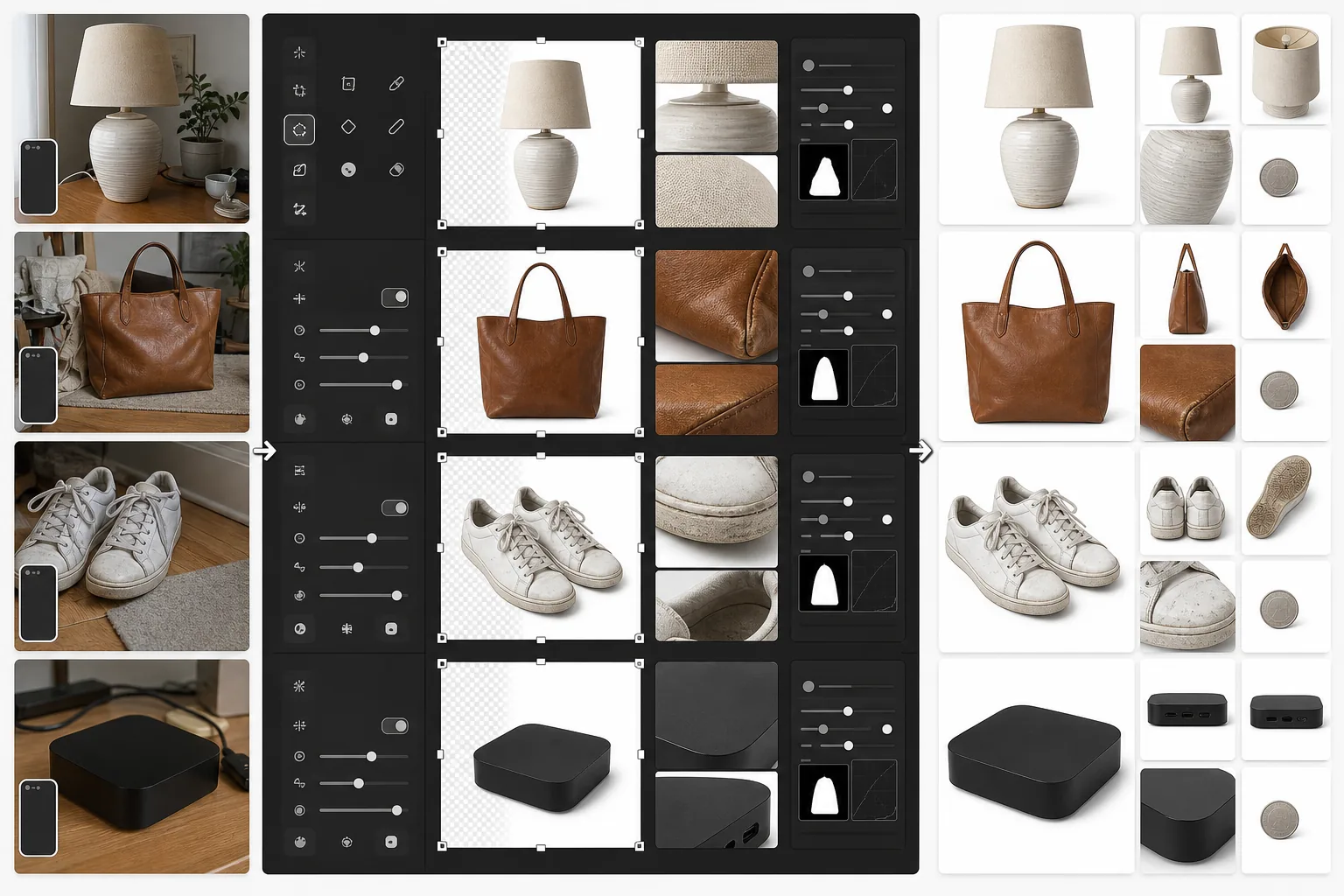
Was diese Vorlage leistet
Bereitet Produktfotos speziell für eBay-Angebote auf. Das Hauptbild erhält einen sauberen weißen Hintergrund, um in den eBay-Suchergebnissen und beim Durchsuchen der Kategorien gut abzuschneiden. Sekundärbilder werden verbessert, um den Artikelzustand deutlich zu zeigen — Kratzer, Abnutzungsspuren, Etiketten und Seriennummern werden gestochen scharf sichtbar. Magic Eraser entfernt das Hintergrunddurcheinander aus Zustandsaufnahmen, ohne den Artikel selbst zu beeinträchtigen.
Vorlageneinstellungen
| Hauptbildgröße | 1600×1600px (quadratisch, überschreitet das eBay-Minimum von 500px) |
| Hintergrund (Hauptbild) | Reinweiß (#FFFFFF) für das Galerie-Vorschaubild |
| Zustandsdetailmodus | Mikrokontrast-Verstärkung für Kratzer, Etiketten und Abnutzung |
| Dateiformat | JPEG 90% Qualität (unter dem eBay-Limit von 12MB) |
| Farbprofil | sRGB (Webstandard) |
| Wasserzeichen | Keines (eBay verbietet Wasserzeichen auf Angebotsbildern) |
So verwenden Sie diese Vorlage
Laden Sie Ihre Artikelfotos hoch
Fotografieren Sie Ihren Artikel von vorne, hinten, von den Seiten und mit Nahaufnahmen aller Zustandsdetails wie Kratzer, Etiketten oder Seriennummern. Verwenden Sie natürliches Licht und vermeiden Sie Blitz, der Details verblassen lassen und Blendungen auf reflektierenden Oberflächen erzeugen kann.
Erstellen Sie das Galeriebild
Background Eraser isoliert den Artikel und platziert ihn für das Hauptangebotsfoto auf reinem Weiß. Der Suchalgorithmus von eBay bevorzugt Bilder mit weißem Hintergrund, und sie schneiden in den Suchergebnissen für 'Buy It Now' und Auktionen deutlich besser ab.
Verbessern Sie die Zustandsdokumentation
Bei gebrauchten, generalüberholten oder Vintage-Artikeln wendet AI Enhance eine Mikrokontrast-Schärfung an, die Zustandsdetails deutlich sichtbar macht — Schrammen, Patina, Fusseln im Stoff und Echtheitsmerkmale. Magic Eraser entfernt das Hintergrunddurcheinander aus Detailaufnahmen, ohne den Artikel zu berühren.
Exportieren Sie Ihr Angebotsfoto-Set
Laden Sie alle Bilder in 1600×1600px herunter. eBay erlaubt bis zu 24 Fotos pro Angebot — nutzen Sie das vollständige Set für das beste Käufervertrauen und die niedrigste Rücksendequote.
Profi-Tipps für beste Ergebnisse
- ✓Fotografieren Sie den Artikel für das Hauptgaleriebild vor einem beliebigen kontrastreichen Hintergrund. Den Rest erledigt Background Eraser. Ein dunkler Artikel auf heller Oberfläche (oder umgekehrt) ergibt die sauberste Kantenerkennung.
- ✓Dokumentieren Sie jeden Mangel bei gebrauchten Artikeln mit Nahaufnahmen. Verbesserte Zustandsbilder reduzieren Rücksendungen wegen 'Artikel weicht von der Beschreibung ab', was Ihre Verkäuferbewertung schützt und Ihre Angebote sichtbar hält.
- ✓Fügen Sie ein Foto mit einem alltäglichen Gegenstand als Maßstab hinzu — eine Münze neben kleiner Elektronik oder ein Stift neben Kleidungsstücken. eBay-Käufer schätzen die Größe anhand reiner Produktfotos häufig falsch ein.
- ✓Fotografieren Sie Elektronik und Sammlerstücke mit deutlich sichtbaren Seriennummern und Echtheitsmerkmalen. Die Detailschärfung von AI Enhance macht diese selbst auf leicht schräg aufgenommenen Smartphone-Fotos lesbar.
E-commerce workflow
Product photo hub
Use this template with the full ecommerce product photo workflow for marketplace backgrounds, cleanup, compression, resizing, and listing-ready exports.
View ecommerce product photo workflowHäufige Fragen
Verlangt eBay einen weißen Hintergrund?
+
eBay verlangt nicht strikt weiße Hintergründe, aber sein Suchalgorithmus und das Best-Match-Ranking bevorzugen saubere Hauptbilder mit weißem Hintergrund. Angebote mit Galeriefotos auf weißem Hintergrund erhalten in den Suchergebnissen von eBay durchweg mehr Impressionen und höhere Klickraten.
Kann ich Wasserzeichen oder Logos aus meinen Fotos entfernen?
+
eBay verbietet Wasserzeichen, Rahmen und Textüberlagerungen auf Angebotsbildern. Diese Vorlage erzeugt saubere Bilder ohne hinzugefügte Elemente. Wenn Ihre Kamera einen Datumsstempel hinzufügt, kann Magic Eraser ihn entfernen.
Wie viele Fotos sollte ich pro Angebot einfügen?
+
Verwenden Sie so viele, wie der Zustand erfordert — eBay erlaubt bis zu 24 kostenlose Fotos. Für neue Artikel reichen in der Regel 4 bis 6 Blickwinkel. Bei gebrauchten Artikeln fügen Sie jeden Blickwinkel sowie Nahaufnahmen aller Abnutzungen, Etiketten und Zubehörteile hinzu. Mehr Fotos korrelieren mit höheren Verkaufsquoten und weniger Käuferstreitigkeiten.
Erstellen Sie eBay-Angebote, die schneller verkaufen
Laden Sie Ihre Artikelfotos hoch und erhalten Sie in Sekunden suchoptimierte Galeriebilder sowie eine verbesserte Zustandsdokumentation.
Kostenlos testenRelated templates
More e-commerce templates for your workflow.
Reinweiße Hintergrundvorlage für Produktfotos. Amazon-, Shopify- und Marketplace-fähige Einstellungen für saubere, professionelle Produktbilder, die konvertieren.
Für Etsy optimierte Fotovorlage für Einträge. Wandelt Lifestyle-Aufnahmen in saubere weiße Hintergründe mit 2000 Pixel um, verbessert handgefertigte Produktdetails und erfüllt die Bildrichtlinien von Etsy.
Professionelle Schmuckfotografie-Vorlage für Ringe, Halsketten und Uhren. Kontrolliert Reflexionen, verstärkt das Glitzern von Edelsteinen und liefert marktreife Bilder auf sauberen Hintergründen.
Professionelle Möbelfotovorlage für Marktplatzangebote. Beseitigen Sie Unordnung im Raum, zeigen Sie echte Dimensionen und präsentieren Sie Stücke auf sauberen Hintergründen oder in stilvollen Raumkontexten.
Bereinigen Sie flach liegende Kleidungsfotos mit Faltenentfernung, Fusselentfernung, reinweißen Hintergründen und präziser Stofffarbe. Bereit für Shopify, Amazon und Boutiquen.
Erstellen Sie Amazon-konforme Produktfotos mit reinweißem Hintergrund, korrekter Beleuchtungskorrektur und optimierten Abmessungen für Haupt- und Nebenangebotsbilder.