
Foto für Möbelangebote
Verkaufen Sie Möbel schneller mit sauberen, professionellen Angebotsfotos. Diese Vorlage entfernt Unordnung im Raum und persönliche Gegenstände aus dem Hintergrund, korrigiert Farbverfälschungen durch Innenbeleuchtung und präsentiert jedes Stück im besten Zustand – egal ob Sie einen weißen Hintergrund für die Marktplatzanforderungen oder einen stilvollen Raumkontext für Lifestyle-Appeal benötigen.
Diese Vorlage kostenlos testenE-commerce template preview
Was diese Vorlage macht
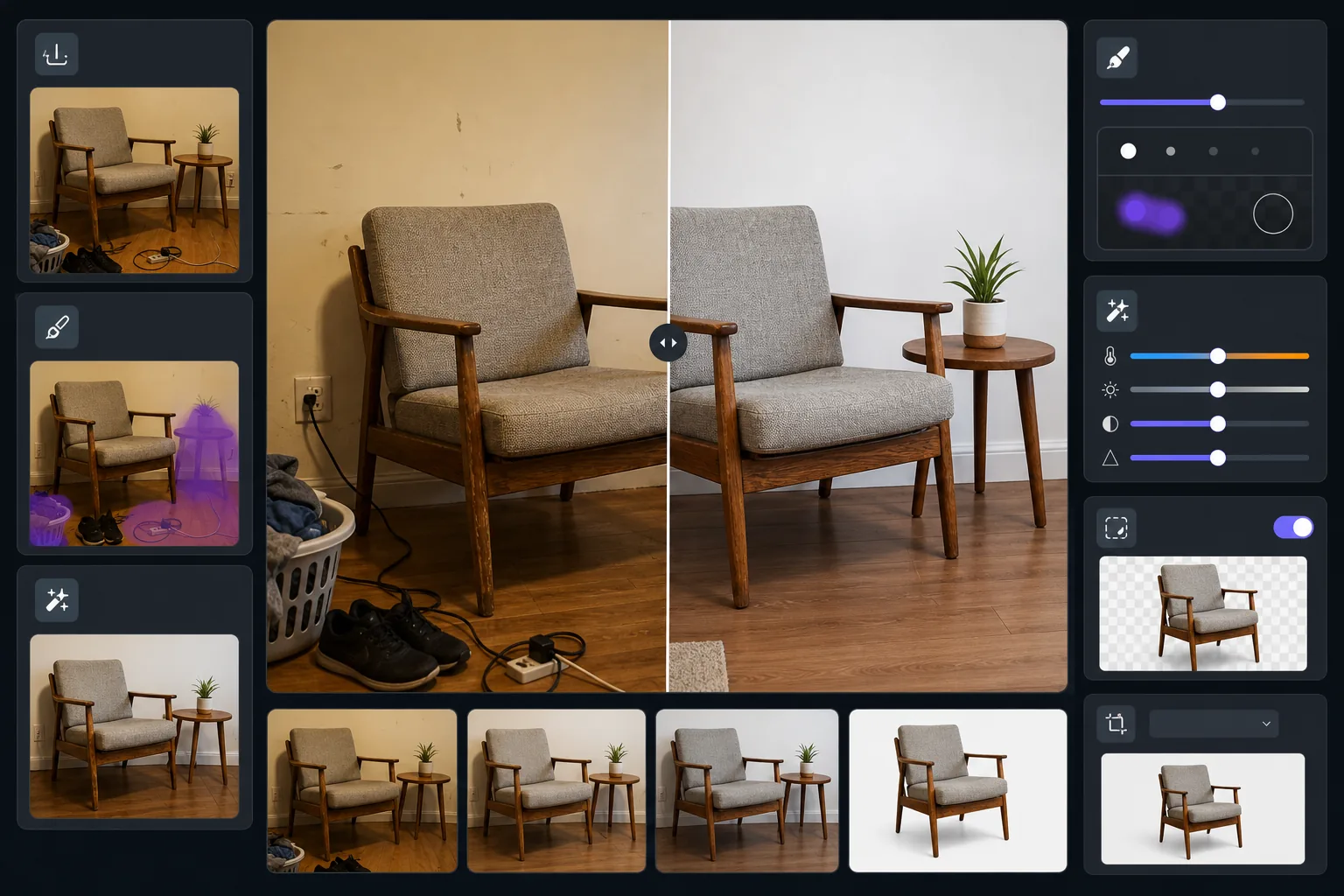
Verwandelt Möbelfotos aus bewohnten Räumen in geschliffene Angebotsbilder. Magic Eraser entfernt umgebende Unordnung, persönliche Gegenstände und im Bild sichtbare Wandschäden. AI Enhance korrigiert den gelben Farbstich der Innenbeleuchtung, um echte Holztöne und Stofffarben zu zeigen. Background Eraser kann das Stück vollständig freistellen, für einen sauberen weißen Hintergrund, der den Angebotsstandards von Facebook Marketplace, Craigslist und Chairish entspricht.
Vorlageneinstellungen
| Hintergrundmodus | Sauberes Weiß oder aufgeräumter Raumkontext (wählbar) |
| Ausgabegröße | 2000×1500px (4:3 Querformat, Angebotsstandard) |
| Farbkorrektur | Weißabgleich von Innenraum zu Tageslicht |
| Entfernung von Unordnung | Automatisch – entfernt Objekte innerhalb von 12 inches um die Möbelkanten |
| Detailverbesserung | Texturbewusst – schärft Holzmaserung, Stoffgewebe und Beschläge |
| Zustandsdokumentation | Bewahrt Gebrauchsspuren und Patina für eine ehrliche Darstellung |
So verwenden Sie diese Vorlage
Fotografieren Sie das Möbelstück
Treten Sie weit genug zurück, um das gesamte Stück mit etwas Raum drumherum zu erfassen. Fotografieren Sie bei Stühlen und Tischen aus stehender Augenhöhe, bei niedrigen Stücken wie Couchtischen aus sitzender Höhe. Schalten Sie alle Raumlichter ein und öffnen Sie die Vorhänge für eine gleichmäßige Ausleuchtung.
Umgebende Unordnung entfernen
Magic Eraser erkennt und entfernt automatisch Objekte in der Nähe – Schuhe auf dem Boden, Gegenstände auf angrenzenden Flächen, Wanddekorationen und Stromkabel. Das Ergebnis zeigt nur das Möbelstück in einer sauberen Umgebung.
Farbe korrigieren und Details verbessern
AI Enhance entfernt den warmgelben oder kühl-fluoreszierenden Farbstich von Innenaufnahmen und enthüllt die echte Farbe von Holzbeizen, Polsterstoffen und Metallbeschlägen. Die Texturschärfung bringt Maserungsmuster und Nahtdetails hervor, die Käufer prüfen möchten.
Hintergrund wählen und exportieren
Behalten Sie den aufgeräumten Raumkontext für Lifestyle-Appeal bei oder wechseln Sie für die Marktplatzkonformität zu reinem Weiß. Exportieren Sie in angebotsoptimierten Abmessungen, die schnell laden und dabei zoomwürdige Details bewahren.
Profi-Tipps für beste Ergebnisse
- ✓Legen Sie vor dem Entfernen einen alltäglichen Gegenstand wie ein Buch oder eine Tasse auf die Möbeloberfläche – so können Käufer die Größe anhand des Vorher-Bildes einschätzen, während das Nachher-Bild sauber bleibt.
- ✓Fotografieren Sie gepolsterte Stücke aus einem Dreiviertelwinkel, um Vorderseite und Seitenprofil in einer Aufnahme zu zeigen.
- ✓Fotografieren Sie Holzmöbel tagsüber in Fensternähe, um genaue Holztöne einzufangen – Kunstlicht lässt Eiche orange und Nussbaum schlammbraun erscheinen.
- ✓Machen Sie eine Weitwinkelaufnahme und eine Nahaufnahme bemerkenswerter Details (Verbindungen, Beschläge, Stofftextur) und bearbeiten Sie beide mit dieser Vorlage für ein vollständiges Angebot.
E-commerce workflow
Product photo hub
Use this template with the full ecommerce product photo workflow for marketplace backgrounds, cleanup, compression, resizing, and listing-ready exports.
View ecommerce product photo workflowHäufige Fragen
Verbirgt das Schäden oder Abnutzung am Möbel?
+
Nein, und das ist Absicht. Die Vorlage bewahrt vorhandene Gebrauchsspuren, Kratzer und Patina am Möbel selbst – sie entfernt nur die umgebende Unordnung und korrigiert die Beleuchtungsfarbe. Eine ehrliche Zustandsdarstellung schafft Käufervertrauen und reduziert Rückgabestreitigkeiten.
Kann ich das Stück in einer Raumumgebung ohne das Durcheinander zeigen?
+
Ja. Der Modus für aufgeräumten Raumkontext entfernt persönliche Gegenstände, Unordnung und Ablenkungen, während Wände, Boden und die allgemeine Raumumgebung erhalten bleiben. Käufer sehen das Möbel in einer realistischen Umgebung ohne das visuelle Rauschen eines bewohnten Raums.
Welche Abmessungen eignen sich für Facebook Marketplace und Craigslist?
+
Die Standardausgabe von 2000×1500px funktioniert auf allen großen Plattformen. Facebook Marketplace zeigt Bilder mit 1200px Breite an, und Craigslist akzeptiert bis zu 600×450px – die Vorlagenausgabe sieht in jeder dieser Anzeigegrößen scharf aus.
Stellen Sie Möbel ein, die auf den ersten Blick verkaufen
Laden Sie Ihr Möbelfoto hoch und erhalten Sie in Sekunden ein sauberes, professionelles Angebotsbild. Kein Styling, kein Fotostudio, keine Designkenntnisse erforderlich.
Kostenlos testenRelated templates
More e-commerce templates for your workflow.
Reinweiße Hintergrundvorlage für Produktfotos. Amazon-, Shopify- und Marketplace-fähige Einstellungen für saubere, professionelle Produktbilder, die konvertieren.
Für Etsy optimierte Fotovorlage für Einträge. Wandelt Lifestyle-Aufnahmen in saubere weiße Hintergründe mit 2000 Pixel um, verbessert handgefertigte Produktdetails und erfüllt die Bildrichtlinien von Etsy.
Für eBay optimierte Angebotsfotovorlage. Weißer Hintergrund für Galeriebilder, Verbesserung der Zustandsdokumentation und Mehrwinkel-Layouts, die den eBay-Bildstandards entsprechen.
Professionelle Schmuckfotografie-Vorlage für Ringe, Halsketten und Uhren. Kontrolliert Reflexionen, verstärkt das Glitzern von Edelsteinen und liefert marktreife Bilder auf sauberen Hintergründen.
Bereinigen Sie flach liegende Kleidungsfotos mit Faltenentfernung, Fusselentfernung, reinweißen Hintergründen und präziser Stofffarbe. Bereit für Shopify, Amazon und Boutiquen.
Erstellen Sie Amazon-konforme Produktfotos mit reinweißem Hintergrund, korrekter Beleuchtungskorrektur und optimierten Abmessungen für Haupt- und Nebenangebotsbilder.