
Fahrzeuginventar-Foto
Verwandeln Sie Fotos vom Hof in Fahrzeugbilder in Ausstellungsraumqualität für Online-Inventarlisten. Diese Vorlage entfernt überladene Händlerhintergründe — andere Autos, Schilder, Gebäude — und ersetzt sie durch einen sauberen weißen, grauen oder studioartigen Hintergrund. Magic Eraser bereinigt Reflexionen auf der Windschutzscheibe, Details des Kennzeichens und Aufkleber vom Hof, während die Farbkorrektur sicherstellt, dass der Lack unter jeder Beleuchtung naturgetreu erscheint.
Diese Vorlage kostenlos testenE-commerce template preview
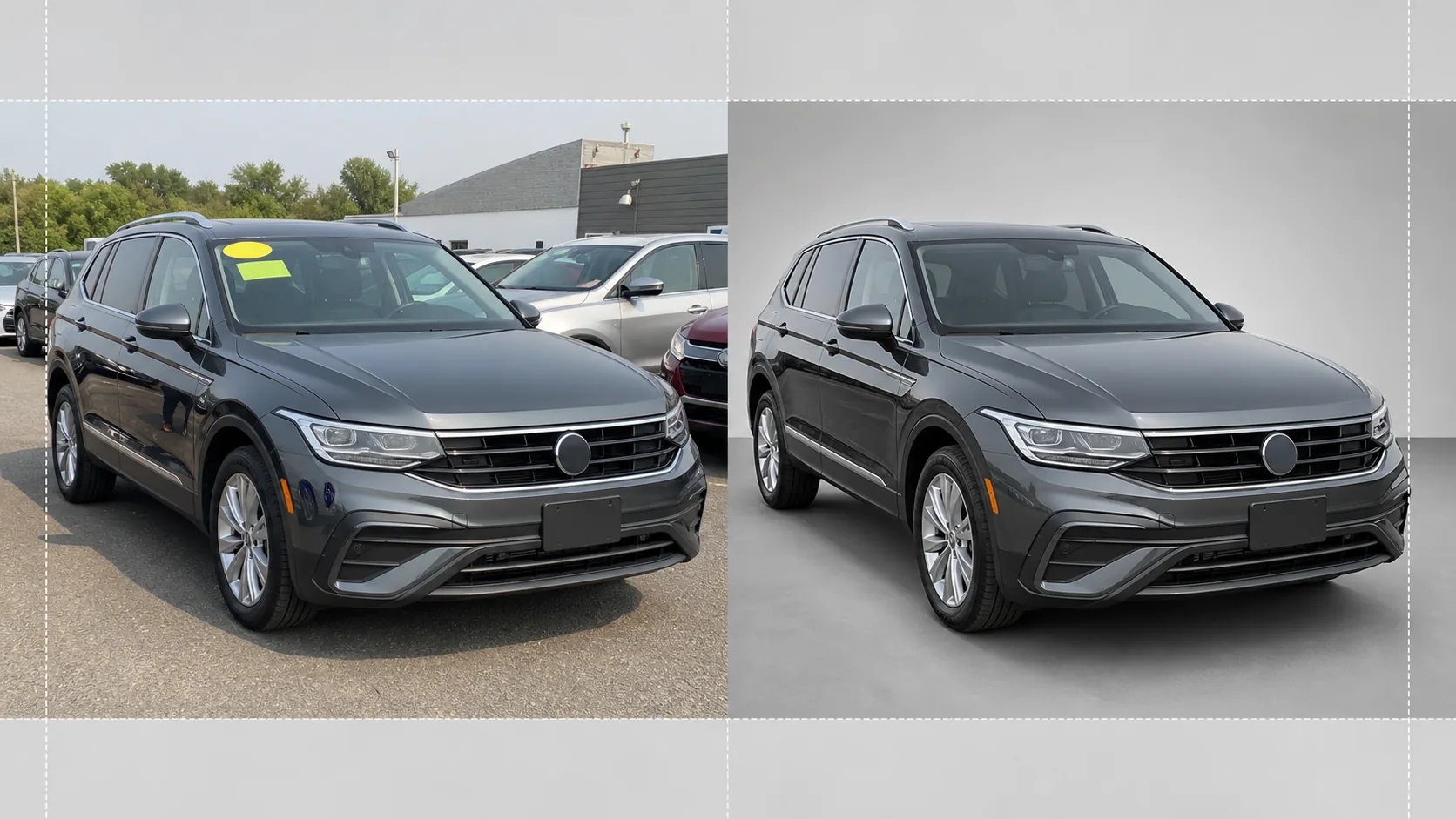
Was diese Vorlage macht
Übernimmt den gesamten Arbeitsablauf für die Inventarfotografie von Händlern. Background Eraser isoliert das Fahrzeug aus der Hofumgebung und ersetzt den Hintergrund durch einen sauberen studioartigen Hintergrund, der die gesamte Aufmerksamkeit auf das Auto, den Lkw oder den SUV lenkt. Magic Eraser entfernt Preisaufkleber von der Windschutzscheibe, Hofschilder, Kennzeichen (zum Schutz der Privatsphäre) sowie Reflexionen des Fotografen oder umstehender Fahrzeuge im glänzenden Lack und Glas. Die Farbkorrektur normalisiert die Lackfarbe, sodass Fotos, die bei bedecktem Himmel, unter Natriumlicht auf dem Parkplatz oder in greller Mittagssonne aufgenommen wurden, alle denselben präzisen Lackton zeigen. Das fertige Bild wird zugeschnitten und ausgerichtet, sodass das Fahrzeug über Ihr gesamtes Inventar hinweg zentriert und horizontal sitzt.
Vorlageneinstellungen
| Hintergrund | Studioweiß, neutrales Grau oder Ausstellungsraumboden mit Farbverlauf |
| Reflexionsbereinigung | Entfernt Fotograf, Unordnung auf dem Hof und benachbarte Autos aus Reflexionen auf Lack und Glas |
| Lackfarbkorrektur | Normalisierung auf das Erscheinungsbild des Herstellerlackcodes bei neutralem Tageslicht |
| Schwärzung zum Datenschutz | Kennzeichen automatisch unkenntlich machen oder entfernen |
| Zuschneiden und ausrichten | Fahrzeug automatisch zentrieren, am Horizont ausrichten, Seitenverhältnis 16:9 |
| Ausgabeauflösung | 3000×1688px (optimiert für AutoTrader, Cars.com und Händler-Websites) |
So verwenden Sie diese Vorlage
Hoffoto hochladen
Laden Sie ein Foto des Fahrzeugs hoch, das auf dem Händlerhof aufgenommen wurde. Ein Dreiviertel-Frontwinkel ist ideal, aber auch Seitenprofile und Heckwinkel funktionieren. Die Vorlage kommt mit Smartphones, Kompaktkameras und professionellen Setups gleichermaßen zurecht.
Hintergrund und Ablenkungen entfernen
Background Eraser schneidet die Hofumgebung aus und ersetzt sie durch einen sauberen Hintergrund. Magic Eraser entfernt Aufkleber von der Windschutzscheibe, Hofnummernschilder, Preisaufkleber und den Text auf Kennzeichen. Reflexionen benachbarter Autos und des Fotografen in Lack und Scheiben werden automatisch bereinigt.
Farbe und Belichtung korrigieren
Die Lackfarbe wird normalisiert, um dem vom Hersteller beabsichtigten Ton bei neutralem Tageslicht zu entsprechen. Überbelichtete Lichter auf Chrom und Glas werden wiederhergestellt, und Schattendetails unter Radkästen und Stoßstangen werden aufgehellt, für ein gleichmäßiges Erscheinungsbild in Ausstellungsraumqualität.
Für Inventarliste exportieren
Laden Sie das fertige Bild in 3000×1688px im Seitenverhältnis 16:9 herunter. Das Format ist optimiert für AutoTrader, Cars.com, CarGurus, Facebook Marketplace und Ihr Händlerverwaltungssystem. Für Aufnahmen des gesamten Hofinventars steht eine Stapelverarbeitung zur Verfügung.
Profi-Tipps für beste Ergebnisse
- ✓Fotografieren Sie das Fahrzeug aus einem Dreiviertel-Frontwinkel auf Stoßstangenhöhe. Das erfasst sowohl die Frontpartie als auch das Seitenprofil in einem einzigen Bild und ist der am häufigsten angeklickte Winkel in Online-Inventarlisten.
- ✓Vermeiden Sie Aufnahmen in direkter, hoch stehender Sonne — sie erzeugt harte Schatten unter dem Auto und ausgebrannte Lichter auf Dach und Motorhaube. Bedeckte Tage oder schattige Bereiche des Hofs liefern die gleichmäßigste Beleuchtung, mit der die KI arbeiten kann.
- ✓Entfernen Sie nach Möglichkeit den Preisaufkleber von der Windschutzscheibe vor der Aufnahme. Die KI kann ihn zwar digital entfernen, doch große Aufkleber, die Details des Armaturenbretts verdecken, hinterlassen manchmal eine leichte Kontur, die manuelle Nachbearbeitung erfordert.
- ✓Halten Sie das Fahrzeug vor dem Fotografieren sauber. Die Vorlage korrigiert Beleuchtung und Hintergrund, aber Schmutz, Wasserflecken und Vogelkot auf dem Lack lassen sich besser mit einer schnellen Wäsche als mit KI-Retusche beheben.
E-commerce workflow
Product photo hub
Use this template with the full ecommerce product photo workflow for marketplace backgrounds, cleanup, compression, resizing, and listing-ready exports.
View ecommerce product photo workflowHäufige Fragen
Kann ich ein ganzes Inventar auf einmal verarbeiten?
+
Ja. Laden Sie mehrere Fahrzeugfotos hoch, und die Vorlage wendet dieselben Einstellungen für Hintergrund, Farbkorrektur und Bereinigung auf jedes einzelne an. Das sorgt für visuelle Konsistenz über Ihr gesamtes Online-Inventar hinweg.
Wird die Lackfarbe genau sein?
+
Die Farbkorrektur normalisiert den Lack, sodass er seinem Erscheinungsbild bei neutralem Tageslicht (5500K) entspricht. Wenn Sie den Herstellerlackcode kennen, verwendet die KI ihn als Referenz, damit die Farbe auf dem Bildschirm dem realen Fahrzeug möglichst nahekommt.
Funktioniert es für Motorräder und Boote?
+
Ja. Die Hintergrundentfernung und Reflexionsbereinigung funktionieren für jeden Fahrzeugtyp, einschließlich Motorräder, Boote, Wohnmobile und schwere Lkw. Die automatische Zentrierung und das Zuschneideverhältnis müssen bei nicht standardmäßigen Fahrzeugproportionen möglicherweise manuell angepasst werden.
Lassen Sie jedes Fahrzeug auf Ihrem Hof wie für den Ausstellungsraum bereit aussehen
Laden Sie Fotos vom Händlerhof hoch und erhalten Sie in Sekunden saubere, konsistente, professionelle Inventarbilder.
Kostenlos testenRelated templates
More e-commerce templates for your workflow.
Reinweiße Hintergrundvorlage für Produktfotos. Amazon-, Shopify- und Marketplace-fähige Einstellungen für saubere, professionelle Produktbilder, die konvertieren.
Für Etsy optimierte Fotovorlage für Einträge. Wandelt Lifestyle-Aufnahmen in saubere weiße Hintergründe mit 2000 Pixel um, verbessert handgefertigte Produktdetails und erfüllt die Bildrichtlinien von Etsy.
Für eBay optimierte Angebotsfotovorlage. Weißer Hintergrund für Galeriebilder, Verbesserung der Zustandsdokumentation und Mehrwinkel-Layouts, die den eBay-Bildstandards entsprechen.
Professionelle Schmuckfotografie-Vorlage für Ringe, Halsketten und Uhren. Kontrolliert Reflexionen, verstärkt das Glitzern von Edelsteinen und liefert marktreife Bilder auf sauberen Hintergründen.
Professionelle Möbelfotovorlage für Marktplatzangebote. Beseitigen Sie Unordnung im Raum, zeigen Sie echte Dimensionen und präsentieren Sie Stücke auf sauberen Hintergründen oder in stilvollen Raumkontexten.
Bereinigen Sie flach liegende Kleidungsfotos mit Faltenentfernung, Fusselentfernung, reinweißen Hintergründen und präziser Stofffarbe. Bereit für Shopify, Amazon und Boutiquen.