
Sonnenbrillen-Produktfoto
Erstellen Sie E-Commerce-fertige Sonnenbrillenfotos mit sauberen Hintergründen, präzisen Glastönungsfarben und reflexionsfreien Oberflächen. Diese Vorlage entfernt unerwünschte Reflexionen von Gläsern und Fassungen, ersetzt unruhige Hintergründe durch reines Weiß oder gestaltete Oberflächen und hebt Materialdetails hervor, sodass Kunden Fassungstexturen, Scharnierkonstruktion und die Verlaufsübergänge der Gläser klar erkennen können.
Diese Vorlage kostenlos testenE-commerce template preview
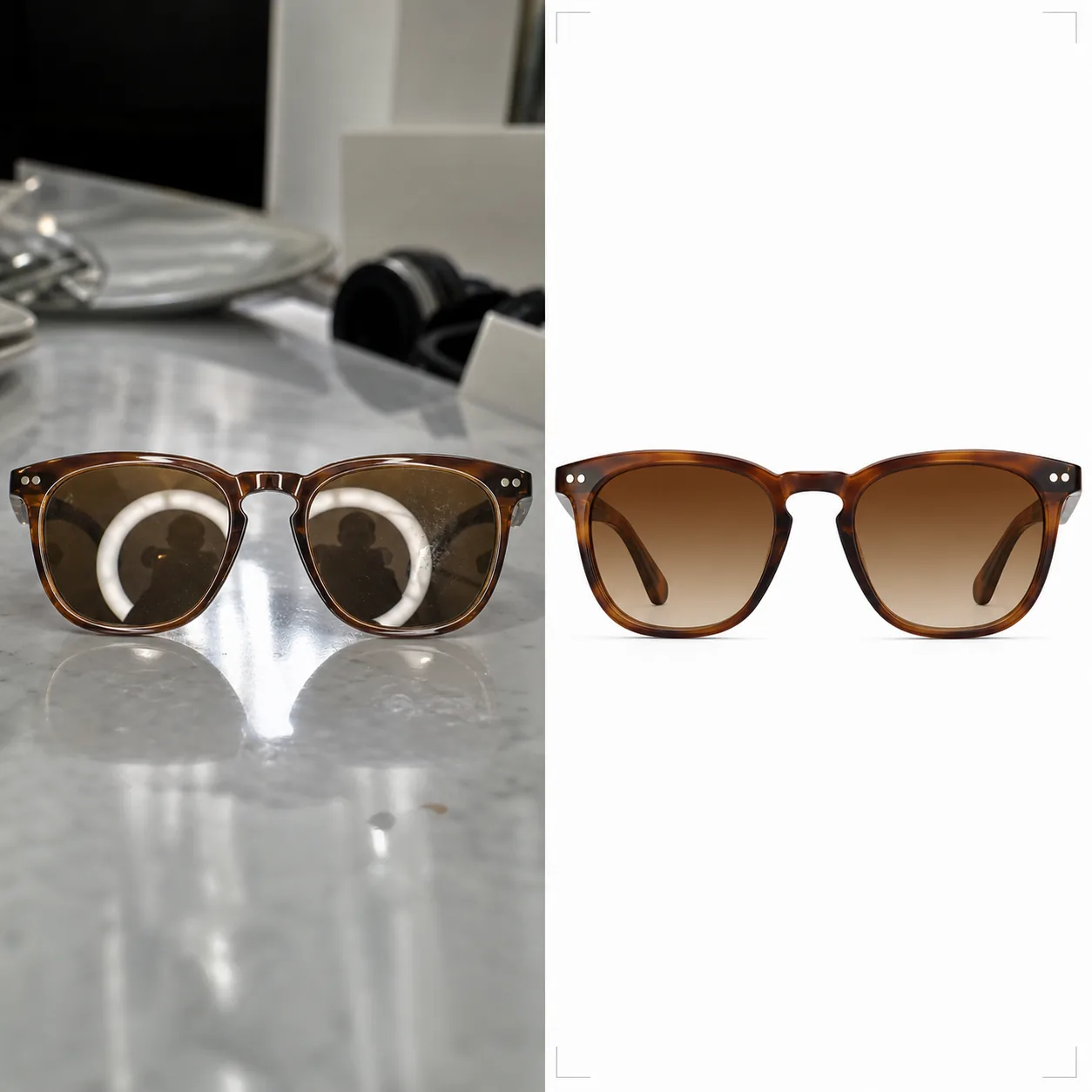
Was diese Vorlage leistet
Sie bewältigt die besonderen Herausforderungen beim Fotografieren von Brillen für den Online-Handel. Sonnenbrillen gehören zu den am schwierigsten zu fotografierenden Produkten, da jede gekrümmte Oberfläche das Studio, die Kamera und den Fotografen spiegelt. Background Eraser löst die Sonnenbrille von jeder Oberfläche und ersetzt den Hintergrund durch reines Weiß (marktplatzkonform), neutrales Grau oder eine gestaltete Oberfläche wie Marmor oder Holz. AI Enhance entfernt unerwünschte Reflexionen von Gläsern und Metallfassungen und bewahrt zugleich die beabsichtigte Spiegelung, die das Produkt attraktiv macht. Die Glastönungsfarben werden an die Herstellervorgaben angepasst, sodass bernsteinfarbene, grüne, graue und Verlaufsgläser ihre wahre Farbe auf dem Bildschirm zeigen. Fassungstexturen — Acetatmaserung, gebürstetes Metall, mattes Titan — werden geschärft, um Kunden die Sicherheit einer Begutachtung im Geschäft zu geben.
Vorlageneinstellungen
| Hintergrund | Reines Weiß (#FFFFFF), neutrales Grau oder gestaltete Oberfläche (Marmor, Holz, Stoff) |
| Reflexionsentfernung | Reflexionen von Studio, Kamera und Fotograf von Gläsern und Fassungen entfernen |
| Glastönungskorrektur | Glasfarbe an Herstellervorgabe anpassen (Bernstein, Grau, Grün, Verlauf) |
| Verbesserung der Fassungsdetails | Acetatmaserung, gebürstetes Metall, Scharnierbeschläge und Bügellogo schärfen |
| Ausgabeauflösung | 3000×3000px (1:1-Quadrat für Marktplätze oder 4:3 für Markenkataloge) |
So verwenden Sie diese Vorlage
Laden Sie Ihr Sonnenbrillenfoto hoch
Laden Sie ein Produktfoto der Sonnenbrille hoch — flach liegend, im Winkel, zusammengeklappt oder auf einem Modellgesicht. Die Vorlage bewältigt alle Blickwinkel. Für die beste Genauigkeit der Glastönung sollte das Originalfoto bei neutralem Tageslicht oder mit 5500K-Studiobeleuchtung aufgenommen worden sein.
Hintergrund und Reflexionen bereinigen
Background Eraser löst die Sonnenbrille heraus und ersetzt den Hintergrund. Reflexionen auf den Gläsern, die den Studioaufbau, das Ringlicht oder den Fotografen zeigen, werden entfernt, während die natürlichen Glanzlichter erhalten bleiben, die die Qualität des Glasmaterials vermitteln. Reflexionen auf glänzendem Acetat oder poliertem Metall an den Fassungen werden ebenso bereinigt.
Farbe korrigieren und Details verbessern
Die Glastönung wird korrigiert, um die genaue Farbe anzuzeigen, die Kunden persönlich sehen werden. AI Enhance schärft die Fassungstextur — das Maserungsmuster im Acetat, das gebürstete Finish auf Titan, die polierte Oberfläche auf Edelstahl —, sodass Kunden die Verarbeitungsqualität allein anhand des Fotos beurteilen können.
Für Angebote exportieren
Laden Sie in 3000×3000px für Angebote auf Amazon, Shopify und Marktplätzen herunter oder im Seitenverhältnis 4:3 für Layouts von Markenkatalogen. Die Version mit weißem Hintergrund erfüllt die Anforderungen von Amazon und Google Shopping für Hauptproduktbilder.
Profi-Tipps für beste Ergebnisse
- ✓Fotografieren Sie Sonnenbrillen leicht geöffnet (Bügel in etwa 20 Grad angewinkelt), statt vollständig zusammengeklappt oder ganz geöffnet. Dieser Winkel zeigt die meisten Fassungsdetails — Bügel, Scharniere und das Branding an der Bügelinnenseite — in einer einzigen Aufnahme.
- ✓Legen Sie die Sonnenbrille auf eine matte statt auf eine reflektierende Oberfläche. Glastische und glänzende Theken erzeugen Doppelreflexionen, die das Bereinigen der Gläser erschweren. Eine weiße Schaumstoffplatte eignet sich perfekt als Aufnahmefläche.
- ✓Fotografieren Sie aus mehreren Blickwinkeln: frontal, im Dreiviertelprofil, im Seitenprofil und zusammengeklappt. Die Vorlage verarbeitet jedes Bild einheitlich, und Marktplatzangebote mit vier oder mehr Blickwinkeln konvertieren deutlich besser als Angebote mit nur einem Bild.
E-commerce workflow
Product photo hub
Use this template with the full ecommerce product photo workflow for marketplace backgrounds, cleanup, compression, resizing, and listing-ready exports.
View ecommerce product photo workflowHäufige Fragen
Wird die Glastönung auf dem Bildschirm genau aussehen?
+
Die Vorlage korrigiert die Glastönung so, dass sie der vom Hersteller angegebenen Farbe bei neutralem Tageslicht (Normlichtart D65) entspricht. Bei Verlaufsgläsern wird der Übergang von dunkel zu hell mit genauer Positionierung erhalten. Die Monitorkalibrierung auf der Seite des Betrachters bleibt die verbleibende Variable, doch die Datei selbst ist in sRGB farbgenau.
Kann ich Sonnenbrillen auf dem Gesicht eines Modells zeigen?
+
Ja. Wenn die Vorlage eine Aufnahme auf dem Gesicht erkennt, bewahrt sie die Haut und die Gesichtszüge des Modells und bereinigt nur die Reflexionen der Gläser und verbessert die Fassungsdetails. Der Hintergrundaustausch funktioniert weiterhin hinter dem Modell.
Funktioniert das auch für Korrekturbrillen?
+
Ja. Klare Korrekturgläser haben die gleichen Reflexionsherausforderungen wie getönte Sonnenbrillen. Die Vorlage entfernt Reflexionen von klaren Gläsern und bewahrt zugleich die Sichtbarkeit der Glaskante, die Kunden die Glasdicke und die Qualität des Schliffs zeigt.
Zeigen Sie jede Fassung in ihrer schärfsten und genauesten Form
Laden Sie Sonnenbrillenfotos hoch und erhalten Sie reflexionsfreie, farbgenaue Produktbilder, die bereit für Marktplätze und Markenkataloge sind.
Kostenlos testenRelated templates
More e-commerce templates for your workflow.
Reinweiße Hintergrundvorlage für Produktfotos. Amazon-, Shopify- und Marketplace-fähige Einstellungen für saubere, professionelle Produktbilder, die konvertieren.
Für Etsy optimierte Fotovorlage für Einträge. Wandelt Lifestyle-Aufnahmen in saubere weiße Hintergründe mit 2000 Pixel um, verbessert handgefertigte Produktdetails und erfüllt die Bildrichtlinien von Etsy.
Für eBay optimierte Angebotsfotovorlage. Weißer Hintergrund für Galeriebilder, Verbesserung der Zustandsdokumentation und Mehrwinkel-Layouts, die den eBay-Bildstandards entsprechen.
Professionelle Schmuckfotografie-Vorlage für Ringe, Halsketten und Uhren. Kontrolliert Reflexionen, verstärkt das Glitzern von Edelsteinen und liefert marktreife Bilder auf sauberen Hintergründen.
Professionelle Möbelfotovorlage für Marktplatzangebote. Beseitigen Sie Unordnung im Raum, zeigen Sie echte Dimensionen und präsentieren Sie Stücke auf sauberen Hintergründen oder in stilvollen Raumkontexten.
Bereinigen Sie flach liegende Kleidungsfotos mit Faltenentfernung, Fusselentfernung, reinweißen Hintergründen und präziser Stofffarbe. Bereit für Shopify, Amazon und Boutiquen.