
Produkt-360-Spinner
Erstellen Sie professionelle 360-Grad-Drehansichten von Produkten aus Drehteller-Fotos. Diese Vorlage entfernt den Hintergrund aus jedem Drehwinkel, sorgt für einheitliche Beleuchtung und Farben über alle Frames hinweg, entfernt Staub und Oberflächenfehler und gibt einen einheitlichen Bildsatz aus, der für interaktive 360-Viewer auf Ihren Produktseiten bereit ist.
Diese Vorlage kostenlos testenE-commerce template preview
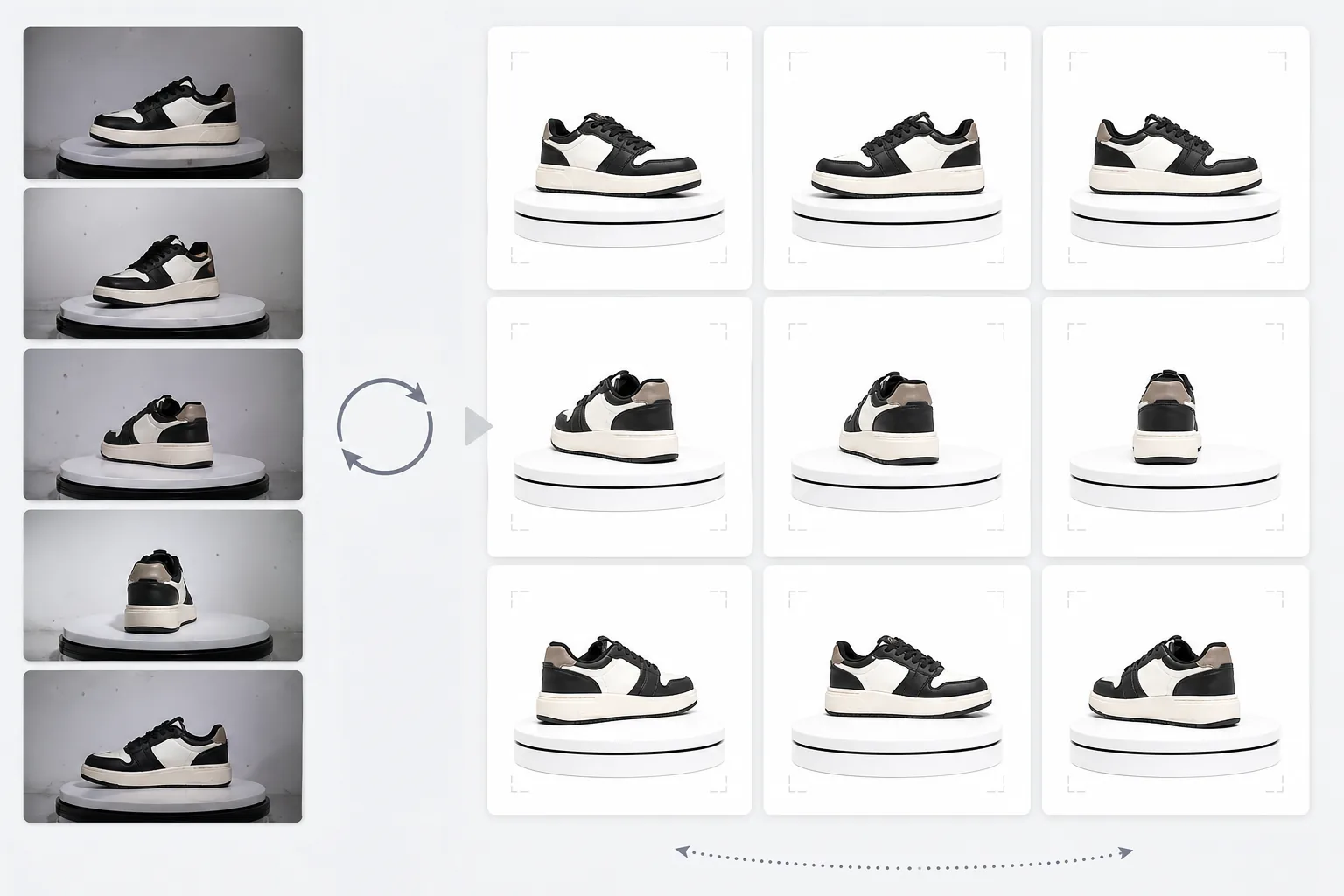
Was diese Vorlage leistet
Verarbeitet Produktfotos aus mehreren Winkeln zu einem einheitlichen Satz, der für interaktive 360-Grad-Drehviewer auf E-Commerce-Seiten geeignet ist. Wenn Sie ein Produkt auf einem Drehteller aus 24 oder 36 Winkeln fotografieren, summieren sich kleine Unstimmigkeiten bei Hintergrund, Beleuchtung und Schatten und erzeugen ein ruckeliges, unprofessionelles Dreherlebnis. Diese Vorlage verwendet Background Eraser, um das Produkt aus jedem Winkel mit einheitlicher Kantenbearbeitung freizustellen, normalisiert Beleuchtung und Farbtemperatur über alle Frames hinweg, damit das Produkt beim Drehen nicht zwischen warmen und kühlen Tönen flackert, und nutzt Magic Eraser, um Staub, Fingerabdrücke und Oberflächenfehler zu entfernen, die störend werden, wenn sie auf einem Frame erscheinen, auf dem nächsten aber nicht.
Vorlageneinstellungen
| Hintergrund | Reines Weiß (#FFFFFF) — einheitlich über alle Drehframes |
| Beleuchtungsnormalisierung | Frame-übergreifende Einheitlichkeit (beseitigt Flackern zwischen Winkeln) |
| Oberflächenreinigung | Entfernt Staub, Fingerabdrücke und Reflexionen pro Frame |
| Produktzentrierung | Zentriert das Produkt automatisch in jedem Frame für eine gleichmäßige Drehachse |
| Ausgabeabmessungen | 1500 × 1500 px pro Frame (optimiert für Web-360-Viewer) |
| Frame-Anzahl | Unterstützt Sequenzen mit 12, 24 oder 36 Frames |
So verwenden Sie diese Vorlage
Laden Sie Ihre Drehteller-Fotos hoch
Laden Sie den vollständigen Satz an Drehfotos (12, 24 oder 36 Frames) hoch, die auf einem Drehteller in gleichmäßigen Abständen aufgenommen wurden. Benennen Sie die Dateien fortlaufend (001.jpg bis 036.jpg), damit die Vorlage sie in der richtigen Drehreihenfolge verarbeitet. Die Vorlage verarbeitet Fotos vor jedem Hintergrund — weißer Hintergrundverlauf, grau oder farbig.
Hintergrundentfernung und Einheitlichkeit
Background Eraser entfernt den Hintergrund aus jedem Frame mit denselben Kantenerkennungseinstellungen und stellt sicher, dass die Produktkontur über alle Winkel hinweg einheitlich bleibt. Das Produkt wird in jedem Frame automatisch zentriert, sodass die Drehachse stabil bleibt und sich die Drehung nicht verwackelt.
Frame-übergreifende Normalisierung
Beleuchtung, Farbtemperatur und Belichtung werden über alle Frames hinweg normalisiert. Dies beseitigt die subtilen Helligkeits- und Farbschwankungen, die auftreten, wenn die Drehtellerbeleuchtung nicht aus jedem Winkel perfekt gleichmäßig ist. Oberflächenfehler, die unter bestimmten Winkeln sichtbar sind, werden zur Einheitlichkeit bereinigt.
Frame-Sequenz exportieren
Laden Sie die vollständige Frame-Sequenz mit 1500 × 1500 px pro Frame im JPEG-Format herunter. Die Dateien sind fortlaufend nummeriert und bereit für den direkten Import in 360-Viewer-Plugins wie Magic 360, Sirv oder Webrotate 360. Die Gesamtdateigröße ist für schnelles Laden im Web optimiert.
Profi-Tipps für beste Ergebnisse
- ✓Verwenden Sie einen manuellen Drehteller mit Gradmarkierungen statt einer freihändigen Drehung. Gleichmäßige Abstände von 10 Grad (36 Frames) erzeugen die flüssigste Drehung. Die Vorlage kann leichte Drehungenauigkeiten verarbeiten, doch gleichmäßige Abstände führen zu einem merklich flüssigeren Ergebnis.
- ✓Fixieren Sie Ihre Kamera auf einem Stativ und verwenden Sie für alle Frames manuelle Belichtungseinstellungen. Die automatische Belichtung führt dazu, dass die Kamera die Helligkeit in jedem Winkel unterschiedlich anpasst und so den Flackereffekt erzeugt, den die Vorlage anschließend korrigieren muss. Manuelle Einstellungen bieten der Vorlage einen saubereren Ausgangspunkt.
- ✓Reinigen Sie Ihr Produkt vor der Aufnahme gründlich — Staub und Fingerabdrücke sind in einer 360-Drehung sichtbarer und störender als in einem einzelnen statischen Foto, da sie beim Drehen des Produkts erscheinen und wieder verschwinden. Die Vorlage entfernt sie, doch ein sauberer Start liefert bessere Ergebnisse.
E-commerce workflow
Product photo hub
Use this template with the full ecommerce product photo workflow for marketplace backgrounds, cleanup, compression, resizing, and listing-ready exports.
View ecommerce product photo workflowHäufige Fragen
Wie viele Frames benötige ich?
+
36 Frames (10-Grad-Abstände) erzeugen für die meisten Produkte die flüssigste Drehung. 24 Frames (15-Grad-Abstände) sind für Produkte ohne feine Details akzeptabel. 12 Frames (30-Grad-Abstände) sind das Minimum für eine erkennbare Drehung, wirken aber bei detailreichen Produkten wie Uhren oder Elektronik ruckelig.
Kann ich Frames aus einem Video verarbeiten?
+
Ja, wenn Sie Frames aus einem Drehteller-Video in gleichmäßigen Abständen extrahieren. Exportieren Sie die Frames in der höchsten verfügbaren Auflösung und sorgen Sie für eine gleichmäßige Winkelverteilung über die vollen 360 Grad. Video-Frames können aufgrund von Bewegungsunschärfe und Videokompression eine geringere Qualität als dedizierte Standfotos haben.
Welche 360-Viewer-Plugins sind kompatibel?
+
Die sequenzielle JPEG-Ausgabe ist mit allen wichtigen 360-Viewer-Lösungen kompatibel, darunter Magic 360, Sirv 360, Webrotate 360, jQuery Reel und benutzerdefinierte Implementierungen. Die einheitlichen Abmessungen und die Namenskonvention erleichtern den Import.
Bieten Sie Käufern die 360-Produktansicht, die sie erwarten
Laden Sie Drehteller-Fotos hoch und erhalten Sie eine einheitliche, saubere Frame-Sequenz, die für interaktive 360-Drehviewer auf Ihren Produktseiten bereit ist.
Kostenlos testenRelated templates
More e-commerce templates for your workflow.
Reinweiße Hintergrundvorlage für Produktfotos. Amazon-, Shopify- und Marketplace-fähige Einstellungen für saubere, professionelle Produktbilder, die konvertieren.
Für Etsy optimierte Fotovorlage für Einträge. Wandelt Lifestyle-Aufnahmen in saubere weiße Hintergründe mit 2000 Pixel um, verbessert handgefertigte Produktdetails und erfüllt die Bildrichtlinien von Etsy.
Für eBay optimierte Angebotsfotovorlage. Weißer Hintergrund für Galeriebilder, Verbesserung der Zustandsdokumentation und Mehrwinkel-Layouts, die den eBay-Bildstandards entsprechen.
Professionelle Schmuckfotografie-Vorlage für Ringe, Halsketten und Uhren. Kontrolliert Reflexionen, verstärkt das Glitzern von Edelsteinen und liefert marktreife Bilder auf sauberen Hintergründen.
Professionelle Möbelfotovorlage für Marktplatzangebote. Beseitigen Sie Unordnung im Raum, zeigen Sie echte Dimensionen und präsentieren Sie Stücke auf sauberen Hintergründen oder in stilvollen Raumkontexten.
Bereinigen Sie flach liegende Kleidungsfotos mit Faltenentfernung, Fusselentfernung, reinweißen Hintergründen und präziser Stofffarbe. Bereit für Shopify, Amazon und Boutiquen.