
Podcast-Cover-Art
Erstellen Sie professionelle Podcast-Cover, die in den Verzeichnissen von Apple Podcasts, Spotify und Google Podcasts auffallen. Diese Vorlage isoliert Host-Porträts von jedem Hintergrund, platziert sie auf markengerechten Hintergründen und gibt das Artwork in den exakten Spezifikationen aus, die von den großen Podcast-Plattformen verlangt werden — ohne Grafikdesign-Software.
Diese Vorlage kostenlos ausprobierenDesign template preview
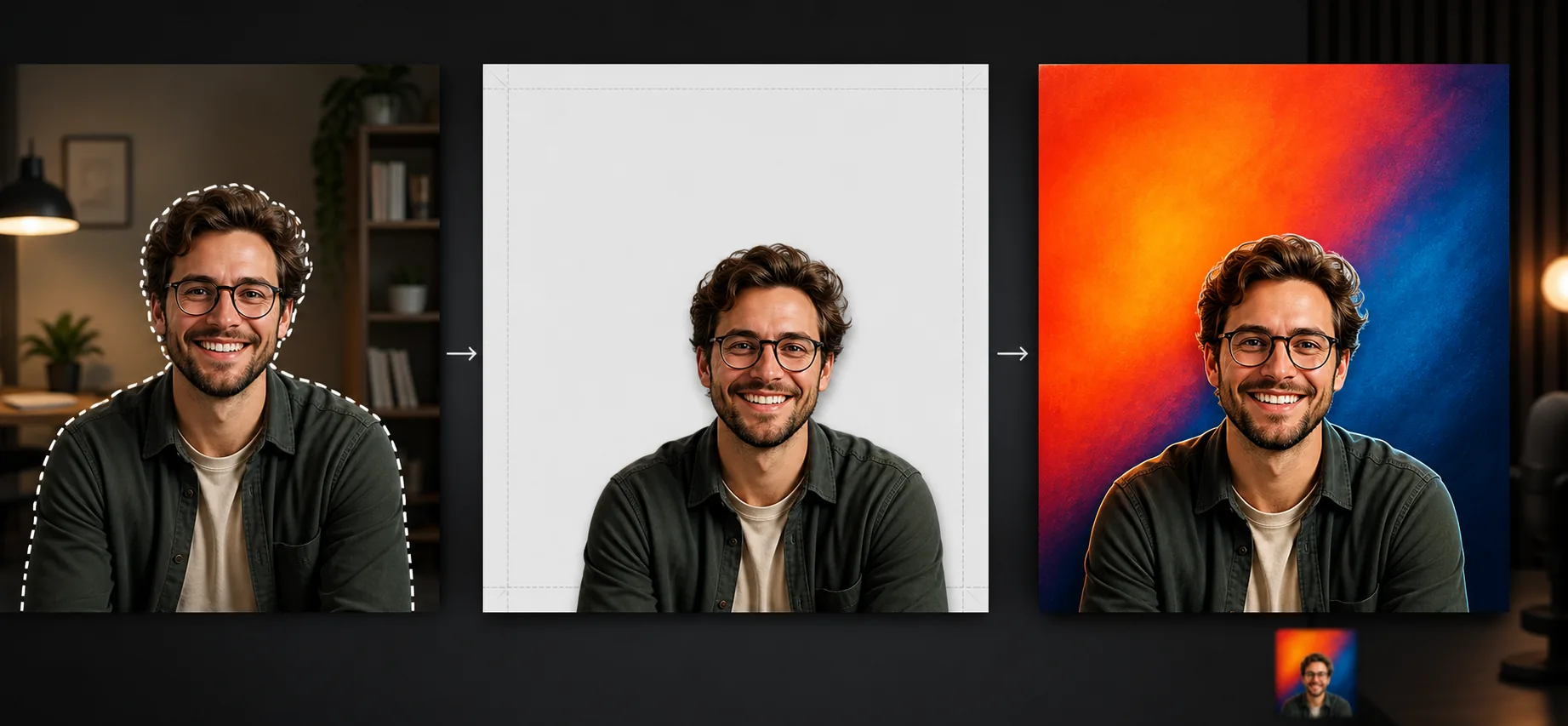
Was diese Vorlage leistet
Erstellt Podcast-Cover, die die technischen Anforderungen jeder großen Vertriebsplattform erfüllen und dabei professionell genug aussehen, um mit Shows zu konkurrieren, hinter denen große Medienunternehmen stehen. Background Eraser isoliert Ihr Porträtfoto oder das Gruppenfoto der Hosts aus jeder Umgebung — Homeoffice, Konferenzraum, Außenaufnahme — und platziert die Porträts auf einfarbigen, mit Farbverlauf versehenen oder texturierten Hintergründen, die sowohl in voller Größe von 3000×3000px als auch in der Miniaturansicht von 55×55px gut zur Geltung kommen. Das Layout ist so aufgebaut, dass das obere Drittel für den Show-Titel reserviert ist (wohin der Blick der Hörer in der Rasteransicht zuerst fällt) und die unteren zwei Drittel für das Host-Porträt. Die Farbintensität ist so abgestimmt, dass das Cover vor den dunklen Hintergründen der Browse-Oberflächen von Apple Podcasts und Spotify hervorsticht.
Vorlageneinstellungen
| Canvas-Größe | 3000×3000px (1:1 quadratisch, Apple- & Spotify-konform) |
| Hintergrund | Einfarbig, zweifarbiger Farbverlauf oder dezentes Texturmuster |
| Porträt-Platzierung | Untere zwei Drittel des Canvas, oberes Drittel frei für den Titeltext |
| Farbintensität | Erhöhte Sättigung für die Sichtbarkeit auf dunklen Plattform-Hintergründen |
| Ausgabeformat | JPEG (Apple-Anforderung) und PNG (zur weiteren Bearbeitung) |
| Farbraum | sRGB (von Apple Podcasts und Spotify gefordert) |
So verwenden Sie diese Vorlage
Host-Foto hochladen
Laden Sie ein Foto des Hosts oder der Co-Hosts hoch. Porträtaufnahmen, Aufnahmen des Oberkörpers und ungezwungene Porträts funktionieren alle. Wenn Sie mehrere Hosts haben, laden Sie ein Gruppenfoto oder einzelne Fotos hoch, und die Vorlage setzt sie nebeneinander zusammen.
Hintergrund entfernen und positionieren
Background Eraser isoliert den Host aus der ursprünglichen Umgebung. Das Porträt wird in den unteren zwei Dritteln des quadratischen Canvas positioniert, sodass das obere Drittel für Ihren Show-Titel frei bleibt. Sie können den Bildausschnitt anpassen — enger zur Betonung des Gesichts, weiter für Oberkörper und Handgesten.
Hintergrund und Branding anwenden
Wählen Sie eine Hintergrundfarbe oder einen Farbverlauf, der zu Ihrer Podcast-Marke passt. Die Vorlage schlägt kontrastreiche Kombinationen vor, die auch in kleinen Miniaturgrößen lesbar bleiben. Die Farben werden in sRGB gerendert und die Intensität ist so abgestimmt, dass sie sich vor den dunklen Hintergründen von Apple Podcasts und Spotify abheben.
Plattformfertiges Artwork exportieren
Laden Sie in 3000×3000px im JPEG-Format (Apple Podcasts verlangt JPEG) und im PNG-Format herunter (zum Hinzufügen des Titeltexts in Ihrem bevorzugten Design-Tool). Die Datei erfüllt alle Plattform-Spezifikationen, darunter eine Mindestauflösung von 1400×1400 und eine Höchstauflösung von 3000×3000, den sRGB-Farbraum und eine Dateigröße unter 5 MB.
Profi-Tipps für die besten Ergebnisse
- ✓Testen Sie Ihr Cover vor der Fertigstellung bei 55×55 Pixeln. Das ist die Miniaturgröße, die die meisten Hörer beim Durchstöbern von Podcast-Verzeichnissen auf dem Smartphone sehen. Wenn das Gesicht des Hosts in dieser Größe nicht erkennbar ist, zoomen Sie beim Porträtausschnitt näher heran.
- ✓Verwenden Sie nicht mehr als zwei Farben in Ihrem Hintergrund. Komplexe Muster und mehrfarbige Farbverläufe reduzieren sich in Miniaturgröße zu visuellem Rauschen, das das Host-Porträt verdeckt und den Text unleserlich macht.
- ✓Lächeln Sie auf Ihrem Host-Foto. Podcast-Cover mit lächelnden Hosts schneiden in Stöber- und Abonnier-Kontexten durchweg besser ab als ernste oder neutrale Mienen, denn das Lächeln vermittelt Zugänglichkeit und Energie, die zum intimen Charakter von Audio-Inhalten passen.
Häufige Fragen
Fügt die Vorlage dem Cover Titeltext hinzu?
+
Die Vorlage erstellt den Hintergrund und das Porträt-Layout, fügt aber keinen Text hinzu. Das ist beabsichtigt — die Typografie des Podcast-Titels muss exakt zu Ihrer Markenschriftart und Ihren Größenvorlieben passen. Die Ausgabe enthält einen freien Bereich im oberen Drittel, in dem Sie Ihren Titel in einem beliebigen Design-Tool oder sogar im Editor Ihrer Podcast-Hosting-Plattform hinzufügen.
Kann ich episodenspezifisches Artwork erstellen?
+
Ja. Verwenden Sie denselben Hintergrund und dasselbe Porträt-Layout für eine einheitliche Marke und tauschen Sie dann für jede Episode verschiedene Hintergrundfarben oder Gäste-Porträts aus. So entsteht eine wiedererkennbare visuelle Serie in Podcast-Playern, die episodenspezifisches Artwork anzeigen.
Was sind die technischen Anforderungen der Plattformen?
+
Apple Podcasts verlangt JPEG oder PNG, 1400×1400 bis 3000×3000 Pixel, den sRGB-Farbraum, mindestens 72 DPI und unter 512 KB. Spotify verlangt ein quadratisches Format mit mindestens 640×640. Die Vorlage gibt in 3000×3000 in sRGB aus und erfüllt die Anforderungen aller großen Plattformen mit einem einzigen Export.
Starten Sie Ihren Podcast mit Artwork, das Klicks bringt
Laden Sie ein Host-Foto hoch und erhalten Sie plattformkonformes Podcast-Cover-Art, das in den Verzeichnissen von Apple Podcasts und Spotify auffällt.
Kostenlos ausprobierenRelated templates
More design templates for your workflow.
Erstellen Sie transparente PNG-Logos mit sauberer Kantenverfeinerung und Export in mehreren Größen für Web-, Druck-, soziale Medien- und App-Symbole. Funktioniert mit Fotos von gedruckten Logos und digitalen Dateien.
Erstellen Sie realistische Buchcover-Modelle mit 3D-Perspektive, Schattenwiedergabe und Lifestyle-Hintergründen für Autorenmarketing und Verlagswerbung.
Bereiten Sie digitale Kunstwerke und Fotos für den Großformatdruck mit KI-Hochskalierung, Leinwanderweiterung, farbgenauem Proofing und druckfertigem Dateiexport vor.
Bereiten Sie Fotos für die Einreichung durch eine Bildagentur vor, indem Sie Marken entfernen, die Einhaltung von Model-Releases bearbeiten, technische Qualitätsprüfungen durchführen und agenturspezifische Formatanforderungen erfüllen.