
Kunstdruck-Vorbereitung
Bereiten Sie digitale Kunstwerke, Fotografien und Illustrationen für Galeriedrucke im Großformat, Keilrahmenbespannungen und die Posterproduktion vor. Diese Vorlage nutzt AI Enhance, um Bilder ohne Qualitätsverlust auf druckfertige Auflösungen hochzuskalieren, und AI Expand, um die Leinwandränder für Keilrahmenmargen zu erweitern – und das alles unter Wahrung der Farbgenauigkeit für den professionellen Druck.
Diese Vorlage kostenlos testenDesign template preview
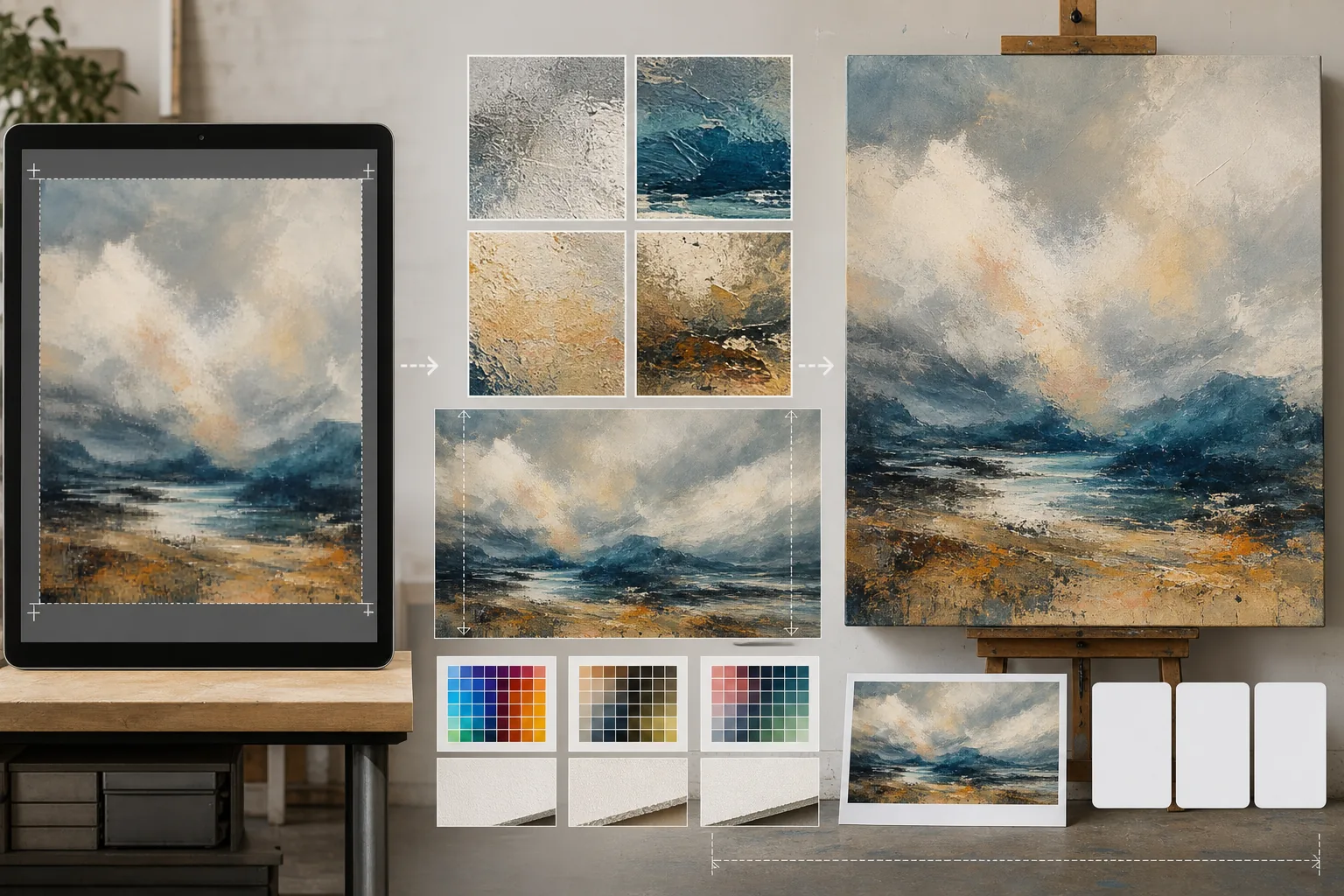
Was diese Vorlage leistet
Schließt die Lücke zwischen digitalen Dateien in Bildschirmauflösung und den anspruchsvollen Auflösungsanforderungen der physischen Druckproduktion. AI Enhance skaliert Bilder um das 2- bis 4-Fache hoch und bewahrt dabei feine Details – Pinselstriche in Gemälden, die Kornstruktur in Fotografien, die Linienführung in Illustrationen – ohne die Unschärfe oder Artefakte einer einfachen Interpolation. AI Expand erweitert die Leinwandränder, indem es nahtlose Fortsetzungen des Kunstwerks erzeugt, und liefert so die zusätzliche Marge, die für Galerie-Keilrahmenbespannungen nötig ist, bei denen sich das Bild um den Rahmen faltet. Farbprofile werden in CMYK oder Adobe RGB umgewandelt, mit einem Softproof, der zeigt, wie der finale Druck auf Papier, Leinwand oder Metallträgern aussehen wird.
Vorlageneinstellungen
| Hochskalierungsfaktor | 2x, 3x oder 4x (bis zu 16000px Längskante für Großformatdrucke) |
| Leinwanderweiterung | 1,5-Zoll-, 2-Zoll- oder benutzerdefinierte Marge für den Keilrahmen-Beschnitt |
| Detailerhaltung | Adaptiv: Pinselstrich für Gemälde, Korn für Fotos, Linie für Illustrationen |
| Farbprofil | sRGB (Bildschirm), Adobe RGB (Fotodruck) oder CMYK (Offsetdruck) |
| Ausgabeformat | TIFF (verlustfreier Druck), PNG (Transparenz) oder JPEG (Web-Vorschau) |
So verwenden Sie diese Vorlage
Laden Sie Ihr Kunstwerk hoch
Laden Sie die digitale Datei hoch – Gemälde, Fotografie, Illustration oder Mischtechnik. Die Vorlage akzeptiert JPEG-, PNG-, TIFF- und PSD-Dateien. Für die besten Hochskalierungsergebnisse beginnen Sie mit der höchstauflösenden Version, die Sie haben, auch wenn sie unter der Druckanforderung liegt.
Auf Druckauflösung hochskalieren
Wählen Sie den Hochskalierungsfaktor anhand Ihrer Zieldruckgröße. Für einen Druck von 24×36 Zoll bei 300 DPI benötigen Sie 7200×10800 Pixel. Die KI skaliert hoch und bewahrt dabei den Charakter des Originals – Pinselstriche bleiben Pinselstriche, Filmkorn bleibt Korn, Pixel-Art behält ihren kantigen Charme.
Leinwand für Keilrahmen erweitern
Beim Druck auf Leinwand mit Keilrahmenbespannung erzeugt AI Expand nahtlose Erweiterungen des Kunstwerks an allen vier Rändern. Die erweiterte Marge passt zu Stil, Farbpalette und Textur des Originals, sodass die umgeschlagenen Kanten beabsichtigt wirken und nicht gestreckt oder gespiegelt.
Proofen und exportieren
Prüfen Sie den Softproof, der zeigt, wie das Bild in Ihrem Zielfarbprofil dargestellt wird – CMYK für Offset- oder Giclee-Druck, Adobe RGB für den Fine-Art-Tintenstrahldruck. Exportieren Sie als TIFF für die Druckerei oder als PNG für die weitere Bearbeitung. Die Datei enthält eingebettete ICC-Profildaten für eine genaue Farbwiedergabe.
Profi-Tipps für beste Ergebnisse
- ✓Beginnen Sie immer mit der Originaldatei in ihrer nativen Auflösung. Das Hochskalieren einer Datei, die bereits für die Webdarstellung komprimiert und herunterskaliert wurde, führt zu Artefakten, die sich mit jeder Verarbeitungsgeneration verstärken.
- ✓Fordern Sie für Keilrahmen-Leinwanddrucke eine Erweiterungsmarge von 2 Zoll an, auch wenn der Keilrahmen nur 1,5 Zoll tief ist. Der zusätzliche halbe Zoll bietet Toleranz beim Spannen der Leinwand, wo ein leichtes Verrutschen während des Aufziehens den Bildrand freilegen kann.
- ✓Fordern Sie einen physischen Proofdruck in kleinerer Größe an, bevor Sie sich auf eine Großformatproduktion festlegen. Bildschirme und Papierdrucke geben Farben unterschiedlich wieder, und ein 5×7-Proof kostet nur einen Bruchteil einer 30×40-Leinwand, deckt aber alle Farbverschiebungen auf, die korrigiert werden müssen.
Tools
Häufige Fragen
Wie groß kann ich von einem Handyfoto drucken?
+
Ein typisches 12-Megapixel-Handyfoto (4000×3000px) druckt sich bei 300 DPI gut in 13×10 Zoll. Mit 2-facher KI-Hochskalierung verdoppelt sich das auf 26×20 Zoll. Mit 4-facher Hochskalierung kann ein Handyfoto einen sauberen Druck von 40×30 Zoll erzeugen – geeignet für die Galeriepräsentation.
Verändert das Hochskalieren das Aussehen meines Kunstwerks?
+
Die KI passt ihren Hochskalierungsansatz an die Art des Inhalts an. Gemälde behalten sichtbare Pinselstriche und Textur. Fotografien bewahren ihre Kornstruktur und ihren Schärfecharakter. Illustrationen erhalten eine gleichmäßige Linienstärke. Das Ziel ist eine größere Version, die wie das Original aussieht, keine Neuinterpretation.
Kann ich nur eine Seite der Leinwand erweitern?
+
Ja. Sie können festlegen, welche Kanten und um wie viel erweitert werden sollen. Das ist nützlich, wenn Sie die Komposition innerhalb eines Drucks verschieben möchten – zum Beispiel Himmel über einer Landschaft hinzufügen, um Platz für einen Titel zu schaffen, oder Vordergrund ergänzen, um eine horizontlastige Komposition auszugleichen.
Drucken Sie Ihre Kunst in jeder Größe ohne Qualitätsverlust
Laden Sie digitale Kunstwerke hoch und erhalten Sie druckfertige Dateien mit KI-Hochskalierung, Leinwanderweiterung und farbgenauem Proofing.
Kostenlos testenRelated templates
More design templates for your workflow.
Erstellen Sie transparente PNG-Logos mit sauberer Kantenverfeinerung und Export in mehreren Größen für Web-, Druck-, soziale Medien- und App-Symbole. Funktioniert mit Fotos von gedruckten Logos und digitalen Dateien.
Erstellen Sie realistische Buchcover-Modelle mit 3D-Perspektive, Schattenwiedergabe und Lifestyle-Hintergründen für Autorenmarketing und Verlagswerbung.
Entwerfen Sie ein Podcast-Cover, das den Apple Podcasts- und Spotify-Spezifikationen entspricht, mit Hintergrundersetzung, Host-Porträt-Isolation und typografietauglichen Layouts.
Bereiten Sie Fotos für die Einreichung durch eine Bildagentur vor, indem Sie Marken entfernen, die Einhaltung von Model-Releases bearbeiten, technische Qualitätsprüfungen durchführen und agenturspezifische Formatanforderungen erfüllen.