
Buchcover-Mockup
Erstellen Sie fotorealistische Mockups Ihres Buchcovers, platziert in Lifestyle-Szenen, auf Regalen oder dargestellt als eigenständiges 3D-Rendering mit natürlichen Schatten. Diese Vorlage verwandelt Ihre flache Cover-Grafik in Werbebilder für Ankuendigungen in sozialen Medien, Autoren-Websites, Amazon-A+-Inhalte und Pressemappen — ganz ohne 3D-Software.
Diese Vorlage kostenlos testenDesign template preview
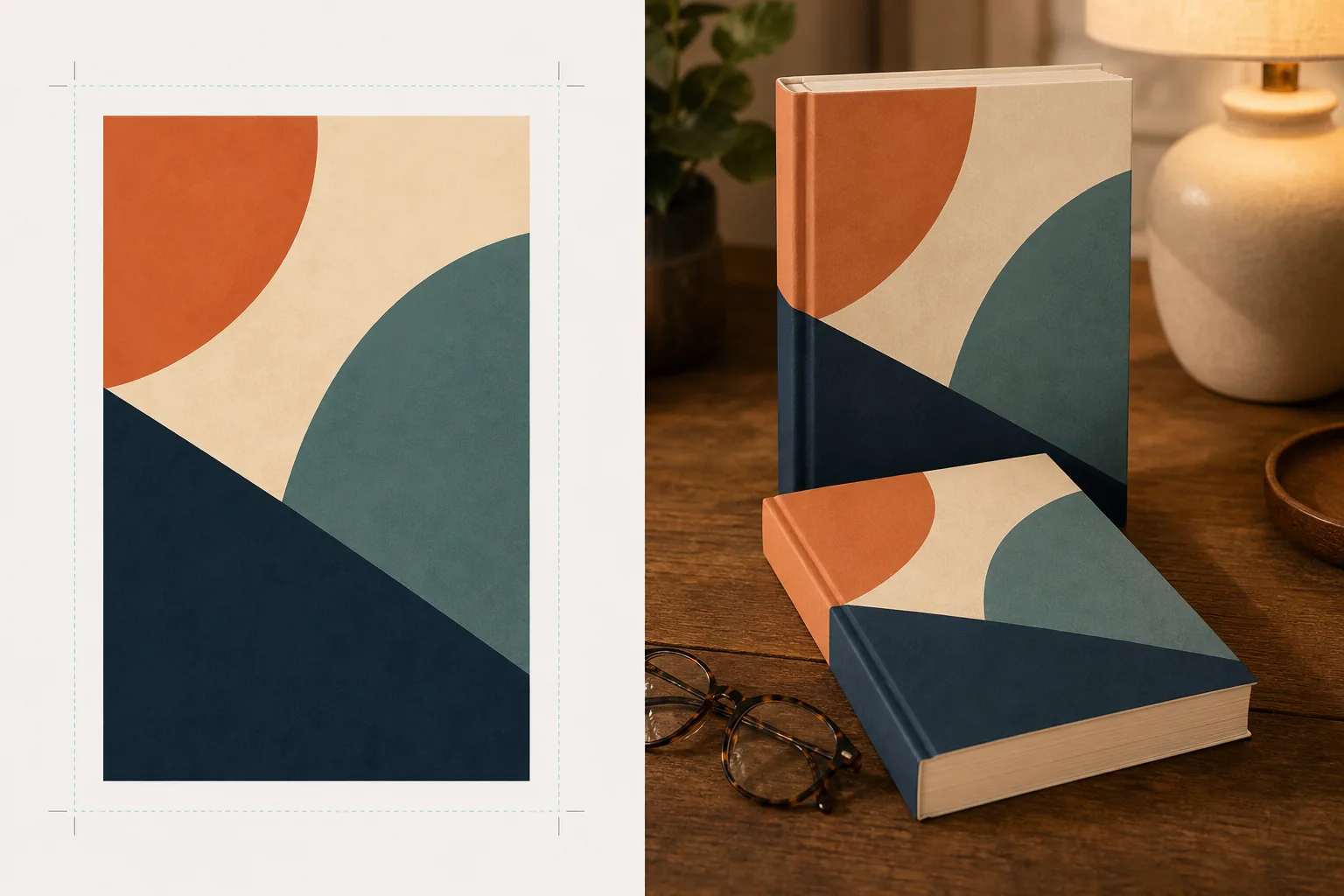
Was diese Vorlage leistet
Verwandelt flache Buchcover-Designs in werbliche Mockup-Bilder, die wie professionelle Produktfotografie aussehen. Laden Sie Ihre Cover-Grafik als flaches JPEG oder PNG hoch, und die Vorlage projiziert sie auf eine realistische Buchform mit korrekter Perspektive, Seitendicke und Ruecken-Woelbung. Das Mockup wird dann in Lifestyle-Szenen platziert — einen Couchtisch mit Lesebrille, ein Buchhandlungsregal, einen Nachttisch mit warmem Lampenlicht — oder als eigenstaendiges Produkt vor einem klaren Hintergrund mit natuerlichem Schatten gerendert. Fuer Reihen oder Mehrbuch-Aktionen lassen sich mehrere Cover in einer Reihe anordnen oder mit konsistenter Perspektive stapeln. Die Licht- und Schattenrichtung passt zur Szenenumgebung, sodass das Buch physisch vorhanden wirkt und nicht zusammenmontiert.
Vorlageneinstellungen
| Buchformat | Taschenbuch, gebundene Ausgabe oder gebundene Ausgabe mit Schutzumschlag |
| Erscheinungsbild der Seitenzahl | Duenn (100 S.), mittel (250 S.), dick (400+ S.) — beeinflusst Ruecken- und Seitenkantenbreite |
| Szenentyp | Eigenstaendig mit Schatten, Couchtisch, Buecherregal, Nachttisch oder in der Hand gehalten |
| Perspektivwinkel | Frontal, Dreiviertel oder leichte Neigung von oben |
| Ausgabeaufloesung | 3000×3000px (1:1 Social) oder 2400×1600px (16:10 Banner) |
So verwenden Sie diese Vorlage
Laden Sie Ihre Cover-Grafik hoch
Laden Sie Ihr Buchcover als flaches Bild hoch — mindestens die Vorderseite. Fuer Mockups gebundener Ausgaben mit Schutzumschlag koennen Sie auch Ruecken und Rueckseite hochladen. Die Vorlage akzeptiert JPEGs, PNGs und PDFs. Die Cover-Abmessungen werden automatisch erkannt und die Buchproportionen entsprechend skaliert.
Buchformat und Szene auswaehlen
Waehlen Sie zwischen den Formaten Taschenbuch, gebundene Ausgabe oder Schutzumschlag. Waehlen Sie den Seitenzahlbereich, damit Ruecken- und Seitenkantenbreite zu Ihrem tatsaechlichen Buch passen. Waehlen Sie dann eine Szene: eigenstaendig mit Schatten, Lifestyle-Umgebung oder eigene Hintergrundfarbe.
Perspektive anpassen und rendern
Waehlen Sie den Betrachtungswinkel — frontal fuer klare Vorschaubilder, Dreiviertel fuer visuelle Tiefe oder Neigung von oben fuer flach liegende Social-Media-Posts. Die Vorlage rendert das Mockup mit passender Beleuchtung, Seitenkanten-Textur und einer Schattenrichtung, die zur ausgewaehlten Szene passt.
Werbebilder herunterladen
Exportieren Sie in 1:1 fuer Instagram, 16:9 fuer Twitter-/Facebook-Header oder in eigenen Abmessungen fuer den Hero-Bereich Ihrer Website. Jeder Export enthaelt das Buch-Mockup mit der Option eines transparenten Hintergrunds, sodass Sie es in Ihre eigenen Layouts einfuegen koennen.
Profi-Tipps fuer beste Ergebnisse
- ✓Laden Sie Ihr Cover in der hoechsten verfuegbaren Aufloesung hoch. Die 3D-Perspektivtransformation verringert die scheinbare Aufloesung auf der zuruecklaufenden Buchflaeche, daher sorgt eine hochaufloesende Quelle dafuer, dass Text auf Ruecken und Cover lesbar bleibt.
- ✓Verwenden Sie fuer Amazon-A+-Inhalte das eigenstaendige Mockup auf weissem Hintergrund. Das verleiht dem Buch die Anmutung hochwertiger Produktfotografie und hebt es vom flachen Cover-Bild ab, das bereits auf der Angebotsseite zu sehen ist.
- ✓Erstellen Sie eine Reihen-Ansicht, indem Sie alle Cover einer Reihe hochladen. Die Vorlage ordnet sie mit konsistenter Perspektive und Abstaenden in einer Reihe an, was fuer die Bewerbung einer Reihe weitaus wirkungsvoller ist als das einzelne Anzeigen der Cover.
Haeufige Fragen
Kann ich ein Mockup mit einem E-Reader oder Tablet erstellen, das mein Cover anzeigt?
+
Die Vorlage konzentriert sich auf Mockups physischer Buecher — Taschenbuch- und Hardcover-Formate. Fuer Mockups mit E-Reader- oder Tablet-Anzeige wuerden Sie das flache Cover separat in ein Geraetefoto einmontieren.
Ist der Text auf dem Ruecken lesbar?
+
Ja, solange die Quell-Cover-Datei die Ruecken-Grafik enthaelt. Die Vorlage legt die Ruecken-Grafik um die Buchkante mit einer Perspektive, die zum Winkel der Vorderseite passt. Bei duennen Buechern (unter 150 Seiten) ist der Ruecken schmal, und kleiner Text kann bei kleinen Anzeigegroessen schwer lesbar werden.
Kann ich dies fuer die Bewerbung von Hoerbuechern oder Podcasts verwenden?
+
Ja. Das quadratische Cover-Format fuer Hoerbuecher und Podcasts kann als Mockup im CD-Huellen-Stil oder als eigenstaendiges Quadrat mit dreidimensionalem Schatten gerendert werden, was ihm eine physische Praesenz verleiht, die flache Cover-Grafik nicht hat.
Verwandeln Sie Ihre Cover-Grafik in beeindruckende Werbebilder
Laden Sie eine flache Cover-Grafik hoch und erhalten Sie fotorealistische Buch-Mockups fuer soziale Medien, Autoren-Websites und Marketingkampagnen.
Kostenlos testenRelated templates
More design templates for your workflow.
Erstellen Sie transparente PNG-Logos mit sauberer Kantenverfeinerung und Export in mehreren Größen für Web-, Druck-, soziale Medien- und App-Symbole. Funktioniert mit Fotos von gedruckten Logos und digitalen Dateien.
Entwerfen Sie ein Podcast-Cover, das den Apple Podcasts- und Spotify-Spezifikationen entspricht, mit Hintergrundersetzung, Host-Porträt-Isolation und typografietauglichen Layouts.
Bereiten Sie digitale Kunstwerke und Fotos für den Großformatdruck mit KI-Hochskalierung, Leinwanderweiterung, farbgenauem Proofing und druckfertigem Dateiexport vor.
Bereiten Sie Fotos für die Einreichung durch eine Bildagentur vor, indem Sie Marken entfernen, die Einhaltung von Model-Releases bearbeiten, technische Qualitätsprüfungen durchführen und agenturspezifische Formatanforderungen erfüllen.