
Handtaschen-Produktfoto
Erstellen Sie Produktfotos in Luxusqualität für Handtaschen, Clutches, Geldbörsen und Lederwaren. Diese Vorlage hebt die Tasche von jeder Oberfläche ab, ersetzt den Hintergrund durch eine saubere Studio- oder Lifestyle-Umgebung, betont die Ledernarbung und die Nahtdetails und schärft Hardware-Elemente wie Reißverschlüsse, Verschlüsse und Schnallen, damit Kunden die Verarbeitung aus jedem Blickwinkel beurteilen können.
Diese Vorlage kostenlos testenE-commerce template preview
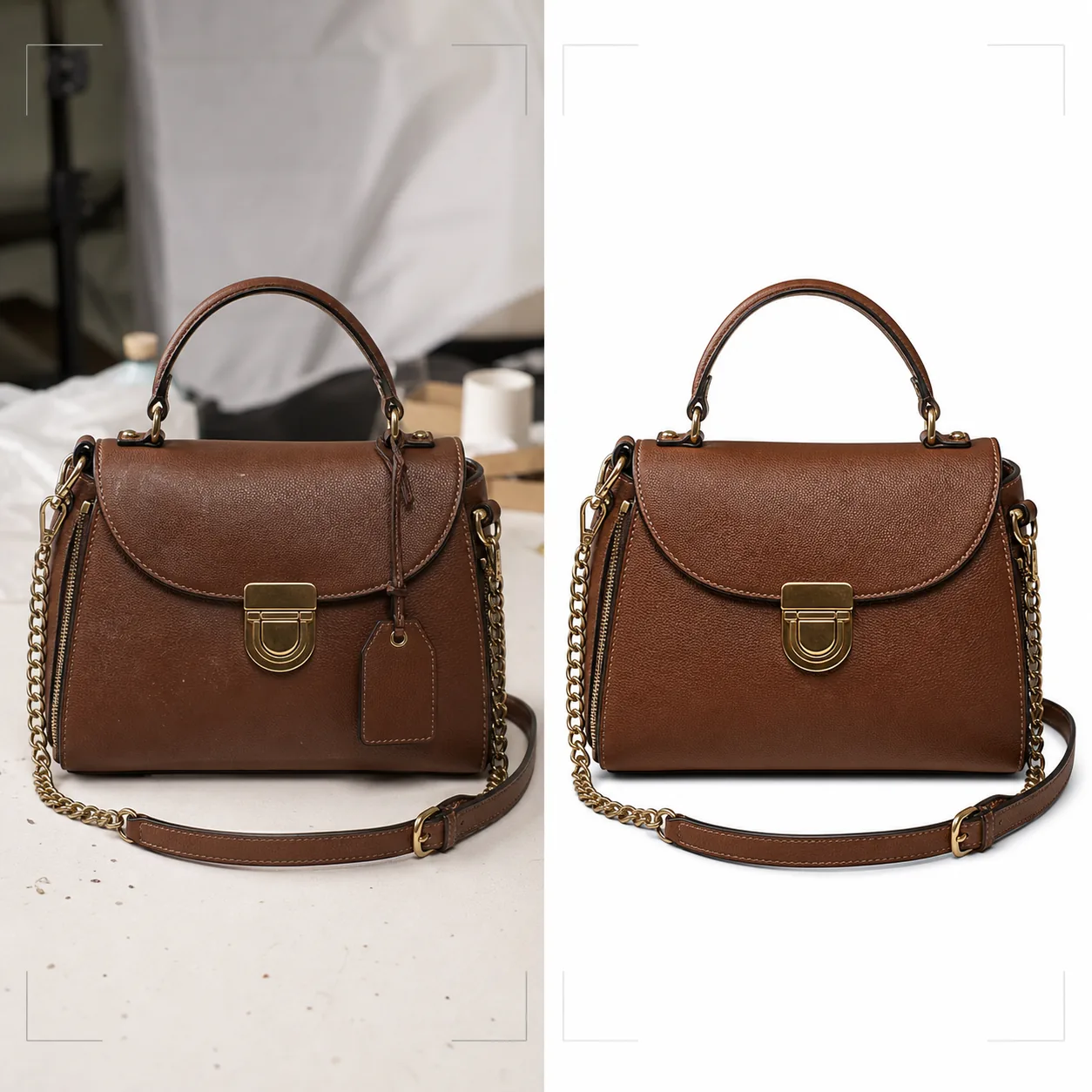
Was diese Vorlage leistet
Liefert den visuellen Standard, den Handtaschenmarken im Luxus- und Mittelsegment für den Online-Handel benötigen. Background Eraser hebt die Tasche von Tischplatten, Aufnahmeflächen und Studio-Unordnung ab und ersetzt die Umgebung durch reines Weiß für die Konformität mit Marktplätzen oder durch gestaltete Hintergründe, die zur Markenästhetik passen. Magic Eraser entfernt Staubpartikel, Fingerabdrücke auf der Hardware und Preisschilder, die bei der Aufnahme übersehen wurden. Die KI-Verbesserung bringt die Ledernarbung, das Canvas-Gewebe oder die Stofftextur zur Geltung, die Qualität vermittelt, während Hardware-Elemente – Reißverschlüsse, Verschlüsse, Kettenriemen und Logo-Plaketten – geschärft werden, sodass Kunden die Verarbeitungsqualität prüfen können, als hielten sie die Tasche in einer Boutique in der Hand.
Vorlageneinstellungen
| Hintergrund | Reines Weiß, Creme oder gestaltete Oberfläche (Marmor, Leinen, Holzregal) |
| Lederverbesserung | Schärfung der Narbentextur unter Erhalt des natürlichen Glanzes |
| Hardware-Detail | Reißverschlüsse, Verschlüsse, Schnallen und metallene Logo-Plaketten schärfen |
| Entfernung von Staub und Fingerabdrücken | Oberflächenpartikel und Verschmierungen auf der Hardware automatisch erkennen und entfernen |
| Schattenstil | Natürlicher Schlagschatten oder Reflexionsschatten auf weißem Hintergrund |
| Ausgabeauflösung | 3000×3000px (1:1 für Marktplätze) oder 2400×3200px (3:4 für Markenwebsites) |
So verwenden Sie diese Vorlage
Laden Sie Ihr Handtaschenfoto hoch
Laden Sie ein Produktfoto der Handtasche hoch – frontal, in einem Winkel zur Darstellung der Tiefe oder als Flatlay mit geöffneter Tasche. Fügen Sie Aufnahmen aus mehreren Blickwinkeln für ein vollständiges Angebot hinzu. Die Vorlage verarbeitet Fotos von Handykameras, Studio-Setups und Spiegelreflex-Rigs.
Hintergrund säubern und Unvollkommenheiten entfernen
Background Eraser trennt die Handtasche von der Aufnahmefläche mit einer Kantenerkennung, die weiche Lederkanten, herabhängende Riemen und Kettendetails bewahrt. Magic Eraser entfernt Staubflecken auf dem Leder, Fingerabdruckverschmierungen auf polierter Hardware sowie noch angebrachte Preisschilder oder Sicherungssensoren.
Materialien und Hardware verbessern
Die Ledertextur wird geschärft, um Narbenmuster und Nähte sichtbar zu machen. Hardware-Elemente werden für mehr Klarheit verbessert – Kunden können erkennen, ob Reißverschlüsse von YKK sind, ob Verschlüsse aus massivem Messing oder beschichtet sind und ob die Nähte gleichmäßig und straff sind. Die Farbkorrektur stellt sicher, dass das Leder in seinem echten Färbeton erscheint.
Für den E-Commerce exportieren
Laden Sie in 3000×3000px für Amazon, eBay und Poshmark herunter oder in benutzerdefinierten Seitenverhältnissen für Ihre Markenwebsite. Die Version mit reinweißem Hintergrund erfüllt die Bildanforderungen der Marktplätze. Versionen mit Lifestyle-Hintergrund eignen sich für soziale Medien und E-Mail-Kampagnen.
Profi-Tipps für beste Ergebnisse
- ✓Stopfen Sie die Handtasche vor dem Fotografieren mit Seidenpapier aus, um ihr die vorgesehene Form und Struktur zu geben. Eine leere Tasche fällt zusammen und faltet sich auf eine Weise, die sie weniger hochwertig erscheinen lässt, als sie in Wirklichkeit ist.
- ✓Fotografieren Sie Hardware-Nahaufnahmen separat. Während die Vorlage die Hardware in Aufnahmen der gesamten Tasche verbessert, bietet eine eigene Nahaufnahme von Verschluss, Reißverschlusszieher und Logo-Plakette den Kunden das Detailprüfungserlebnis, das sie in einem physischen Geschäft haben.
- ✓Wischen Sie die Hardware vor der Aufnahme mit einem Mikrofasertuch ab. Die Vorlage entfernt Fingerabdrücke digital, aber starke Verschmierungen auf polierter Gold- oder Silberhardware können die Klarheit des darunterliegenden Metallfinishs selbst nach der KI-Bereinigung verringern.
E-commerce workflow
Product photo hub
Use this template with the full ecommerce product photo workflow for marketplace backgrounds, cleanup, compression, resizing, and listing-ready exports.
View ecommerce product photo workflowHäufige Fragen
Kann dies Taschen aus Canvas oder Nylon verarbeiten?
+
Ja. Die Vorlage erkennt den Materialtyp und passt die Texturverbesserung entsprechend an. Canvas-Gewebe und Nylon-Ripstop-Texturen werden anders geschärft als Ledernarbung, um die charakteristischen Eigenschaften jedes Materials hervorzuheben.
Bleibt das Detail des Kettenriemens bei der Hintergrundentfernung erhalten?
+
Ja. Die Kantenerkennung ist auf feine metallische Details wie Kettenglieder, dünne Lederriemen und herabhängende Reißverschlusszieher abgestimmt. Diese Elemente bleiben mit sauberen Kanten vor dem neuen Hintergrund erhalten.
Kann ich einen Reflexionsschatten auf weißem Hintergrund hinzufügen?
+
Ja. Die Vorlage bietet sowohl einen natürlichen Schlagschatten (als ob die Tasche auf einer von oben beleuchteten weißen Oberfläche steht) als auch einen Reflexionsschatten (ein gespiegeltes Verblassen unter der Tasche), der häufig in der Luxus-Produktfotografie verwendet wird.
Präsentieren Sie jede Tasche mit Boutique-Niveau im Detail
Laden Sie Handtaschenfotos hoch und erhalten Sie Produktbilder in Luxusqualität mit verbesserter Ledertextur, scharfer Hardware und sauberen Hintergründen.
Kostenlos testenRelated templates
More e-commerce templates for your workflow.
Reinweiße Hintergrundvorlage für Produktfotos. Amazon-, Shopify- und Marketplace-fähige Einstellungen für saubere, professionelle Produktbilder, die konvertieren.
Für Etsy optimierte Fotovorlage für Einträge. Wandelt Lifestyle-Aufnahmen in saubere weiße Hintergründe mit 2000 Pixel um, verbessert handgefertigte Produktdetails und erfüllt die Bildrichtlinien von Etsy.
Für eBay optimierte Angebotsfotovorlage. Weißer Hintergrund für Galeriebilder, Verbesserung der Zustandsdokumentation und Mehrwinkel-Layouts, die den eBay-Bildstandards entsprechen.
Professionelle Schmuckfotografie-Vorlage für Ringe, Halsketten und Uhren. Kontrolliert Reflexionen, verstärkt das Glitzern von Edelsteinen und liefert marktreife Bilder auf sauberen Hintergründen.
Professionelle Möbelfotovorlage für Marktplatzangebote. Beseitigen Sie Unordnung im Raum, zeigen Sie echte Dimensionen und präsentieren Sie Stücke auf sauberen Hintergründen oder in stilvollen Raumkontexten.
Bereinigen Sie flach liegende Kleidungsfotos mit Faltenentfernung, Fusselentfernung, reinweißen Hintergründen und präziser Stofffarbe. Bereit für Shopify, Amazon und Boutiquen.