
E-Commerce-Lifestyle-Foto
Verwandeln Sie schlichte Produktfotos in Lifestyle-Bilder, die Ihre Artikel im realen Kontext zeigen — auf Küchenarbeitsplatten, in Wohnzimmern, an Schreibtischen oder im Freien. Diese Vorlage entfernt den ursprünglichen Hintergrund und platziert Ihr Produkt in kuratierten Lifestyle-Szenen mit passender Beleuchtung und natürlichen Schatten, sodass Ihre Angebote die kontextbezogenen Bilder erhalten, die Kaufentscheidungen fördern – ganz ohne teures Fotoshooting.
Diese Vorlage kostenlos testenE-commerce template preview
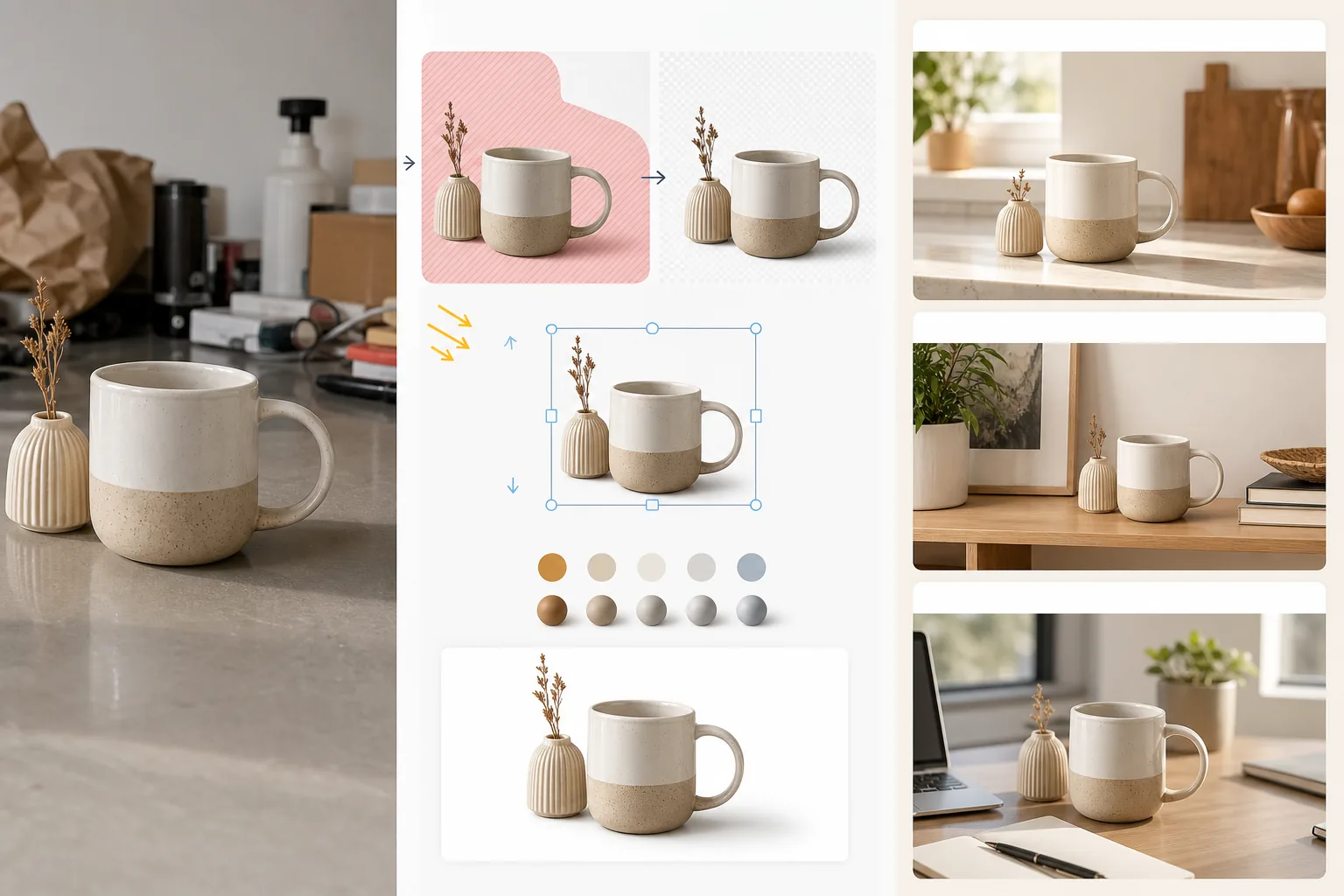
Was diese Vorlage leistet
Wandelt standardmäßige Produktbilder auf weißem Hintergrund oder informelle Produktfotos in Lifestyle-Szenen um, die Kunden helfen, sich den Besitz und die Nutzung des Artikels vorzustellen. Magic Eraser entfernt den ursprünglichen Hintergrund und alle störenden Elemente rund um das Produkt. AI Enhance platziert das Produkt anschließend in einer kuratierten Lifestyle-Umgebung — eine Küchenarbeitsplatte für Kochgeschirr, ein Wohnzimmerregal für Wohndeko, ein Schreibtisch-Setup für Elektronik, eine Außenterrasse für Gartenartikel — mit einer Lichtrichtung und Schattendarstellung, die zur Szene passen. Farbe und Belichtung des Produkts werden auf die Umgebung abgestimmt, sodass die Montage wie eine einzige Fotografie wirkt, die in einem gestylten Setting aufgenommen wurde. Dadurch wird die Lücke zwischen der reinen Weißhintergrund-Anforderung der Marktplätze (die Funktion verkauft) und dem Lifestyle-Kontext (der Begehren verkauft) geschlossen, von dem E-Commerce-Conversion-Studien durchweg zeigen, dass er höhere Warenkorb-Hinzufügungsraten antreibt.
Vorlageneinstellungen
| Szenenkategorie | Küche, Wohnzimmer, Badezimmer, Schreibtisch/Büro, Außenbereich oder Flat-Lay-Oberfläche |
| Lichtharmonisierung | Lichtrichtung und Farbtemperatur des Produkts an die Szene anpassen |
| Schattendarstellung | Natürlicher Kontaktschatten und Umgebungsverdeckung, abgestimmt auf die Szenengeometrie |
| Produktmaßstab | Automatische Erkennung oder manuelle Größenanpassung relativ zu Möbeln und Objekten der Szene |
| Farbharmonisierung | Weißabgleich des Produkts an das Umgebungslicht der Szene anpassen |
| Ausgabeauflösung | 3000×3000px (1:1 quadratisch) oder 3000×2250px (4:3 für Markenwebsites) |
So verwenden Sie diese Vorlage
Laden Sie Ihr Produktfoto hoch
Laden Sie ein Produktfoto hoch, das vor einem beliebigen Hintergrund aufgenommen wurde — weißes Studio, Tischplatte oder sogar Ihre Küchenarbeitsplatte. Je sauberer der ursprüngliche Hintergrund, desto besser die Produktfreistellung, doch die Vorlage bewältigt auch unaufgeräumte Umgebungen. Erfassen Sie das vollständige Produkt, ohne die Ränder abzuschneiden.
Wählen Sie eine Lifestyle-Szene
Wählen Sie eine Szenenkategorie, die dazu passt, wie Kunden das Produkt nutzen würden. Die KI wählt anhand von Produkttyp und -größe eine konkrete Umgebung innerhalb dieser Kategorie. Wenn der erste Vorschlag nicht zur Ästhetik Ihrer Marke passt, können Sie Alternativen durchstöbern.
Harmonisieren Sie das Produkt in der Szene
Das Produkt wird mit passender Lichtrichtung, geeigneter Schattendarstellung und Farbtemperaturanpassung in die Szene eingefügt. Die KI sorgt dafür, dass das Produkt physisch präsent erscheint — auf der Arbeitsplatte stehend, auf dem Regal liegend, auf dem Schreibtisch aufgestellt — statt über der Oberfläche zu schweben.
Exportieren für Angebote und Marketing
Laden Sie in 3000×3000px für die Lifestyle-Bildplätze der Marktplätze oder in 4:3 für die Produktseiten von Markenwebsites herunter. Verwenden Sie es zusammen mit Ihrem Hero-Bild auf weißem Hintergrund — das Lifestyle-Foto zeigt Kontext und Begehren, während das Bild auf weißem Hintergrund Details und Spezifikationen zeigt.
Profi-Tipps für beste Ergebnisse
- ✓Fotografieren Sie Ihr Produkt mit Licht von oben links. Die meisten Lifestyle-Szenenumgebungen werden von oben links beleuchtet; wenn Sie diese Richtung von Anfang an angleichen, entsteht die überzeugendste Montage, bei der die Schattenrichtung zwischen Produkt und Umgebung konsistent ist.
- ✓Erfassen Sie im Originalfoto des Produkts ein kleines Stück Bodenfläche. Der Kontaktpunkt zwischen Produktsockel und Oberfläche hilft der KI, die Perspektive des Produkts zu verstehen und es überzeugend auf der neuen Szenenoberfläche zu platzieren.
- ✓Verwenden Sie Lifestyle-Bilder für die sekundären Plätze in Marktplatzangeboten. Behalten Sie als Hauptbild ein sauberes Hero-Bild auf weißem Hintergrund zur Einhaltung der Marktplatzrichtlinien bei und nutzen Sie Lifestyle-Bilder auf den Plätzen 2 bis 5, um das Produkt im Kontext zu zeigen. Diese Kombination übertrifft durchweg reine Weiß- oder reine Lifestyle-Ansätze.
E-commerce workflow
Product photo hub
Use this template with the full ecommerce product photo workflow for marketplace backgrounds, cleanup, compression, resizing, and listing-ready exports.
View ecommerce product photo workflowHäufige Fragen
Wirkt das Produkt auf die Szene aufgeklebt?
+
Nein. Die Vorlage gleicht Lichtrichtung, Farbtemperatur und Schattenwinkel des Produkts an die Szenenumgebung an. Kontaktschatten dort, wo das Produkt die Oberfläche berührt, werden mit weichem Halbschatten dargestellt, der zum Umgebungslicht der Szene passt. Das Ergebnis sieht aus, als wäre das Produkt in dieser Umgebung fotografiert worden.
Kann ich eigene benutzerdefinierte Szenenfotos verwenden?
+
Ja. Sie können Ihr eigenes Lifestyle-Szenenfoto als Hintergrundumgebung hochladen. Die KI harmonisiert Beleuchtung und Farbe des Produkts mit Ihrer benutzerdefinierten Szene, genau wie bei der integrierten Szenenbibliothek.
Wird der Produktmaßstab automatisch gehandhabt?
+
Ja. Die KI schätzt die reale Größe des Produkts anhand des Originalfotos und skaliert es passend relativ zu Möbeln und Objekten in der Szene. Eine Kaffeetasse erscheint auf einer Küchenarbeitsplatte in Tassengröße und nicht so groß wie ein Lampenschirm. Sie können den Maßstab manuell anpassen, falls die automatische Erkennung eine Korrektur benötigt.
Zeigen Sie Kunden, wie der Besitz Ihres Produkts aussieht
Laden Sie Produktfotos hoch und erhalten Sie Lifestyle-Bilder, die Kaufentscheidungen mit realem Kontext fördern.
Kostenlos testenRelated templates
More e-commerce templates for your workflow.
Reinweiße Hintergrundvorlage für Produktfotos. Amazon-, Shopify- und Marketplace-fähige Einstellungen für saubere, professionelle Produktbilder, die konvertieren.
Für Etsy optimierte Fotovorlage für Einträge. Wandelt Lifestyle-Aufnahmen in saubere weiße Hintergründe mit 2000 Pixel um, verbessert handgefertigte Produktdetails und erfüllt die Bildrichtlinien von Etsy.
Für eBay optimierte Angebotsfotovorlage. Weißer Hintergrund für Galeriebilder, Verbesserung der Zustandsdokumentation und Mehrwinkel-Layouts, die den eBay-Bildstandards entsprechen.
Professionelle Schmuckfotografie-Vorlage für Ringe, Halsketten und Uhren. Kontrolliert Reflexionen, verstärkt das Glitzern von Edelsteinen und liefert marktreife Bilder auf sauberen Hintergründen.
Professionelle Möbelfotovorlage für Marktplatzangebote. Beseitigen Sie Unordnung im Raum, zeigen Sie echte Dimensionen und präsentieren Sie Stücke auf sauberen Hintergründen oder in stilvollen Raumkontexten.
Bereinigen Sie flach liegende Kleidungsfotos mit Faltenentfernung, Fusselentfernung, reinweißen Hintergründen und präziser Stofffarbe. Bereit für Shopify, Amazon und Boutiquen.