
Produktfoto für Kosmetik
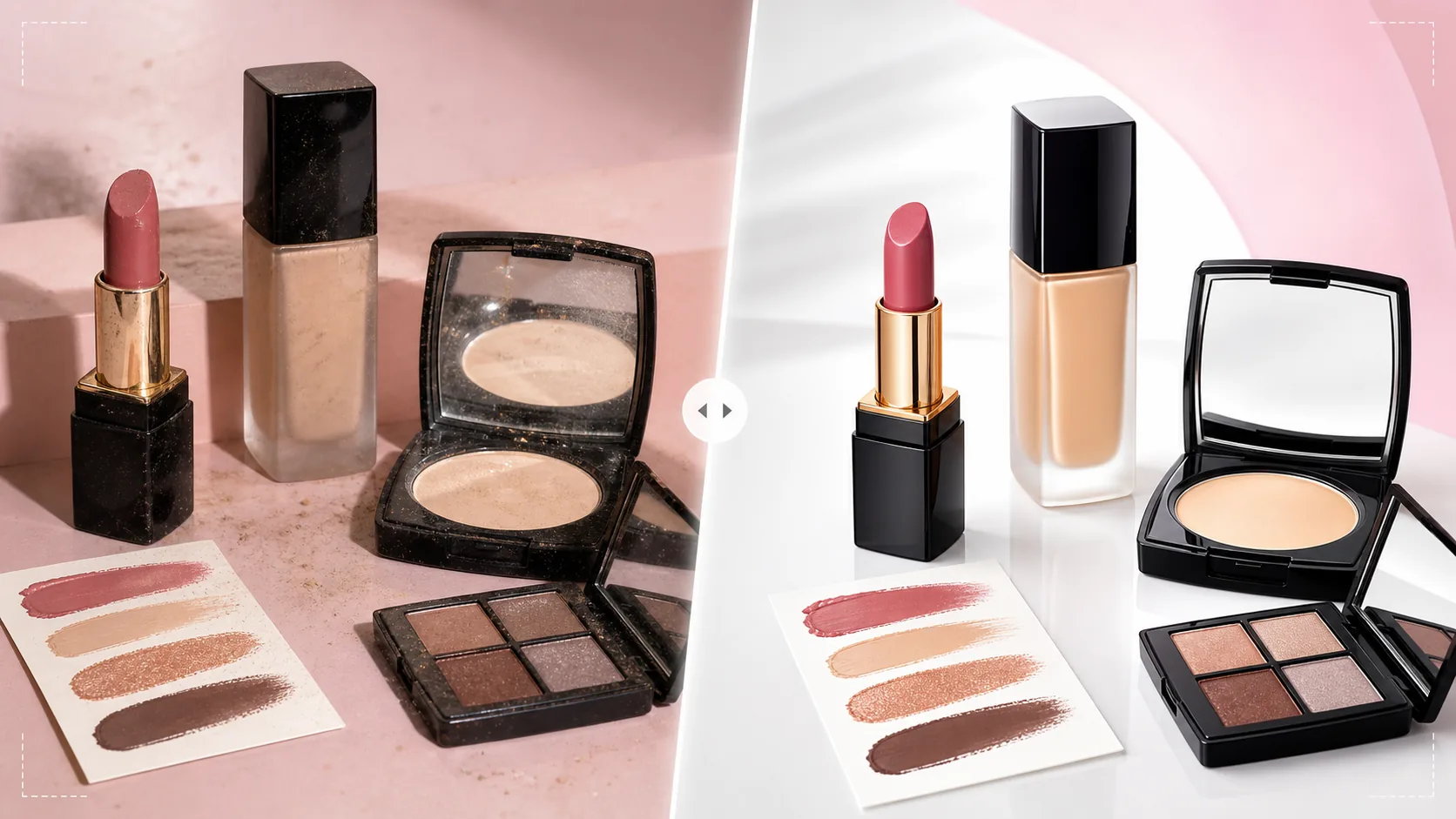
Präsentieren Sie Schönheitsprodukte mit der Farbgenauigkeit und Oberflächenqualität, die Käufer erwarten. Diese Vorlage schärft Verpackungsetiketten und Inhaltsstofftexte, gibt Farbfelder mit bildschirmgetreuer Wiedergabetreue wieder, kontrolliert Spiegelungen auf glänzenden Tuben und Puderdosen und erzeugt saubere Hintergründe nach dem Standard der Kosmetikbranche.
Diese Vorlage kostenlos testenE-commerce template preview
Was diese Vorlage leistet
Bewältigt die besonderen Herausforderungen der Kosmetik- und Schönheitsproduktfotografie, bei der die Farbgenauigkeit Kaufentscheidungen und Rückgabequoten direkt beeinflusst. Farbfelder von Foundation, Lippenstift, Lidschatten und Nagellack müssen auf dem Bildschirm möglichst nah an ihrer echten Farbe erscheinen – diese Vorlage wendet eine bildschirmkalibrierte Farbkorrektur an, die sicherstellt, dass das, was Käufer auf dem Bildschirm sehen, mit dem übereinstimmt, was im Paket ankommt. Background Eraser isoliert Produkte mit präzisen Kanten um komplexe Verpackungsformen wie geschwungene Lippenstifthülsen, Puderdosenspiegel und Pipettenfläschchen. AI Enhance schärft Etikettentext, Inhaltsstofflisten und Farbtonnamen, sodass sie selbst auf Mobilbildschirmen lesbar sind. Spiegelungen auf glänzenden Oberflächen werden reduziert, um die Produktfarbe durch die Verpackung statt der Studiolichter zu zeigen.
Vorlageneinstellungen
| Farbgenauigkeit | sRGB-bildschirmkalibriert (minimiert die Farbabweichung zwischen Bildschirm und Produkt) |
| Etikettenschärfung | Mikroschärfung von Text und Logo für die mobile Lesbarkeit |
| Spiegelungskontrolle | Glanzlichter auf glänzenden Tuben und Puderdosen reduzieren |
| Hintergrund | Reinweiß, Pastell oder Marmortextur (Standard der Kosmetikbranche) |
| Ausgabeabmessungen | 2000 × 2000 px (Marktplatz) oder 1200 × 1200 px (Social Media) |
So verwenden Sie diese Vorlage
Laden Sie Ihr Kosmetikfoto hoch
Laden Sie Produktfotos einzelner Artikel, Sets oder Farbmusterkarten hoch. Die Vorlage verarbeitet alle Verpackungsarten – Glasflaschen, Kunststofftuben, Puderdosen, Paletten, Tiegel und Pumpspender. Fügen Sie sowohl Aufnahmen des verpackten Produkts als auch Aufnahmen des geöffneten Produkts hinzu, die die tatsächliche Farbe zeigen (Lippenstiftminen, Lidschattenpfannen, Cremetexturen).
Farbkorrektur und Genauigkeit
Die Vorlage passt den Weißabgleich auf neutrales Tageslicht an und wendet eine sRGB-kalibrierte Farbkorrektur an. Das ist bei Kosmetik entscheidend, da die Farbtongenauigkeit bestimmt, ob Käufer dem Angebot vertrauen. Farbfelder werden auf Genauigkeit statt Leuchtkraft optimiert – das Ziel ist eine naturgetreue Wiedergabe, keine Übersättigung.
Oberflächen- und Etikettenoptimierung
Spiegelungen auf glänzenden Verpackungen werden reduziert, damit Käufer Produktfarbe und Etikett durch das Verpackungsmaterial sehen können. Etikettentext, Farbtonnamen und Inhaltsstofflisten werden für die mobile Lesbarkeit geschärft. Fingerabdrücke und Staub auf Verpackungsoberflächen werden automatisch entfernt.
Export für Angebote und Social Media
Laden Sie mit 2000 × 2000 px für Marktplatzangebote mit Zoom herunter oder mit 1200 × 1200 px für Produktbeiträge auf Instagram und in sozialen Medien. Das sRGB-Farbprofil gewährleistet eine konsistente Farbwiedergabe über verschiedene Geräte und Browser hinweg.
Profi-Tipps für beste Ergebnisse
- ✓Fotografieren Sie Kosmetik unter einer tageslichtausgewogenen Lichtquelle (5500K). Warme Glühlampen oder kaltes LED-Licht erzeugen Farbstiche, die die Vorlage korrigiert, doch der Start mit tageslichtausgewogenem Licht liefert die genauesten Farbfelder im Endergebnis.
- ✓Fügen Sie sowohl Fotos mit geschlossener als auch mit geöffneter Verpackung hinzu. Käufer möchten die Markenverpackung und die tatsächliche Produktfarbe sehen – eine Lippenstiftmine, eine geöffnete Lidschattenpalette, die alle Farbtöne zeigt, oder einen Cremetiegel mit abgenommenem Deckel, der die Produkttextur zeigt.
- ✓Fotografieren Sie Farbmuster auf der Haut vor einem neutralen Hintergrund und achten Sie darauf, dass die Haut sauber und ohne Lotion ist. Die Vorlage verbessert die Sichtbarkeit der Farbmusterfarbe und bewahrt zugleich einen natürlichen Hautton im Hintergrund, was Käufern hilft, sich die Farbe auf der eigenen Haut vorzustellen.
- ✓Reinigen Sie alle Verpackungen vor der Aufnahme mit einem fusselfreien Tuch. Kosmetikverpackungen ziehen Fingerabdrücke und Staub leicht an, und obwohl die Vorlage diese entfernt, bewahrt ein sauberer Start mehr der ursprünglichen Oberflächendetails im verarbeiteten Bild.
E-commerce workflow
Product photo hub
Use this template with the full ecommerce product photo workflow for marketplace backgrounds, cleanup, compression, resizing, and listing-ready exports.
View ecommerce product photo workflowHäufige Fragen
Wie genau sind die verarbeiteten Farbmusterfarben?
+
Die Vorlage wendet eine sRGB-kalibrierte Farbkorrektur an, um die Abweichung zwischen Bildschirmanzeige und physischem Produkt zu minimieren. Auf einem kalibrierten Monitor liegen verarbeitete Farbmuster innerhalb von Delta E 3 der physischen Produktfarbe – nah genug, dass die meisten Betrachter sie als identisch wahrnehmen.
Kann damit Lidschattenpaletten mit vielen Farbtönen verarbeitet werden?
+
Ja. Paletten mit mehreren Farbtönen und 8, 12 oder mehr Pfannen werden mit individueller Farbgenauigkeit für jeden Farbton verarbeitet. Die Vorlage schärft die Pfannengrenzen und Farbtonnamen, während die Gesamtkomposition der Palette erhalten bleibt.
Was ist mit transparenten oder satinierten Verpackungen?
+
Transparentes Glas und satinierter Kunststoff erfordern bei der Hintergrundentfernung eine besondere Kantenbehandlung. Die Vorlage bewahrt die Durchsichtigkeit der Verpackung vor dem neuen Hintergrund und stellt zugleich sicher, dass das Produkt im Inneren klar sichtbar bleibt.
Verkaufen Sie Schönheit mit farbgetreuen Produktbildern
Laden Sie Kosmetikfotos hoch und erhalten Sie farbgetreue, etikettenscharfe, professionell veredelte Bilder, die das Käufervertrauen in jeden Farbton stärken.
Kostenlos testenRelated templates
More e-commerce templates for your workflow.
Reinweiße Hintergrundvorlage für Produktfotos. Amazon-, Shopify- und Marketplace-fähige Einstellungen für saubere, professionelle Produktbilder, die konvertieren.
Für Etsy optimierte Fotovorlage für Einträge. Wandelt Lifestyle-Aufnahmen in saubere weiße Hintergründe mit 2000 Pixel um, verbessert handgefertigte Produktdetails und erfüllt die Bildrichtlinien von Etsy.
Für eBay optimierte Angebotsfotovorlage. Weißer Hintergrund für Galeriebilder, Verbesserung der Zustandsdokumentation und Mehrwinkel-Layouts, die den eBay-Bildstandards entsprechen.
Professionelle Schmuckfotografie-Vorlage für Ringe, Halsketten und Uhren. Kontrolliert Reflexionen, verstärkt das Glitzern von Edelsteinen und liefert marktreife Bilder auf sauberen Hintergründen.
Professionelle Möbelfotovorlage für Marktplatzangebote. Beseitigen Sie Unordnung im Raum, zeigen Sie echte Dimensionen und präsentieren Sie Stücke auf sauberen Hintergründen oder in stilvollen Raumkontexten.
Bereinigen Sie flach liegende Kleidungsfotos mit Faltenentfernung, Fusselentfernung, reinweißen Hintergründen und präziser Stofffarbe. Bereit für Shopify, Amazon und Boutiquen.