
Entfernen Sie Flecken und verschüttete Flüssigkeiten von Fotos
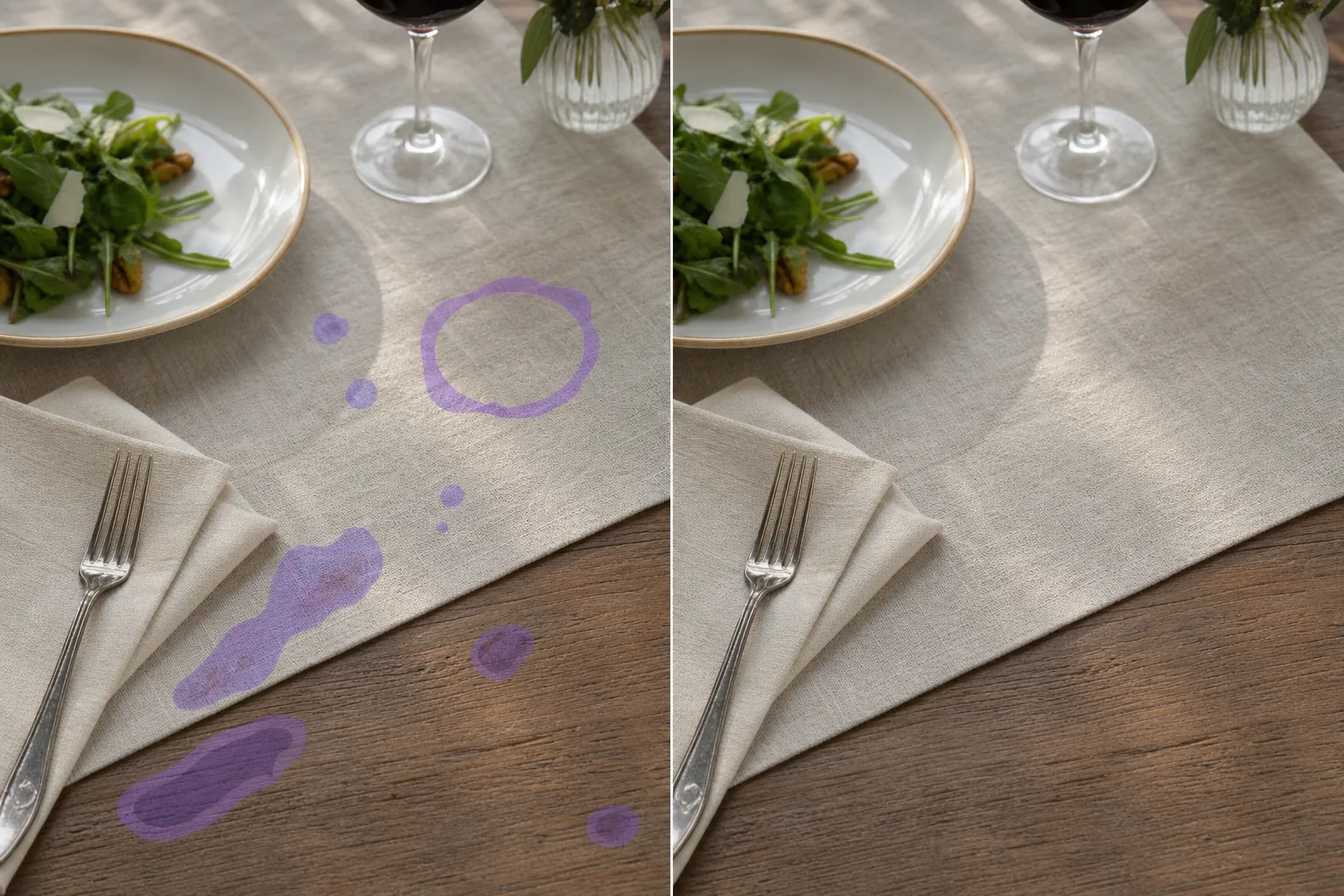
Bei echten Fotosessions landen Flecken und verschüttete Flüssigkeiten auf realen Oberflächen – Soße auf der Tischdecke während eines 30-sekündigen Styling-Durchgangs, Wasserflecken auf einem Hotelbadezimmerspiegel kurz vor der Aufnahme des Angebots, Kaffeeringe auf einer Schreibtischoberfläche während eines Arbeitsplatzfotos, Weinflecken auf einer Hochzeitstischdecke, Roststreifen auf architektonischen Elementen im Freien. Die KI von Magic Eraser entfernt Flecken oder verschüttete Flüssigkeiten und stellt die saubere darunter liegende Oberfläche – Tischdeckengewebe, polierte Steintheke, bemalte Wand, Stoffmuster, Holzmaserung – in Sekundenschnelle wieder her, ohne dass die gesamte Szene erneut aufgenommen werden muss.
Zuletzt aktualisiert
Warum Flecken in echten Fotorahmen landen
Um einen Fleck aus einem Foto zu entfernen, öffne Magic Eraser im Web, auf iOS oder Android, lade das Bild hoch, übermale die Stelle mit dem Pinsel – einen verschütteten Klecks im Bild, einen Wasserfleck oder Altersfleck auf einem eingescannten Abzug, einen Kaffeerand auf dem Tisch – und lass die KI rekonstruieren, was darunter liegen sollte. Es ist kostenlos und ganz ohne Anmeldung. Am besten gelingt die Bereinigung über gleichmäßigen Flächen (eine Tischplatte, eine Wand, einfacher Stoff, der Himmel), während belebtere Bereiche als plausible Entsprechung wiederhergestellt werden. Bei einem alten eingescannten Foto solltest du mit dem Scan in der höchsten verfügbaren Auflösung starten; bei einem hartnäckigen Fleck übermale ihn abschnittsweise und führe den Vorgang erneut aus, dann zoome hinein, um die ausgebesserte Stelle zu prüfen. Fotosessions sind von Natur aus chaotisch. Bei der Food-Fotografie geht es um das Bewegen von Tellern, das Eingießen von Soßen, das Schneiden von Käse und das Garnieren. Bei jedem Arbeitsgang besteht eine Wahrscheinlichkeit von 3–5 % pro Minute, dass irgendwo im Bild etwas verschüttet wird, und bei einem typischen 90-minütigen Restaurant-Menü-Shooting sammeln sich Dutzende kleiner Verschüttungen an, die das Styling-Team zwischen den Aufnahmen reinigt, aber nicht immer auffängt, bevor der Verschluss ausgelöst wird. Das Fotografieren von Immobilienanzeigen findet in bewohnten Häusern statt, in denen Wasserflecken auf Badezimmerspiegeln, Kaffeeringe auf Esstischen, Seifenreste am Fuß von Glasduschtüren und Staubflecken auf Edelstahlgeräten auch nach der Reinigung zur Besichtigungsvorbereitung vorhanden sind. Die Fotografie von Bekleidungsprodukten fängt Stoffausreißer, Deodorantflecken an Kragen, Wasserflecken auf gefärbten Stoffen durch Dämpfen und gelegentliche Make-up-Übertragungen von Styling-Models ein. Lifestyle-Fotografie in Arbeitsräumen, Küchen und Schlafzimmern dokumentiert die tatsächlichen Texturen des täglichen Gebrauchs, darunter Kaffeeringe, Tintenflecken und die Patina häufig genutzter Oberflächen – manchmal ist dies die beabsichtigte ästhetische und manchmal versehentliche Unordnung, die der Fotograf entfernen möchte. Die manuelle Fleckenentfernung in Photoshop ist eine der vielfältigeren Reinigungsaufgaben, da Flecken viele Formen annehmen (durchscheinende Flüssigkeit, undurchsichtiger Feststoff, ringförmig, spritzerförmig, tropfenförmig, schlierenförmig) und sich über alle Oberflächentypen erstrecken (gewebter Stoff, polierter Stein, bemalte Trockenbauwände, Holzmaserung, Glas). Das Klon-Stempel-Werkzeug muss den Bereich jedes Flecks mit kontinuierlicher Texturanpassung über die gesamte darunter liegende Oberfläche neu aufbauen. Die KI von Magic Eraser verarbeitet die Geometrie, indem sie das darunter liegende Oberflächenmuster aus den nicht markierten angrenzenden Bereichen ableitet und die Oberfläche in einem einzigen Pinseldurchgang kontinuierlich über die gesamte Fläche des Flecks rekonstruiert.
Entfernen Sie Flecken in drei Schritten
- 1
Laden Sie das Foto hoch
Öffnen Sie Magic Eraser im Web, iOS oder Android. Werfen Sie einen Blick auf den Food-Fotorahmen mit verschütteter Soße, auf das Immobilienfoto mit Wasserflecken, auf das Foto eines Bekleidungsprodukts mit Stoffflecken, auf das Lifestyle-Foto mit Kaffeeringen oder auf jedes andere Foto, auf dem Flecken oder verschüttete Flüssigkeiten eine ansonsten saubere Oberfläche verunreinigen. JPEG, PNG, HEIC und WebP werden alle unterstützt.
- 2
Über jeden Fleck oder jede verschüttete Flüssigkeit streichen
Übermalen Sie jeden sichtbaren Fleck, jede Verschüttung, jeden Ring, jedes Tropfen, jede Schmiererei oder jeden Spritzer. Decken Sie die gesamte Fläche des Flecks ab, plus einen kleinen Rand, um etwaige weiche Kanten oder Schatten aufzufangen. Bei verschütteten Flüssigkeiten mit starkem Richtungsfluss (eine ausgegossene Soße, die über die Tischdecke tropft, ein Kaffeering mit Schwanz) bürsten Sie den gesamten Weg, einschließlich der Hinterkante. Bei Stoffflecken auf Kleidungsstücken bürsten Sie den Fleckbereich und einen Rand ab, der der lokalen Webrichtung des Stoffes entspricht. Bei mehreren kleinen Flecken auf einer einzigen Oberfläche (einer Tischdecke mit 8–12 kleinen Flecken während der Styling-Sitzung) bearbeiten Sie die Flecken einzeln, anstatt den gesamten Oberflächenbereich massenhaft zu bürsten – die KI erzeugt sauberere Rekonstruktionen, wenn jeder Fleck seine eigene klare Grenze hat.
- 3
Tippen Sie auf Löschen und verfeinern
Die KI baut die saubere Untergrundoberfläche unter jedem Fleck wieder auf und passt sie an die umgebende Textur an (Tischdeckengewebe, poliertes Steinmuster, Stoffmaserung, Holzstruktur, gestrichene Wandoberfläche, Fliesenfugenmuster). Bei typischen Food-Fotografie- und Lifestyle-Fällen ist der Umbau bei Standard-Anzeigegrößen unsichtbar. Für redaktionelle Drucke im Format 16x20 oder größer und für Bekleidungsarbeiten in Katalogqualität, bei denen die Stofftextur die gesamte visuelle Geschichte darstellt, führen Sie anschließend einen AI Enhance-Durchgang durch, um die rekonstruierten Texturdetails zu schärfen und alle durch die KI-Glättung abgeflachten Richtungsgewebe wiederherzustellen. Exportieren Sie in voller Auflösung.
Am besten für
- Restaurantmenüs und Food-Fotografie, bei der sich während der Fotosession Styling-Spritzer auf Tellern, Tischdecken, Oberflächenhintergründen und Requisitenarrangements ansammeln
- Küchen und Esszimmer mit Immobilienanzeigen, in denen Kaffeekränze, Wasserflecken und kleinere Flecken auf der Arbeitsplatte für scrollende Käufer als "Dieses Haus ist nicht gut instand gehalten“ gelesen werden
- Badezimmer mit Immobilienangeboten, in denen Wasserflecken auf Spiegeln, Seifenreste an gläsernen Duschtüren und Roststreifen auf Wasserhähnen die Positionierung als bezugsfertiges Angebot untergraben
- Bei Produktfotografien im Bereich Bekleidung verringern Stoffflecken, Deodorantflecken, Wasserflecken beim Dämpfen und Make-up-Übertragungen beim Styling die Angebotskonvertierung
- Lifestyle- und Arbeitsplatzfotografie, bei der Kaffeeringe, Tintenflecken und Oberflächenpatina mit dem beabsichtigten Motiv um visuelle Aufmerksamkeit konkurrieren
- Marketingfotos von Hotels und Airbnb, auf denen Flecken auf Badezimmer- und Küchenoberflächen die kuratierte, saubere Ästhetik untergraben, auf die das Inserat angewiesen ist
- Hochzeits- und Eventfotografie, bei der sich während der gesamten Empfangssitzung Tischdecken ansammeln, der Fotograf aber möchte, dass die formellen Bilder sauber sind
- Architekturfotografie im Freien, bei der Roststreifen, Wasserflecken auf Stein oder Beton und Graffiti-Rückstände mit dem beabsichtigten visuellen Charakter des Gebäudes konkurrieren
Randfälle und Tipps
Die Fleckenentfernung funktioniert am besten, wenn die umgebende Oberfläche im Umkreis von wenigen Zentimetern um den Fleck optisch konsistent ist – eine durchgehende Tischdeckenbindung, ein nicht markierter Gegenabschnitt, ein sauberer Stoffmaserungsbereich –, da die KI diesen angrenzenden Bereich als Referenz verwendet, um die Oberfläche unter dem Fleck wiederherzustellen. Vier Fälle erfordern einen anderen Ansatz. Erstens Flecken, die sich über mehrere unterschiedliche Oberflächentypen in einer Markierung erstrecken (eine ausgegossene Soße, die von einer Tellerkante auf eine Tischdecke und vom Tisch auf den Boden läuft): Bürsten Sie den Fleck in Abschnitten, die den darunter liegenden Oberflächengrenzen entsprechen (ein Durchgang über den Tellerbereich, ein Durchgang über den Tischtuchbereich, ein Durchgang über den Bodenbereich). Die KI behandelt jedes Oberflächensegment mit sauberer Referenz, wobei ein kontinuierlicher Massenpinsel über den gesamten Pfad zu inkonsistenten Texturen an den Oberflächenübergängen führen kann. Zweitens Flecken auf stark gemusterten Oberflächen mit sich stark wiederholenden Motiven (karierte Tischdecken, geometrische Fliesenmuster, gewebte Teppiche mit gerichtetem Muster): Die KI bewältigt die Texturrekonstruktion gut, kann jedoch die Musterkontinuität entlang des neu aufgebauten Abschnitts glätten oder leicht verzerren. Bei Ausdrucken in redaktioneller Qualität stellt ein 2–3-minütiger Verfeinerungsdurchgang mit einem kleineren Pinsel die Musterausrichtung wieder her. Drittens Flecken auf glänzenden, reflektierenden Oberflächen, bei denen der Fleck sowohl die Oberfläche als auch die Reflexion beeinträchtigt (ein Wasserfleck auf einer polierten Arbeitsplatte mit einem reflektierenden Fenster): Bürsten Sie den Fleckbereich sorgfältig ab – die KI baut die Oberfläche und die Reflexion zusammen wieder auf, aber sehr starke gerichtete Reflexionen können auffällige Nähte erzeugen, die nachbearbeitet werden müssen. Viertens, absichtliche Flecken und ästhetische Patina, die der Fotograf bewahren möchte (Rostpatina auf der Industriefotografie, Kaffeeringe als bewusstes Stilelement, absichtliche Alterungsspuren): Bürsten Sie diese nicht ab. Die KI entfernt alles, was gebürstet ist, was der Säuberung dient, aber der Beibehaltung bewusster ästhetischer Elemente widerspricht. Insbesondere bei der Fotografie von Immobilienangeboten kann das Entfernen von Flecken, die tatsächliche Schäden verbergen (aktive Wasserflecken, die auf Undichtigkeiten hinweisen, Rost, der auf anhaltende strukturelle Probleme hinweist, Flecken, die auf Schimmel hinweisen), Auswirkungen auf die Offenlegung gemäß den regionalen MLS-Regeln haben – überprüfen Sie Ihre spezifischen MLS-Richtlinien, bevor Sie bearbeitete Fotos veröffentlichen.
Häufig gestellte Fragen
- Ist es kostenlos, Flecken von einem Foto zu entfernen?
- Ja. Das kostenlose Kontingent von Magic Eraser deckt die Flecken- und Verschüttungsreinigung mit täglichen Nutzungsbeschränkungen ab. Durch ein Upgrade auf Premium (29,99 $/Jahr) werden die Beschränkungen aufgehoben und Exporte mit höherer Auflösung freigeschaltet – nützlich für den Menüdruck, MLS-Immobilienlisten, die Arbeit mit Bekleidungskatalogen und redaktionelle Fotografie, bei der es bei großen Anzeige- und Druckgrößen auf die volle Auflösung ankommt.
- Funktioniert es bei mehreren Flecken auf einem Foto?
- Ja. Überstreichen Sie jeden Fleck einzeln in einer einzigen Magic Eraser-Sitzung – die KI behandelt mehr als 10–30 separate Fleckenbereiche pro Foto in einem Durchgang, ohne dass ein erneutes Hochladen erforderlich ist. Bei einer sehr dichten Fleckenansammlung (eine Tischdecke am Ende einer langen Styling-Sitzung mit mehr als 20 kleinen Flecken) bürstet der Reiniger-Arbeitsablauf in 2–3 regionalen Durchgängen und nicht mit einem Massenpinsel über die gesamte Tischdeckenfläche, da die KI sauberere Rekonstruktionen mit einer klaren, nicht blockierten Referenz neben jedem Durchgang erzeugt.
- Entspricht die wiederhergestellte Oberfläche genau der ursprünglichen Textur?
- Bei typischen Lebensmittel-, Lifestyle- und Immobilienfällen entspricht die Neukonstruktion der umgebenden Textur so gut, dass sie bei Standardanzeigegrößen (Webanzeige, Druck bei 8x10 und kleiner, soziale Medien) unsichtbar ist. Bei stark gemusterten Oberflächen (karierte Tischdecken, geometrische Fliesen, gewebte Teppiche mit starkem Richtungsmotiv) übernimmt die KI die Texturrekonstruktion, kann jedoch die Musterkontinuität entlang des neu aufgebauten Abschnitts leicht abschwächen. Planen Sie für Ausdrucke in redaktioneller Qualität im Format 16x20 oder größer, bei denen die Textur die visuelle Geschichte darstellt, nach der ersten Fleckenentfernung einen 2-3-minütigen Verfeinerungsdurchgang mit einem kleineren Pinsel ein.
- Kann ich Flecken von Produktfotos von Bekleidung entfernen?
- Ja. Beim Fotografieren von Bekleidungsprodukten kommt es häufig zu Stoffflecken während des Shootings (Deodorantflecken auf Kragen durch Anprobieren, Wasserflecken durch Dämpfen, Make-up-Übertragung beim Model-Styling, Hängenbleiben und Ziehen). Der Pinsel von Magic Eraser bearbeitet jeweils: Malen Sie über den Fleckbereich und einen kleinen Rand, der der lokalen Webrichtung des Stoffes entspricht, und die KI stellt die saubere Maserung des Stoffes wieder her. Bei Kleidungsstücken mit stark richtungsgebundener Webart (Jeans, Twill, Fischgrätenmuster, Strickmuster) behält die KI die Webrichtung gut bei; Bei sehr feinen Mustern (kleine Blumendrucke, Mikrostreifen, gewebte Karos) kann die Neukonstruktion die Musterdetails leicht abschwächen und durch einen Verfeinerungsdurchgang wiederhergestellt werden.
- Gehört das Entfernen von Flecken auf Fotos von Immobilienanzeigen zu den MLS-Regeln?
- Im Allgemeinen ja, wenn es sich nur um kosmetische Flecken handelt, mit Vorbehalten bei der Offenlegung von Flecken, die auf Schäden hinweisen. Die meisten regionalen MLS-Ausschüsse verlangen Auflistungsfotos, um die dauerhaften Merkmale der Immobilie genau wiederzugeben. Kosmetische Oberflächenflecken (Kaffeeringe, Wasserflecken, Seifenreste auf dem Glas) sind keine bleibenden Eigenschaftsmerkmale und werden in der Regel als standardmäßige Kosmetikartikel zu entfernende Fotos angesehen. Für Flecken, die auf einen Schaden hinweisen, gelten unterschiedliche Regeln: Aktive Wasserflecken an der Decke deuten auf ein Dachleck hin, Roststreifen weisen auf anhaltende strukturelle Korrosion hin oder Fleckenmuster deuten auf Schimmel hin. Dies sind Tatsachen über den Zustand der Immobilie, für die gemäß den regionalen Vorschriften möglicherweise eine Offenlegungspflicht besteht. Als Faustregel gilt: Wenn es sich bei dem Fleck um einen Fleck handelt, den eine routinemäßige Reinigung entfernen würde, ist die kosmetische Reinigungsbehandlung in Ordnung; Wenn der Fleck auf einen anhaltenden Zustand hinweist, der den Wert der Immobilie beeinträchtigt, gelten die Offenlegungsregeln. Überprüfen Sie vor der Veröffentlichung Ihre spezifischen MLS-Richtlinien.
- Kann ich dies telefonisch tun, um während eines Shootings sofort aufzuräumen?
- Ja. Die iOS- und Android-Apps von Magic Eraser führen denselben Fleckenentfernungs-Workflow aus wie die Web-App. Für Food-Fotografen, Immobilienmakler und Produktfotografen, die während einer aktiven Sitzung auf einem Telefon oder Tablet fotografieren, sorgt die Bereinigung auf dem Gerät dafür, dass der Workflow nur auf dem Telefon erfolgt, ohne dass ein Export zurück auf den Desktop erfolgt. Ein üblicher Arbeitsablauf für Food-Fotografen: Fotografieren Sie die Sitzung, machen Sie einen kurzen Reinigungsdurchgang von Flecken und verschütteten Flüssigkeiten mit den stärksten 5–10 Aufnahmen aus dem Café oder der Küche, schicken Sie die gereinigten Versionen noch am Abend an den Kunden und bewahren Sie den sorgfältigen Verfeinerungsdurchgang für das komplette Menü am nächsten Tag auf.
- Behandelt die KI sehr durchscheinende oder wässrige Flecken (Wasserflecken, leichte Kondensation)?
- Ja. Durchscheinende Flecken (Wasserflecken auf Glas oder Spiegeln, Kondensationsringe auf Arbeitsflächen, leichte Sprühmuster) sind für die KI in vielen Fällen tatsächlich etwas einfacher, da die umgebende Oberflächentextur teilweise durchscheint und der KI eine klare Extrapolationsreferenz gibt. Die Pinseltechnik ist die gleiche: Übermalen Sie den Fleck mit einem kleinen Rand, und die KI baut die saubere Oberfläche wieder auf. Die schwierigeren Fälle sind undurchsichtige Flecken auf gemusterten Oberflächen, bei denen der Fleck das Muster vollständig bedeckt, oder Flecken mit starkem Richtungsfluss, der mehrere unterschiedliche darunter liegende Texturen kreuzt – diese profitieren von dem segmentierten Pinselansatz, der im Abschnitt "Randfälle“ beschrieben wird.