
Entfernen Sie Rasengeräte von den Fotos
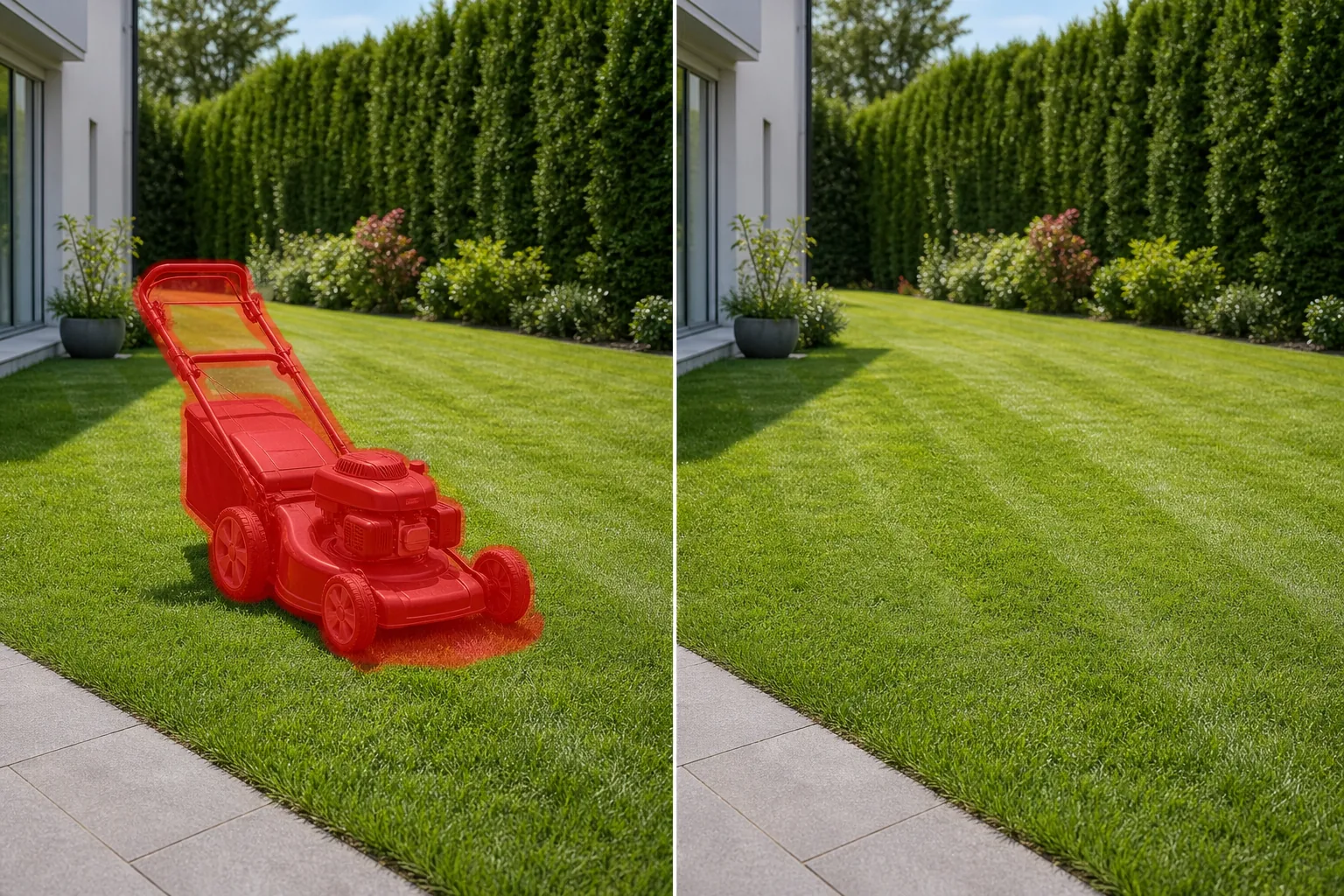
Löschen Sie Rasenmäher in der Mitte des Hofes, Laubbläser auf der Einfahrt, an Zäune gelehnte Unkrautschneider, Schubkarren auf dem Rasen und Gartenschlauchtrommeln neben dem Haus aus Immobilienangeboten, Landschaftsbau-Portfolioaufnahmen und Marketingfotos für das Leben im Freien. Magic Eraser entfernt die Ausrüstung und rekonstruiert den Rasen, die Terrasse oder die Auffahrt darunter.
Zuletzt aktualisiert
Warum Rasengeräte ansonsten perfekte Gartenfotos überladen
Rasengeräte werden in der Immobilien- und Landschaftsfotografie häufig versehentlich verwendet, da die Aufnahmen oft mit der Wartung zusammenfallen. Das Landschaftsgärtnerteam war gerade da, oder der Hausbesitzer war mitten in der Arbeit – und ein Rasenmäher steht mitten auf dem frisch geschnittenen Rasen, ein Laubbläser steht auf der Einfahrt, ein Rasentrimmer lehnt an der Garage. Diese Gegenstände verwandeln ein makelloses Gartenfoto in eine Szene, die wie eine unterbrochene Hausarbeit aussieht. Bei Immobilien ist der Hinterhof ein wichtiges Verkaufsargument, und im Rahmen verbleibende Geräte verringern die wahrgenommene Größe und Schönheit von Außenbereichen. Landschaftsbauunternehmen stehen umgekehrt vor dem gleichen Problem: Ihre Portfoliofotos müssen den fertigen Rasen, Garten oder die Landschaftsgestaltung zeigen, nicht die Werkzeuge, mit denen sie erstellt wurden. Magic Eraser entfernt Rasengeräte in Sekundenschnelle. Die KI identifiziert den Mäher, das Gebläse, den Trimmer oder die Schubkarre, einschließlich ihres Schattens auf dem Gras, und rekonstruiert die Rasenoberfläche mit passender Grastextur, Mähmuster und Farbe.
Entfernen Sie Rasengeräte in drei Schritten
- 1
Laden Sie Ihr Foto hoch
Öffnen Sie Magic Eraser im Internet, auf iOS oder Android und laden Sie das Hof-, Garten- oder Außenfoto mit sichtbaren Rasengeräten hoch. Die Formate JPEG, PNG, HEIC und WebP werden in jeder Auflösung akzeptiert.
- 2
Bürsten Sie über das Gerät
Übermalen Sie das gesamte Gerät – Mähwerk, Griff, Räder und Bodenschatten. Berücksichtigen Sie bei einem Schubmäher die gesamte Aufstandsfläche vom Griff bis zu den Vorderrädern. Bei einem Laubbläser oder Trimmer auf dem Boden decken Sie das gesamte Gerät und alle daneben liegenden Verlängerungskabel oder Benzinkanister ab. Berücksichtigen Sie den Schattenwurf auf dem Rasen oder der Auffahrt.
- 3
Löschen und überprüfen
Tippen Sie auf "Löschen“ und die KI entfernt die Ausrüstung und rekonstruiert gleichzeitig das Gras, den Beton, den Mulch oder die Terrassenoberfläche darunter. Überprüfen Sie, ob die Grasstruktur, das Mähmuster und die Farbe mit dem umgebenden Rasen übereinstimmen. Stellen Sie bei Einfahrtsflächen sicher, dass die Beton- oder Asphaltstruktur gleichmäßig ist. Exportieren Sie es für Ihren Eintrag, Ihr Landschaftsbau-Portfolio oder Ihr Outdoor-Wohnobjekt.
Am besten für
- Immobilienfotos, auf denen während des Shootings ein Rasenmäher oder Gartengeräte im Hinterhof stehen
- Portfoliobilder von Landschaftsbauunternehmen zeigen fertige Rasen- und Gartenarbeiten ohne sichtbare Werkzeuge
- Fotos von Airbnb- und Mietobjekten, auf denen Gartengeräte draußen gelagert werden, verringern die Attraktivität
- Marketingfotos für das Leben im Freien und die Terrasse, bei denen eine Schubkarre oder ein Rasentrimmer die unterhaltsame Ästhetik durchbricht
- HOA- und Community-Marketingmaterialien, die saubere, gerätefreie Rasenaufnahmen von Gemeinschaftsflächen erfordern
Tipps für die natürlich aussehende Entfernung von Rasengeräten
Das Entfernen von Rasengeräten funktioniert gut, da die Objekte auf gleichmäßigem Gras oder gepflasterten Oberflächen liegen, die die KI genau rekonstruiert. Das Hauptaugenmerk liegt auf Rasenmähmustern – den durch das Mähen entstehenden Richtungsstreifen oder diagonalen Linien. Wenn die KI einen Mäher entfernt und ihn mit Gras füllt, behält sie die umliegende Mähmusterrichtung bei. Wenn der Mäher am Ende einer teilweise gemähten Reihe stand (halb gemähtes, halb ungemähtes Gras), füllt die KI basierend auf der vorherrschenden Höhe des umgebenden Grases, wodurch die exakte Mähgrenze möglicherweise nicht perfekt wiederhergestellt wird. Für diesen Randfall verfeinert ein zweiter Durchgang entlang der Mählinie das Ergebnis. Aufsitzmäher und Nullwendekreismäher sind größer und werfen größere Schatten – einschließlich der gesamten Schattenfläche. Mehrere Geräte (Mäher plus Trimmer plus Gebläse) können in einem Durchgang entfernt werden, wenn sie gruppiert sind, oder in separaten Durchgängen, wenn sie über den Hof verteilt sind. Kombinieren Sie bei Landschaftsbau-Portfolio-Arbeitsabläufen die Entfernung von Geräten mit der Entfernung von Schläuchen und allen temporären Bewässerungs- oder Sprinklergeräten für eine vollständige Gartenreinigung.
Häufig gestellte Fragen
- Ist es kostenlos, Rasengeräte von einem Foto zu entfernen?
- Ja. Das kostenlose Kontingent von Magic Eraser übernimmt die Entfernung von Rasengeräten mit täglichem Nutzungslimit. Premium (29,99 $/Jahr) hebt Beschränkungen auf und ermöglicht Exporte mit höherer Auflösung, die sich zum Auflisten von Fotos und Druckportfolios eignen.
- Kann ein Aufsitzmäher von einem großen Gartenfoto entfernt werden?
- Ja. Aufsitzmäher und Nullwendekreismäher sind größer als Schubmäher, liegen aber dennoch auf gleichmäßigem Gras, das die KI gut rekonstruiert. Bürsten Sie über den gesamten Mäher, einschließlich seiner breiten Schattenfläche, und die KI füllt ihn mit der passenden Rasenstruktur.
- Was ist mit Gartengeräten, die an einen Zaun oder eine Wand lehnen?
- Ja. Rechen, Schaufeln, Trimmer und andere Werkzeuge, die an Zäunen, Wänden oder Garagen lehnen, werden entfernt, indem man über das Werkzeug und seinen Schatten streicht. Die KI rekonstruiert den Zaun, die Abstellgleise oder die Wandoberfläche hinter dem Werkzeug.
- Bleibt das Mähmuster im Gras erhalten?
- Ja. Die KI erkennt und setzt das gerichtete Mähmuster (Streifen, Diagonalen oder gleichmäßiger Schnitt) vom umgebenden Rasen in die gefüllte Fläche fort. Das Ergebnis entspricht dem natürlichen Rasenbild.