
تنظيف تصوير الطعام باستخدام التحرير باستخدام الذكاء الاصطناعي
تعمل صور الطعام الرائعة على زيادة الطلبات والمشاركة، لكن الطاولات والأواني الفوضوية والفوضى في الخلفية تفسد اللقطة. Magic Eraser يساعد المطاعم ومدوني الطعام ومنصات التوصيل على تنظيف صور الطعام بسرعة.
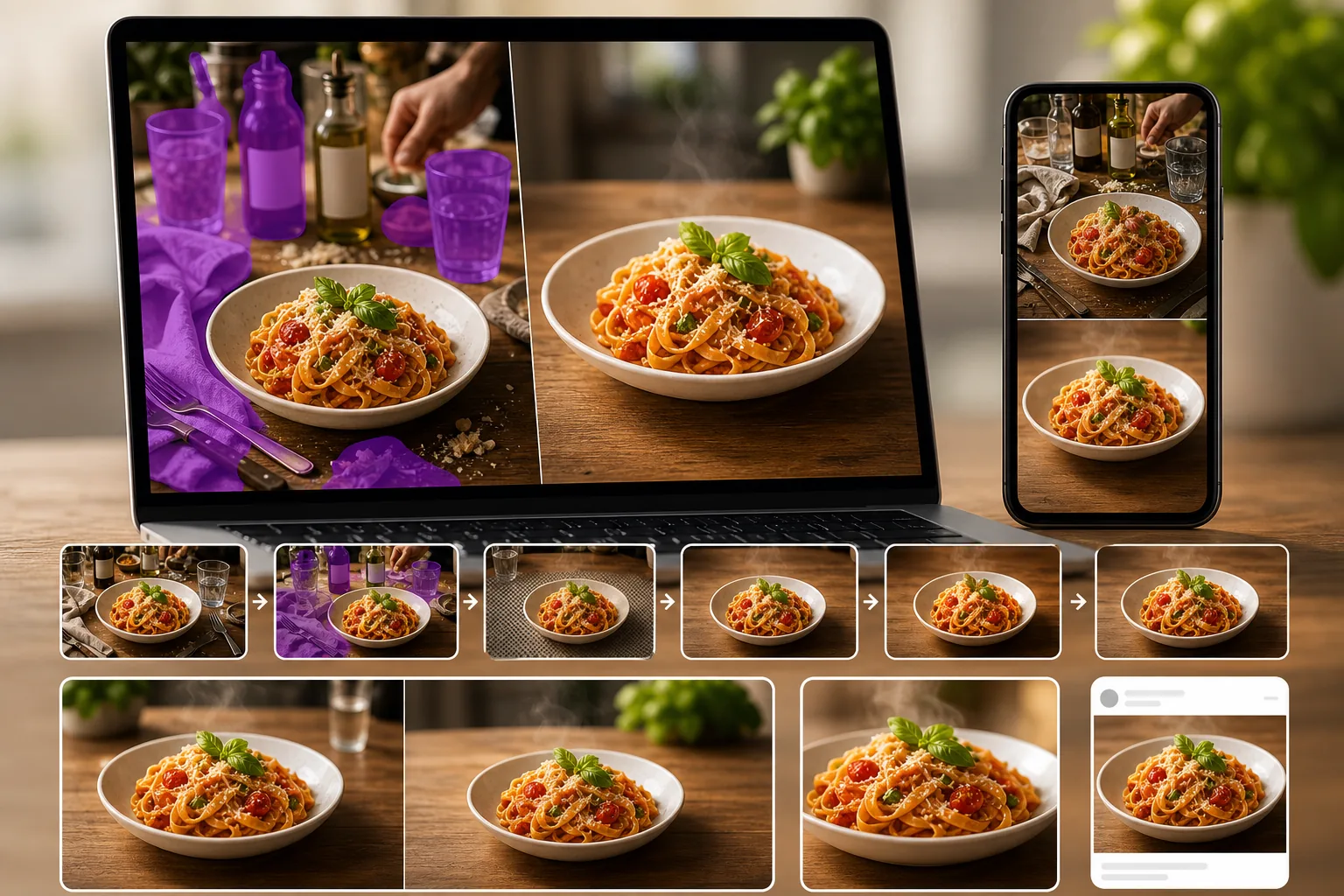
تشوش أسطح الطاولة والخلفيات
المناديل والأواني وزجاجات البهارات والأطباق الأخرى تزدحم الإطار وتشتت انتباهك عن الطبق. تعتبر إزالتها يدويًا في برنامج التحرير بطيئة.
عدم تناسق الإضاءة ودقة الألوان
تختلف إضاءة المطاعم بشكل كبير. غالبًا ما تبدو الصور الملتقطة تحت ضوء دافئ أو خافت مختلفة عن الطبق الفعلي، مما يقلل من جاذبية الشهية.
حجم القائمة وصور منصة التسليم
تحتاج المطاعم التي تقوم بتحديث قوائمها أو إدراجها في تطبيقات التوصيل إلى العشرات من صور الأطعمة النظيفة. يعد التصوير الفوتوغرافي الاحترافي للأغذية لكل عنصر أمرًا مكلفًا ويستغرق وقتًا طويلاً.
كيف يساعد Magic Eraser في تصوير الطعام
قم بتحميل صورة الطعام
افتح Magic Eraser وقم بتحميل صورة الطبق التي تحتاج إلى التنظيف أو التحسين.
إزالة الفوضى في الجدول
امسح الأشياء التي تشتت الانتباه مثل المناديل أو الأدوات الإضافية أو الأيدي أو أكواب المشروبات أو أي شيء يشتت الانتباه عن الطبق.
تعزيز الألوان والحدة
استخدم AI Enhancement لتحسين حيوية الألوان، وتثبيت توازن اللون الأبيض، وتوضيح تفاصيل الطعام حتى يبدو الطبق شهيًا للغاية.
الأسئلة المتداولة
هل يستطيع Magic Eraser تنظيف خلفيات الطاولة الفوضوية؟
+
نعم. استخدم أداة الممحاة لإزالة المناديل والأواني والتوابل وغيرها من فوضى الطاولة، مما يترك تركيبة أنظف تركز على الطبق.
هل هذا مفيد لصور قائمة المطاعم؟
+
نعم. تستخدم المطاعم Magic Eraser لتحويل صور الأطباق اليومية إلى صور أكثر وضوحًا ومناسبة للقوائم المطبوعة ومواقع الويب وقوائم منصات التوصيل.
هل يمكنني تحسين ألوان صور الطعام؟
+
نعم. يمكن لـ AI Enhancement تحسين حيوية الألوان وتوازن اللون الأبيض لجعل الطعام يبدو أكثر شهية، خاصة بالنسبة للصور الملتقطة تحت إضاءة المطاعم الصعبة.
هل يعمل Magic Eraser لمدوني الطعام؟
+
نعم. يستخدم مدونو الطعام ومنشئو المحتوى Magic Eraser لتنظيف صور الطعام وصقلها سريعًا لمنشورات الوسائط الاجتماعية ومقالات الوصفات.
هل يمكنني إزالة العلامة التجارية من أغلفة المواد الغذائية في الصور؟
+
نعم. يمكن لأداة الممحاة إزالة الشعارات والنصوص والعلامات التجارية من العبوات أو الحاويات المرئية في لقطات تصوير الطعام.
اجعل كل صورة طبق تبدو احترافية
جرّب Magic Eraser صور الطعام المجانية والنظيفة، وحسّن الألوان، وأنشئ صورًا شهية لقوائم الطعام ووسائل التواصل الاجتماعي.
جرب Magic Eraser مجانًاحالات استخدام ذات صلة
شاهد كيف يستخدم المحترفون هذه الأدوات في مهام العمل الفعلية.
صور الإعلانات المزدحمة بالأغراض الشخصية أو السيارات المركونة أو معدات البناء قد تنفّر المشترين. يستخدم Magic Eraser الذكاء الاصطناعي لتنظيف صور عقارك فورًا — دون الحاجة إلى مهارات Photoshop.
الخلفيات المشوشة ولقطات المنتجات الفوضوية تكلفك مبيعات كل يوم. يساعدك Magic Eraser على إنشاء صور منتجات احترافية ونظيفة في ثوانٍ — دون الحاجة إلى مهارات Photoshop. ما عليك سوى الرفع، ومسح العناصر المشتتة، والإدراج بثقة.
متطفلون يفسدون صور سفرك؟ خلفيات فوضوية تدمّر صور السيلفي؟ توقف عن إضاعة الساعات في Photoshop. يزيل Magic Eraser المشتتات، وينظّف اللقطات المزدحمة، ويوسّع صورك لتناسب أي تنسيق منصة — كل ذلك بنقرة واحدة.
مقارنات ذات صلة
شاهد كيف يقارن Magic Eraser بالأدوات المشابهة.
TouchRetouch هو تطبيق جوال مدفوع شائع لإزالة الكائنات والعيوب. يوفّر Magic Eraser تحريرًا مجانيًا مدعومًا بالذكاء الاصطناعي على أي جهاز دون الحاجة إلى التثبيت. اطّلع على كيفية مقارنتهما من حيث الميزات والأسعار وسهولة الاستخدام.
Cleanup.pictures هي أداة ويب مجانية لإزالة الكائنات بسرعة. يذهب Magic Eraser إلى أبعد من ذلك مع 8 أدوات تحرير مدعومة بالذكاء الاصطناعي AI وتطبيقات للهاتف المحمول ومعالجة متقدمة. اطلع على المقارنة بين الاثنين.
يُعد remove.bg الرائد في السوق لإزالة الخلفية، حيث يوفر واجهة برمجة تطبيقات قوية وتكاملات مع Photoshop و Figma. ويذهب Magic Eraser إلى أبعد من ذلك بثماني أدوات تحرير مدعومة بالذكاء الاصطناعي — من إزالة الكائنات والتعبئة التوليدية إلى التحسين والتصميم بالذكاء الاصطناعي — كل ذلك في محرر واحد.
محرران قويان للصور بالذكاء الاصطناعي بنقاط قوة مختلفة. يقدم Magic Eraser مجموعة أوسع من أدوات الذكاء الاصطناعي التوليدية، بينما يتفوق Photoroom في تصوير منتجات التجارة الإلكترونية والمعالجة الدفعية. اعرف أيهما يناسب سير عملك.
أدلة ذات صلة
استكشف المزيد من الأدلة والمحتوى المتعلق بسير العمل هذا.
تعرّف على كيفية استخدام Magic Eraser لإزالة العناصر والأشخاص والنصوص والمشتتات من الصور بنتائج ذكاء اصطناعي أنظف.
تعلّم كيفية إزالة الأشخاص من الصور بالذكاء الاصطناعي في ثوانٍ. دليل لصور السفر والعقارات والمنتجات.
دليل خطوة بخطوة لإزالة العلامات المائية من صورك باستخدام الذكاء الاصطناعي. متى يكون ذلك مناسبًا، وأفضل التقنيات، وكيف يتعامل Magic Eraser معها.