
Chuẩn bị ảnh stock
Để ảnh của bạn được các đại lý ảnh stock chấp nhận ngay lần gửi đầu tiên. Mẫu này xóa nhãn hiệu, logo và các yếu tố thương hiệu gây ra việc bị từ chối, dọn dẹp các khiếm khuyết kỹ thuật không vượt qua khâu kiểm duyệt chất lượng, và xuất tệp đúng theo các thông số kỹ thuật chính xác mà Shutterstock, Adobe Stock, Getty và iStock yêu cầu — loại bỏ những lý do phổ biến nhất khiến ảnh bị từ chối khỏi thư viện stock.
Dùng thử mẫu này miễn phíDesign template preview
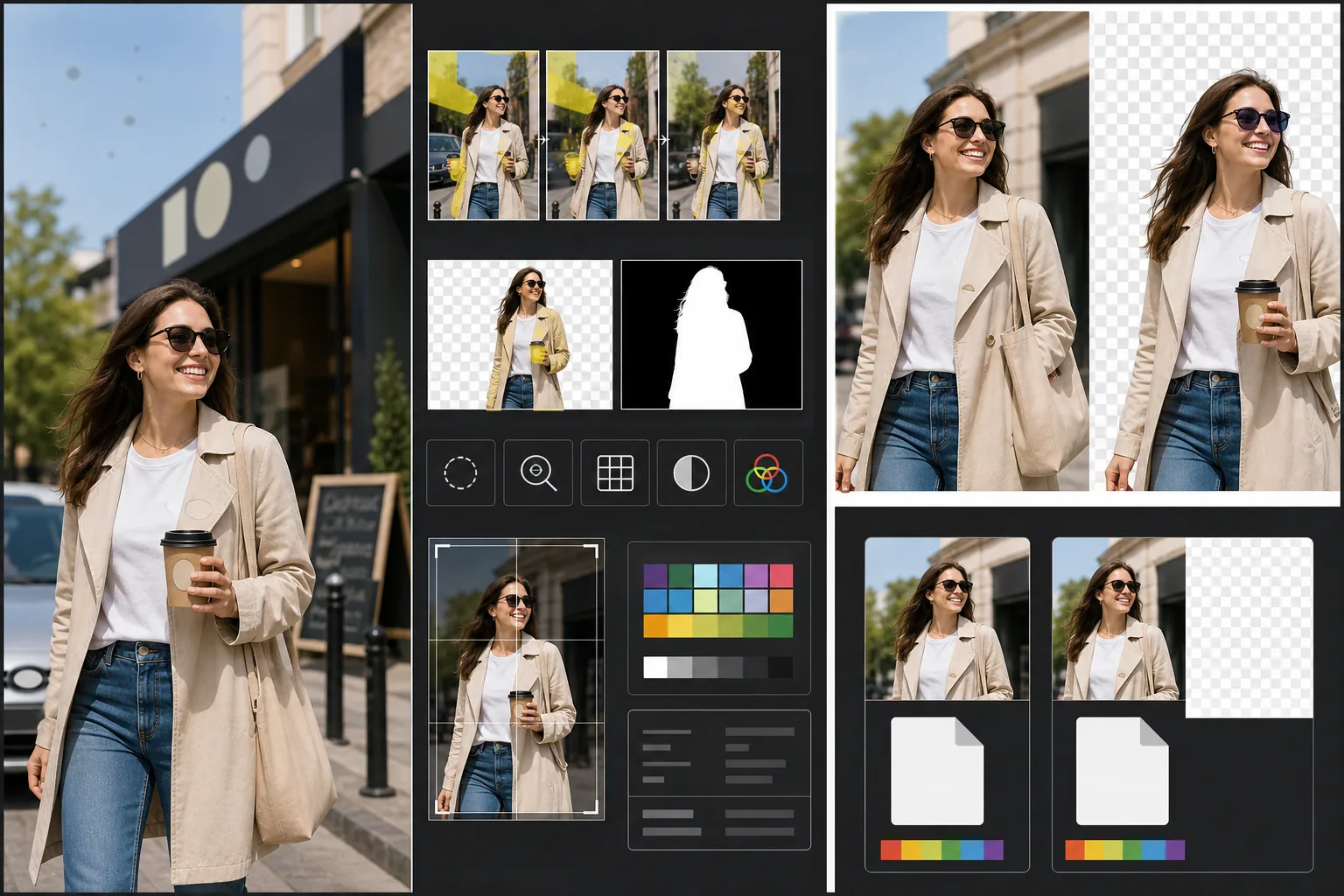
Mẫu này làm gì
Giải quyết các yêu cầu kỹ thuật và pháp lý cụ thể gây ra việc ảnh stock bị từ chối. Magic Eraser phát hiện và xóa các nhãn hiệu, logo thương hiệu, nhãn sản phẩm và biển hiệu có thương hiệu nhìn thấy được vốn sẽ đòi hỏi giấy phép tài sản hoặc gây ra việc bị từ chối hoàn toàn. Điều này bao gồm logo trên quần áo, biểu tượng xe hơi, biển hiệu cửa hàng và tên thương hiệu trên bao bì. Background Eraser cung cấp việc tách nền sạch cho ảnh dùng để cắt ghép, tạo ra cả ảnh RGB lẫn một lớp mặt nạ alpha riêng mà các đại lý stock yêu cầu. Việc kiểm tra chất lượng kỹ thuật xác minh mức độ nhiễu, độ sắc nét, quang sai màu và các đốm bụi cảm biến — tất cả đều là nguyên nhân phổ biến gây từ chối — và AI sửa những gì có thể trong khi đánh dấu các vấn đề cần chụp lại. Bản xuất cuối cùng khớp với thông số kỹ thuật của đại lý về định dạng tệp, hồ sơ màu, độ phân giải và việc nhúng siêu dữ liệu.
Cài đặt mẫu
| Phát hiện nhãn hiệu | Tự động phát hiện và xóa logo, tên thương hiệu và nhãn sản phẩm nhìn thấy được |
| Kiểm tra chất lượng kỹ thuật | Xác minh nhiễu, độ sắc nét, quang sai màu và bụi cảm biến |
| Mặt nạ tách nền | Tạo kênh alpha cho ảnh cắt ghép (PNG có nền trong suốt) |
| Hồ sơ màu | sRGB (bắt buộc với hầu hết đại lý stock) |
| Siêu dữ liệu | Nhúng các trường IPTC cho tiêu đề, mô tả và từ khóa |
| Định dạng đầu ra | JPEG ở chất lượng tối đa (mức 12) hoặc TIFF (không mất dữ liệu, Getty ưu tiên) |
Cách dùng mẫu này
Tải ảnh của bạn lên
Tải lên ảnh bạn muốn gửi cho các đại lý stock. Mẫu này chấp nhận tệp RAW, JPEG, TIFF và PNG. Hãy tải lên phiên bản chất lượng cao nhất có sẵn — các đại lý stock đánh giá chất lượng kỹ thuật ở độ phân giải đầy đủ và từ chối những ảnh có dấu hiệu nén do lưu lại nhiều lần.
Xóa nhãn hiệu và thương hiệu
Magic Eraser quét ảnh để tìm các nhãn hiệu, logo, tên thương hiệu và nhãn sản phẩm nhìn thấy được. Các mục được phát hiện sẽ được làm nổi bật để xem xét. Những phần được duyệt xóa sẽ được thực hiện với AI tái dựng bề mặt phía sau mỗi nhãn hiệu — sợi vải dưới logo trên quần áo, thân xe dưới một biểu tượng, bề mặt tường dưới biển hiệu cửa hàng.
Chạy kiểm tra chất lượng kỹ thuật
Mẫu này phân tích ảnh để tìm các vấn đề kỹ thuật thường gây ra việc đại lý stock từ chối: nhiễu ở vùng tối, độ sắc nét không đủ, quang sai màu ở các cạnh tương phản cao, đốm bụi cảm biến và lỗi cân bằng trắng. Các vấn đề có thể sửa được khắc phục tự động. Các vấn đề không thể sửa (như nhòe do chuyển động nặng) được đánh dấu để bạn biết trước khi gửi.
Xuất kèm siêu dữ liệu đại lý
Chọn đại lý mục tiêu và mẫu sẽ xuất theo định dạng và thông số kỹ thuật ưu tiên của đại lý đó. Các trường siêu dữ liệu IPTC cho tiêu đề, mô tả và từ khóa có thể được nhúng trước khi xuất. Tệp sẵn sàng để tải trực tiếp lên cổng đóng góp của Shutterstock, Adobe Stock, Getty/iStock hoặc Alamy.
Mẹo chuyên nghiệp để có kết quả tốt nhất
- ✓Hãy lưu ý đến nhãn hiệu ngay từ đầu khi chụp. Dù AI xóa logo hiệu quả, những cảnh có ít yếu tố thương hiệu hơn cần ít chỉnh sửa nội suy hơn và trông tự nhiên hơn. Lật nhãn quần áo vào trong, chọn đạo cụ không thương hiệu, và đặt máy ảnh sao cho loại trừ biển hiệu cửa hàng khi có thể.
- ✓Hãy gửi ở độ phân giải cao nhất mà máy ảnh của bạn tạo ra. Các đại lý stock xếp hạng kết quả tìm kiếm một phần dựa trên độ phân giải — một ảnh 50 megapixel xuất hiện trên một ảnh 12 megapixel cho cùng một truy vấn tìm kiếm vì người mua thích tệp lớn hơn để cắt linh hoạt và dùng cho khổ lớn.
- ✓Hãy đưa người vào ảnh stock của bạn khi có thể. Ảnh có chủ thể là người nhận diện được (kèm giấy phát hành mô hình) luôn mang lại doanh thu cao hơn các cảnh tương tự không có người. Tính năng tút da của mẫu được hiệu chỉnh ở mức tối thiểu, điều mà các đại lý stock ưa thích hơn so với da chỉnh sửa quá nhiều.
Câu hỏi thường gặp
Việc xóa biểu tượng xe hơi có trông tự nhiên không?
+
Có. AI tái dựng thân xe phía sau biểu tượng — khớp màu sơn, phản chiếu và độ cong bề mặt. Với các vị trí biểu tượng phổ biến (lưới tản nhiệt phía trước, cốp xe, tâm bánh xe), việc tái dựng rất sạch. Những vị trí bất thường hoặc biểu tượng rất lớn có thể cần chỉnh tay nhanh ở các cạnh.
Mẫu này có tạo từ khóa cho bài gửi của tôi không?
+
Mẫu này nhúng các trường siêu dữ liệu IPTC nơi bạn có thể nhập tiêu đề, mô tả và từ khóa. Nó không tự động tạo từ khóa — tối ưu từ khóa stock là một kỹ năng chuyên biệt phụ thuộc vào việc bạn hiểu cách người mua tìm kiếm, và từ khóa tạo tự động thường bỏ lỡ các khái niệm thương mại thúc đẩy doanh số.
Mẫu này hỗ trợ những đại lý nào?
+
Các thiết lập sẵn xuất bao gồm Shutterstock, Adobe Stock, Getty Images, iStock, Alamy, Dreamstime và 500px. Mỗi thiết lập cấu hình đúng định dạng tệp, hồ sơ màu, kích thước tệp tối đa và việc nhúng siêu dữ liệu cho yêu cầu gửi bài cụ thể của đại lý đó.
Để ảnh của bạn được chấp nhận ngay lần gửi đầu tiên
Tải ảnh lên và nhận các tệp sẵn sàng cho đại lý stock với nhãn hiệu đã xóa, chất lượng đã xác minh và yêu cầu định dạng đã đáp ứng.
Dùng thử miễn phíRelated templates
More design templates for your workflow.
Tạo các biểu tượng PNG trong suốt với khả năng sàng lọc rõ ràng và xuất nhiều kích thước cho các biểu tượng web, bản in, mạng xã hội và ứng dụng. Hoạt động trên ảnh của logo in và các tập tin kỹ thuật số.
Tạo các mô hình bìa sách thực tế với phối cảnh 3D, kết xuất bóng và nền phong cách sống để tiếp thị tác giả và quảng cáo cho nhà xuất bản.
Thiết kế ảnh bìa podcast đáp ứng các thông số kỹ thuật của Apple Podcasts và Spotify với tính năng thay nền, cách ly chân dung máy chủ và bố cục sẵn sàng cho kiểu chữ.
Chuẩn bị tác phẩm nghệ thuật kỹ thuật số và ảnh để in khổ lớn với tính năng nâng cấp AI, mở rộng canvas, kiểm tra màu sắc chính xác và xuất tệp sẵn sàng in.