
Mô phỏng bìa sách
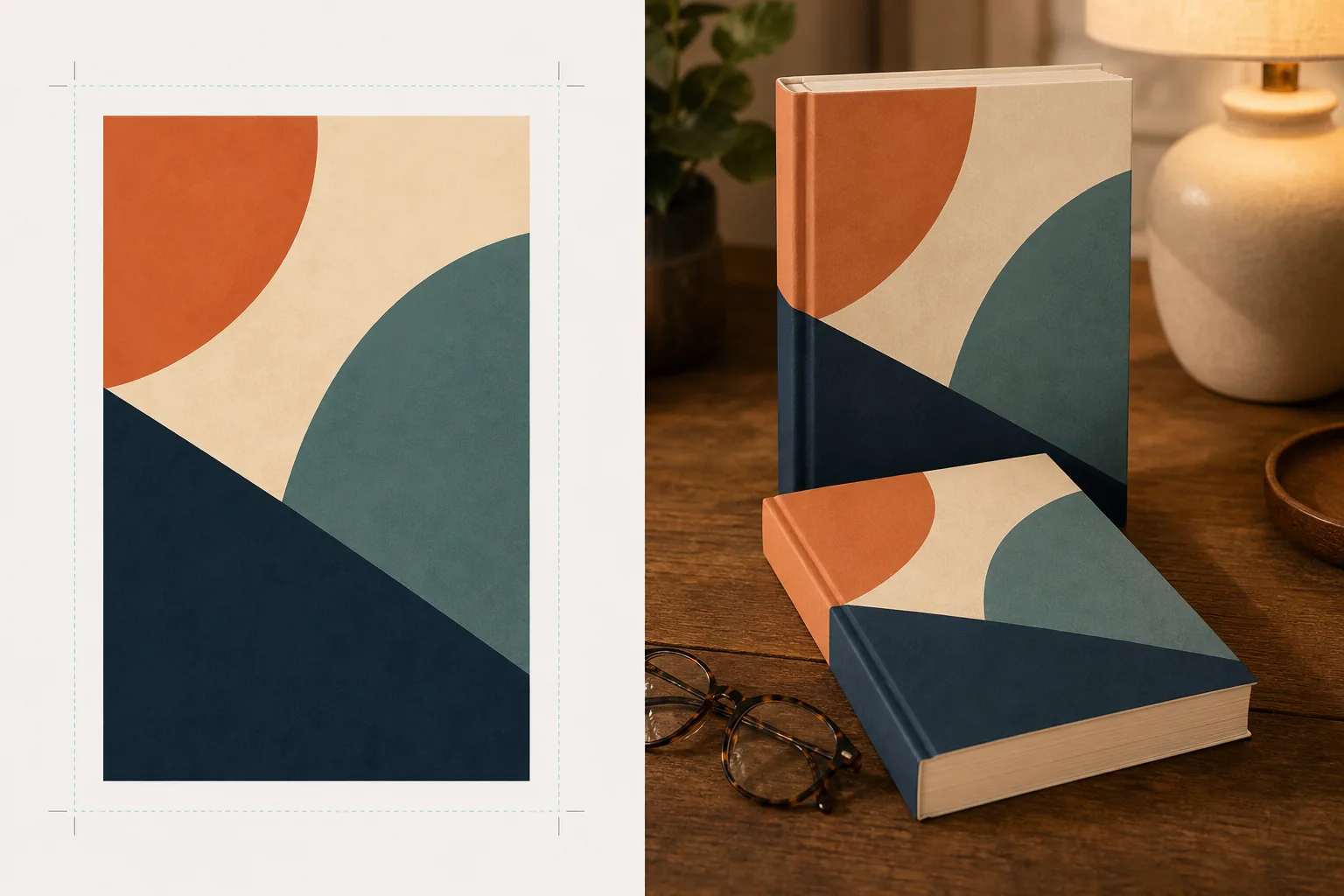
Tạo các mô hình bìa sách chân thực được đặt trong các cảnh phong cách sống, trên kệ sách, hoặc hiển thị dưới dạng bản kết xuất 3D độc lập với bóng đổ tự nhiên. Mẫu này lấy tác phẩm bìa phẳng của bạn và biến nó thành hình ảnh quảng cáo cho các thông báo trên mạng xã hội, trang web tác giả, nội dung Amazon A+ và bộ tài liệu báo chí — không cần phần mềm 3D nào.
Dùng thử mẫu này miễn phíDesign template preview
Mẫu này làm gì
Chuyển đổi các thiết kế bìa sách phẳng thành hình ảnh mô phỏng quảng cáo trông như ảnh chụp sản phẩm chuyên nghiệp. Tải lên tác phẩm bìa của bạn dưới dạng JPEG hoặc PNG phẳng và mẫu sẽ ánh xạ nó lên một hình dạng sách chân thực với phối cảnh chính xác, độ dày trang và độ cong của gáy sách. Sau đó, mô hình được đặt vào các cảnh phong cách sống — một chiếc bàn cà phê với cặp kính đọc sách, một kệ sách hiệu sách, một chiếc tủ đầu giường với ánh đèn ấm áp — hoặc được kết xuất dưới dạng sản phẩm độc lập trên nền sạch với bóng đổ tự nhiên. Đối với các bộ sách hoặc chiến dịch quảng bá nhiều cuốn, có thể sắp xếp nhiều bìa thành một hàng hoặc xếp chồng lên nhau với phối cảnh nhất quán. Hướng ánh sáng và bóng đổ khớp với môi trường cảnh để cuốn sách trông hiện diện thực sự thay vì được ghép vào.
Cài đặt mẫu
| Định dạng sách | Bìa mềm, bìa cứng, hoặc bìa cứng có áo bọc bụi |
| Hình thức số trang | Mỏng (100 trang), trung bình (250 trang), dày (400+ trang) — ảnh hưởng đến chiều rộng gáy và cạnh trang |
| Loại cảnh | Độc lập có bóng đổ, bàn cà phê, kệ sách, tủ đầu giường, hoặc cầm trên tay |
| Góc phối cảnh | Nhìn thẳng, ba phần tư, hoặc hơi nghiêng từ trên xuống |
| Độ phân giải đầu ra | 3000×3000px (1:1 mạng xã hội) hoặc 2400×1600px (banner 16:10) |
Cách sử dụng mẫu này
Tải lên tác phẩm bìa của bạn
Tải lên bìa sách của bạn dưới dạng hình ảnh phẳng — tối thiểu là bìa trước. Đối với mô hình bìa cứng có áo bọc bụi, bạn cũng có thể tải lên gáy sách và bìa sau. Mẫu chấp nhận tệp JPEG, PNG và PDF. Kích thước bìa được phát hiện tự động và tỷ lệ cuốn sách được điều chỉnh tương ứng.
Chọn định dạng sách và cảnh
Chọn giữa các định dạng bìa mềm, bìa cứng hoặc áo bọc bụi. Chọn khoảng số trang sao cho chiều rộng gáy và cạnh trang khớp với cuốn sách thực tế của bạn. Sau đó chọn một cảnh: độc lập có bóng đổ, bối cảnh phong cách sống, hoặc màu nền tùy chỉnh.
Điều chỉnh phối cảnh và kết xuất
Chọn góc nhìn — nhìn thẳng để hình thu nhỏ rõ ràng, ba phần tư để tạo chiều sâu thị giác, hoặc nghiêng từ trên xuống cho các bài đăng dạng phẳng trên mạng xã hội. Mẫu kết xuất mô hình với ánh sáng phù hợp, kết cấu cạnh trang và hướng bóng đổ khớp với cảnh đã chọn.
Tải xuống hình ảnh quảng cáo
Xuất ở tỷ lệ 1:1 cho Instagram, 16:9 cho tiêu đề Twitter/Facebook, hoặc kích thước tùy chỉnh cho phần hero trang web của bạn. Mỗi lần xuất bao gồm mô hình sách với tùy chọn nền trong suốt để bạn có thể đặt nó vào các bố cục tùy chỉnh của riêng mình.
Mẹo chuyên nghiệp để có kết quả tốt nhất
- ✓Tải lên bìa của bạn ở độ phân giải cao nhất có thể. Phép biến đổi phối cảnh 3D làm giảm độ phân giải biểu kiến ở mặt lùi của cuốn sách, vì vậy bắt đầu với nguồn độ phân giải cao đảm bảo chữ trên gáy và bìa vẫn dễ đọc.
- ✓Đối với nội dung Amazon A+, hãy dùng mô hình độc lập trên nền trắng. Điều này mang lại cho cuốn sách cảm giác ảnh chụp sản phẩm cao cấp, giúp phân biệt với hình bìa phẳng đã hiển thị trên trang danh sách.
- ✓Tạo một dải bộ sách bằng cách tải lên tất cả các bìa trong một bộ. Mẫu sắp xếp chúng thành một hàng với phối cảnh và khoảng cách nhất quán, điều này tạo ấn tượng thị giác mạnh mẽ hơn nhiều cho việc quảng bá bộ sách so với việc hiển thị từng bìa riêng lẻ.
Công cụ
Câu hỏi thường gặp
Tôi có thể mô phỏng máy đọc sách điện tử hoặc máy tính bảng hiển thị bìa của mình không?
+
Mẫu tập trung vào mô hình sách vật lý — định dạng bìa mềm và bìa cứng. Đối với mô hình hiển thị trên máy đọc sách điện tử hoặc máy tính bảng, bạn sẽ ghép bìa phẳng lên ảnh thiết bị một cách riêng biệt.
Chữ trên gáy sách có đọc được không?
+
Có, miễn là tệp bìa nguồn bao gồm tác phẩm gáy sách. Mẫu bọc tác phẩm gáy quanh cạnh sách với phối cảnh khớp với góc bìa trước. Đối với sách mỏng (dưới 150 trang), gáy hẹp và chữ nhỏ có thể trở nên khó đọc ở kích thước hiển thị nhỏ.
Tôi có thể dùng mẫu này để quảng bá sách nói hoặc podcast không?
+
Có. Định dạng bìa vuông dùng cho sách nói và podcast có thể được kết xuất dưới dạng mô hình kiểu hộp CD hoặc dưới dạng hình vuông độc lập với bóng đổ có chiều sâu, mang lại cho nó sự hiện diện vật lý mà tác phẩm bìa phẳng không có.
Biến tác phẩm bìa của bạn thành hình ảnh quảng cáo ấn tượng
Tải lên tác phẩm bìa phẳng và nhận các mô hình sách chân thực cho mạng xã hội, trang web tác giả và các chiến dịch tiếp thị.
Dùng thử miễn phíRelated templates
More design templates for your workflow.
Tạo các biểu tượng PNG trong suốt với khả năng sàng lọc rõ ràng và xuất nhiều kích thước cho các biểu tượng web, bản in, mạng xã hội và ứng dụng. Hoạt động trên ảnh của logo in và các tập tin kỹ thuật số.
Thiết kế ảnh bìa podcast đáp ứng các thông số kỹ thuật của Apple Podcasts và Spotify với tính năng thay nền, cách ly chân dung máy chủ và bố cục sẵn sàng cho kiểu chữ.
Chuẩn bị tác phẩm nghệ thuật kỹ thuật số và ảnh để in khổ lớn với tính năng nâng cấp AI, mở rộng canvas, kiểm tra màu sắc chính xác và xuất tệp sẵn sàng in.
Chuẩn bị ảnh để gửi đại lý chứng khoán với việc xóa nhãn hiệu, chỉnh sửa tuân thủ phát hành mô hình, kiểm tra chất lượng kỹ thuật và các yêu cầu về định dạng dành riêng cho đại lý.