
Chuẩn bị bản in nghệ thuật
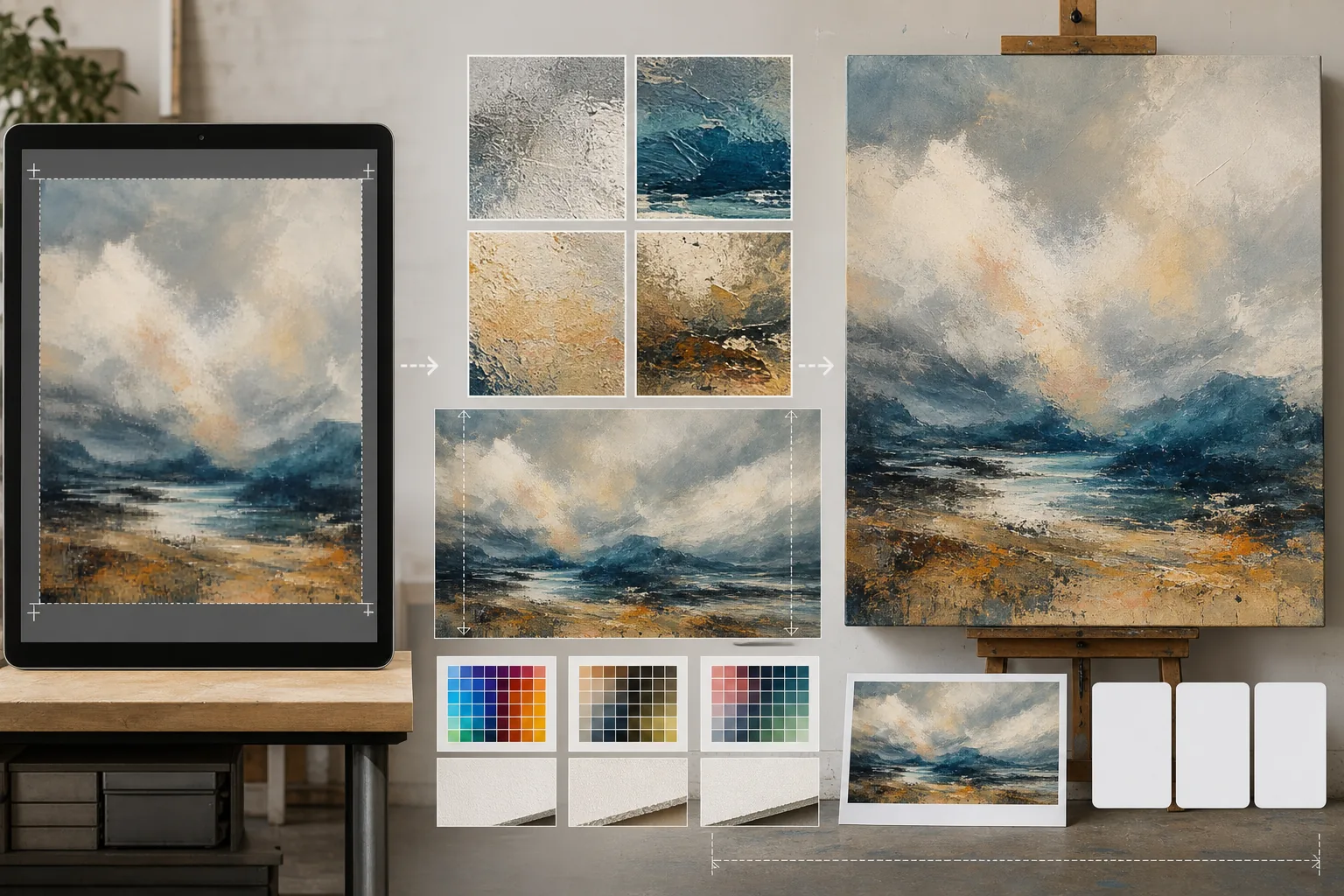
Chuẩn bị tác phẩm kỹ thuật số, ảnh chụp và hình minh họa cho các bản in thư viện khổ lớn, tranh canvas căng khung và sản xuất áp phích. Mẫu này dùng AI Enhance để nâng cấp ảnh lên độ phân giải sẵn sàng in mà không mất chất lượng, và AI Expand để mở rộng các cạnh canvas tạo lề căng khung — tất cả đều giữ độ chính xác màu sắc cho việc in chuyên nghiệp.
Dùng thử mẫu này miễn phíDesign template preview
Mẫu này làm gì
Thu hẹp khoảng cách giữa các tệp kỹ thuật số ở độ phân giải màn hình và yêu cầu độ phân giải khắt khe của sản xuất in vật lý. AI Enhance nâng cấp ảnh từ 2x đến 4x trong khi giữ lại các chi tiết tinh tế — nét cọ trong tranh, cấu trúc hạt trong ảnh chụp, đường nét trong hình minh họa — mà không gây mờ nhòe hay nhiễu hình vốn thường gặp ở phép nội suy đơn giản. AI Expand mở rộng các cạnh canvas bằng cách tạo ra phần tiếp nối liền mạch của tác phẩm, cung cấp lề bổ sung cần thiết cho tranh canvas căng khung nơi hình ảnh gập quanh khung căng. Hồ sơ màu được chuyển sang CMYK hoặc Adobe RGB với chế độ kiểm tra mềm cho thấy bản in cuối cùng sẽ trông ra sao trên giấy, canvas hay nền kim loại.
Cài đặt mẫu
| Hệ số nâng cấp | 2x, 3x hoặc 4x (lên đến cạnh dài 16000px cho các bản in khổ lớn) |
| Mở rộng canvas | Lề 1,5 inch, 2 inch hoặc tùy chỉnh cho phần tràn lề căng khung |
| Giữ chi tiết | Thích ứng: nét cọ cho tranh, hạt cho ảnh, đường nét cho hình minh họa |
| Hồ sơ màu | sRGB (màn hình), Adobe RGB (in ảnh) hoặc CMYK (in thương mại) |
| Định dạng đầu ra | TIFF (in không mất dữ liệu), PNG (trong suốt) hoặc JPEG (xem trước trên web) |
Cách sử dụng mẫu này
Tải lên tác phẩm của bạn
Tải lên tệp kỹ thuật số — tranh vẽ, ảnh chụp, hình minh họa hoặc tác phẩm hỗn hợp. Mẫu chấp nhận tệp JPEG, PNG, TIFF và PSD. Để có kết quả nâng cấp tốt nhất, hãy bắt đầu với phiên bản độ phân giải cao nhất bạn có, ngay cả khi nó thấp hơn yêu cầu in.
Nâng cấp lên độ phân giải in
Chọn hệ số nâng cấp dựa trên kích thước in mục tiêu. Đối với bản in 24×36 inch ở 300 DPI, bạn cần 7200×10800 pixel. AI nâng cấp trong khi vẫn giữ đặc trưng của bản gốc — nét cọ vẫn là nét cọ, hạt phim vẫn là hạt, pixel art vẫn giữ nét vuông vắn đặc trưng.
Mở rộng canvas cho tranh căng khung
Nếu in trên canvas căng khung, AI Expand tạo ra các phần mở rộng liền mạch của tác phẩm quanh cả bốn cạnh. Phần lề mở rộng khớp với phong cách, bảng màu và kết cấu của bản gốc nên các cạnh gập trông có chủ ý chứ không bị kéo giãn hay phản chiếu.
Kiểm tra và xuất tệp
Xem lại bản kiểm tra mềm cho thấy hình ảnh sẽ hiển thị thế nào trong hồ sơ màu mục tiêu — CMYK cho in offset hoặc giclee, Adobe RGB cho in phun mỹ thuật. Xuất dưới dạng TIFF cho xưởng in hoặc PNG để chỉnh sửa thêm. Tệp bao gồm dữ liệu hồ sơ ICC nhúng để tái tạo màu chính xác.
Mẹo chuyên nghiệp để có kết quả tốt nhất
- ✓Luôn bắt đầu với tệp gốc ở độ phân giải nguyên bản. Nâng cấp một tệp đã bị nén và giảm mẫu để hiển thị trên web sẽ tạo ra nhiễu hình tích tụ qua mỗi lần xử lý.
- ✓Đối với tranh canvas căng khung, hãy yêu cầu lề mở rộng 2 inch ngay cả khi khung căng sâu 1,5 inch. Phần nửa inch dư ra tạo dung sai cho quá trình căng canvas, nơi sự xê dịch nhẹ khi căng có thể làm lộ mép hình ảnh.
- ✓Hãy yêu cầu một bản in thử vật lý ở kích thước nhỏ hơn trước khi cam kết sản xuất khổ lớn. Màn hình và bản in trên giấy hiển thị màu khác nhau, và một bản thử 5×7 chỉ tốn một phần nhỏ chi phí so với canvas 30×40 nhưng lại bộc lộ mọi sai lệch màu cần chỉnh sửa.
Công cụ
Câu hỏi thường gặp
Tôi có thể in lớn đến mức nào từ ảnh chụp bằng điện thoại?
+
Một ảnh điện thoại 12 megapixel điển hình (4000×3000px) in tốt ở khổ 13×10 inch tại 300 DPI. Với nâng cấp AI 2x, kích thước đó tăng gấp đôi lên 26×20 inch. Với nâng cấp 4x, một ảnh điện thoại có thể cho ra bản in sạch nét 40×30 inch — phù hợp để trưng bày trong thư viện.
Việc nâng cấp có làm thay đổi diện mạo tác phẩm của tôi không?
+
AI điều chỉnh cách nâng cấp theo loại nội dung. Tranh vẽ giữ lại nét cọ và kết cấu rõ nét. Ảnh chụp duy trì cấu trúc hạt và độ sắc nét đặc trưng. Hình minh họa giữ độ dày đường nét đồng nhất. Mục tiêu là một phiên bản lớn hơn trông giống bản gốc, chứ không phải một sự diễn giải lại.
Tôi có thể chỉ mở rộng một cạnh của canvas không?
+
Có. Bạn có thể chỉ định cạnh nào cần mở rộng và mở rộng bao nhiêu. Điều này hữu ích khi bạn muốn dịch chuyển bố cục trong một bản in — ví dụ, thêm bầu trời phía trên một phong cảnh để tạo khoảng trống cho tiêu đề, hoặc thêm tiền cảnh để cân bằng một bố cục nặng về đường chân trời.
In tác phẩm của bạn ở mọi kích thước mà không mất chất lượng
Tải lên tác phẩm kỹ thuật số và nhận tệp sẵn sàng in với tính năng nâng cấp AI, mở rộng canvas và kiểm tra màu chính xác.
Dùng thử miễn phíRelated templates
More design templates for your workflow.
Tạo các biểu tượng PNG trong suốt với khả năng sàng lọc rõ ràng và xuất nhiều kích thước cho các biểu tượng web, bản in, mạng xã hội và ứng dụng. Hoạt động trên ảnh của logo in và các tập tin kỹ thuật số.
Tạo các mô hình bìa sách thực tế với phối cảnh 3D, kết xuất bóng và nền phong cách sống để tiếp thị tác giả và quảng cáo cho nhà xuất bản.
Thiết kế ảnh bìa podcast đáp ứng các thông số kỹ thuật của Apple Podcasts và Spotify với tính năng thay nền, cách ly chân dung máy chủ và bố cục sẵn sàng cho kiểu chữ.
Chuẩn bị ảnh để gửi đại lý chứng khoán với việc xóa nhãn hiệu, chỉnh sửa tuân thủ phát hành mô hình, kiểm tra chất lượng kỹ thuật và các yêu cầu về định dạng dành riêng cho đại lý.