
Xóa thiết bị cắt cỏ khỏi ảnh
Xóa máy cắt cỏ để giữa sân, máy thổi lá trên đường lái xe, máy xén cỏ dựa vào hàng rào, xe cút kít trên bãi cỏ và cuộn vòi làm vườn bên cạnh nhà khỏi danh sách bất động sản, ảnh chụp danh mục cảnh quan và ảnh tiếp thị cuộc sống ngoài trời. Magic Eraser tháo thiết bị và xây dựng lại bãi cỏ, sân trong hoặc đường lái xe bên dưới thiết bị.
Cập nhật lần cuối
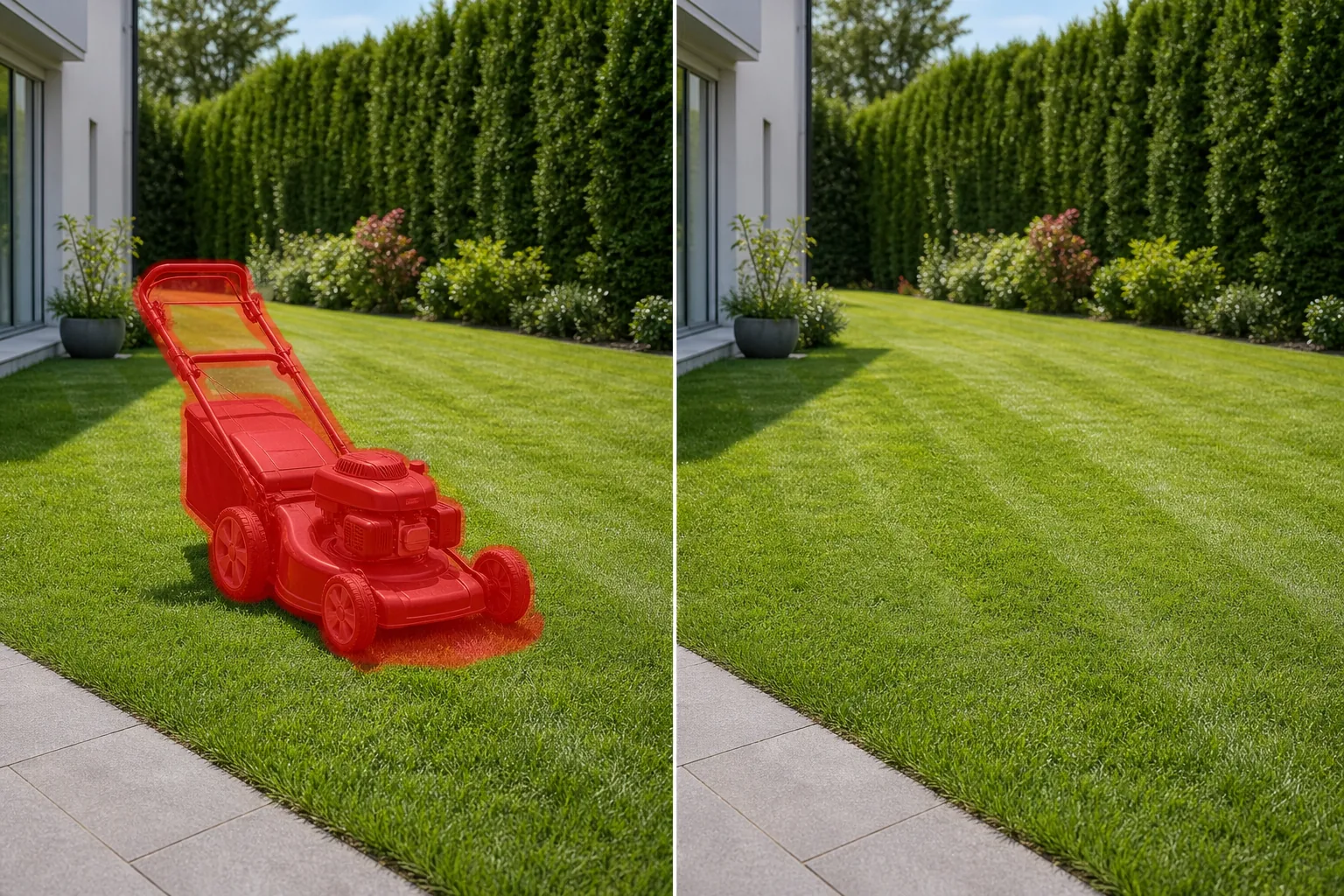
Tại sao thiết bị làm cỏ lại lộn xộn, nếu không thì những bức ảnh sân hoàn hảo
Thiết bị cắt cỏ thường vô tình được đưa vào chụp ảnh bất động sản và phong cảnh vì việc chụp ảnh thường trùng với thời điểm bảo trì. Đội ngũ cảnh quan vừa ở đó, hoặc chủ nhà đang làm dở nhiệm vụ - và một chiếc máy cắt cỏ đẩy nằm giữa bãi cỏ mới cắt, một chiếc máy thổi lá nằm trên đường lái xe, một chiếc máy xén dây tựa vào gara. Những món đồ này biến một bức ảnh sân vườn nguyên sơ thành một khung cảnh trông giống như một công việc bị gián đoạn. Trong bất động sản, sân sau là điểm bán hàng chính và các thiết bị còn lại trong khung làm giảm kích thước và vẻ đẹp của không gian ngoài trời. Ngược lại, các công ty thiết kế cảnh quan cũng phải đối mặt với cùng một vấn đề: ảnh portfolio của họ cần thể hiện bãi cỏ, khu vườn hoặc cảnh quan đã hoàn thiện chứ không phải các công cụ đã tạo ra nó. Magic Eraser loại bỏ thiết bị cắt cỏ trong vài giây. AI xác định máy cắt cỏ, máy thổi, máy xén hoặc xe cút kít, bao gồm cả bóng của nó trên cỏ và tái tạo lại bề mặt bãi cỏ với kết cấu, kiểu cắt và màu sắc cỏ phù hợp.
Loại bỏ thiết bị cắt cỏ trong ba bước
- 1
Tải ảnh của bạn lên
Mở Magic Eraser trên web, iOS hoặc Android và tải lên ảnh sân, vườn hoặc ngoại thất có chứa thiết bị cắt cỏ nhìn thấy được. Các định dạng JPEG, PNG, HEIC và WebP được chấp nhận ở mọi độ phân giải.
- 2
Quét qua thiết bị
Sơn toàn bộ thiết bị - sàn máy cắt cỏ, tay cầm, bánh xe và bóng nền. Đối với máy cắt cỏ đẩy, hãy bao gồm toàn bộ dấu chân từ tay cầm đến bánh trước. Đối với máy thổi lá hoặc máy xén lá trên mặt đất, hãy che toàn bộ dụng cụ và bất kỳ dây nối dài hoặc bình nhiên liệu nào bên cạnh nó. Bao gồm bóng đổ trên bãi cỏ hoặc đường lái xe.
- 3
Xóa và xem lại
Nhấn vào Xóa và AI sẽ loại bỏ thiết bị trong khi tái tạo lại bề mặt cỏ, bê tông, lớp phủ hoặc sân bên dưới thiết bị. Kiểm tra xem kết cấu cỏ, kiểu cắt và màu sắc có phù hợp với bãi cỏ xung quanh không. Đối với bề mặt đường lái xe, hãy kiểm tra kết cấu bê tông hoặc nhựa đường có nhất quán hay không. Xuất cho danh sách, danh mục cảnh quan hoặc tính năng sống ngoài trời của bạn.
Tốt nhất cho
- Những bức ảnh liệt kê bất động sản có máy cắt cỏ hoặc dụng cụ làm vườn ở sân sau trong buổi chụp
- Hình ảnh danh mục đầu tư của công ty cảnh quan giới thiệu công việc làm vườn và bãi cỏ đã hoàn thiện mà không cần dụng cụ nhìn thấy được
- Hình ảnh tài sản cho thuê và Airbnb nơi thiết bị sân được cất giữ bên ngoài làm giảm sức hấp dẫn của lề đường
- Những bức ảnh tiếp thị về cuộc sống ngoài trời và sân hiên trong đó xe cút kít hoặc tông đơ phá vỡ tính thẩm mỹ mang tính giải trí
- HOA và các tài liệu tiếp thị cộng đồng cần những bức ảnh chụp bãi cỏ ở khu vực chung sạch sẽ, không có thiết bị
Mẹo để loại bỏ thiết bị cắt cỏ trông tự nhiên
Việc loại bỏ thiết bị cắt cỏ hoạt động tốt vì các vật thể nằm trên cỏ đồng nhất hoặc bề mặt lát đá mà AI tái tạo lại chính xác. Điều cần cân nhắc chính là kiểu cắt cỏ - các sọc định hướng hoặc đường chéo được tạo ra khi cắt cỏ. Khi AI loại bỏ máy cắt cỏ và lấp đầy cỏ, nó sẽ duy trì hướng cắt xung quanh. Nếu máy cắt cỏ đang ở cuối hàng được cắt một phần (cỏ cắt nửa, nửa chưa cắt), AI sẽ lấp đầy dựa trên chiều cao cỏ xung quanh chiếm ưu thế, điều này có thể không tái tạo hoàn hảo ranh giới cắt chính xác. Đối với trường hợp cạnh này, lần thứ hai dọc theo đường cắt sẽ tinh chỉnh kết quả. Máy cắt cỏ cưỡi ngựa và máy cắt cỏ không quay lớn hơn và tạo bóng lớn hơn - bao gồm cả dấu chân bóng đầy đủ. Nhiều thiết bị (máy cắt cỏ, tông đơ và máy thổi) có thể được tháo ra trong một lần nếu chúng được nhóm lại với nhau hoặc theo từng lượt riêng biệt nếu nằm rải rác trên sân. Đối với quy trình làm việc của danh mục cảnh quan, hãy kết hợp loại bỏ thiết bị với loại bỏ vòi và bất kỳ thiết bị tưới hoặc phun nước tạm thời nào để dọn dẹp toàn bộ sân.
Câu hỏi thường gặp
- Có thể loại bỏ thiết bị cắt cỏ khỏi ảnh miễn phí không?
- Đúng. Cấp miễn phí của Magic Eraser xử lý việc loại bỏ thiết bị cắt cỏ với giới hạn sử dụng hàng ngày. Premium ($29,99/năm) loại bỏ các giới hạn và mở khóa các bản xuất có độ phân giải cao hơn phù hợp để liệt kê ảnh và in danh mục đầu tư.
- Nó có thể loại bỏ một chiếc máy cắt cỏ khỏi một bức ảnh sân rộng không?
- Đúng. Máy cắt cỏ cưỡi ngựa và máy cắt cỏ không quay lớn hơn máy cắt cỏ đẩy nhưng vẫn nằm trên bãi cỏ đồng nhất mà AI tái tạo tốt. Quét lên toàn bộ máy cắt bao gồm cả vùng bóng rộng của nó và AI sẽ lấp đầy bằng kết cấu bãi cỏ phù hợp.
- Thế còn những dụng cụ làm vườn dựa vào hàng rào hoặc tường thì sao?
- Đúng. Cào, xẻng, tông đơ và các dụng cụ khác dựa vào hàng rào, tường hoặc gara được loại bỏ bằng cách quét qua dụng cụ và bóng của nó. AI tái tạo lại hàng rào, vách ngăn hoặc bề mặt tường phía sau công cụ.
- Liệu nó có bảo tồn được kiểu cắt trên cỏ không?
- Đúng. AI phát hiện và tiếp tục mô hình cắt định hướng (sọc, đường chéo hoặc đường cắt đồng nhất) từ bãi cỏ xung quanh vào khu vực đã được lấp đầy. Kết quả phù hợp với diện mạo bãi cỏ tự nhiên.