
Loại bỏ mụn khỏi ảnh
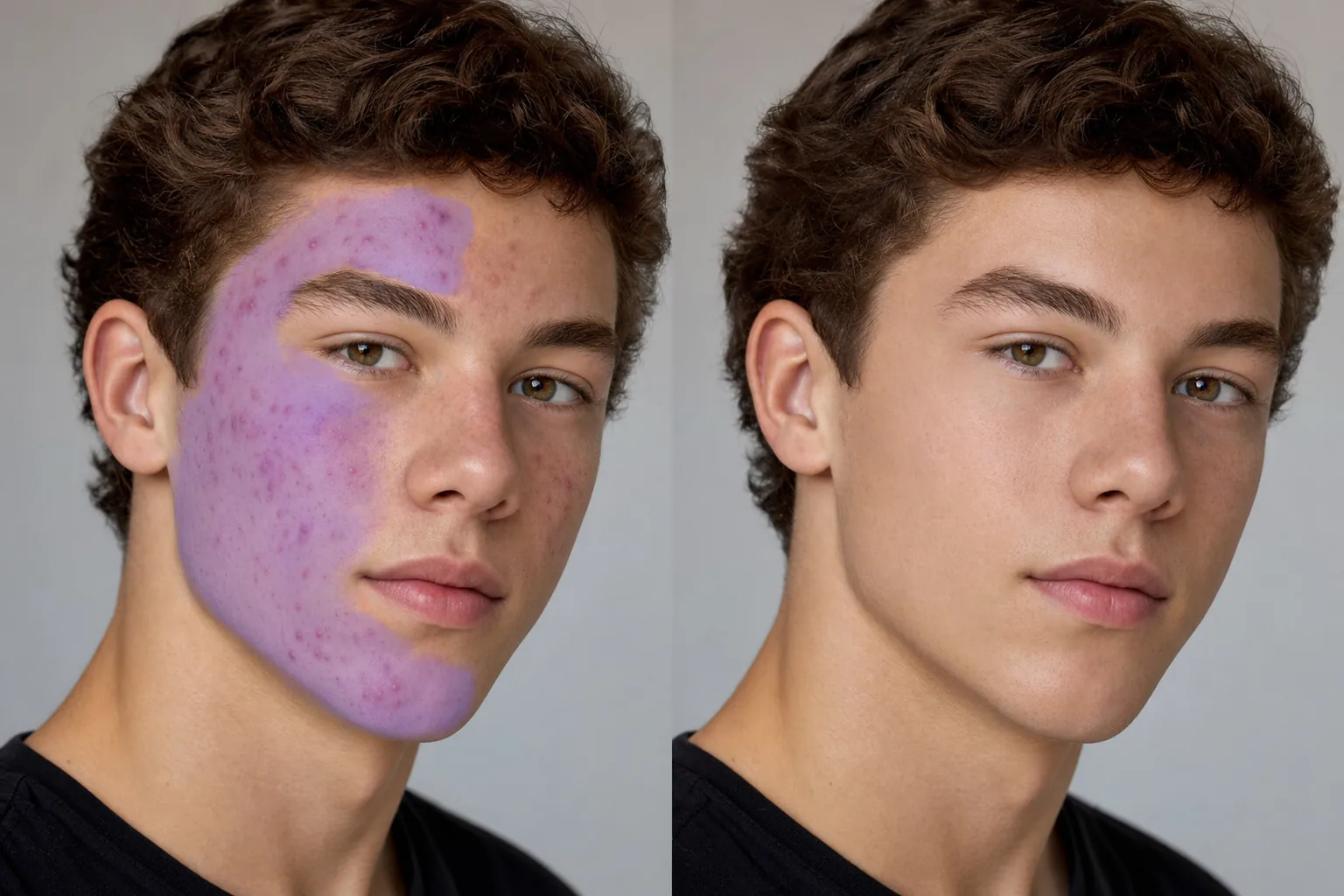
Làm sạch mụn nhọt, mụn trứng cá, sẹo mụn và vết đỏ trên ảnh chân dung trong khi vẫn giữ cho làn da trông tự nhiên. Magic Eraser loại bỏ mụn trứng cá mà không tạo ra vẻ ngoài bóng bẩy, dẻo dai — lỗ chân lông và kết cấu da tự nhiên vẫn nguyên vẹn nên kết quả trông giống như một làn da trong suốt cả ngày chứ không phải bộ lọc trên bìa tạp chí.
Cập nhật lần cuối
Tại sao chỉnh sửa mụn cần độ chính xác của AI
Mụn ảnh hưởng đến da theo nhiều cách cùng một lúc: các nốt mụn nổi lên làm thay đổi kết cấu bề mặt, vết đỏ làm thay đổi màu sắc, bóng bên dưới và xung quanh vết mụn làm thay đổi kiểu chiếu sáng. Một phương pháp chữa lành tại chỗ hoặc đóng dấu nhân bản đơn giản xử lý từng nốt mụn một nhưng lại gặp khó khăn với các cụm mụn mà mọi nguồn nhân bản có thể cũng bị ảnh hưởng. AI của Magic Eraser hiểu kết cấu da như một khuôn mẫu và tái tạo lại làn da trong trẻo phù hợp với cấu trúc lỗ chân lông xung quanh, độ chuyển màu và ánh sáng. Đối với những nốt mụn nghiêm trọng trên diện rộng, AI sẽ tái tạo làn da sạch trên toàn bộ vùng đó chỉ trong một lần thay vì yêu cầu chỉnh sửa thủ công từng đốm một. Điều này đặc biệt có giá trị đối với ảnh kỷ yếu, ảnh chân dung chuyên nghiệp và chụp ảnh sự kiện trong đó hàng chục hoặc hàng trăm bức chân dung cần chỉnh sửa nhất quán.
Loại bỏ mụn trứng cá trong ba bước
- 1
Tải lên chân dung của bạn
Mở Magic Eraser trên web, iOS hoặc Android và tải ảnh chân dung hoặc ảnh chân dung lên. Hỗ trợ JPEG, PNG, HEIC và WebP. Sử dụng phiên bản có độ phân giải cao nhất hiện có để bảo toàn kết cấu da tốt nhất.
- 2
Chải qua các khu vực bị ảnh hưởng
Sơn lên những vùng bị ảnh hưởng bởi mụn trứng cá - mụn ở trán, cụm má, mụn ở cằm hoặc vết thâm ở đường quai hàm. Đối với các khu vực bị ảnh hưởng lớn, hãy chải toàn bộ khu vực thay vì chấm từng điểm riêng lẻ. Bao gồm một vùng da rõ ràng xung quanh các nhược điểm để AI có kết cấu khỏe mạnh làm tham chiếu cho quá trình tái tạo.
- 3
Xóa và xem lại
Nhấn vào Xóa và Magic Eraser xóa mụn trong khi vẫn giữ được kết cấu da bên dưới, hình dạng lỗ chân lông và ánh sáng tự nhiên. Thu phóng đến 100% để xác minh kết quả trông tự nhiên. Chạy các lượt bổ sung trên bất kỳ điểm nào bị bỏ sót hoặc các khu vực cần dọn dẹp thêm. Xuất ở độ phân giải đầy đủ cho kỷ yếu, danh mục đầu tư, phương tiện truyền thông xã hội hoặc bản in.
Tốt nhất cho
- Chụp ảnh kỷ yếu và chân dung trường học nơi học sinh muốn có những bức ảnh có làn da rõ nét
- Những bức ảnh chụp cận cảnh chuyên nghiệp trong thời gian đột phá đang diễn ra
- Chân dung cấp cao và ảnh tốt nghiệp
- Hình ảnh hồ sơ ứng dụng hẹn hò mà đối tượng muốn có một bài thuyết trình tự tin
- Ảnh cưới và ảnh đính hôn với những nốt mụn tạm thời do căng thẳng hoặc thay đổi cách chăm sóc da
- Chụp ảnh sự kiện trong đó các đối tượng có những điểm nổi bật rõ ràng trong các bức ảnh nhóm và ảnh tự nhiên
- Buổi chụp chân dung thanh thiếu niên và gia đình
- Tạo nội dung trên mạng xã hội trong đó sự xuất hiện nhất quán là quan trọng trên các bài đăng
Lời khuyên để loại bỏ mụn trứng cá trông tự nhiên
Chìa khóa để chỉnh sửa mụn đáng tin cậy là duy trì kết cấu da đồng thời loại bỏ các vết thâm. AI của Magic Eraser thực hiện việc này một cách tự động nhưng có hai tình huống cần được chú ý thêm. Đầu tiên: mụn bọc đang hoạt động với bóng sâu tạo ra sự gián đoạn về kết cấu vượt ra ngoài vết mụn - chải rộng hơn một chút so với vùng đỏ có thể nhìn thấy để bao gồm vùng chuyển tiếp bóng. Thứ hai: sẹo do mụn trứng cá (sẹo do băng hoặc sẹo hình hộp) có kiểu kết cấu khác với các vết mụn đang hoạt động - AI xử lý cả hai nhưng có thể cần một đường chuyền riêng cho từng loại vì kiểu tái tạo khác nhau. Đối với các nhiếp ảnh gia làm kỷ yếu xử lý hàng trăm bức ảnh chân dung, Magic Eraser nhanh hơn đáng kể so với việc chỉnh sửa thủ công. Xử lý hàng loạt bằng cách chạy từng bức chân dung thông qua cùng một quy trình làm việc bằng bút vẽ và xóa. Hướng tới kết quả tự nhiên mà đối tượng sẽ hài lòng ở mọi khoảng cách xem.
Câu hỏi thường gặp
- Có thể loại bỏ mụn khỏi ảnh miễn phí không?
- Đúng. Cấp miễn phí của Magic Eraser xử lý việc loại bỏ mụn trứng cá với giới hạn sử dụng hàng ngày. Premium ($29,99/năm) loại bỏ các giới hạn và mở khóa khả năng xuất có độ phân giải cao hơn cho tác phẩm kỷ yếu và ảnh chân dung có chất lượng in.
- Nó có loại bỏ sẹo mụn cũng như mụn đang hoạt động không?
- Đúng. Magic Eraser xử lý cả mụn đang hoạt động và sẹo mụn. Các nốt mụn đang hoạt động (da nổi mẩn đỏ) và sẹo mụn (vết lõm hoặc vết đổi màu) được AI xử lý khác nhau nhưng cả hai đều tạo ra làn da sạch trông tự nhiên. Đối với sẹo sâu, thực hiện lần thứ hai có thể cải thiện kết quả.
- Da được chỉnh sửa sẽ trông dẻo hoặc mịn quá mức?
- Không. AI duy trì kết cấu lỗ chân lông tự nhiên, lông mịn (lông tơ màu đào) và độ chuyển màu ánh sáng tự nhiên của da. Kết quả trông giống như làn da trong trẻo chứ không giống như một bộ lọc làm đẹp được áp dụng. Điều quan trọng là AI sẽ xây dựng lại kết cấu ở vùng bị xóa thay vì chỉ làm mờ nó.
- Tôi có thể chỉnh sửa một loạt kỷ yếu gồm hơn 200 bức chân dung không?
- Đúng. Mỗi bức chân dung chỉ mất vài giây để xử lý — tải lên, quét qua các vùng bị ảnh hưởng, xóa, xuất. Đối với các lô lớn, nên sử dụng quyền truy cập Premium để tránh giới hạn cấp miễn phí hàng ngày. Phương pháp tiếp cận AI nhất quán tạo ra kết quả đồng nhất trên tất cả các bức chân dung.
- Còn vết đỏ mà không nổi mụn thì sao?
- Chứng đỏ da do bệnh rosacea, mẩn đỏ sau mụn và kích ứng đều phản ứng tốt với Magic Eraser. Quét lên vùng màu đỏ và AI sẽ trung hòa vết đỏ đồng thời phù hợp với tông màu da xung quanh. Đối với những vùng da bị đỏ rất lớn (trứng đỏ toàn bộ má), hãy thực hiện theo từng phần để có sự hòa trộn tự nhiên nhất.