
Best Emoji Remover Tools in 2026: 6 Erasers Ranked
Откройте лучшие Инструменты удаления эмодзи для обработки фотографий. Мы сравнили функции, цены и AI-возможности, чтобы помочь вам выбрать подходящий инструмент.
Last updated
Попробовать Magic Eraser бесплатноComparison rows are editorial summaries from the latest page review, not a guarantee of current pricing, limits, watermark policy, batch support, speed, or platform availability.
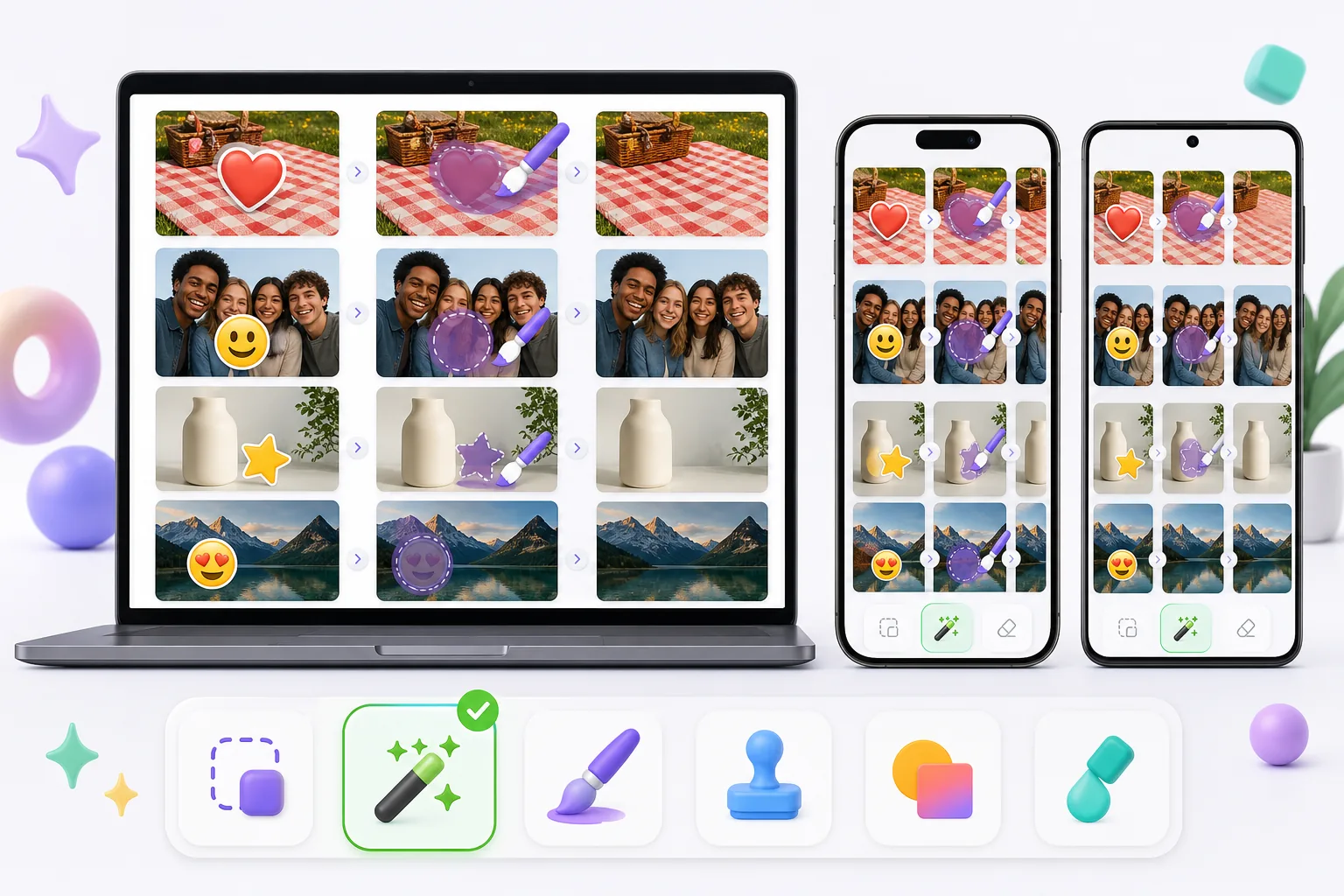
Обзор
Magic Eraser — бесплатный веб-редактор фото на основе ИИ с удалением объектов, удалением фона, улучшением фото, расширением изображений, AI-заполнением, AI-фильтрами и пакетной обработкой. Работает на любом устройстве с браузером — установка не требуется.
Other capable emoji removers exist, and the best one for you depends on the photo. Pixelcut, Picsart, and MyEdit pair object/emoji removal with broader editing suites; Cleanup.pictures is a simple web eraser; Snapseed's healing tool can patch small emoji on a phone. Quality, free limits, and watermark policies vary between them, so it's worth matching the tool to whether the emoji sits on plain background, skin, or a face.
Сравнение функций
Magic Eraser — бесплатный веб-редактор фото на основе ИИ с удалением объектов, удалением фона, улучшением фото, расширением изображений, AI-заполнением, AI-фильтрами и пакетной обработкой. Работает на любом устройстве с браузером — установка не требуется.
Other capable emoji removers exist, and the best one for you depends on the photo. Pixelcut, Picsart, and MyEdit pair object/emoji removal with broader editing suites; Cleanup.pictures is a simple web eraser; Snapseed's healing tool can patch small emoji on a phone. Quality, free limits, and watermark policies vary between them, so it's worth matching the tool to whether the emoji sits on plain background, skin, or a face.
| Feature | Magic Eraser | Others |
|---|---|---|
| Free tier for emoji removal | Yes — free to start after sign-in | Often limited or trial-gated |
| No watermark on export | No watermark | Some add a watermark on the free plan |
| AI reconstruction behind the emoji | Generative inpainting rebuilds the area | Ranges from AI fill to simple clone/blur |
| Works on mobile and web | Web + iOS + Android, same engine | Many are mobile-only or web-only |
| Handles emoji over faces and busy backgrounds | Reconstructs backgrounds well; faces are AI-estimated | Varies; small/plain areas handled best |
| Remove several emoji at once (batch on one image) | Brush all, erase in one pass | Often one-at-a-time |
| Guidance for emoji-specific cases | 11 emoji how-tos (iPhone, screenshot, face, story) | General object-removal docs |
Feature rows summarize visible product positioning and should be rechecked against official product pages before purchase, migration, or compliance decisions.
- Last content review June 20, 2026
- Magic Eraser source: https://magiceraser.live/ru/product/magic-eraser
- Pricing, feature availability, platform support, and limits can change; recheck official sources before relying on a buying decision.
Преимущества Magic Eraser
Built for emoji, not just objects
Beyond a general eraser, Magic Eraser has a dedicated emoji-removal tool and 11 emoji-specific how-tos — covering iPhone photos, screenshots, Instagram stories, group shots, and emoji over faces. That focus means the workflow is tuned for the exact cases people hit: heart-eyes stickers, smiley censors, and promo stamps burned into saved images.
AI rebuilds what the emoji hid
An emoji flattens into the file, so the pixels behind it are gone. Instead of blurring or clone-stamping, Magic Eraser's generative AI reads the surrounding skin tone, pattern, and texture and synthesizes a plausible fill. On repetitive backgrounds — grass, fabric, walls, sky — the result is often seamless, which is where simpler erasers tend to smear.
Free, no watermark
Emoji removal runs on the free tier: upload, brush over the emoji, export the cleaned photo at no cost and with no watermark or account required. Some other tools gate exports behind a sign-up or stamp a watermark on free output, which defeats the point of cleaning up a photo to share.
Same tool on phone and desktop
Magic Eraser works in any mobile browser and as native iOS and Android apps, so you can erase emoji straight from your camera roll or screenshots — then switch to the desktop web version for larger images or finer brushing. The AI and results are identical across devices, with a 4.9 rating from 559,700 reviews.
Инструменты
Часто задаваемые вопросы
Magic Eraser бесплатный?
+
Да, Magic Eraser позволяет сразу редактировать фото бесплатно. Без регистрации и установки. Для безлимитной обработки можно перейти на план Pro.
Чем Magic Eraser отличается от Инструменты удаления эмодзи?
+
Magic Eraser объединяет 8 AI-инструментов на одной платформе — удаление объектов, удаление фона, улучшение, расширение, AI-заполнение, AI-фильтры, AI-генерация изображений и дизайн. По сравнению с Инструменты удаления эмодзи, Magic Eraser предлагает больше функций без установки ПО.
Magic Eraser работает на мобильных устройствах?
+
Да, Magic Eraser доступен на iOS, Android и в вебе. Вы можете переключаться между устройствами без смены инструмента.
Нужно ли создавать аккаунт?
+
Нет, вы можете начать редактирование сразу без создания аккаунта. Просто откройте браузер и начните.
Готовы попробовать Magic Eraser?
Отредактируйте первое фото бесплатно — без регистрации.
Попробовать Magic Eraser бесплатноСвязанные сценарии использования
Узнайте, как профессионалы используют эти инструменты в реальных рабочих процессах.
Фотографии объявлений, заваленные личными вещами, припаркованными машинами или стройматериалами, отпугивают покупателей. Magic Eraser использует ИИ для мгновенной очистки ваших фото — навыки Photoshop не нужны.
Грязный фон и неопрятные фотографии товаров каждый день стоят вам продаж. Magic Eraser помогает создавать чистые, профессиональные изображения за секунды — без навыков Photoshop. Загрузите фото, удалите всё лишнее и размещайте с уверенностью.
Случайные прохожие портят ваши фото из путешествий? Беспорядок на фоне убивает ваши селфи? Хватит тратить часы в Фотошопе. Magic Eraser удаляет всё лишнее, очищает фон и адаптирует фото под любой формат — в одно касание.
Похожие руководства
Изучите другие руководства и редакционный контент, связанные с этим сценарием.
Узнайте, как с помощью Magic Eraser удалять объекты, людей, текст и отвлекающие детали с фото и получать более чистый результат ИИ.
Узнайте, как убрать людей с фото с помощью ИИ за секунды. Руководство для тревел-фото, недвижимости и товаров.
Пошаговое руководство по удалению водяных знаков с собственных фото с помощью ИИ. Когда это уместно, техники и советы.
Другие сравнения
Узнайте, как Magic Eraser сравнивается с другими инструментами для редактирования фото.
Мы протестировали и сравнили лучшие инструменты для AI-редактирования фото. От удаления объектов до замены фона — узнайте, какой редактор лучше всего подходит для вашей работы.
Photoshop — отраслевой стандарт для глубокого редактирования изображений, но многим нужно лишь быстро удалить объекты, получить чистый фон и ИИ-исправления. Magic Eraser сосредоточен на этих задачах с более лёгким рабочим процессом, который выполняется за секунды в вебе и на мобильных устройствах.
Adobe Photoshop — мощный инструмент, но большинство людей используют лишь малую часть его возможностей. Magic Eraser предоставляет именно те инструменты обработки фото, которые вам действительно нужны — удаление объектов, удаление фона, улучшение с помощью AI и генеративную заливку — в более простом интерфейсе, который работает в вебе и на мобильных устройствах и не требует подписки для начала работы.
Tried to remove an object or background and hit a Pro paywall in Canva, Adobe Express/Photoshop, or Fotor? Magic Eraser does the same job — object removal, background removal, watermark cleanup, and enhancement — for free. No subscription, and no watermark stamped on your download.
Сравните Magic Eraser с magic-eraser.io. Смотрите функции, цены и удобство использования бок о бок. Узнайте, почему Magic Eraser — лучший выбор для AI-обработки фото.
Сравните Magic Eraser с Pixelcut. Смотрите функции, цены и удобство использования бок о бок. Узнайте, почему Magic Eraser — лучший выбор для AI-обработки фото.