
ナチュラルな肌レタッチ
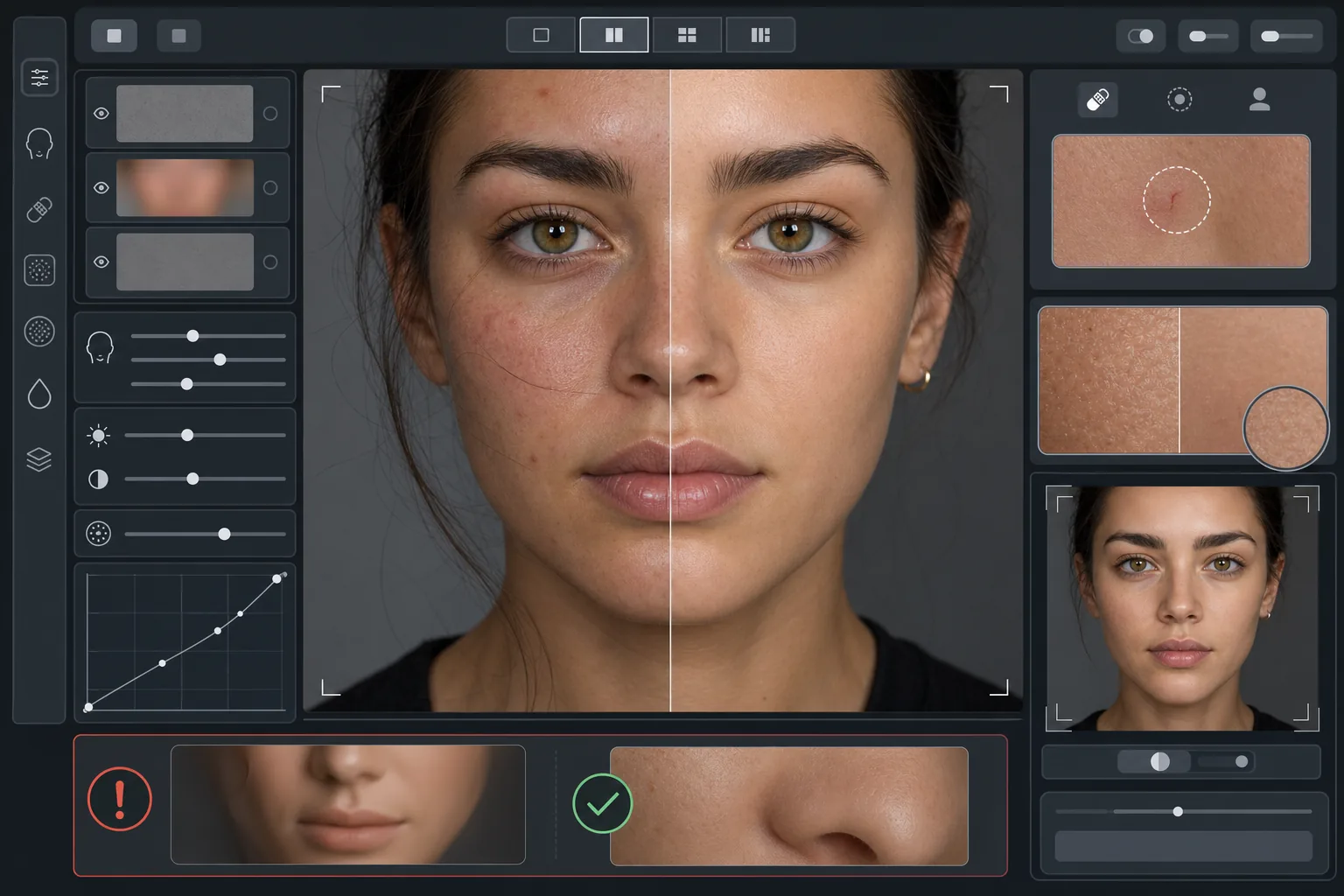
プラスチックのような不自然さを出さずにポートレートを美しく仕上げます。このテンプレートは一時的な肌トラブルを除去し、肌の色味を整え、照明のムラをなめらかにしながら、毛穴・小じわ・肌を本物らしく見せる自然な質感を意図的に残します。仕上がりは、最高の日に最高の自分が写ったポートレート——AIが生成したマネキンではありません。
このテンプレートを無料で試すPortrait template preview
このテンプレートでできること
質感と色味を分離する周波数対応の肌レタッチを適用します。AI Enhance は一時的な不完全さ(吹き出物、赤み、目の下のクマ)を除去しつつ、目が本物だと感じ取る繊細な肌の質感——毛穴、うぶ毛、自然なばらつき——を残します。Magic Eraser は、AIによる補正では範囲が広すぎる場合に、特定の箇所だけを除去します。たとえば、周囲の肌に影響を与えずに一本の引っかき傷や虫刺されを消すといった用途です。全体としての効果は、ズームしても自然に見える、均一で健康的な肌です。
テンプレート設定
| レタッチの強度 | ナチュラル — 吹き出物と赤みに対応し、質感を保持 |
| 毛穴の保持 | フル — ピクセルレベルで自然な肌の質感をすべて維持 |
| 色味の均一化 | 中程度 — 色のばらつきを平坦にせずに、まだら感と赤みを軽減 |
| 目の下の補正 | 控えめ — 自然な影を消さずにクマを明るくする |
| 照明のなめらか化 | 強い影を埋め、直接フラッシュによる白飛びを軽減 |
| 出力解像度 | 入力に一致(トリミングとズームのために全ディテールを保持) |
このテンプレートの使い方
ポートレート写真をアップロード
顔にしっかりピントが合った、光のよく当たったポートレートを使用してください。元の画像に自然な肌の質感が見えるときに最も効果を発揮します——ソフトフォーカスや強く圧縮された画像は、AIが保持できる質感が少なくなります。
ナチュラルなレタッチを適用
AI Enhance は一時的な肌トラブル、不均一な赤み、色味の乱れを検出して補正しつつ、下地となる肌の質感を完全にそのまま保ちます。毛穴、小じわ、自然な色のばらつきは見えたまま——変わるのは不完全な部分だけです。
特定の箇所をピンポイント補正
残った個別の跡を消したいときは Magic Eraser を使います——治りかけの引っかき傷、一時的な発疹、顔にかかった一本の髪の毛など。それぞれの除去は周囲の自然な肌の質感になじみます。
最大ズームで確認して書き出し
100%にズームして肌の質感が保たれているか確認します——毛穴が見え、自然であるべきです。なめらかすぎる箇所があれば、レタッチの強度を下げて再処理してください。自然なディテールを保つため、フル解像度で書き出します。
最良の結果を得るためのプロのヒント
- ✓まずレタッチの強度を最も低く設定し、必要な場合のみ上げてください——なめらかさを足すのは、処理で失われた質感を取り戻すよりはるかに簡単です。
- ✓ニキビや酒さのある被写体の場合、このテンプレートは下地の肌色を変えずに個々のトラブルだけを除去します——別人ではなく、肌の調子が良い日のように仕上がります。
- ✓このテンプレートをスマートフォンのカメラの美肌フィルターと重ねて使わないでください——多くのスマホカメラに搭載された美肌処理はすでに質感を減らしており、二重処理はこのテンプレートが避けようとしているプラスチックのような外観を生み出します。
- ✓可能であればRAW形式で撮影し、アップロード前にJPEGに変換してください——RAWはレタッチ中にAIが保持できる肌の質感データをより多く記録します。
よくある質問
肌をなめらかにする美肌フィルターと何が違うのですか?
+
美肌フィルターは均一なぼかしを適用し、毛穴・小じわ・自然な質感を消し去り——あの紛れもないプラスチックのような外観を生み出します。このテンプレートは質感と色味を分離する周波数対応の処理を用い、色味のレイヤーから肌トラブルを除去しつつ質感のレイヤーはそのまま残します。仕上がりはレンダリングされた表面ではなく、本物の肌のように見えます。
顔のパーツの形は変わりますか?
+
いいえ。このテンプレートが影響を与えるのは肌の表面の見え方——色味、トラブル、照明の均一さ——だけです。鼻、あご、目、その他の顔の構造を作り変えることは決してありません。被写体はまさにご本人のまま、ただ肌がより澄み、照明がより均一になります。
プロのヘッドショットやポートフォリオ作品に使えますか?
+
はい。このナチュラルなレタッチ基準は、企業向けヘッドショット、俳優のポートフォリオ、マッチングプロフィール、信頼性が重要なSNSにおけるプロの期待に応えます。被写体は実際に会ったときも写真どおりに見えます——それこそがナチュラルなレタッチの目的そのものです。
より良い肌、それでもあなた
ポートレートをアップロードすれば、数秒で質感を保ったナチュラルな肌レタッチが手に入ります。プラスチックのような外観も、不自然なスムージングもなく——最高の日のあなただけがそこにいます。
無料で試すRelated templates
More portrait templates for your workflow.
年齢に応じた学校のポートレートレタッチテンプレート。自然な傷の除去、一貫した背景、クラス全体のバッチ処理による卒業アルバムの標準出力。
スタジオ品質のペットのポートレート テンプレート。毛皮の端を処理し、リードやハンドラーを取り外し、背景を置き換え、犬、猫、その他の動物の目を鮮明にします。
柔らかい温かみのある色調、優しい肌のスムージング、小道具や気が散る要素の除去、アナウンスやウォール アート用の印刷可能なサイズ調整により、新生児や赤ちゃんの写真を強化します。
優しい肌のスムージング、柔らかな光の照明、背景の簡略化、温かみのあるカラー グレーディングを使用してマタニティ写真をレタッチし、時代を超越した妊娠ポートレートの外観を実現します。
気を散らす背景を取り除き、不均一な露出を修正し、肌を自然に滑らかにして、全員が同じフレーム内で最高に見えるようにすることで、家族のポートレートをきれいにします。