
ペット ポートレート スタジオ
リビングルームで撮ったペットのスナップ写真を、スタジオ品質のポートレートに変えましょう。このテンプレートは、動物写真の最も難しい課題を解決します — ごちゃごちゃした背景からふわふわした毛皮の輪郭を切り出し、写り込んだリードやハンドラーの手を取り除き、ペットのポートレートを魅力的にする表情豊かな瞳を鮮明にします。
このテンプレートを無料で試すPortrait template preview
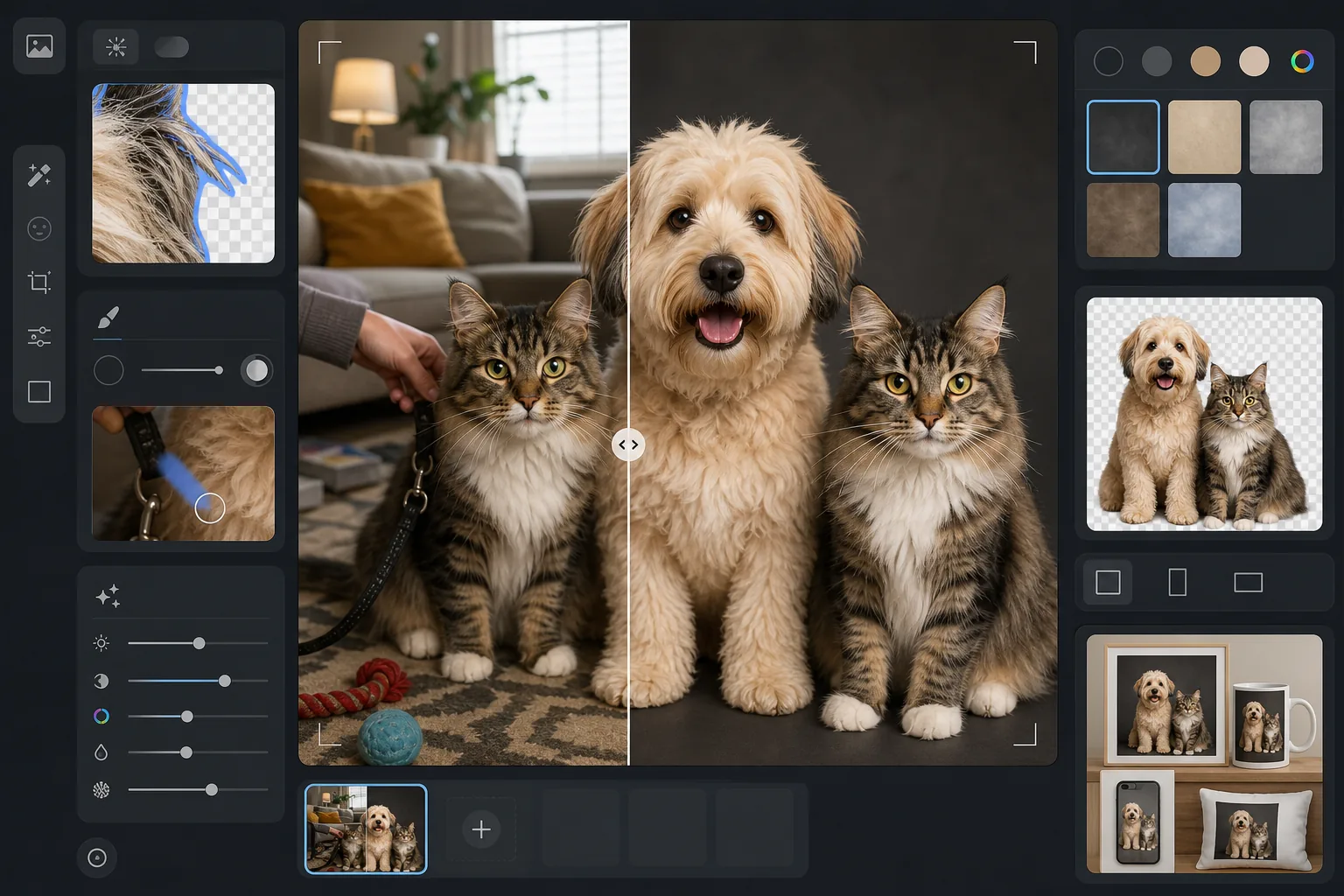
このテンプレートの機能
動物ならではの課題に対応し、何気ない写真からプロ品質のペットポートレートを作成します。Background Eraser は毛皮を認識するエッジ検出を使い、細い毛、ひげ、羽のような耳をあらゆる背景からきれいに分離します。Magic Eraser はリード、ハーネス、ハンドラーの手、気を散らす物を取り除きます。AI Enhance は瞳の細部を鮮明にして心に響く表情を引き出し、被毛の質感と色を際立たせ、ペット写真によくある被写体ブレを補正します。
テンプレート設定
| エッジ検出 | 毛皮対応 — 一本一本の毛、ひげ、羽のような輪郭を保持します |
| 背景 | スタジオ背景(チャコール、クリーム、スカイブルー)または透明 PNG |
| 瞳の強調 | キャッチライトの復元によるシャープ化で、表情豊かで澄んだ瞳に |
| 出力サイズ | 2000×2000px(正方形、印刷やSNSに最適) |
| ブレ補正 | 軽度のブレ除去 — 撮影中のペットのわずかな動きを補正します |
| 被毛の強調 | 毛皮、羽、うろこの質感のシャープ化と色彩の豊かさ |
このテンプレートの使い方
ペットの写真を撮る
最も魅力的な構図にするため、ペットの目線の高さまでかがみましょう。自然光と速いシャッタースピード(またはスマホの連写モード)を使って動きを止めます。カメラのレンズのすぐ上におやつを掲げるのが、まっすぐ目を合わせてもらう一番の方法です。
背景を取り除く
Background Eraser は、細い毛、ひげ、耳の柔らかな輪郭 — 通常のエッジ検出ではたいてい失われてしまう細部 — を保持する毛皮対応のエッジ検出でペットを切り出します。仕上がりは切り抜いたようではなく、自然に分離されて見えます。
リードや気を散らす物を取り除く
Magic Eraser は、写り込んだリード、ハーネス、ハンドラーの手、フレーム内のあらゆる物を取り除きます。AI が取り除いた物の背後の毛皮や背景を再構成するので、ペットが一匹で堂々とポーズをとったように見えます。
強調して書き出す
AI Enhance は瞳の細部を鮮明にし、被毛の色と質感を豊かにし、わずかな被写体ブレを補正します。スタジオ背景の色を選ぶか、透明な背景で書き出してカード、プリント、ギフトに自由にお使いください。
最良の結果を得るためのプロのコツ
- ✓連写モードで撮影し、最も鮮明なコマを選びましょう — ペットは絶えずまばたきや動きをするので、枚数の多さが味方になります。
- ✓毛色の濃いペット(黒い犬、濃い色の猫)は、明るい背景の前で撮影し、AI がエッジ検出に使える最大限のコントラストを与えましょう。
- ✓誰かにスマホやカメラのすぐ上でおやつを持ってもらい、まっすぐ目を合わせてもらいましょう — これが最高のポートレートを生む、魅力的で心に響く表情を作り出します。
- ✓猫の場合は、日差しの中やお気に入りの場所に落ち着くまで待ちましょう — リラックスした猫は、目を開けて生き生きとした、最も自然なポートレートになります。
よくある質問
長い毛やふわふわの毛でも、輪郭がギザギザにならずに処理できますか?
+
はい。毛皮対応のエッジ検出は、動物の被毛のために特別に設計されています。一本一本の毛、下毛の柔らかなグラデーション、耳の毛束やひげのような細い部分を保持するので、仕上がりはデジタルの切り抜きではなく、自然な写真のように見えます。
リードをアーティファクトを残さずに取り除けますか?
+
はい。Magic Eraser はリード、ハーネス、首輪をきれいに取り除きます。AI が周囲の被毛の質感を使って取り除いた物の背後の毛皮の模様を再構成するので、最終的な画像にリードの痕跡は見えません。
犬や猫以外の動物でも使えますか?
+
はい。このテンプレートはあらゆる動物に対応します — ウサギ、鳥、馬、爬虫類などです。毛皮対応のエッジ検出は、毛皮だけでなく羽、なめらかな肌、うろこにも適応します。瞳の強調は、目が見えるあらゆる動物で機能します。
Related templates
More portrait templates for your workflow.
年齢に応じた学校のポートレートレタッチテンプレート。自然な傷の除去、一貫した背景、クラス全体のバッチ処理による卒業アルバムの標準出力。
毛穴や質感を維持しながらシミを除去する自然な肌レタッチ テンプレート。均一な照明で、プラスチック的な外観はありません。カメラに映る肌がより美しく見えるだけです。
柔らかい温かみのある色調、優しい肌のスムージング、小道具や気が散る要素の除去、アナウンスやウォール アート用の印刷可能なサイズ調整により、新生児や赤ちゃんの写真を強化します。
優しい肌のスムージング、柔らかな光の照明、背景の簡略化、温かみのあるカラー グレーディングを使用してマタニティ写真をレタッチし、時代を超越した妊娠ポートレートの外観を実現します。
気を散らす背景を取り除き、不均一な露出を修正し、肌を自然に滑らかにして、全員が同じフレーム内で最高に見えるようにすることで、家族のポートレートをきれいにします。