
家族ポートレートのクリーンアップ
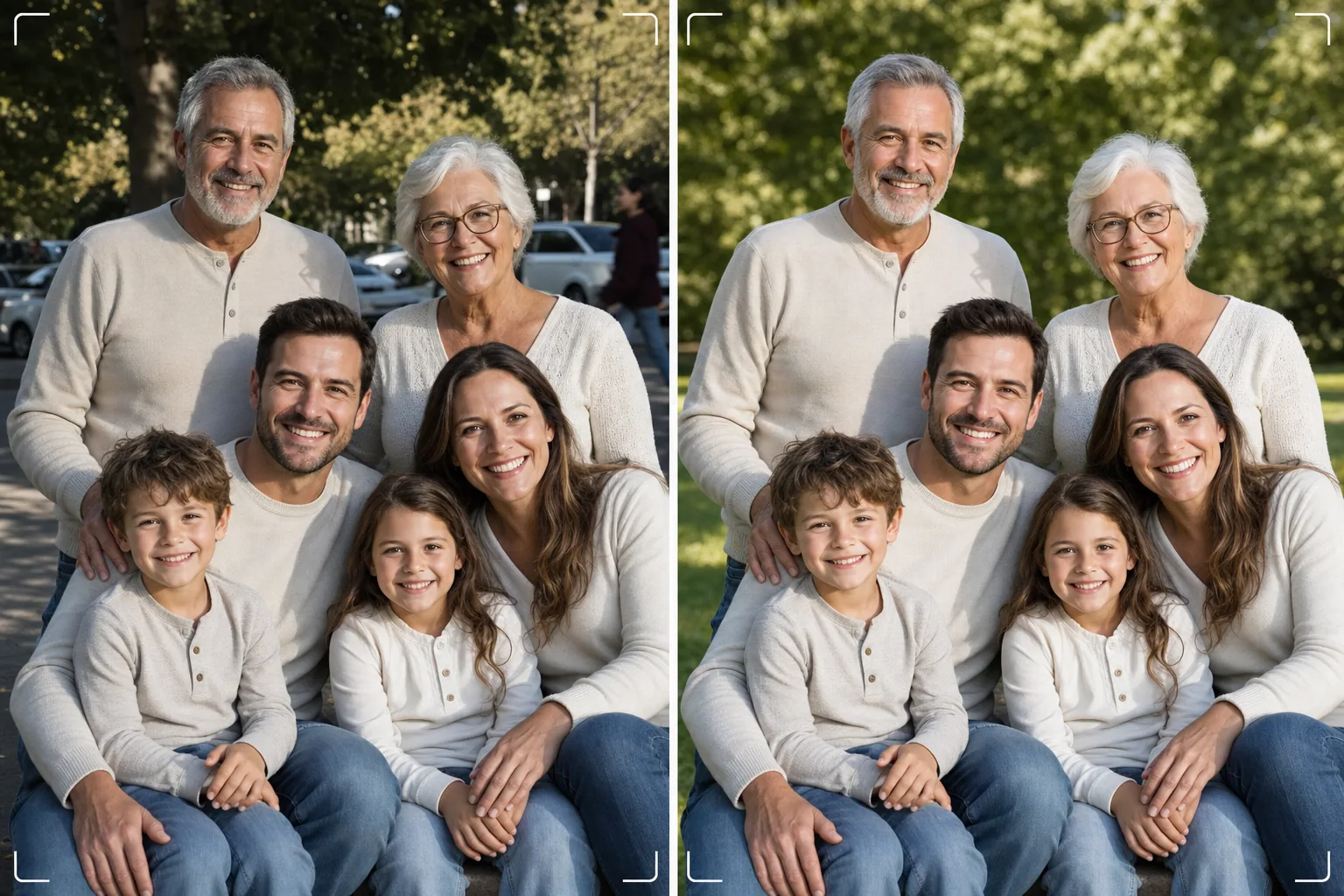
何百回も撮り直すことなく、完璧な家族写真を手に入れましょう。このテンプレートは、背景の気を散らす要素を取り除き、グループ全体の不均一な照明を補正し、すべての顔のシミを自然に軽減し、良い集合写真が素晴らしい一枚になるのを妨げる小さな欠点をきれいにします。
このテンプレートを無料で試すPortrait template preview
このテンプレートでできること
家族写真の普遍的な悩み、つまり全員が一枚のフレームで最高に見えるようにするという課題を解決します。Magic Eraser は、写り込んだ人物、ゴミ箱、非常口の表示、電線、駐車中の車など、本来良いはずの集合写真の構図を台無しにする要素を取り除きます。AI Enhance は、一部の家族が日陰にいて他の人が直射日光の下にいるときに生じる不均一な照明を補正し、全員を一貫した美しい露出にそろえます。自然な肌の滑らか化により、不自然なレタッチに見せることなく、すべての顔のシミ、目の下のクマ、赤みを軽減します。その結果、皆を集めたときに思い描いていた家族のポートレートが完成します。
テンプレート設定
| 背景のクリーンアップ | 気を散らす要素を自動検出して削除(人物、看板、物体) |
| 露出の調整 | すべての被写体で均一な照明(シャドウの持ち上げ+ハイライトの復元) |
| 肌の補正 | 顔ごとの自然なシミ軽減(個々の特徴を保持) |
| 色補正 | 混在した照明の集合写真全体で統一したホワイトバランス |
| シャープ化 | 顔認識シャープ化(目と笑顔を優先) |
| 出力解像度 | 長辺6000px(300 DPIで最大20×13インチの壁掛けプリント) |
このテンプレートの使い方
家族写真をアップロード
家族の集まり、休日、同窓会、またはポートレート撮影で撮った集合写真をアップロードします。このテンプレートは2人から30人までのグループに対応します。最良の結果を得るには、最も多くの顔がカメラを見て気持ちのよい表情をしているフレームを選んでください。テンプレートは背景と照明を補正しますが、顔の表情や閉じた目を変えることはできません。
背景の気を散らす要素を削除
Magic Eraser は、家族グループの後ろにいる見知らぬ人、気を散らす看板、ゴミ、車両、その他の不要な要素を識別して取り除きます。AI は背景を自然に再構成し、取り除いた物体の後ろの芝生、空、壁、床を補完します。
照明を整えて顔を補正
AI Enhance は家族間の露出の差を補正します。グループの半分が日陰、半分が日差しで目を細める、ということはもうありません。各顔には個別にシミ軽減とさりげない目の明るさ調整が施され、一人ひとりの個性と自然な見た目が保たれます。
印刷または共有用に書き出し
大判の壁掛けプリント用に長辺6000px、SNSやデジタルのホリデーカード用に2000pxでダウンロードできます。テンプレートは画面表示用のsRGB、またはプロ印刷用のAdobe RGBで出力します。一般的なフレームサイズに合わせて複数のトリミング比率(4:5、5:7、8:10)が利用できます。
最良の結果を得るためのプロのヒント
- ✓立て続けに3〜5枚撮影してください。最も多くの人が目を開けて自然な表情をしている1枚を選びましょう。テンプレートが他のすべてを処理しますが、表情と目が開いているかどうかは後から変えられません。
- ✓日差しと日陰が混在した場所ではなく、開けた日陰(木陰や建物の影側)に家族を配置してください。これにより、テンプレートは均一に照らされた出発点を得られ、最も自然な仕上がりになります。
- ✓大人数のグループ(10人以上)の場合は、背の高い人を後ろにして人を段違いの列に配置してください。この自然な重なりが奥行きを生み、すべての顔が見えるようにします。テンプレートは、光源から遠いためにやや暗くなった後列の顔を明るくできます。
よくある質問
閉じた目や悪い表情を直せますか?
+
いいえ。このテンプレートは照明を補正し、気を散らす要素を取り除き、肌を滑らかにしますが、顔の表情を変えたり、閉じた目を開けたり、人物を配置し直したりすることはできません。アップロードする前に最良の表情のフレームを選んでください。テンプレートはそのフレームを最高に見せます。
大人数の同窓会グループはどうですか?
+
このテンプレートは約30人までのグループに対応します。非常に大人数のグループでは、フレーム内の顔のサイズが小さくなるため個々の顔の補正はより控えめになりますが、背景のクリーンアップと照明補正はどのグループサイズでも十分に効果を発揮します。
家族写真から人物を削除できますか?
+
はい、Magic Eraser はグループから特定の人物を削除できます。削除したい人物を選択すると、AI がその背後の背景を再構成します。これは、人物が他の人の間の中央ではなくグループの端にいる場合に最も効果的です。
Related templates
More portrait templates for your workflow.
年齢に応じた学校のポートレートレタッチテンプレート。自然な傷の除去、一貫した背景、クラス全体のバッチ処理による卒業アルバムの標準出力。
スタジオ品質のペットのポートレート テンプレート。毛皮の端を処理し、リードやハンドラーを取り外し、背景を置き換え、犬、猫、その他の動物の目を鮮明にします。
毛穴や質感を維持しながらシミを除去する自然な肌レタッチ テンプレート。均一な照明で、プラスチック的な外観はありません。カメラに映る肌がより美しく見えるだけです。
柔らかい温かみのある色調、優しい肌のスムージング、小道具や気が散る要素の除去、アナウンスやウォール アート用の印刷可能なサイズ調整により、新生児や赤ちゃんの写真を強化します。
優しい肌のスムージング、柔らかな光の照明、背景の簡略化、温かみのあるカラー グレーディングを使用してマタニティ写真をレタッチし、時代を超越した妊娠ポートレートの外観を実現します。