
赤ちゃん・新生児のソフトグロー
新生児や赤ちゃんの写真に、プロのスタジオ撮影のような柔らかく温かで幻想的な質感を与えます。このテンプレートは穏やかな暖かみを加え、乳児の撮影に適した繊細な肌のなめらか化を行い、気を散らす小道具や背景の雑然さを取り除き、出生のお知らせ、壁掛けプリント、SNS共有に合わせて出力サイズを調整します。
このテンプレートを無料で試すPortrait template preview
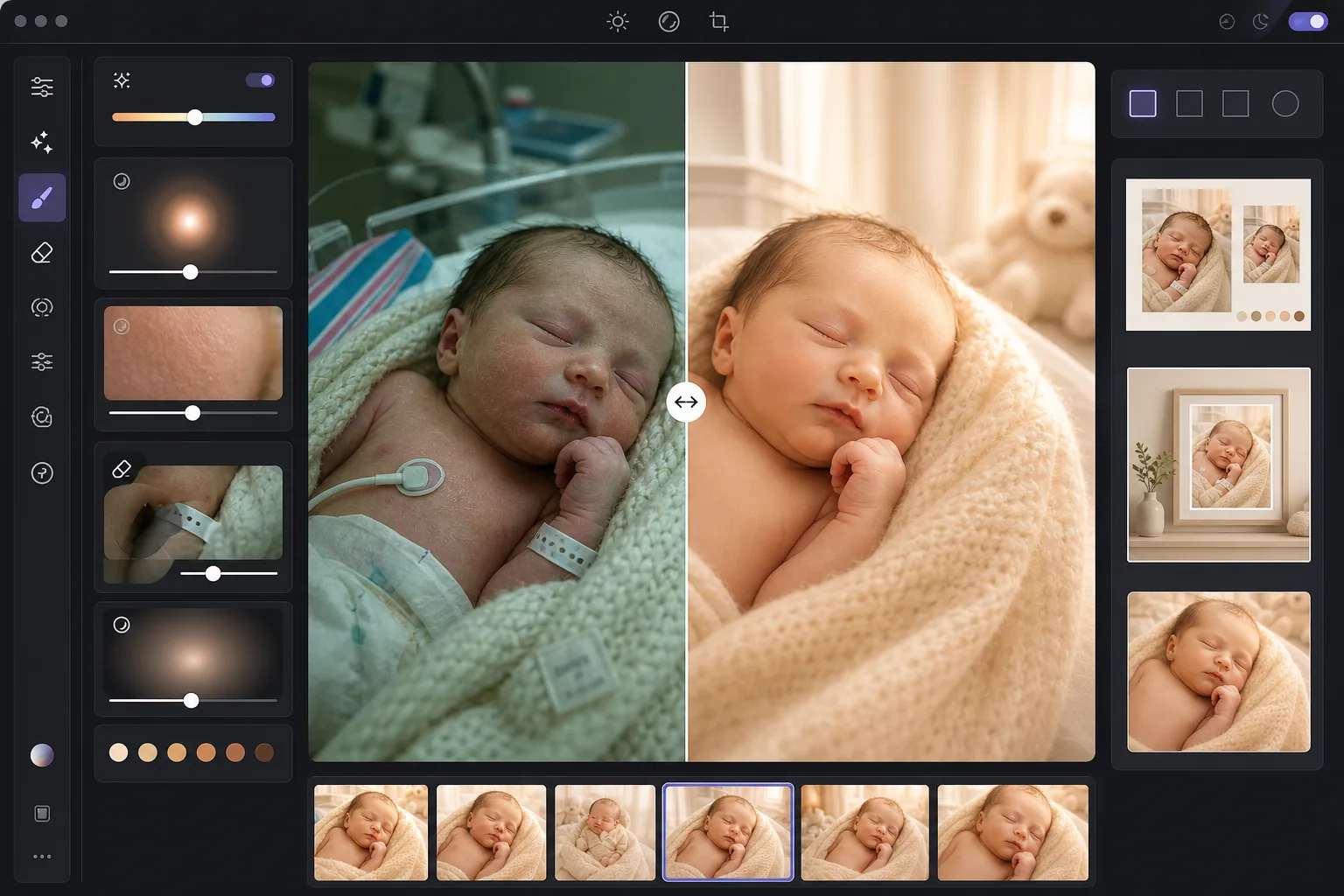
このテンプレートでできること
病院でスマートフォンで撮った写真でも、自宅での撮影でも、加工前の新生児や赤ちゃんの写真を、親が大切にする柔らかく輝く一枚へと変えます。AI Enhance は新生児の肌を引き立てる穏やかな暖色トーンを加え、柔らかな雰囲気を損なわずに影を持ち上げ、画像を温もりで包む繊細な発光感を与えます。肌のなめらか化は乳児専用に調整されており、新生児によく見られるまだらな赤みを整えつつ、赤ちゃんの写真を本物らしく見せる細かなうぶ毛のディテールを残します。Magic Eraser は病院のリストバンド、点滴ライン、モニターケーブル、おむつの端、おしゃぶりのクリップ、保育室の背景の雑然さを取り除きます。
テンプレート設定
| Warmth | +10の暖かみとゴールデンな中間調シフト(新生児の肌に最適化) |
| Soft glow | 発光するハイライトのにじみ(半径40px、不透明度25%) |
| Skin smoothing | 乳児向け調整(まだらさを軽減し、うぶ毛を保持) |
| Shadow lift | シャドウを+0.5 EV、なめらかなロールオフ付き(きつい復元なし) |
| Vignette | 穏やかな暖色ビネット(視線を中央へ誘導、端を15%暗く) |
このテンプレートの使い方
赤ちゃんや新生児の写真をアップロード
病院、自宅、スタジオで撮影した新生児、乳児、よちよち歩きの子の写真をアップロードします。テンプレートはさまざまな照明環境に適応します — 病院のきつい蛍光灯、保育室の柔らかな窓明かり、家庭の混合照明など。スマートフォンとプロ用カメラのどちらの画像にも対応しています。
暖かみとソフトグローを適用
AI Enhance は中間調に暖かなゴールドのトーンを、ハイライトに柔らかな発光感を加え、プロの新生児写真に特有の夢のように幻想的な質感を生み出します。シャドウ部分は穏やかに持ち上げられ、巻いた毛布や黒い髪のディテールを引き出しつつ、平板で加工しすぎた印象を避けます。
肌をなめらかにして気を散らす要素を除去
乳児向けの肌のなめらか化は、新生児によく見られるまだらな赤みや乾燥した皮むけを整えつつ、細い毛や自然な肌の質感を残します。Magic Eraser は病院のリストバンド、モニターのリード線、巻き布から覗くおむつの端、毛布のタグ、洗濯かごやコンセントといった背景の物を取り除きます。
プリントやお知らせ用に書き出し
複数のサイズでダウンロードできます。出生のお知らせカード用の5x7と4x6、額装の壁掛けプリント用の8x10と11x14、Instagramの出生報告用の1080x1080の正方形。すべての出力は300 DPIで、写真用紙やカード用紙に鮮明に印刷できます。
最良の結果を得るためのプロのヒント
- ✓新生児の写真に最適な光は、一方向からの柔らかく間接的な窓明かりです。自宅で撮影する場合は、午前中か午後遅くに、薄手のカーテンのかかった大きな窓のそばに赤ちゃんを置いてください。テンプレートはこの自然光を美しく引き立てますが、きつい直射日光は影を作り、補正により多くの手間がかかります。
- ✓天井の蛍光灯下で撮った病院の写真では、テンプレートが緑がかった色かぶりを取り除き、画像を大きく暖かくします。ただし、天井の蛍光灯によるきつい影は、あごや鼻の下のわずかに持ち上げられた暗い部分として依然見えます。看護師に天井の照明を消してもらい、窓明かりや柔らかなランプを使うと、はるかに良い出発点になります。
- ✓病院のリストバンドを消すときは、バンドが手首に巻きついて一部隠れているのではなく、手首の見える面に来るように配置してください。完全に見えているバンドのほうが、皮膚のしわの後ろに消えているものより、AIがきれいに消しやすくなります。
- ✓巻き布や小道具を使ってポーズをとった新生児の写真では、テンプレートはニットの毛布、編みかご、ファーの敷物の質感を残しつつ、赤ちゃんの肌だけをなめらかにします。撮影全体の一括処理を行う前に、まずテスト画像を処理して巻き布の質感が保たれていることを確認してください。
よくある質問
肌のなめらか化は新生児の写真に安全ですか?
+
肌のなめらか化は乳児の肌専用に調整されています。生後数週間によく見られるまだらな赤い斑点、サモンパッチ、乾燥した皮むけを軽減しつつ、新生児の写真を本物らしく見せる細かなうぶ毛、眉のディテール、小さなまつげは残します。仕上がりはエアブラシをかけた人形ではなく、健康的で均一な肌に見えます。
スマートフォンで撮った病院の写真も改善できますか?
+
はい、これは最も一般的な使い方の一つです。病院の部屋にはきつい蛍光灯があり、新生児の肌を緑がかって見せ、見栄えの悪い天井からの影を作ります。テンプレートは色かぶりを補正し、影を和らげ、全体のトーンを暖かくし、見えている医療機器を取り除いて、臨床的に見えるスマートフォン写真を温かく親密なポートレートへと変えます。
出力はどのプリントサイズに対応していますか?
+
テンプレートは300 DPIで出力し、元画像の解像度に応じて5x7、8x10、11x14、16x20インチでの鮮明な印刷に対応します。標準的な1200万画素のスマートフォン写真なら、最大11x14インチまで鮮明に印刷できます。より高解像度のカメラ画像は16x20以上に対応します。
かけがえのない瞬間を時を超えるポートレートに
新生児や赤ちゃんの写真をアップロードすると、出生のお知らせ、壁掛けプリント、SNS共有に使える、柔らかく温かでプロ仕様に仕上げた画像が手に入ります。
無料で試すRelated templates
More portrait templates for your workflow.
年齢に応じた学校のポートレートレタッチテンプレート。自然な傷の除去、一貫した背景、クラス全体のバッチ処理による卒業アルバムの標準出力。
スタジオ品質のペットのポートレート テンプレート。毛皮の端を処理し、リードやハンドラーを取り外し、背景を置き換え、犬、猫、その他の動物の目を鮮明にします。
毛穴や質感を維持しながらシミを除去する自然な肌レタッチ テンプレート。均一な照明で、プラスチック的な外観はありません。カメラに映る肌がより美しく見えるだけです。
優しい肌のスムージング、柔らかな光の照明、背景の簡略化、温かみのあるカラー グレーディングを使用してマタニティ写真をレタッチし、時代を超越した妊娠ポートレートの外観を実現します。
気を散らす背景を取り除き、不均一な露出を修正し、肌を自然に滑らかにして、全員が同じフレーム内で最高に見えるようにすることで、家族のポートレートをきれいにします。