
学校ポートレートのレタッチ
自然で年齢にふさわしい仕上がりを保ちながら、すべての生徒が満足できるポートレートを提供します。このテンプレートは、学校写真でよくある問題(一時的な肌の荒れ、撮影中の不均一な照明、ばらつきのある背景)に対応し、クラスのすべての生徒で均一かつプロ品質の、卒業アルバム向けの画像に仕上げます。
このテンプレートを無料で試すPortrait template preview
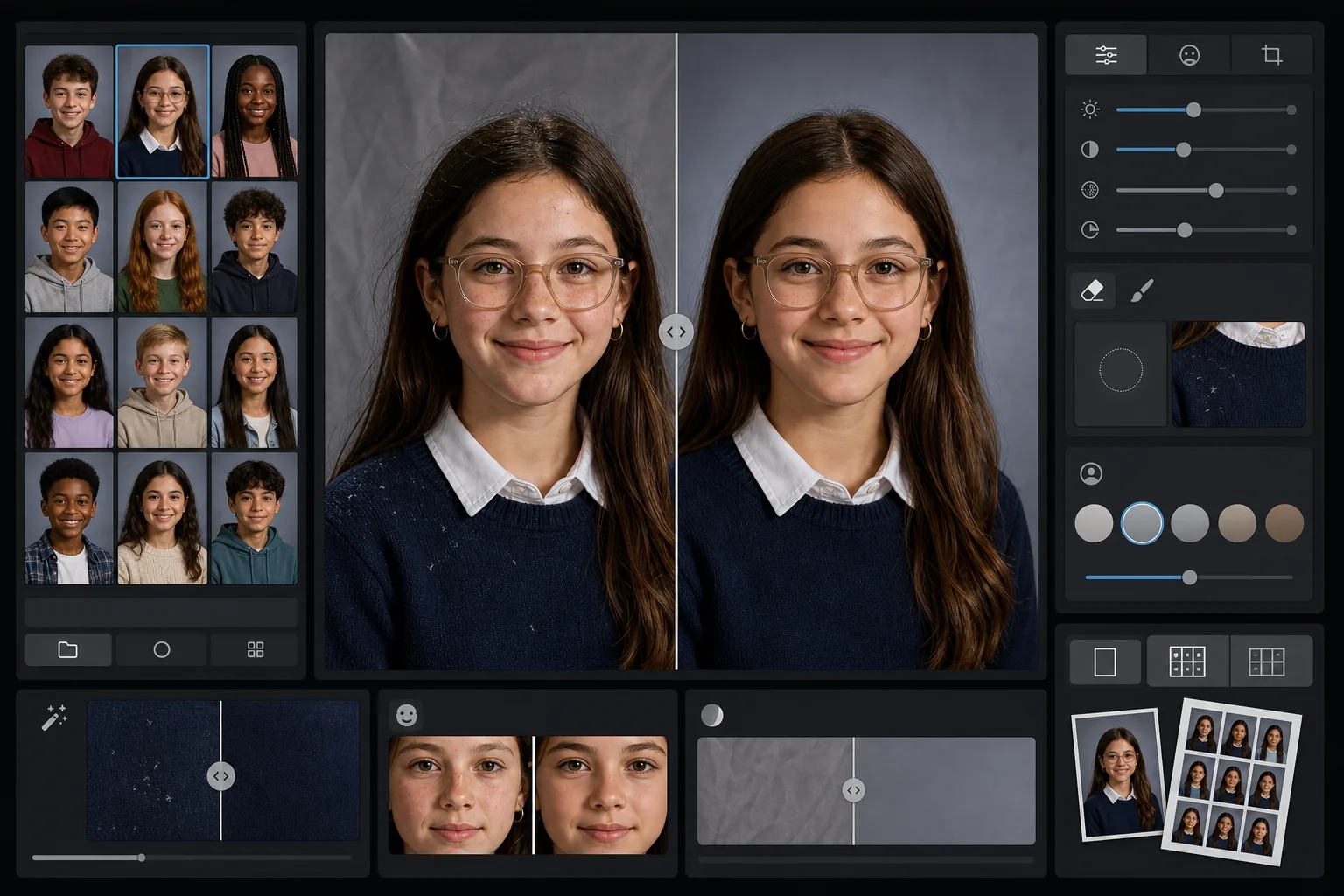
このテンプレートの機能
学校のポートレートに、各生徒の自然な見た目を保ちつつ一時的な肌荒れをなめらかにする、やさしく年齢にふさわしいレタッチを適用します。AI Enhance は、撮影中に同じ照明設定で何十人もの生徒を撮影する際に生じる不均一な露出や色の変化を補正します。Magic Eraser は、衣服についた抜け毛、よれた襟元、簡易背景のしわなどを取り除きます。
テンプレート設定
| レタッチレベル | ライト — 一時的な肌荒れのみを除去し、そばかすや自然な特徴は保持 |
| 出力サイズ | 1200×1500px(4:5 標準ポートレート、ウォレットサイズで300 DPI) |
| 背景の正規化 | バッチ内のすべての画像で背景のトーンをそろえる |
| 露出補正 | 自動 — 撮影セッション中の照明のずれを補正 |
| 色の一貫性 | 処理したすべてのポートレートで均一なホワイトバランス |
| 細かなディテールのクリーンアップ | 肩の浮き毛、糸くず、背景のしわを除去 |
このテンプレートの使い方
クラスのポートレートをアップロード
1枚のポートレート、またはクラス全体のバッチをアップロードします。テンプレートは個別の画像でもグループでも対応し、すべての写真に同じレタッチ基準を適用して、一貫した卒業アルバムのページを作成します。
年齢にふさわしいレタッチを適用
AI Enhance は、吹き出物やひっかき傷などの一時的な肌荒れをやさしくなめらかにしながら、それぞれの生徒がその生徒らしく見えるようにします。そばかす、ほくろ、歯の矯正器具、メガネは常に保持されます。目標は、本来の見た目を洗練させたバージョンです。
露出と背景を正規化
ポートレート撮影中、セットアップがずれて照明条件が変化します。テンプレートは露出とホワイトバランスを補正し、すべての生徒が一貫して照らされて見えるようにし、バッチ全体で背景のトーンをそろえます。
クリーンアップして書き出し
Magic Eraser は、濃い色のセーターについた糸くず、額にかかった抜け毛、簡易背景のしわなど、小さな気になる要素を取り除きます。印刷用には卒業アルバム標準の解像度で、学校のオンラインギャラリー用には低解像度のJPEGで書き出します。
最良の結果を得るためのプロのヒント
- ✓1枚ずつではなく、クラス全体のバッチをまとめて処理しましょう。テンプレートはグループ全体を使って、すべてのポートレートで一貫した露出と色を調整します。
- ✓メガネをかけている生徒の場合、元の写真であごを少し下げてもらうと反射を抑えられます。AIによる補正は、レンズ越しに目がはっきり見えるときに最も効果を発揮します。
- ✓学校全体を処理する前に、5〜10枚のポートレートでテストバッチを実行し、レタッチレベルが卒業アルバム委員会の基準を満たしているか確認しましょう。
- ✓処理後のバージョンとあわせて、レタッチしていない元のファイルも保管しておきましょう。完全に未編集の写真を個人利用に好む保護者もいます。
よくある質問
このレタッチは子どもやティーンエイジャーに適していますか?
+
はい。このテンプレートは就学年齢の被写体専用に設計されています。撮影日の吹き出物のような一時的な肌荒れだけを除去し、顔立ちを変えたり、肌のトーンを変えたり、大人向けの美容レタッチで使われるような肌のなめらか加工を行ったりは決してしません。どの生徒もその生徒らしく見えます。
クラスや学校全体を一度に処理できますか?
+
はい。1つのバッチで最大数百枚のポートレートをアップロードできます。テンプレートは同一のレタッチ基準を適用し、すべての画像で露出、色、背景の一貫性を正規化するため、卒業アルバムのページが均一に見えます。
歯の矯正器具、メガネ、補聴器は除去されますか?
+
いいえ。このテンプレートは、歯の矯正器具、メガネ、補聴器、医療機器を含むすべての恒久的・半恒久的な特徴を保持するように設計されています。糸くずや背景のしわといった一時的な表面の荒れや環境による気になる要素のみに対応します。
卒業アルバム向けのポートレートを数分で仕上げる
学校のポートレートを1枚ずつ、またはクラス単位でアップロードすれば、印刷に対応した一貫性のある自然なレタッチ画像が手に入ります。どの生徒も最高の姿に。
無料で試すRelated templates
More portrait templates for your workflow.
スタジオ品質のペットのポートレート テンプレート。毛皮の端を処理し、リードやハンドラーを取り外し、背景を置き換え、犬、猫、その他の動物の目を鮮明にします。
毛穴や質感を維持しながらシミを除去する自然な肌レタッチ テンプレート。均一な照明で、プラスチック的な外観はありません。カメラに映る肌がより美しく見えるだけです。
柔らかい温かみのある色調、優しい肌のスムージング、小道具や気が散る要素の除去、アナウンスやウォール アート用の印刷可能なサイズ調整により、新生児や赤ちゃんの写真を強化します。
優しい肌のスムージング、柔らかな光の照明、背景の簡略化、温かみのあるカラー グレーディングを使用してマタニティ写真をレタッチし、時代を超越した妊娠ポートレートの外観を実現します。
気を散らす背景を取り除き、不均一な露出を修正し、肌を自然に滑らかにして、全員が同じフレーム内で最高に見えるようにすることで、家族のポートレートをきれいにします。