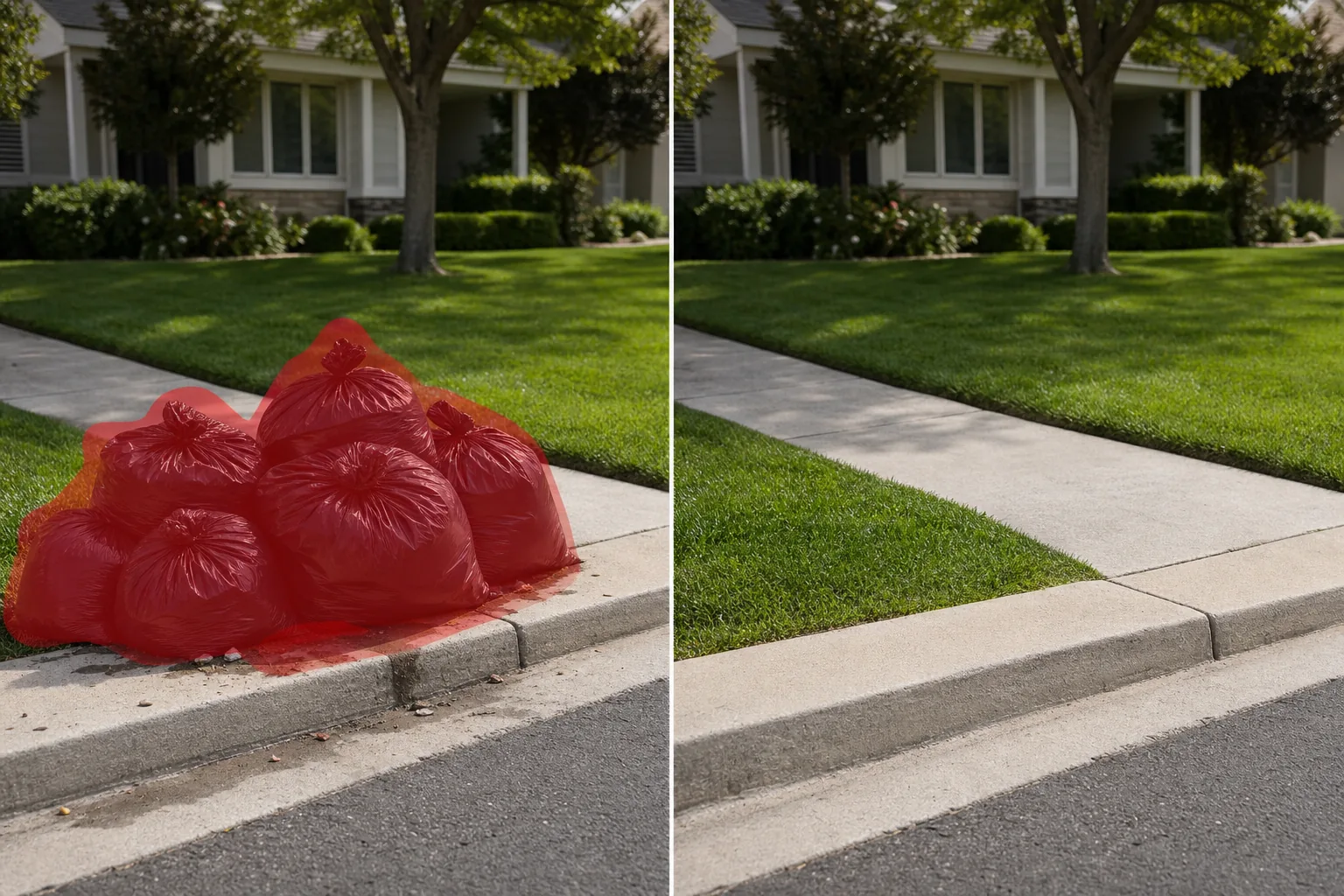
Remove trash bags from photos
Erase garbage bags piled on curbs, stuffed beside dumpsters, or scattered along streets from real estate listing photos, travel shots, event photography, and urban landscapes. Magic Eraser removes the bags and reconstructs the sidewalk, grass, asphalt, or wall behind them — no manual cloning required.
Last updated
今すぐ試すWhy trash bags ruin curb appeal and street photography — Magic Eraser
Garbage bags are one of the most common visual pollutants in exterior photography. In real estate listings, black trash bags piled at the curb on collection day signal neglect — buyers scrolling through listing photos form snap judgments, and a row of bulging garbage sacks in the driveway undercuts even the most manicured lawn. In street and travel photography, trash bags stacked on sidewalks break the clean lines of a European alley or a downtown restaurant row. Event photographers frequently capture venue exteriors where catering waste bags sit beside back entrances. Magic Eraser handles all of these in seconds. The AI identifies each bag, including sagging shapes, tied tops, and ground-level shadows, then fills the area with matching pavement, grass, brick, or curb texture. For real estate agents who can't always schedule shoots around trash collection, this is an essential post-processing step.
ステップバイステップ手順
- 1
Upload your photo
Open Magic Eraser on the web, iOS, or Android and upload the exterior photo, street scene, or listing image containing trash bags. JPEG, PNG, HEIC, and WebP formats are accepted at any resolution.
- 2
Brush over the trash bags
Paint over each garbage bag, including its shadow and any visible leakage or debris around the base. For a pile of multiple bags, brush the entire cluster in one stroke. Extend the brush slightly beyond each bag to give the AI context for the surface underneath.
- 3
Erase and review
Tap Erase and the AI removes the trash bags while reconstructing the curb, sidewalk, grass, or pavement behind them. Check that the rebuilt surface matches surrounding textures in color and perspective. Run a second pass if residual shadow marks remain. Export for your listing, portfolio, or social media post.
こんな方におすすめ
- Real estate exterior photos taken on trash collection day when curbside bags are unavoidable
- Airbnb and vacation rental listings where garbage bags near the property entrance reduce booking appeal
- Street and travel photography in cities where sidewalk trash bags break the composition
- Restaurant and hospitality marketing photos where back-of-house waste bags are visible
- Event venue photography where catering refuse bags sit near entrances or loading areas
注意事項
Trash bags are irregular, amorphous shapes that sit on relatively uniform surfaces — sidewalks, driveways, curbs, grass — which makes them good candidates for AI removal. The main challenge is piles: when multiple bags overlap and cast combined shadows, brush the entire group in one pass rather than attempting individual bag removal, as this gives the AI a cleaner boundary to work with. For trash bags sitting against a wall or fence, include the contact shadow where the bag meets the vertical surface. If a bag partially obscures a fire hydrant, mailbox, or other curbside object, inspect the result carefully — the AI reconstructs based on context but may not perfectly recreate the hidden object. Black bags on dark asphalt can be low-contrast; zoom in to ensure you've covered the full shape. White kitchen bags on light concrete present the same issue. For real estate workflows, combine trash bag removal with trash can removal for a complete curbside cleanup in two passes.
よくある質問
- Is it free to remove trash bags from a photo?
- Yes. Magic Eraser's free tier handles trash bag removal with daily usage limits. Premium ($29.99/year) removes limits and unlocks higher-resolution exports for MLS-quality listing photos.
- Can I remove a whole pile of garbage bags at once?
- Yes. Brush over the entire pile in one continuous stroke, including shadows and any scattered debris. The AI treats the cluster as a single removal target and reconstructs the surface behind all of them at once.
- What if the trash bags are partially behind a car or mailbox?
- Brush only the visible portion of the bags. The AI removes the exposed trash bag area and reconstructs the surface, leaving the car or mailbox intact. The result looks as if the bags were never there.
- Does it work on colored recycling bags too?
- Yes. Blue recycling bags, clear bags, white kitchen bags, and standard black garbage bags all work. The AI identifies the bag shape regardless of color and removes it from the scene.