
写真からパラボラアンテナを削除する
衛星テレビの受信アンテナ、取り付けアーム、同軸ケーブル、およびブラケットのハードウェアを屋根、壁、バルコニーから消去します。 Magic Eraser は、皿を取り外し、屋根の屋根板、羽目板、レンガ、またはその裏側の漆喰を再構築して、家の外観が清潔でモダンに見えるようにします。
最終更新日
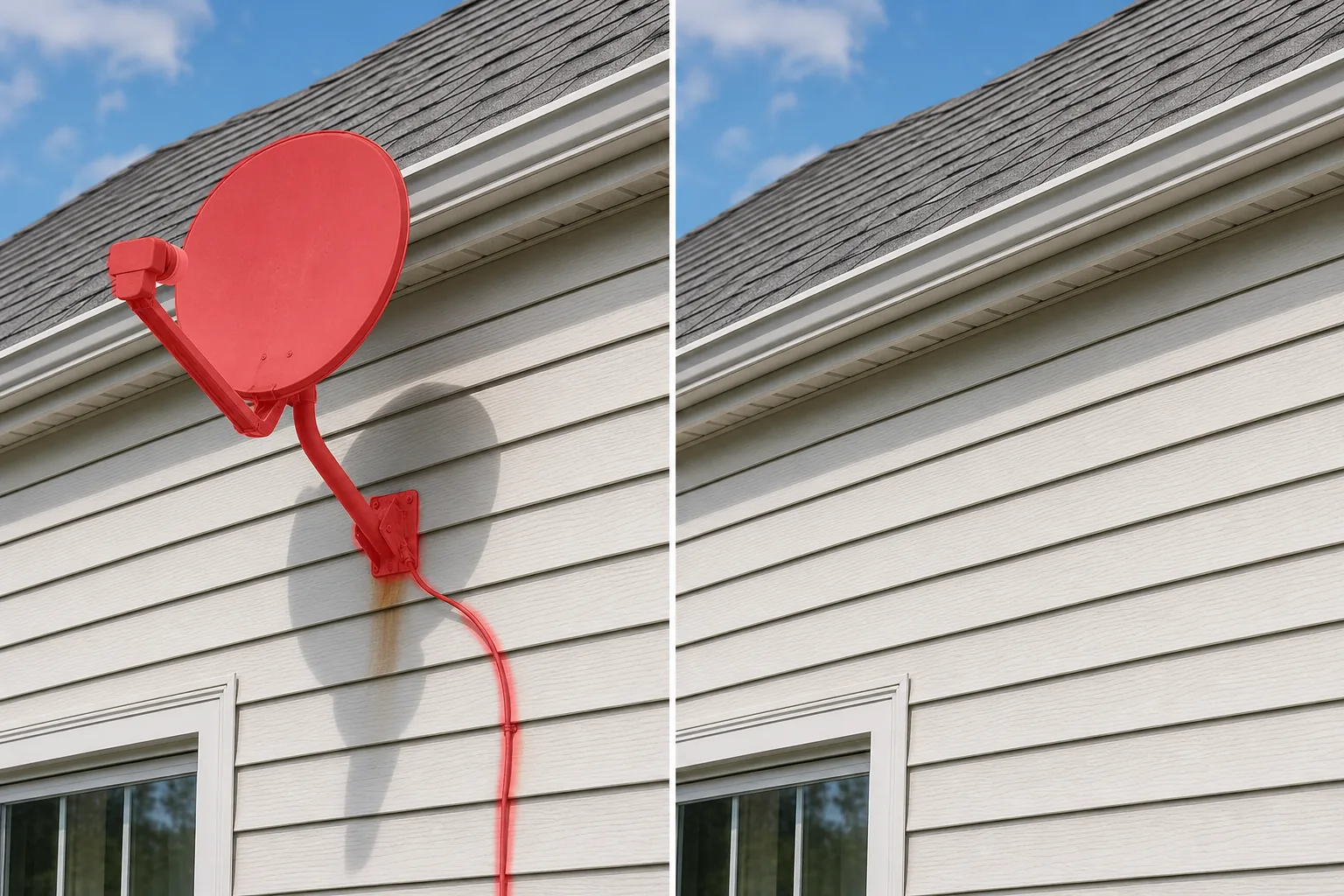
屋根や壁の衛星放送受信アンテナが物件写真の価値を損なう理由
衛星放送受信アンテナは、不動産の写真撮影において最も頻繁に挙げられる目障りなものの 1 つです。屋根や壁に取り付けられたアンテナは時代遅れのテクノロジーを示しており、ほとんどの購入者は衛星放送受信アンテナを最新のストリーミングではなく従来の TV サービスと関連付けています。また、建物の輪郭を物理的に乱雑にしています。ルーフラインでは、衛星受信アンテナが、建築家や写真家が撮影しようと努めているきれいなシルエットを壊します。壁には、窓、シャッター、その他の意図的なデザイン要素と競合する、工業的な外観の突起が追加されます。ディッシュが使用されなくなった場合、問題はさらに悪化します。放棄されたディッシュには、取り付けアームがたるんだり、切断されたケーブルが壁に垂れ下がったり、ディッシュの下の表面に錆び跡が残っていることがよくあります。パラボラアンテナを物理的に取り外すには、屋根に登り、ラグボルトを抜き取り、取り付け穴にパッチを当てる必要がありますが、ほとんどの売り手は出品前にこの作業を省略します。 Magic Eraser はディッシュをデジタル処理で数秒で取り除きます。ディッシュリフレクター、LNB アーム、取り付けブラケット、同軸ケーブル、錆や変色した汚れはすべて、清潔で連続した屋根または壁面に置き換えられます。
衛星放送受信アンテナを 3 つのステップで取り外します
- 1
写真をアップロードする
Web、iOS、または Android で Magic Eraser を開き、屋根、壁、またはバルコニーにパラボラアンテナが写っている外観写真をアップロードします。 JPEG、PNG、HEIC、WebP はすべてサポートされています。
- 2
パラボラアンテナをブラシで覆う
リフレクター、LNB アーム、取り付けブラケット、および壁やルーフラインに沿って走っている目に見える同軸ケーブルを含むディッシュ全体をペイントします。取り付けブラケットの下の表面に錆汚れや変色がないか確認してください。ケーブルがアース ブロックまたはエントリ ポイントまで伸びている場合は、ブラシでケーブルをたどります。
- 3
消去して見直す
[消去] をタップすると、屋根板、壁のサイディング、またはレンガの表面を再構築するときに、Magic Eraser によってディッシュが削除されます。 100% ズームで、屋根板の列が連続していること、サイディングのプロファイルが揃っていること、塗りつぶされた領域に色の違いがないことを確認します。ケーブルの残骸や汚れマークに対して 2 回目のパスを実行し、最大解像度でエクスポートします。
こんな方に最適
- 屋上のパラボラアンテナが家の外観の年代を示す不動産物件の写真
- 食器やケーブルが建物のデザインされたファサードを破壊する建築写真
- 清潔で均一なルーフラインが必要な HOA および近隣マーケティング資料
- 皿のない外観がモダンで更新された物件を伝える Airbnb と賃貸物件の写真
- 現代の衛星機器が当時の美しさを損なう歴史的建造物の記録
自然に見えるパラボラアンテナを除去するためのヒント
衛星放送受信アンテナは、強力な視覚的パターンを持つ表面 (列状の屋根板、水平コースのラップサイディング、結合パターンのレンガ) を備えた表面に取り付けられています。これは、AI が再構築のための優れたコンテキストを備えていることを意味しますが、パターンの不連続性がすぐに見えることも意味します。最良の結果を得るための 3 つのヒント。まず、完全なケーブル配線を含めます。ケーブルのないディッシュはすっきりと見えますが、ディッシュのないケーブルは壁を走る謎のワイヤーのように見えます。両方を同じパスで取り外し、ディッシュから建物に入る場所、またはトリムの後ろに消える場所までケーブルをたどります。次に、取り付けブラケットは慎重に扱ってください。ラグボルト衛星マウントでは、屋根または壁に長方形のブラケットの設置面積が残ります。マスクにブラケットとその周囲の小さな領域を含めて、ボルトの頭やブラケットの影のクラスターを残さず、AI がきれいな表面で満たされるようにします。第三に、汚れに対処します。長年据え付けられていた食器は、明るい色の壁に錆が発生したり、その下の日陰の屋根部分に藻が発生したりすることがよくあります。ブラシを伸ばして変色をカバーします。変色は料理の視覚的な影響の一部です。皿が屋根の端にぴったり収まるルーフラインの場合は、ズームインして、リッジ キャップ、ドリップ エッジ、または樋のラインが塗りつぶされた領域を通って連続していることを確認します。
よくある質問
- 写真からパラボラアンテナを無料で削除できますか?
- はい。 Magic Eraser の無料利用枠は、1 日の使用量制限付きで衛星放送受信アンテナの取り外しを処理します。プレミアム (年間 29.99 ドル) では制限がなくなり、より高解像度のエクスポートが可能になります。
- 屋根のこけら板は取り外し後も連続しているように見えますか?
- はい。 AI は周囲の屋根の表面と一致するように屋根板の列、色、影の線を再構築します。その結果、まるでディッシュが取り付けられていなかったかのように、連続したルーフラインが得られます。 100% ズームで屋根板コースが揃っていることを確認します。
- 皿ごとケーブルを取り外すことはできますか?
- はい。ディッシュからその入口点までのケーブル配線をブラシで拭きます。 AI はケーブルを取り外し、パス全体に沿って、対応する壁面 (サイディング、レンガ、または漆喰) で埋めます。
- 取付金具による壁の錆汚れはどうなるのでしょうか?
- ブラシの選択に汚れた領域を含めます。 AI は、変色した表面を、色、質感、仕上げが周囲のエリアと一致するきれいな壁材に置き換えます。